
AI Formatter vs Never Drop
Side-by-side comparison to help you choose the right tool.
AI Formatter
Transform your text into stunning professional documents with AI Formatter's smart templates, all for free and in.
Last updated: March 1, 2026

Never Drop
NeverDrop instantly captures contacts and crafts personalized follow-ups, ensuring you never lose a lead at events.
Last updated: February 28, 2026
Visual Comparison
AI Formatter
Never Drop

Feature Comparison
AI Formatter
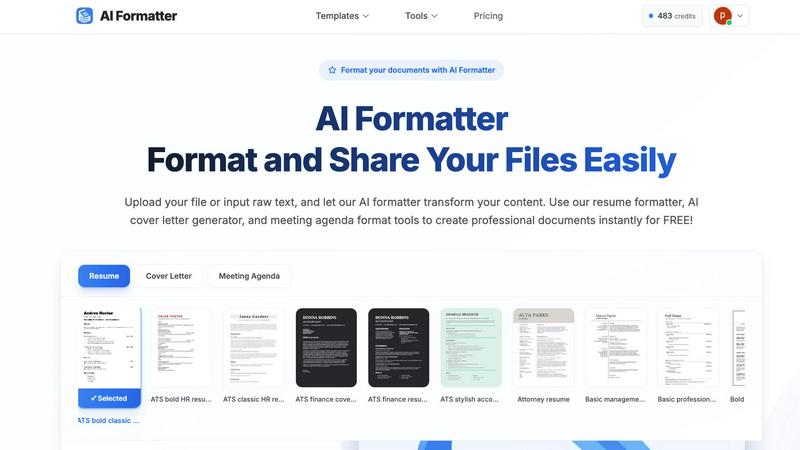
Intuitive Document Upload
AI Formatter allows users to effortlessly upload existing files or input raw text directly into the platform. It supports multiple formats, including PDF, DOC, DOCX, and TXT, making it easy to get started with your document formatting.
Extensive Template Library
Choose from a diverse library of over 162 professionally designed templates tailored for various document types. Whether you need an ATS-optimized resume or a polished cover letter, the extensive selection ensures you find the perfect fit for your needs.
Automated Formatting
Once your content is uploaded or pasted, AI Formatter automatically processes it and applies the selected template. This feature ensures your documents maintain professional formatting and structure without the hassle of manual adjustments.
Multi-Format Export Options
After editing your document, you can easily download it in multiple formats, including Word, PDF, and more. This flexibility allows you to share your documents in the format that best suits your needs, whether for online applications or physical submissions.
Never Drop
Smart Business Card Scanning
Never Drop allows users to effortlessly scan any business card using their smartphones. The app employs advanced AI-powered Optical Character Recognition (OCR) technology to extract critical contact details, including names, companies, titles, phone numbers, and emails, in just seconds. This feature saves time and reduces the chances of errors that often occur with manual data entry.
Automatic Email Enrichment
Many business cards contain generic email addresses or may lack them entirely. Never Drop addresses this issue by automatically finding and verifying work emails based on the name and company information extracted from the card. This feature ensures that your contact profiles are complete and accurate, eliminating guesswork and manual LinkedIn searches.
Personalized AI Drafting
After scanning a business card and adding context about the conversation, Never Drop generates a personalized follow-up email in under two minutes. The AI drafts emails based on your voice notes and the specifics of your interaction, ensuring that each follow-up feels genuine and tailored rather than generic. Users can review and tweak these emails before sending them with just one tap.
Team Collaboration Dashboard
Never Drop is designed for teams, allowing users to organize scans by event, reassign leads among team members, and track overall activity from a centralized dashboard. This feature promotes collaboration and ensures that no lead falls through the cracks, keeping your sales efforts aligned and efficient.
Use Cases
AI Formatter
Job Seekers
Job seekers can benefit from AI Formatter by creating polished and ATS-friendly resumes and cover letters. This tool helps individuals stand out in the competitive job market, ensuring their applications are visually appealing and professionally formatted.
Business Professionals
Business professionals can use AI Formatter to standardize their company documents, including invoices and meeting agendas. This feature helps maintain consistency across documents, making them look credible and organized.
Academics and Students
Academics and students can utilize AI Formatter to format research papers and reports effortlessly. The tool saves time and ensures that documents meet the required formatting standards, allowing users to focus more on content than presentation.
Entrepreneurs and Freelancers
Entrepreneurs and freelancers can quickly generate professional invoices and receipts using AI Formatter. This feature streamlines the billing process, enabling them to present polished documents to clients and maintain a professional image.
Never Drop
Trade Shows
At bustling trade shows, sales teams can quickly scan business cards from potential clients, add context about their conversations, and send follow-up emails while still engaging with other attendees. This rapid response can significantly increase conversion rates.
Networking Events
Networking events often involve numerous interactions in a short period. Never Drop enables users to capture leads seamlessly, ensuring they can follow up with personalized messages that reference specific discussions, enhancing rapport with potential clients.
Conferences
Conferences provide valuable opportunities for sales outreach, and with Never Drop, attendees can collect and manage leads efficiently. By organizing scans by event, teams can track their follow-up efforts and measure success post-conference.
Business Dinners
Even in more intimate settings like business dinners, Never Drop proves useful. Users can scan cards and add personal insights about their conversations, making follow-up communications more meaningful and impactful.
Overview
About AI Formatter
AI Formatter is your ultimate AI-powered assistant designed to simplify the document creation process. Whether you are a job seeker polishing your resume, a professional crafting a business invoice, or an academic formatting a research report, AI Formatter is here to help. With just a few clicks, you can upload your existing files or input raw text, and the intelligent AI will transform your content using one of over 100 professional templates. The tool is especially beneficial for those looking to pass automated resume screenings (ATS) or for anyone who wants to create visually appealing documents quickly. The main value proposition of AI Formatter is its ability to save you over 2 hours per document, allowing you to focus on what truly matters. With its user-friendly interface, secure sharing options, and multi-format exports, AI Formatter makes creating professional documents accessible and remarkably easy for everyone.
About Never Drop
Never Drop is a cutting-edge lead-capture app tailored for sales teams who thrive in high-energy environments like trade shows, conferences, and networking events. Its primary goal is to streamline the process of collecting and managing leads, making it easier for sales professionals to convert connections into clients. By allowing users to scan business cards directly with their smartphones, Never Drop eliminates the hassle of manual entry and the risk of losing essential contact information. Once a card is scanned, users can enhance the data with voice notes or text context about their interactions, ensuring that they remember important details about each lead. With advanced AI capabilities, the app generates personalized follow-up emails in under two minutes, helping teams maintain momentum and responsiveness. Integrated seamlessly with popular CRMs such as HubSpot, Never Drop keeps your sales pipeline organized and ready for action. Say goodbye to lost leads and hello to efficient follow-ups that can turn a simple handshake into a closed deal.
Frequently Asked Questions
AI Formatter FAQ
How does AI Formatter work?
AI Formatter works by allowing users to upload their documents or input raw text. After selecting a template, the AI processes the content and applies professional formatting, making it ready for download and sharing.
What types of documents can I create with AI Formatter?
You can create a variety of documents with AI Formatter, including resumes, cover letters, business invoices, meeting agendas, and more. The tool is versatile, catering to the needs of different users.
Is AI Formatter free to use?
Yes, AI Formatter offers a free version that allows users to format documents using the available templates. There may be premium features or templates available for a fee, but basic functionalities are free.
Can I customize my documents after formatting?
Absolutely! After AI Formatter processes your document, you can use the intuitive editor to make adjustments and customize the content. This ensures that your final document reflects your unique style and preferences.
Never Drop FAQ
What is Never Drop?
Never Drop is a lead-capture app designed for sales teams at events. It allows users to scan business cards, add voice or text context, and automatically generate personalized follow-up emails in under two minutes, enriching contacts with verified work emails and syncing everything to your CRM.
How does business card scanning work?
Simply take a photo of any business card with the Never Drop mobile app. The app uses AI-powered OCR to extract contact details such as name, company, title, phone, and email in seconds. Users can also enter details manually if they prefer.
What types of events is Never Drop suitable for?
Never Drop is ideal for trade shows, conferences, networking events, meetups, and business dinners. It helps users efficiently capture leads and follow up quickly, organizing scans by event for easier tracking.
Do I need the mobile app?
Yes, the mobile app is essential for scanning business cards, recording voice context, and triggering follow-ups on the go. The web dashboard complements the app by allowing team management, scan reviews, and billing configuration. Both platforms work seamlessly together.
Alternatives
AI Formatter Alternatives
AI Formatter is an innovative tool that falls under the productivity and management category, specifically designed to streamline the document creation process. It leverages advanced AI technology to transform raw text into beautifully formatted professional documents, such as resumes, cover letters, and business invoices. Users often seek alternatives to AI Formatter for various reasons, including pricing, desired features, or specific platform compatibility that better meets their unique needs. When searching for an alternative to AI Formatter, consider factors such as ease of use, the variety of templates available, and the ability to export documents in multiple formats. Additionally, look for tools that offer robust support and security features to ensure that your sensitive information remains protected during the document creation process. Finding the right balance of functionality and affordability is key to selecting an alternative that suits your requirements.
Never Drop Alternatives
Never Drop is an innovative lead-capture app designed for sales teams, particularly in fast-paced environments like trade shows and networking events. It falls under the Productivity & Management category, aiming to streamline the process of collecting and managing leads. Users often seek alternatives to Never Drop for various reasons, such as pricing considerations, specific feature requirements, or compatibility with different platforms. When searching for an alternative, it's essential to evaluate the core features that matter most to your business, such as ease of use, integration capabilities with existing tools, and the efficiency of lead management. Consider what additional functionalities you may need, like advanced analytics or customization options, to ensure you choose a solution that meets your unique requirements.