
AI Formatter vs LuxSign
Side-by-side comparison to help you choose the right tool.
AI Formatter
Transform your text into stunning professional documents with AI Formatter's smart templates, all for free and in.
Last updated: March 1, 2026

LuxSign offers legally valid electronic signatures across the EU, ensuring secure and compliant digital transactions.
Last updated: February 26, 2026
Visual Comparison
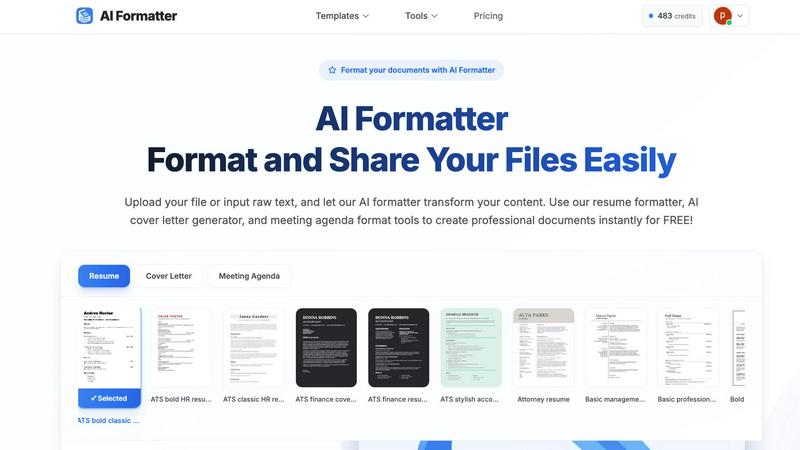
AI Formatter
LuxSign

Feature Comparison
AI Formatter
Intuitive Document Upload
AI Formatter allows users to effortlessly upload existing files or input raw text directly into the platform. It supports multiple formats, including PDF, DOC, DOCX, and TXT, making it easy to get started with your document formatting.
Extensive Template Library
Choose from a diverse library of over 162 professionally designed templates tailored for various document types. Whether you need an ATS-optimized resume or a polished cover letter, the extensive selection ensures you find the perfect fit for your needs.
Automated Formatting
Once your content is uploaded or pasted, AI Formatter automatically processes it and applies the selected template. This feature ensures your documents maintain professional formatting and structure without the hassle of manual adjustments.
Multi-Format Export Options
After editing your document, you can easily download it in multiple formats, including Word, PDF, and more. This flexibility allows you to share your documents in the format that best suits your needs, whether for online applications or physical submissions.
LuxSign
Secure Document Storage
LuxSign employs end-to-end encryption for all documents, ensuring that sensitive information remains secure throughout the signing process. All data is stored in Luxembourg, complying fully with GDPR regulations to protect user privacy.
eIDAS SES Compliance
The platform is built to comply with eIDAS SES standards, guaranteeing that electronic signatures are legally valid across all EU member states. This feature provides peace of mind for businesses that operate internationally.
Customizable Signing Workflows
LuxSign allows users to create both parallel and sequential signing workflows, making it flexible enough to accommodate various business needs. Users can easily set up processes that suit their operational requirements, whether for individual contracts or bulk signing.
Automated Notifications and Reminders
With LuxSign, teams can benefit from automated email notifications that alert signers when documents are ready for review and signature. This feature ensures that no important signing tasks slip through the cracks, helping maintain project timelines.
Use Cases
AI Formatter
Job Seekers
Job seekers can benefit from AI Formatter by creating polished and ATS-friendly resumes and cover letters. This tool helps individuals stand out in the competitive job market, ensuring their applications are visually appealing and professionally formatted.
Business Professionals
Business professionals can use AI Formatter to standardize their company documents, including invoices and meeting agendas. This feature helps maintain consistency across documents, making them look credible and organized.
Academics and Students
Academics and students can utilize AI Formatter to format research papers and reports effortlessly. The tool saves time and ensures that documents meet the required formatting standards, allowing users to focus more on content than presentation.
Entrepreneurs and Freelancers
Entrepreneurs and freelancers can quickly generate professional invoices and receipts using AI Formatter. This feature streamlines the billing process, enabling them to present polished documents to clients and maintain a professional image.
LuxSign
Contract Management
Businesses can use LuxSign to streamline their contract management processes. By enabling electronic signatures, organizations can quickly finalize agreements with clients or partners, reducing delays associated with traditional signing methods.
Compliance Documentation
For industries that require rigorous documentation, LuxSign offers a secure way to sign compliance documents. The platform's adherence to legal standards ensures that all signed documents are valid and can withstand audits.
Employee Onboarding
Human resources departments can leverage LuxSign to manage employee onboarding documents. New hires can sign contracts, policy agreements, and other essential paperwork electronically, making the onboarding process faster and more efficient.
Project Collaboration
Teams working on collaborative projects can utilize LuxSign to facilitate the signing of project agreements and contracts. This ensures that all parties can quickly agree to terms, keeping projects on track and fostering better collaboration.
Overview
About AI Formatter
AI Formatter is your ultimate AI-powered assistant designed to simplify the document creation process. Whether you are a job seeker polishing your resume, a professional crafting a business invoice, or an academic formatting a research report, AI Formatter is here to help. With just a few clicks, you can upload your existing files or input raw text, and the intelligent AI will transform your content using one of over 100 professional templates. The tool is especially beneficial for those looking to pass automated resume screenings (ATS) or for anyone who wants to create visually appealing documents quickly. The main value proposition of AI Formatter is its ability to save you over 2 hours per document, allowing you to focus on what truly matters. With its user-friendly interface, secure sharing options, and multi-format exports, AI Formatter makes creating professional documents accessible and remarkably easy for everyone.
About LuxSign
LuxSign is a secure, cloud-based electronic signature platform designed specifically for businesses that require high compliance and security in their document handling processes. Developed in Luxembourg, LuxSign ensures that all documents are encrypted end-to-end and stored exclusively within the country, aligning with stringent GDPR compliance regulations. This platform supports the eIDAS SES standards, making it a legally valid option for contracts across the entire European Union. LuxSign is ideal for organizations of all sizes that handle sensitive information and need a reliable way to manage electronic signatures. Its user-friendly interface and robust features streamline the signing process, enabling teams to save time and reduce administrative burdens while maintaining the highest standards of security and compliance.
Frequently Asked Questions
AI Formatter FAQ
How does AI Formatter work?
AI Formatter works by allowing users to upload their documents or input raw text. After selecting a template, the AI processes the content and applies professional formatting, making it ready for download and sharing.
What types of documents can I create with AI Formatter?
You can create a variety of documents with AI Formatter, including resumes, cover letters, business invoices, meeting agendas, and more. The tool is versatile, catering to the needs of different users.
Is AI Formatter free to use?
Yes, AI Formatter offers a free version that allows users to format documents using the available templates. There may be premium features or templates available for a fee, but basic functionalities are free.
Can I customize my documents after formatting?
Absolutely! After AI Formatter processes your document, you can use the intuitive editor to make adjustments and customize the content. This ensures that your final document reflects your unique style and preferences.
LuxSign FAQ
What makes LuxSign different from other e-signature platforms?
LuxSign stands out due to its strong focus on security and compliance. With documents encrypted end-to-end and stored in Luxembourg, it ensures full GDPR compliance and meets eIDAS SES standards, making it ideal for businesses that prioritize legal validity.
How does LuxSign ensure the security of my documents?
All documents signed through LuxSign are encrypted using advanced security protocols, and they are stored exclusively in Luxembourg. This setup not only protects sensitive information but also complies with the GDPR, providing an additional layer of security.
Can LuxSign handle bulk signing?
Yes, LuxSign offers features that support bulk signing, allowing organizations to send multiple documents for signature simultaneously. This feature is particularly useful for contracts or agreements that require signatures from multiple parties.
Is there customer support available for LuxSign?
Absolutely! LuxSign provides customer support to assist users with any questions or issues they may encounter. Their support team is dedicated to ensuring a smooth user experience and helping businesses make the most of the platform.
Alternatives
AI Formatter Alternatives
AI Formatter is an innovative tool that falls under the productivity and management category, specifically designed to streamline the document creation process. It leverages advanced AI technology to transform raw text into beautifully formatted professional documents, such as resumes, cover letters, and business invoices. Users often seek alternatives to AI Formatter for various reasons, including pricing, desired features, or specific platform compatibility that better meets their unique needs. When searching for an alternative to AI Formatter, consider factors such as ease of use, the variety of templates available, and the ability to export documents in multiple formats. Additionally, look for tools that offer robust support and security features to ensure that your sensitive information remains protected during the document creation process. Finding the right balance of functionality and affordability is key to selecting an alternative that suits your requirements.
LuxSign Alternatives
LuxSign is an electronic signature platform based in Luxembourg, designed to meet the needs of businesses that prioritize compliance and security. As a cloud-based solution, it adheres to eIDAS SES standards, ensuring that signatures are legally valid across all EU member states. Users often seek alternatives to LuxSign for various reasons, including pricing differences, specific feature requirements, or compatibility with existing platforms. When exploring alternatives, it’s important to consider aspects such as ease of use, security features, integration capabilities, and customer support to find the best fit for your organization’s needs. Finding the right electronic signature solution can be crucial for streamlining workflows and enhancing productivity. As you search for alternatives, focus on platforms that not only meet regulatory compliance but also offer user-friendly interfaces and customizable options. Evaluating trial versions or demos can help you assess the functionality and ensure the platform aligns with your business processes.