AI Formatter vs CleanPaste.org
Side-by-side comparison to help you choose the right tool.
Transform your text into stunning professional documents with AI Formatter's smart templates, all for free and in.
Last updated: March 1, 2026

CleanPaste.org
CleanPaste instantly removes AI watermarks and invisible characters from your text for free.
Last updated: March 2, 2026
Visual Comparison
AI Formatter
CleanPaste.org
Feature Comparison
AI Formatter
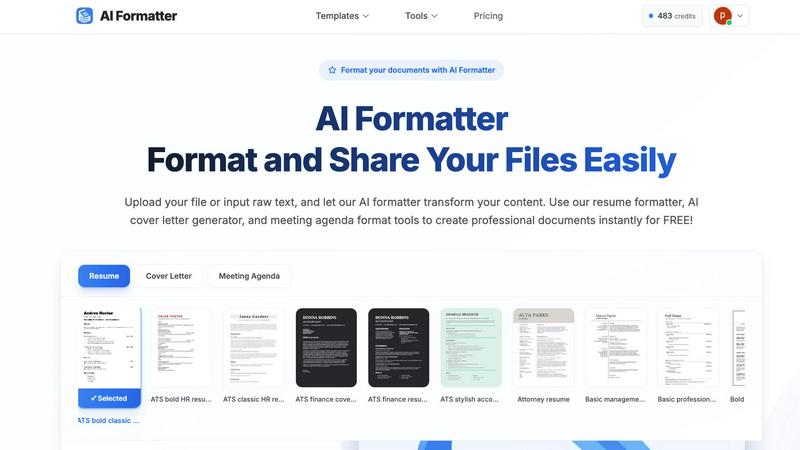
Intuitive Document Upload
AI Formatter allows users to effortlessly upload existing files or input raw text directly into the platform. It supports multiple formats, including PDF, DOC, DOCX, and TXT, making it easy to get started with your document formatting.
Extensive Template Library
Choose from a diverse library of over 162 professionally designed templates tailored for various document types. Whether you need an ATS-optimized resume or a polished cover letter, the extensive selection ensures you find the perfect fit for your needs.
Automated Formatting
Once your content is uploaded or pasted, AI Formatter automatically processes it and applies the selected template. This feature ensures your documents maintain professional formatting and structure without the hassle of manual adjustments.
Multi-Format Export Options
After editing your document, you can easily download it in multiple formats, including Word, PDF, and more. This flexibility allows you to share your documents in the format that best suits your needs, whether for online applications or physical submissions.
CleanPaste.org
Instant AI Watermark Removal
Our specialized Watermark Removal Mode is designed to quickly and effectively strip AI watermarks from your text. This process ensures your content passes AI detection tests while meticulously preserving the original meaning, tone, and quality of your writing. It's the perfect tool for making AI-assisted drafts appear natural and human-crafted.
Deep Clean of Invisible Characters
CleanPaste.org uses an advanced algorithm to perform a deep scan of your text. It detects and eliminates all types of invisible characters and formatting artifacts, such as zero-width spaces and hidden metadata, that are often copied over from other documents or AI platforms. This leaves you with perfectly clean, standard text.
Real-Time Processing with Auto-Paste
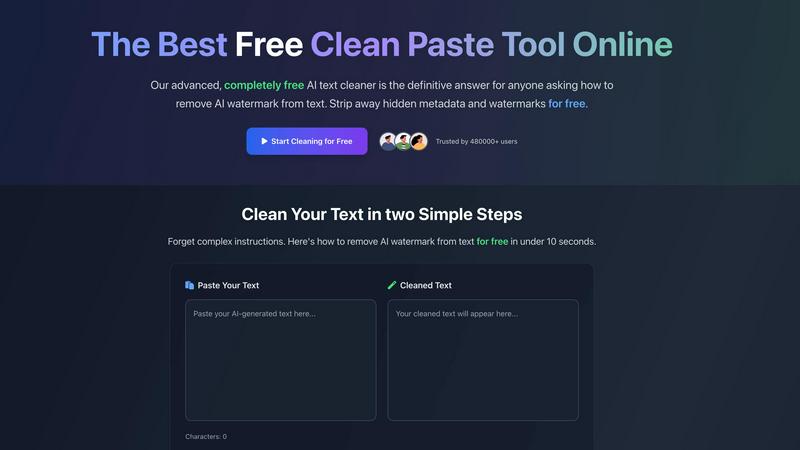
Experience the ultimate convenience with our real-time processing feature. The tool works instantly the moment you paste your text. For an even smoother workflow, enable the auto-paste option to automatically clean content from your clipboard, delivering ready-to-use text in under 10 seconds without any extra clicks.
100% Free with No Limits
CleanPaste.org is committed to being completely free forever. There are no sign-up forms, no daily usage caps, and no premium features locked behind a paywall. Every powerful cleaning feature is available to all users immediately, making professional-grade text cleaning accessible to students, professionals, and creators everywhere.
Use Cases
AI Formatter
Job Seekers
Job seekers can benefit from AI Formatter by creating polished and ATS-friendly resumes and cover letters. This tool helps individuals stand out in the competitive job market, ensuring their applications are visually appealing and professionally formatted.
Business Professionals
Business professionals can use AI Formatter to standardize their company documents, including invoices and meeting agendas. This feature helps maintain consistency across documents, making them look credible and organized.
Academics and Students
Academics and students can utilize AI Formatter to format research papers and reports effortlessly. The tool saves time and ensures that documents meet the required formatting standards, allowing users to focus more on content than presentation.
Entrepreneurs and Freelancers
Entrepreneurs and freelancers can quickly generate professional invoices and receipts using AI Formatter. This feature streamlines the billing process, enabling them to present polished documents to clients and maintain a professional image.
CleanPaste.org
For Students Polishing Essays
Students can use CleanPaste.org to ensure their essays and assignments are submission-ready. By removing invisible characters and metadata from AI-assisted drafts, the tool helps avoid formatting issues and reduces the risk of being flagged for AI use, allowing students to submit their work with confidence and professionalism.
For Content Creators & Bloggers
Bloggers and digital content creators can refine their drafts to maintain an authentic brand voice. CleanPaste.org removes AI watermarks and hidden formatting, ensuring articles resonate as human-written with a natural tone. This helps in building trust with readers and improving content performance on search engines and social platforms.
For Professionals Drafting Communications
Professionals drafting important emails, reports, or client communications can use CleanPaste.org to ensure their messages are flawless. The tool cleans text copied from various sources, removing hidden formatting that can make documents look unprofessional, guaranteeing that every piece of communication is pristine and polished.
For Non-Native English Speakers
Individuals who use AI tools to help draft text in English can rely on CleanPaste.org to make the output undetectable and more natural. It smooths out the text, removing tell-tale AI markers and artifacts, resulting in clean, natural-sounding language that effectively communicates their intended message.
Overview
About AI Formatter
AI Formatter is your ultimate AI-powered assistant designed to simplify the document creation process. Whether you are a job seeker polishing your resume, a professional crafting a business invoice, or an academic formatting a research report, AI Formatter is here to help. With just a few clicks, you can upload your existing files or input raw text, and the intelligent AI will transform your content using one of over 100 professional templates. The tool is especially beneficial for those looking to pass automated resume screenings (ATS) or for anyone who wants to create visually appealing documents quickly. The main value proposition of AI Formatter is its ability to save you over 2 hours per document, allowing you to focus on what truly matters. With its user-friendly interface, secure sharing options, and multi-format exports, AI Formatter makes creating professional documents accessible and remarkably easy for everyone.
About CleanPaste.org
Welcome to CleanPaste.org, your completely free and powerful solution for creating pristine, professional, and undetectable text. In the digital age, text often carries hidden baggage like invisible formatting, secret metadata, and AI watermarks. These elements can make your work look unprofessional or get it flagged by AI detection tools. CleanPaste.org solves this problem instantly. It is a simple, web-based tool designed to deep-clean your text, stripping away all hidden characters and markers while keeping your original content perfectly intact. Whether you are a student finalizing an essay, a content creator polishing a blog post, or a professional drafting a critical email, CleanPaste.org ensures your final copy is clean and appears 100% human-written. The best part is its incredible ease of use and truly free model—no sign-ups, no usage limits, and no hidden paywalls. Just paste your text, click a button, and get perfectly clean content in seconds. Join over 480,000 trusted users who rely on CleanPaste.org for confidence and clarity in their writing every day.
Frequently Asked Questions
AI Formatter FAQ
How does AI Formatter work?
AI Formatter works by allowing users to upload their documents or input raw text. After selecting a template, the AI processes the content and applies professional formatting, making it ready for download and sharing.
What types of documents can I create with AI Formatter?
You can create a variety of documents with AI Formatter, including resumes, cover letters, business invoices, meeting agendas, and more. The tool is versatile, catering to the needs of different users.
Is AI Formatter free to use?
Yes, AI Formatter offers a free version that allows users to format documents using the available templates. There may be premium features or templates available for a fee, but basic functionalities are free.
Can I customize my documents after formatting?
Absolutely! After AI Formatter processes your document, you can use the intuitive editor to make adjustments and customize the content. This ensures that your final document reflects your unique style and preferences.
CleanPaste.org FAQ
How does Clean Paste remove invisible characters?
Our tool employs advanced algorithms specifically designed to detect and strip out invisible characters, zero-width spaces, hidden metadata, and AI watermarks from your text. The process is simple and instant: you just paste your content into the box and click the clean button. All the complex processing happens in the background within seconds.
Is Clean Paste truly free? What's the catch?
Yes, CleanPaste.org is 100% free, with absolutely no catch. We do not impose any usage limits, hide premium features, or require account sign-ups. Our mission is to provide the best free tool for cleaning text and removing AI watermarks for everyone, from students to professionals, without any barriers.
What types of hidden characters does Clean Paste remove?
CleanPaste.org removes a wide array of hidden elements. This includes all types of invisible characters like zero-width spaces, non-printing formatting artifacts, hidden metadata embedded by word processors, and specific watermarks left by AI text generators. Every feature to remove these elements is available for free.
Can Clean Paste help my content pass AI detection tests?
Absolutely. A primary function of our Watermark Removal Mode is to strip the subtle markers that AI detectors look for. By using CleanPaste.org, you significantly increase the likelihood of your content passing as human-written in various AI detection tools, while keeping the original quality and meaning of your text fully intact.
Alternatives
AI Formatter Alternatives
AI Formatter is an innovative tool that falls under the productivity and management category, specifically designed to streamline the document creation process. It leverages advanced AI technology to transform raw text into beautifully formatted professional documents, such as resumes, cover letters, and business invoices. Users often seek alternatives to AI Formatter for various reasons, including pricing, desired features, or specific platform compatibility that better meets their unique needs. When searching for an alternative to AI Formatter, consider factors such as ease of use, the variety of templates available, and the ability to export documents in multiple formats. Additionally, look for tools that offer robust support and security features to ensure that your sensitive information remains protected during the document creation process. Finding the right balance of functionality and affordability is key to selecting an alternative that suits your requirements.
CleanPaste.org Alternatives
CleanPaste.org is a free, web-based tool in the AI writing assistant category. It specializes in removing AI watermarks and invisible formatting from text, helping users produce clean, professional, and human-like content. It's designed for anyone who wants to refine their writing quickly and without cost. Users often explore alternatives for various reasons. Some might need additional features like grammar checking or style enhancement, while others may prefer a downloadable desktop application or a tool with a different user interface. Pricing changes, specific platform needs, or a desire for integrated writing suites can also lead people to look at other options. When choosing an alternative, consider your primary needs. Look for a tool that reliably removes AI detection markers if that's your main goal. Also, evaluate the cost, ease of use, and whether it offers any extra functionalities you might value, such as plagiarism checks or formatting preservation. Security and privacy policies are also crucial factors to review.