
Afterly Plan vs Cosy
Side-by-side comparison to help you choose the right tool.

Afterly Plan
Afterly Plan provides step-by-step guidance to help you navigate probate and estate duties with compassion and clarity.
Last updated: February 28, 2026

Cosy automates Slack onboarding and member connections to save you hours each week.
Last updated: February 28, 2026
Visual Comparison
Afterly Plan

Cosy
Feature Comparison
Afterly Plan
Step-by-Step Guidance
Afterly Plan provides a clear and structured roadmap for families navigating the complexities of grief and estate management. Each step is carefully outlined to help users understand their responsibilities and what needs to be done, making the journey less daunting.
Interactive Checklists
The platform includes interactive checklists that allow users to track their progress and stay organized. These checklists cover everything from planning funeral services to managing financial affairs, ensuring that no important task is overlooked during this challenging time.
Document Templates
Afterly Plan offers a variety of document templates that simplify the process of locating and organizing essential paperwork. Users can easily find and generate wills, deeds, and vital records, making it easier to manage the legal aspects of estate settlement.
Expert Support
Users of Afterly Plan have access to expert support from estate professionals who understand the intricacies of probate and executor duties. This feature ensures that families receive reliable guidance and assistance whenever they encounter questions or uncertainties.
Cosy
Automated Onboarding Sequences
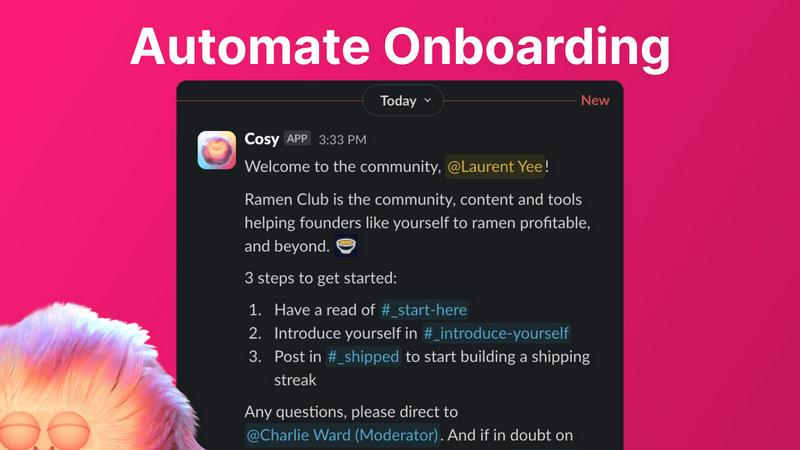
Save countless hours by automating how you welcome new members. You can create up to 10 distinct welcome message sequences that are sent via Direct Message (DM) when someone joins your Slack. These messages can be scheduled to send immediately or on a delay (minutes, hours, or even months later), and they can be sent from you, a team member, or the Cosy bot. Fully customize the messages with the member's name, links, and emojis to make every welcome feel personal and warm, even if you're asleep.
Automated Member Introductions
Grow engagement naturally by helping your members connect. Cosy can automatically introduce opted-in members to each other in a private, three-person DM (the two members and the Cosy bot). You set the frequency—every 1, 2, 3, or 4 weeks—and choose the day and time. Cosy randomly pairs members to enhance serendipity while avoiding recent matches, and you can customize the introductory message template to kickstart conversations effortlessly.
Searchable Member Directory
Help your community members find and learn about each other without ever leaving Slack. Create a custom directory by selecting up to 10 fields for profiles (like text, single-select, or multi-choice). You can then notify all members to fill out their profiles with one click. New joiners get a gentle nudge 24 hours after arriving. Members can search and filter this directory via the Cosy app or a simple /member-directory slash command.
Content Highlights & Moderation
Instantly surface the most valuable conversations and identify posts that need attention. Use simple slash commands to find the top 10 most engaged messages in a specific channel or across all public channels. You can also quickly pull up a list of public messages that have gone unreplied to, allowing you to jump in and re-ignite discussions. This feature helps you recognize contributors and ensure no great question or idea gets lost in the chatter.
Use Cases
Afterly Plan
Planning a Funeral
Afterly Plan guides families through the emotional process of planning a funeral. With checklists and timelines, users can organize the necessary details while honoring their loved one's memory, reducing stress during a difficult period.
Managing Financial Affairs
The platform helps users manage financial accounts, bills, and assets after a loved one's passing. With tools to track expenses and responsibilities, families can ensure that they remain organized and informed about their financial obligations.
Navigating Probate
For those unfamiliar with probate processes, Afterly Plan simplifies the legal aspects by providing resources and information on executor duties. This guidance helps families understand what is required of them, making the probate process more manageable.
Organizing Important Documents
Afterly Plan assists families in locating essential documents such as wills, insurance policies, and other vital records. By offering templates and organizational tools, users can ensure that everything is in order, alleviating some of the burdens during a time of grief.
Cosy
For Onboarding New Customers
If you use a Slack channel for customer support or success, Cosy ensures every new customer feels personally welcomed and guided from day one. Automate a sequence of DMs that introduces your team, shares key resources, and asks how you can help. This reduces the manual burden on your team while providing a consistent, high-touch onboarding experience that sets the tone for a great customer relationship.
For Building Internal Team Culture
Strengthen connections within your remote or hybrid company. Use Cosy's automated introductions to help employees from different departments meet each other regularly, fostering cross-collaboration and a stronger sense of belonging. The member directory also helps new hires learn about their colleagues' roles, skills, and interests, accelerating their integration into the team.
For Running a Paid Membership Community
Manage and grow your premium community efficiently. Cosy automates the initial welcome and orientation for new paying members, delivering immediate value. The member introductions feature encourages networking, which is a key benefit for members. Meanwhile, surfacing top content helps you identify and reward your most active members, keeping overall engagement high and churn low.
For Moderating Large Public Communities
Keep your large community safe and positive with less manual oversight. Use the content highlight tools to quickly identify highly engaged (or contentious) threads. While Cosy provides tools to flag spam, its automation of welcome and connection tasks frees up your time to focus on proactive community management, nuanced conflict resolution, and fostering healthy discussions instead of just administrative chores.
Overview
About Afterly Plan
Afterly Plan is a compassionate and structured platform created to assist families in navigating the complex and emotionally challenging tasks that emerge after the passing of a loved one. Recognizing that dealing with grief can be overwhelming, Afterly Plan provides a step-by-step process that breaks down responsibilities into manageable phases. From funeral arrangements to estate settlement, this platform is designed for individuals and families who may feel lost during such a difficult time. With features like checklists, timelines, and expert support, Afterly Plan simplifies the daunting tasks of paperwork, account management, and memorial planning. Built with input from estate professionals, it offers trustworthy guidance, ensuring that users can focus on healing while receiving the clarity and organization they need to move forward.
About Cosy
Cosy is your all-in-one assistant for building a vibrant, engaged, and well-organized community directly within Slack. Designed for community managers, founders, and team leaders, Cosy automates the repetitive, time-consuming tasks that often bog down community growth, freeing you up to focus on strategy and genuine human connection. Instead of manually welcoming every new member or trying to force interactions, Cosy handles it for you, transforming your Slack workspace from a simple messaging app into a true community hub. Its core value lies in its seamless, Slack-native approach; there's no need for members to visit an external website or learn a new tool. From the moment someone joins, Cosy springs into action with personalized welcome messages. It then fosters meaningful relationships by automatically introducing members to each other, creates a searchable directory to help people network, highlights your best content to boost engagement, and provides moderation tools to maintain a safe space. With a generous free plan and a simple setup, Cosy makes professional community management accessible and effortless, helping you cultivate a warm, active, and connected environment without the manual grind.
Frequently Asked Questions
Afterly Plan FAQ
What is Afterly Plan?
Afterly Plan is a platform designed to assist families through the complex tasks that arise after the death of a loved one. It provides step-by-step guidance, checklists, and expert support to simplify the process.
Is there a cost to use Afterly Plan?
Afterly Plan offers both free and paid plans. The free plan allows users to access essential features without the need for a credit card, ensuring that everyone can benefit from the guidance provided.
How does Afterly Plan ensure privacy?
Afterly Plan prioritizes user privacy, employing bank-level encryption to protect personal data both at rest and in transit. The platform does not sell or share user information, ensuring a secure experience.
Can Afterly Plan help with legal questions?
While Afterly Plan provides guidance on probate and executor duties, it is not a substitute for legal advice. Users are encouraged to consult with legal professionals for specific legal questions regarding their situation.
Cosy FAQ
How do I install Cosy?
Installing Cosy is simple and takes just a few minutes. Just visit the Cosy website and click the "Install to Slack" button. You'll be guided through the standard Slack app authorization process, where you choose which workspace to add it to and grant the necessary permissions. Once installed, you can immediately start configuring your onboarding sequences and other features from the Cosy dashboard.
Is there a free plan?
Yes! Cosy offers a very generous free plan that supports communities with up to 250 members. This includes access to core features like automated onboarding, member introductions, the member directory, and content highlights. You can use the free plan indefinitely. For communities larger than 250 members, you can start a 30-day free trial of the unlimited members plan to test all features.
Can members opt-out of automated messages?
Absolutely. Member consent and comfort are important. For automated introductions, members must actively opt-in to participate. For onboarding messages and profile prompts, members can simply ignore the initial DM from Cosy. The tool is designed to be helpful, not intrusive, and gives you full control over how and when automated communications are sent.
Does Cosy work outside of Slack?
No, Cosy is built exclusively for Slack. It is a native Slack app, which means all its features—like sending DMs, reading public channel messages for highlights, and creating the directory—operate entirely within your Slack workspace. This ensures a seamless experience for both you and your community members without the need to switch between different platforms or log into a separate dashboard.
Alternatives
Afterly Plan Alternatives
Afterly Plan is a compassionate platform in the Productivity & Management category, designed to guide families through the complex tasks that arise after the passing of a loved one. It provides structured support, simplifying everything from funeral arrangements to estate settlement. Users often seek alternatives to Afterly Plan for various reasons, including pricing, specific features, or compatibility with personal needs. When exploring alternatives, it’s essential to consider the platform’s user-friendliness, the comprehensiveness of the guidance provided, and the quality of customer support. Look for features that align with your specific needs, as navigating such a difficult time can be overwhelming, and having the right tools can make a significant difference in the process.
Cosy Alternatives
Cosy is a Slack app in the productivity and management category that automates community onboarding and member connections. It saves community managers and team leaders hours each week by handling repetitive tasks like welcome messages and introductions directly within Slack. People often look for alternatives to tools like Cosy for various reasons. This could be due to budget constraints, a need for features beyond Slack automation, or a requirement to manage communities on other platforms like Discord or Microsoft Teams. It's a normal part of finding the perfect fit for your team's unique workflow. When evaluating alternatives, focus on what matters most for your community. Key considerations include the core platforms supported, the specific automation features offered, the overall pricing and value, and how easy the tool is to set up and use. Prioritizing these elements will help you find a solution that grows with your community.