Adswize vs Gleem.AI Studio
Side-by-side comparison to help you choose the right tool.

Adswize
Adswize simplifies Meta Ads management by providing daily actionable insights to optimize your campaigns effectively.
Last updated: March 4, 2026

Gleem.AI Studio
Gleem.AI Studio simplifies creative design by letting you generate, edit, and personalize visuals all in one intuitive.
Last updated: February 26, 2026
Visual Comparison
Adswize
Gleem.AI Studio

Feature Comparison
Adswize
Daily Performance Analysis
Adswize connects seamlessly to your Meta Ads account and performs a daily analysis of your campaign performance. It identifies key trends, highlights successful strategies, and pinpoints areas that need attention, ensuring that you are always in the loop about your ad performance.
Actionable Optimization Recommendations
Each morning, Adswize provides specific recommendations on what actions to take based on your campaigns' performance. These insights are not just data points; they are clear actions that can be implemented immediately to enhance your ad results and reduce wasted budget.
Intuitive Dashboard
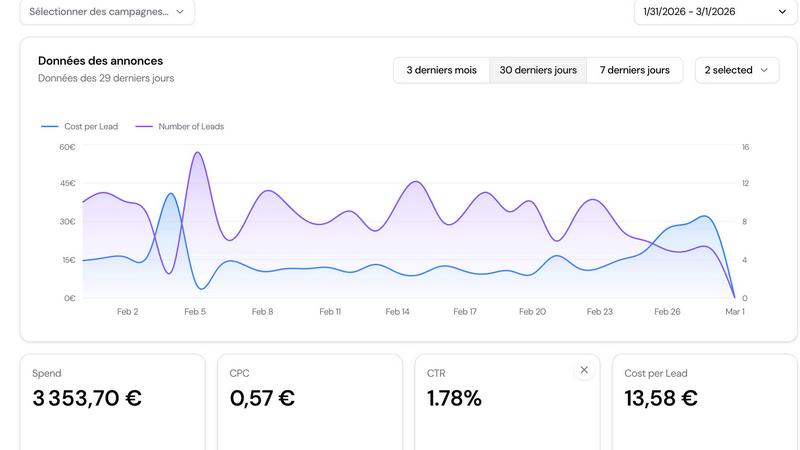
The Adswize dashboard presents a clear overview of your advertising performance at a glance. It enables users to quickly assess which ads are performing well and which ones are not, eliminating the need for sifting through raw data and making sense of complex metrics.
AI-Powered Insights
With Adswize, you can ask specific questions regarding your campaigns, such as "Which audience converts best?" or "Why did my ROAS drop?" The AI assistant provides instant, data-backed answers, helping you to understand trends and make better decisions for your advertising strategy.
Gleem.AI Studio
Text-to-Image Generator
Transform your ideas into beautiful visuals effortlessly using the text-to-image generator. This feature allows you to input your creative vision, choose the desired image size, and watch as Gleem’s Prompt Enhance refines your words into stunning images.
AI Image Editing
Edit images with ease using the AI image editing feature. This tool empowers you to add or remove objects, adjust poses, apply filters, and restore old images, all within a single intuitive interface. Say goodbye to juggling multiple platforms.
AI Avatars
Create personalized AI avatars and place them into any scene seamlessly. This feature enables you to adjust poses or try different outfits, allowing for endless creative possibilities without the need for costly photoshoots.
Project Organization
Gleem.AI Studio keeps your creative projects organized with dedicated spaces for each idea. Each project saves your prompts, edits, and versions, making it easy to revisit, reuse, and iterate on your designs as needed.
Use Cases
Adswize
Optimize Ad Spend
Utilize Adswize to minimize wasted ad spend by receiving daily recommendations on which ads to pause and which to scale. This ensures that your budget is allocated to the highest-performing campaigns, maximizing your return on investment.
Enhance Audience Targeting
Adswize assists in refining your audience targeting by analyzing performance data and suggesting the most effective interests and lookalike audiences to test. This can significantly improve conversion rates and reduce the time spent on audience experiments.
Streamline Creative Testing
With its structured insights, Adswize helps you understand which creatives resonate best with your audience. By identifying underperforming ads, you can refresh your creative strategy more effectively, ensuring that your messaging remains relevant and engaging.
Simplify Campaign Management
For agencies and marketers managing multiple accounts, Adswize simplifies the process by providing a consolidated view of all campaigns. This allows for efficient management and quick decision-making without getting bogged down in data analysis.
Gleem.AI Studio
Creating Marketing Assets
Marketers can use Gleem.AI Studio to generate eye-catching visuals for campaigns, social media posts, and advertisements. The streamlined process allows for quick iterations, ensuring that you can adapt to feedback or changing trends promptly.
Social Media Content Creation
Content creators can benefit from the intuitive platform to produce engaging social media graphics. With the text-to-image generator and image editing capabilities, you can create professional-level visuals that stand out in crowded feeds.
Product Image Generation
Businesses can leverage Gleem.AI Studio for generating high-quality product images. The AI-powered tools allow for the creation and editing of visuals that can be used for online stores, catalogs, and promotional materials, enhancing product visibility.
Creative Experimentation
Artists and designers can explore creative ideas without the constraints of complicated tools. Gleem’s features enable experimentation with different styles and concepts, encouraging innovation while maintaining a user-friendly experience.
Overview
About Adswize
Adswize is an innovative AI-powered assistant specifically designed for managing Meta Ads. It addresses the common pain points faced by advertisers, media buyers, agencies, and brands who often find themselves overwhelmed by the complexities of digital advertising. Many advertisers struggle with the mental load of daily optimization, spending hours trying to make sense of data without clear direction. With Adswize, this burden is lifted. The platform connects directly to your Meta ad accounts and analyzes campaign performance over the last 7, 14, or 30 days, transforming raw data into actionable insights. Instead of drowning in numbers, users receive structured daily summaries that illuminate what is working, what is not, and where budget is being wasted. Adswize delivers tailored optimization recommendations, empowering users to make informed decisions swiftly. It is like having a dedicated media buyer reviewing your campaigns each morning, allowing for streamlined operations and effective scaling of successful campaigns.
About Gleem.AI Studio
Gleem.AI Studio is a comprehensive AI image workspace tailored for individuals and teams eager to create stunning visuals without the hassle of navigating complex tools. It merges the capabilities of image generation and editing into one unified environment, allowing users to iterate on their designs seamlessly. Whether you are a marketer aiming for eye-catching marketing assets or a content creator needing quick social media visuals, Gleem.AI Studio streamlines the process, enabling fast and intuitive creation. The platform is designed with non-technical users in mind, eliminating the need for advanced settings or fragmented tools. With Gleem, you can focus entirely on your creative flow, making decisions that enhance your visuals rather than getting bogged down by technical complexities.
Frequently Asked Questions
Adswize FAQ
How does Adswize connect to my Meta Ads account?
Adswize connects to your Meta Ads account with just one click, allowing for seamless integration and real-time data analysis without complicated setups.
What kind of insights can I expect from Adswize?
You can expect daily summaries that highlight your ad performance, along with specific recommendations on which ads to pause, budgets to shift, and audiences to test, all tailored to enhance your advertising strategy.
Is there a trial period for Adswize?
Yes, Adswize offers a 3-day free trial with no credit card required, allowing you to explore its features and see the value it can bring to your advertising efforts before committing.
Who can benefit from using Adswize?
Adswize is ideal for advertisers, media buyers, agencies, and brands looking to optimize their Meta Ads campaigns efficiently. It is designed for anyone who wants to cut through the noise of data and make informed decisions quickly.
Gleem.AI Studio FAQ
What is Gleem.AI Studio?
Gleem.AI Studio is an all-in-one AI image workspace that enables users to generate and edit images within a single, easy-to-use platform, ideal for marketers and creators.
How does the Text-to-Image Generator work?
The Text-to-Image Generator allows you to input descriptive text, choose the image size, and utilizes AI to transform your text into visually appealing images, enhanced by the Prompt Enhance feature.
Can I edit images after generating them?
Yes, Gleem.AI Studio provides robust AI image editing capabilities. You can add or remove elements, adjust poses, and apply various filters, all within the same platform.
Is there a way to organize my projects?
Absolutely! Gleem.AI Studio offers dedicated spaces for each project, with features that save prompts, edits, and versions, making it easy to manage and iterate on your creative work.
Alternatives
Adswize Alternatives
Adswize is an AI-powered assistant specifically designed for Meta Ads, belonging to the marketing category. It simplifies the process of analyzing ad performance, offering users clear, actionable insights to optimize their campaigns without the confusion of complex data. Many users seek alternatives to Adswize due to varying needs, such as pricing concerns, feature sets that may not align with their specific requirements, or the need for compatibility with different advertising platforms. When searching for an alternative, it is essential to consider the specific features that resonate with your advertising goals, the ease of use of the platform, and the overall cost-effectiveness. Look for solutions that streamline campaign management and provide insightful data analysis, allowing you to make informed decisions swiftly and efficiently.
Gleem.AI Studio Alternatives
Gleem.AI Studio is a comprehensive AI image workspace designed for users who want to create and edit visuals seamlessly without the hassle of complex setups or switching between tools. It serves as an all-in-one platform that combines both image generation and editing, making it easy for marketers, creators, and small teams to produce consistent visuals swiftly. Users are often on the lookout for alternatives due to various reasons such as pricing concerns, specific feature requirements, or the need for compatibility with different platforms. When seeking an alternative to Gleem.AI Studio, it's essential to consider factors like ease of use, the range of features offered, and how well the platform aligns with your specific creative needs. Look for solutions that maintain a streamlined workflow, allowing for fast iterations and minimal technical complexities. Additionally, assessing customer support and community resources can further enhance your experience with whichever alternative you choose.