
Admanage AI vs Master Metrics
Side-by-side comparison to help you choose the right tool.

AdManage AI empowers you to launch ads across multiple platforms 10 times faster, streamlining your advertising process.
Last updated: February 26, 2026

Master Metrics turns your marketing data into clear dashboards and alerts for smarter decisions.
Last updated: February 28, 2026
Visual Comparison
Admanage AI
Master Metrics
Feature Comparison
Admanage AI
Fast Ad Launching
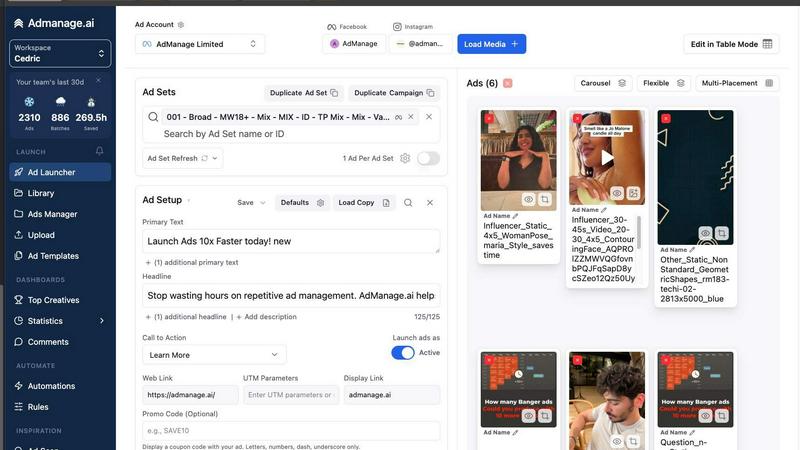
Admanage AI enables users to launch ads up to 10 times faster than traditional methods. With its user-friendly interface, marketers can create and deploy campaigns in seconds, significantly increasing their productivity.
One-Click Templates
The platform provides one-click ad templates derived from top-performing ads. This feature allows marketers to standardize their ad execution, ensuring consistency and quality across various campaigns without the need for tedious manual input.
Automated Multi-Format Grouping
Admanage AI automatically groups ads into different formats, such as 9:16, 4:5, and 1:1. This automation saves time and reduces errors during the ad creation process, enabling marketers to focus on strategy and creative ideation.
Google Sheets Plugin
The free Google Sheets plugin allows for bulk ad launches directly from a spreadsheet, making it easy to manage multiple ad variations. This integration enhances the workflow and simplifies the ad management process for teams.
Master Metrics
Unified Overview Control Panel
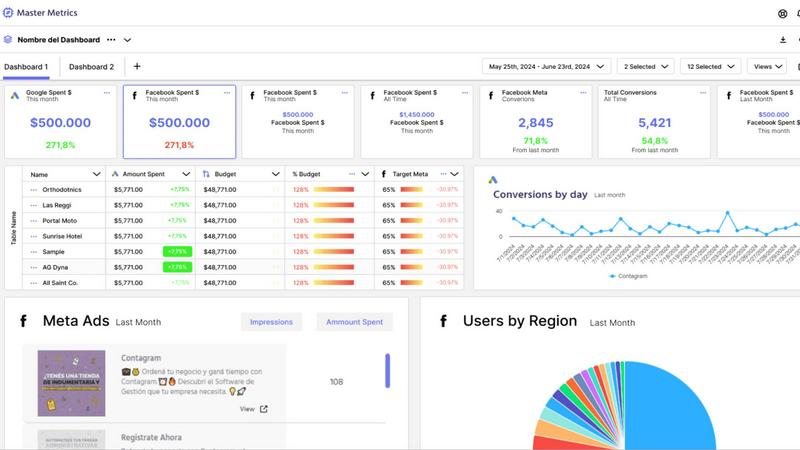
This is your mission control for all client accounts. Instead of logging into ten different platforms, you get a single, customizable dashboard that shows you everything at a glance. You can see what needs immediate attention, track key performance indicators across all campaigns, and bring in data from all your connected sources. It’s the perfect starting point for your day, giving you instant clarity and control over your entire portfolio.
AI-Powered Insights & Presentation Builder
Stop spending hours building reports! Master Metrics uses AI to analyze your data and highlight key trends and insights automatically. Even more impressively, you can create beautiful, client-ready Google Slides presentations in just a few clicks. Simply choose your data sources, select key metrics and goals, pick a design, and let the AI generate a fully editable presentation. It turns days of work into a simple, automated task.
Custom Alerts for Budget & Performance
Never miss a critical change in your campaigns. Set up custom alerts to monitor anything from daily ad spend to sales conversions. You can get notified if a campaign is underperforming, if you’re exceeding your daily budget, or if a key metric drops below a target. Receive these alerts directly in your email, WhatsApp, Slack, or other favorite tools, so you can take action immediately and keep everything on track.
Smart Dashboards & Easy Sharing
Create powerful, visual dashboards without any technical hassle. Use pre-built templates to get started in minutes, and clone them for new client accounts with one click. You can even bring ad creative and social post images directly into your reports for full context. When it’s time to share, easily send updates via public links, scheduled email reports, or PDF exports, keeping everyone informed with professional, automated updates.
Use Cases
Admanage AI
Bulk Ad Launching
Performance marketers can utilize Admanage AI to launch hundreds of ads at once for new product collections or campaigns. This capability is particularly beneficial during high-demand seasons, allowing teams to respond quickly to market needs.
Creative Testing
Admanage AI is perfect for teams engaged in high-velocity creative testing. Marketers can easily experiment with different ad variations and formats, gathering performance data rapidly to refine their strategies.
Streamlined Campaign Management
With features like automated grouping and one-click templates, Admanage AI streamlines the management of complex campaigns. Marketers can maintain consistency and organization across multiple ad sets with minimal effort.
Enhanced Team Collaboration
Admanage AI's cloud integrations with tools like Drive and Dropbox facilitate collaboration among team members. This feature ensures that creative assets are easily accessible and that everyone is on the same page, improving overall workflow efficiency.
Master Metrics
Agency Client Reporting
Marketing agencies can automate the entire client reporting process. Connect all client data sources, use templates to create branded dashboards in minutes, and schedule weekly or monthly PDF reports to be sent automatically. This saves dozens of hours per month, ensures consistency, and provides clients with transparent, professional insights that demonstrate clear value and ROI.
Freelancer Managing Multiple Clients
For freelancers juggling several clients, Master Metrics acts as a force multiplier. The unified Overview Panel lets you monitor all accounts from one screen. You can set up budget alerts for each client to prevent overspend and use the AI Slides feature to quickly generate impressive review presentations, helping you look like a large agency and win more business without the manual workload.
E-commerce Sales & Ad Performance Monitoring
E-commerce managers can merge data from platforms like Google Ads, Meta Ads, and Shopify. Create custom metrics to track true return on ad spend (ROAS) and set alerts for when sales drop or ad costs spike. This real-time monitoring allows for quick budget reallocation and campaign optimization to maximize sales and protect profit margins daily.
Proving Marketing ROI to Stakeholders
Marketing directors and team leads can use Master Metrics to build a single source of truth. Combine data from CRM, website analytics, and ad platforms to create dashboards that clearly show how marketing activities influence pipeline and revenue. The AI insights help highlight key trends, making it easy to present a compelling, data-backed story to company leadership or investors.
Overview
About Admanage AI
Admanage AI is an innovative advertising management platform designed specifically for performance marketers who require a fast and efficient way to test creatives at scale. Traditional native Ads Managers can be slow and cumbersome, making it challenging to launch multiple ads simultaneously. With Admanage AI, marketers can streamline their ad workflow, launching hundreds of ads in just seconds. The platform supports high-velocity creative testing, allowing teams to operate at a pace that matches their strategic needs. It integrates smoothly with tools like Google Sheets, Drive, and Dropbox, ensuring a seamless experience. Designed for marketers at companies like Bolt, Naked Wines, and Reading.com, Admanage AI empowers users to maximize their advertising efforts while minimizing errors and manual work, ultimately allowing more time for strategic planning and creative development.
About Master Metrics
Master Metrics is your all-in-one command center designed to end the chaos of marketing and sales analytics. Built by marketers who understand the struggle, it solves the core problem of fragmented data by pulling information from over ten different sources into one intuitive, unified platform. Imagine having all your client data from ads, social media, e-commerce, and CRM tools in a single, clear view instead of juggling endless spreadsheets and logins. This tool is specifically crafted for agencies, marketing teams, and freelancers who need to prove their value, control budgets, and scale operations efficiently. Its main value proposition is powerful yet simple: it transforms complex, raw data into clear, actionable intelligence. This allows you to make confident, data-driven decisions effortlessly and saves you countless hours previously spent on manual reporting and dashboard creation. Whether you manage a handful of clients or hundreds of campaigns, Master Metrics provides the structure, automation, and insights you need to focus on strategy and growth.
Frequently Asked Questions
Admanage AI FAQ
How does Admanage AI improve ad launching speed?
Admanage AI leverages a fast user interface and automated features like one-click templates and bulk launching capabilities to significantly reduce the time needed to launch ads, allowing users to focus on strategy rather than execution.
Can I integrate Admanage AI with other tools?
Yes, Admanage AI seamlessly integrates with popular cloud storage services such as Google Drive, Dropbox, and Box. This makes it easy to upload and manage media assets directly within the platform.
Is Admanage AI suitable for beginners?
Absolutely! Admanage AI is designed with user-friendliness in mind, providing intuitive features that make it accessible to marketers at all levels, including those who are just starting in digital advertising.
What types of businesses can benefit from Admanage AI?
Admanage AI is ideal for performance marketing teams across various industries, including e-commerce, SaaS, and digital media. Companies looking to scale their ad operations and improve workflow efficiency will find great value in this platform.
Master Metrics FAQ
What data sources can I connect to Master Metrics?
Master Metrics integrates with over ten popular marketing, sales, and analytics platforms. This includes major ad networks like Google Ads and Meta Ads, social media platforms, e-commerce tools like Shopify, and CRM systems. You can see the full, updated list on the "Data Sources" page of their website. This wide connectivity ensures you can bring all your critical data into one place.
How does the AI Slides presentation feature work?
It's designed to be incredibly simple. Within the Master Metrics platform, you select the client or campaign data you want to report on. Then, you choose the specific metrics, goals, and a pre-designed template for the slides. With one click, the AI processes this information and generates a complete, editable Google Slides presentation. You can then fine-tune the text or design before sharing it directly with your client, saving hours of manual work.
Can I control my daily ad spend with this tool?
Absolutely! This is a core function of the Alerts feature. You can set a monthly budget for any campaign, and Master Metrics will calculate the ideal daily spend needed to hit it. You can then create an alert to notify you via email or Slack whenever your actual spend goes above or below a specific percentage of that daily target. This helps you manage budgets proactively and avoid surprises.
Is there a limit to the number of dashboards I can create?
The number of dashboards you can create depends on your chosen pricing plan. Plans are structured based on the number of client "Accounts" you need to manage. Higher-tier plans (like Pro and Pro Plus) allow for more accounts and include more dashboard capabilities. You can review the specific limits for each plan on the "Prices" page to find the best fit for your business size and needs.
Alternatives
Admanage AI Alternatives
Admanage AI is a powerful advertising management tool designed to help marketers launch ads quickly and efficiently across multiple platforms, including Meta, TikTok, Pinterest, Google, YouTube, and Snapchat. As a part of the marketing category, it serves performance marketers who require a streamlined workflow for high-velocity creative testing. Users often seek alternatives to Admanage AI due to various reasons such as pricing structures, specific feature sets, and compatibility with their existing platforms. When searching for an alternative, it's essential to consider factors like ease of use, integration capabilities, and the ability to scale ad campaigns effectively while minimizing errors.
Master Metrics Alternatives
Master Metrics is a marketing analytics platform that helps agencies and teams unify their data from various sources into clear dashboards and automated alerts. It falls into the category of marketing intelligence and reporting tools, designed to save time and provide actionable insights. People often explore alternatives for several practical reasons. Budget is a common factor, as pricing plans need to fit different business sizes. Some teams might need integrations with very specific software, while others may be looking for a feature set tailored to a niche, like e-commerce or enterprise-level security requirements. When evaluating other options, focus on what matters most for your workflow. Key considerations include the range of data sources you can connect, the ease of building and customizing reports, the quality of automation for alerts and scheduled reports, and of course, the overall cost relative to the value provided. The right tool should simplify your data, not add more complexity.