
TypingFirst
TypingFirst is a free, structured platform that teaches you to type faster and more accurately with expert-designed lessons and practice.
Visit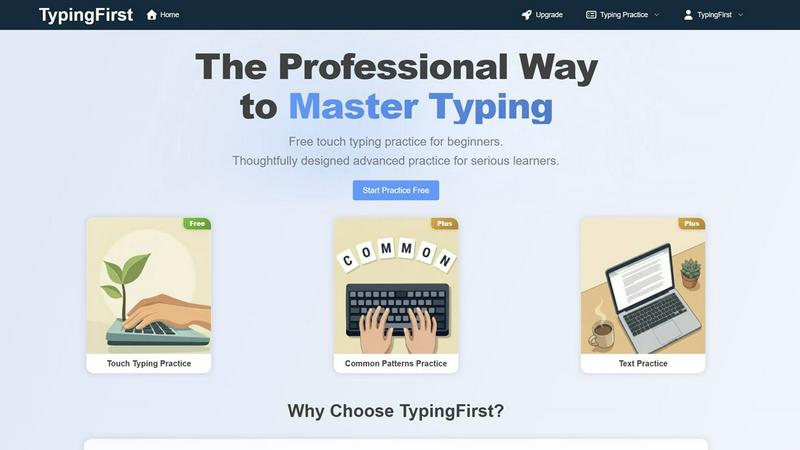
About TypingFirst
TypingFirst is your dedicated partner on the journey to keyboard mastery. It's a professional, structured online platform designed to transform anyone from a hesitant typist into a confident, fast, and accurate one. Whether you're a student starting from scratch, a professional looking to boost productivity, or a serious learner aiming for elite speeds, TypingFirst provides the perfect path. The core value lies in its expertly crafted, step-by-step learning method that builds skill logically and sustainably. You begin with fundamental touch typing lessons to learn proper finger placement without looking at the keyboard. Then, you progress to targeted drills on common letter patterns and full text practice with real-world content. Throughout your practice, you receive instant, visual feedback and detailed performance analytics that highlight your speed (WPM), accuracy, and specific areas for improvement. With its clean, distraction-free interface and motivating progress tracking, TypingFirst makes consistent practice enjoyable and effective, ensuring long-term success in developing this essential modern skill.
Features of TypingFirst
Scientific Touch Typing Method
TypingFirst is built on a scientifically proven foundation, starting with proper touch typing technique. The lessons guide you through correct finger placement on the home row keys, teaching you to type by feel rather than sight. This method is designed to develop natural muscle memory from the very beginning, ensuring you build efficient and ergonomic habits that prevent fatigue and form the bedrock for high-speed typing. You'll systematically master everything from basic letters to complex symbols and numbers.
Structured & Gamified Learning Path
The platform offers a clear, curriculum-based journey that takes the guesswork out of learning. Lessons are organized in a logical sequence that introduces new keys while regularly integrating reviews of previously learned skills. This structured approach is engineered for rapid skill acquisition and retention. To keep motivation high, the path includes gamified milestones and achievements that celebrate your progress, turning practice into a rewarding experience that encourages you to reach the next level.
Distraction-Free Practice Environment
TypingFirst provides a minimalist, focused interface designed for deep concentration. There are no flashy ads or confusing menus to pull your attention away from learning. You get instant access to your practice sessions without any complex setup. The clean design, coupled with real-time visual feedback on your typing as you go, creates an optimal environment for building focus and fluency, allowing you to fully immerse yourself in developing your muscle memory.
Visual Performance Analytics
After every lesson and practice session, you gain access to smart, comprehensive analytics. These detailed reports break down your performance, showing not just your overall Words Per Minute (WPM) and accuracy percentage, but also identifying your specific weak keys and troublesome patterns. This data allows you to understand your strengths and pinpoint exactly where to focus your efforts, enabling you to optimize your practice routine for maximum efficiency and track your tangible growth over time.
Use Cases of TypingFirst
For Students & Beginners
Students and absolute beginners can start their typing journey completely for free with TypingFirst's foundational touch typing course. The patient, step-by-step lessons are perfect for building core skills from the ground up. The structured path prevents overwhelm, and the encouraging feedback helps build confidence. Parents and teachers appreciate it as a valuable investment in a child's future, providing a solid skill set for schoolwork and beyond in a safe, focused environment.
For Professionals & Writers
Content writers, administrators, programmers, and other professionals use TypingFirst to move beyond hunt-and-peck typing and significantly boost their daily productivity and workflow efficiency. By mastering touch typing and practicing with common professional patterns, they can translate thoughts into text faster and with fewer errors. The advanced analytics help seasoned typists break through plateaus, identify persistent mistakes, and systematically push their speed toward 80 WPM and beyond.
For Educators & Classrooms
Technology teachers and instructors find TypingFirst an excellent tool for the classroom. The structured curriculum aligns perfectly with lesson plans, providing a clear progression for students of all levels. Teachers can recommend the platform knowing it offers a serious learning path for beginners while also providing the advanced drills and detailed analytics that challenge top-performing students and help them continuously improve.
For Serious Learners & Enthusiasts
Individuals dedicated to self-improvement and reaching elite typing speeds use TypingFirst for its advanced training modules. The "Common Patterns Practice" and text drills based on the most frequent English words and n-grams are the secret weapons for breaking high-speed barriers like 100 WPM. This targeted practice goes beyond basics to refine fluency, making complex keystrokes automatic and building the muscle memory required for exceptional performance.
Frequently Asked Questions
Is TypingFirst really free to start?
Yes, absolutely! TypingFirst offers a comprehensive set of free touch typing lessons that allow anyone to start learning proper technique from scratch. This free tier includes the core learning path to build fundamental skills. You can practice and improve significantly without any cost. Premium features like advanced Common Patterns Practice and more detailed analytics are available through an optional upgrade.
What makes TypingFirst different from other typing websites?
TypingFirst stands out through its professional, structured, and focused approach. Unlike many cluttered or game-heavy sites, it offers a scientifically designed curriculum built for efficient muscle memory development. It combines a distraction-free interface with powerful, visual performance analytics that give you actionable insights. The progression from basic touch typing to advanced pattern drills is thoughtfully crafted for serious, long-term improvement.
How does TypingFirst help me type faster?
TypingFirst uses a multi-stage method. First, it ensures you learn the correct, efficient touch typing technique. Then, it strengthens that foundation with integrated review sessions. Finally, it accelerates your speed through targeted practice on the most common letter combinations (n-grams) and words in the English language. By drilling these frequent patterns, your fingers learn to execute them automatically, which is the key to unlocking higher typing speeds.
Can I use TypingFirst on any device?
TypingFirst is an online platform accessible through a web browser, meaning you can use it on any computer, laptop, or tablet with an internet connection and a physical or on-screen keyboard. The clean, responsive interface is designed to work well on different screen sizes. The most effective practice, however, is achieved using a standard physical keyboard to properly develop muscle memory.
Similar to TypingFirst
PythonExercise.com
An interactive coding platform featuring bite-sized Python exercises designed to build real coding skills through hands-on practice.
PracticeSIEM
PracticeSIEM.com is an interactive, browser-based hands-on cybersecurity learning platform designed for Security Operations Center (SOC) analysts.
SQLCrab
SQLCrab (sqlcrab.com) is an interactive, browser-based SQL learning platform that lets you practice database queries directly in your browser.
Wordy
Learn languages with real movie and TV show clips.
Name Wheel Pro
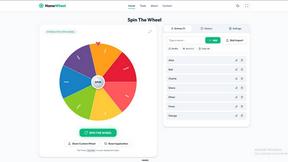
Spin to decide: names, numbers, colors, or yes/no. Free wheel picker tools for teachers, streamers, and teams — no signup needed.
sorry text repeater
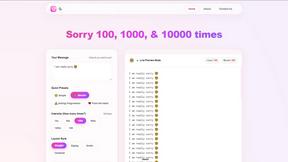
Sorry100Times.org instantly generates and copies apology text — up to 10,000 repeats, styled and ready to paste.
Delta Report
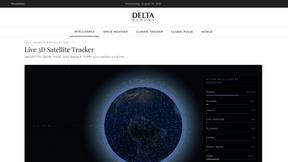
Free, Live 3D Satellite, Space Weather & Climate Tracker in real time on an interactive globe alongside articles and insights.
The French Corner
Learn French through visual stories told by a native speaker. Words you meet come back on their own, right before you'd forget them.