
TaleHug AI Story Generator for Kids
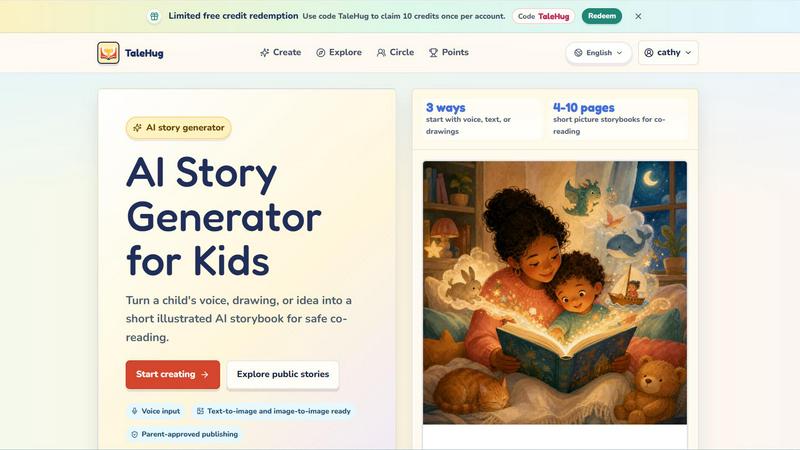
Turn a child's voice, drawing, or idea into a short illustrated AI storybook for safe co-reading.
VisitPublished on:
June 13, 2026
Pricing:
About TaleHug AI Story Generator for Kids
TaleHug is an AI-powered storytelling tool designed specifically for children to craft their own illustrated stories. It turns a child's voice, drawing, or simple idea into a short, illustrated AI storybook that is perfect for safe co-reading between kids and parents. The platform emphasizes kid-friendly interaction and colorful illustrations to make story creation engaging and approachable for young readers and writers, typically those in preschool and kindergarten ages (3-6 years old). With TaleHug, children can start with voice input, text, or even their own drawings, and the AI will generate a complete picture storybook of 4 to 10 pages. Every story is a collaborative adventure where imagination meets technology. The platform is built with safety as a top priority, featuring private drafts by default, parent approval before any public sharing, and no public comments in the MVP (Minimum Viable Product). Safe display names are used instead of full child names, and no school names, addresses, or child contact details are collected. TaleHug also offers a public gallery where approved examples from young creators can be viewed, providing inspiration for new stories. The main value proposition is empowering children to become storytellers in a safe, guided environment, while parents can feel confident that their child's creativity is being nurtured with appropriate safeguards. Whether for bedtime reading, classroom activities, or simply a fun afternoon project, TaleHug makes story creation accessible, safe, and delightful for the whole family.
Features of TaleHug AI Story Generator for Kids
Three Ways to Start: Voice, Text, or Drawings
TaleHug offers three distinct and easy ways for a child to begin their story creation journey. A child can simply speak their idea aloud, and the AI will capture their words to build the narrative. They can also type out a story idea or describe a scene using text. For the most creative young artists, children can upload a drawing they have made, and the AI will transform that picture into the foundation of a storybook. This flexibility ensures that every child, regardless of their comfort with reading or writing, can participate and see their imagination come to life on the page.
AI-Powered Picture Storybook Generation
Once a story idea is submitted, TaleHug's AI generates a complete picture storybook with 4 to 10 pages. Each page features a strong, colorful illustration that matches the child's concept, accompanied by one short, simple sentence that is perfect for early readers. The AI also stores the prompt used for each illustration, allowing for easy regeneration if the child or parent wants to tweak the artwork. This feature turns a single spark of an idea into a full, visually engaging narrative that feels like a real published book, fostering a sense of accomplishment and pride in young creators.
Parent-Approved Publishing and Visibility Controls
Safety is at the core of TaleHug's design. All story drafts are private by default, meaning only the child and their parent or guardian can see them. Before a story can be shared with a wider audience, such as a "Circle" of trusted family and friends or the public gallery, an adult must review and approve it. There are three visibility modes: private, circle, and public. Additionally, the MVP has no public comments, which removes the risk of unwanted feedback. This system ensures that children can create freely while parents maintain full control over their child's digital footprint and online interactions.
Safe and Kid-Friendly Design
TaleHug is built from the ground up with child safety and privacy in mind. The platform uses safe display names instead of a child's real full name. It does not ask for or store school names, addresses, or any other personal contact details. The public gallery only features approved examples, ensuring that all content is appropriate. The entire user interface is designed to be colorful, intuitive, and encouraging, making it easy for children to navigate without confusion. This focus on safety allows parents to relax and enjoy the co-reading experience, knowing their child is in a secure digital environment.
Use Cases of TaleHug AI Story Generator for Kids
Bedtime Story Creation
Parents can use TaleHug to create personalized bedtime stories for their children. Instead of reading the same book every night, a child can describe a dream, a favorite animal, or a make-believe friend, and within minutes, a brand new 4 to 10 page storybook is ready to read together. This turns bedtime into an interactive and creative ritual, helping children wind down while engaging their imagination. The stories can be saved and revisited, building a growing library of unique family tales.
Classroom Storytelling Activities
Teachers in preschool and kindergarten can use TaleHug as a tool for classroom storytelling exercises. Children can take turns sharing ideas or drawings, and the teacher can generate a story for the whole class to read together. This encourages participation, builds confidence in speaking and sharing, and introduces young learners to narrative structure in a fun, low-pressure way. The private draft feature ensures that classroom projects remain within the school environment until the teacher decides to share them with parents.
Encouraging Reluctant Readers and Writers
For children who are hesitant to read or write, TaleHug offers a gentle and motivating entry point. By allowing them to start with a voice recording or a drawing, the tool removes the barrier of having to form sentences on their own. Seeing their own idea transformed into a professional-looking illustrated book can be incredibly empowering. This positive experience can build a child's confidence and spark a greater interest in literacy activities, making reading and writing feel like play rather than work.
Family Bonding and Co-Creation
TaleHug is an excellent tool for family bonding. Siblings can work together to brainstorm a story, parents can help a child refine their idea, and then everyone can gather around to read the finished book. The "Circle" visibility mode allows families to share their creations with grandparents or close friends who live far away. This collaborative process creates lasting memories and provides a meaningful, screen-based activity that brings the family together rather than isolating individual members.
Frequently Asked Questions
What age group is TaleHug designed for?
TaleHug is specifically designed for children in preschool and kindergarten, typically ages 3 to 6 years old. The generated stories are short, with 4 to 10 pages, and each page contains only one simple sentence, making them perfect for early readers and co-reading with a parent. The interface is also designed to be intuitive enough for young children to navigate with minimal adult supervision.
How does TaleHug ensure my child's safety online?
TaleHug has multiple safety layers. All story drafts are private by default. Any sharing to a "Circle" or the public gallery requires explicit parent approval. The MVP does not include public comments, eliminating the risk of unwanted interactions. The platform uses safe display names instead of real full names and does not collect any personal details like school names or addresses. The public gallery only contains pre-approved example stories.
Can my child use their own drawings to create a story?
Yes, absolutely. One of the three main ways to start a story is by uploading a drawing. The AI will analyze the child's artwork and use it as the foundation for the storybook. This is a powerful feature that allows children to see their own creativity directly reflected in the final product, making the experience even more personal and rewarding.
How many pages are in a typical TaleHug storybook?
A typical TaleHug storybook contains between 4 and 10 pages. This length is intentionally designed to be short enough to hold a young child's attention during a single reading session, while being long enough to tell a complete, satisfying story. Each page features one strong illustration and one short sentence, making it ideal for co-reading and early literacy development.
What can I do with a free account on TaleHug?
New users can redeem a limited number of free credits to start creating stories. You can use the code "TaleHug" to claim 10 credits once per account. These credits allow you to explore the platform, generate your first storybook, and experience the full creation process. After using your initial credits, you can explore the public gallery for inspiration and see examples from other young creators.
Similar to TaleHug AI Story Generator for Kids

LiveGameShow
A game show board for the TV, with real buzzers on every player's phone

LivePartyGames
Most likely to, would you rather and more: the TV shows it, every phone votes

LivePoll
Create a free live poll, share a QR code, and watch the votes come in live.

YIX
AI image and video generation, photo editing, restoration and product visuals in one browser studio.

Design.com AI Image Generator
Turn text prompts into polished, copyright-safe visuals that plug directly into branded templates
PracticeNetworking
Master networking with interactive, hands-on practice directly in your browser. Solve real terminal challenges, debug routes, and build core IT skills

Nano AI
Create and edit AI images, generate videos, and compare models in one creative workbench.

FreeVideoGenerator
Turn text prompts and photos into AI video clips with Sora 2, Veo 3.1, Wan and more. Get free starter credits and watermark-free downloads.