
retroshelf
Retroshelf automatically logs your retro handheld gaming sessions so you can track your playtime, discover trends, and connect with fellow players.
Visit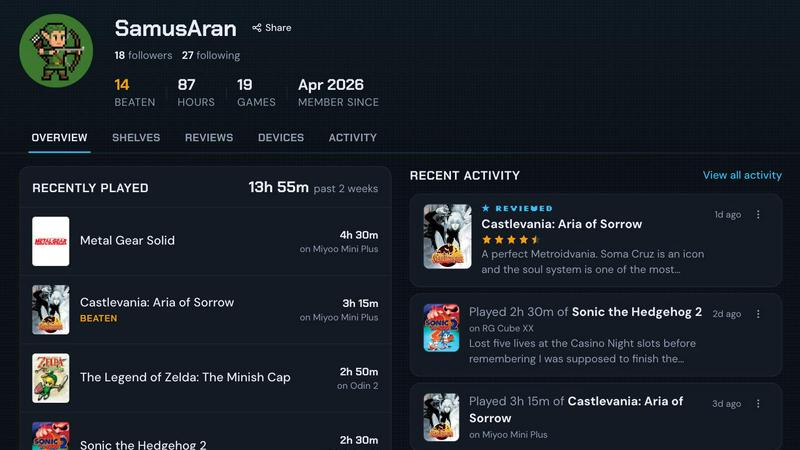
About retroshelf
If you are a retro handheld gaming enthusiast, you know the struggle of trying to remember which games you played, on which device, and for how long. Maybe you have notes scattered across different apps, a messy spreadsheet, or you rely entirely on memory. retroshelf is an innovative play-tracking and discovery app built specifically to solve this problem for you. It provides a beautiful, public shelf that showcases the games you are currently playing, have finished, are reviewing, or are replaying, all while keeping track of the specific handheld device you used. The magic happens automatically. A tiny plugin runs on your handheld device, capturing every session as you play. It logs the game title, your playtime, and the exact handheld you are using. This creates a browsable history of your gaming sessions, turning your scattered gameplay into a clear timeline you can look back on. retroshelf is designed for anyone who loves retro gaming and wants to stop juggling notes. It is for the player who wants to see their year of play laid out legibly, discover what others in the community are picking up, and connect with fellow enthusiasts. With retroshelf, every game you play is worth remembering, and remembering is effortless.
Features of retroshelf
Automatic Session Logging
The core feature of retroshelf is its ability to log your gaming sessions without any manual effort. A small plugin runs quietly on your handheld device, such as those running muOS or OnionOS. As soon as you start playing, it captures the game title, the minutes you play, and the specific device you are using. Your shelf updates while you are still on the couch, giving you a complete, automatic record of your playtime.
Public Shelf and Discovery
Your shelf is public, meaning you can share what you are playing with the community. This feature turns your personal log into a discovery tool. You can see which games are catching on with other handheld players, what they are finishing, and what they are replaying. It transforms your gaming history from a private note into a way to connect and find your next favorite title.
Timeline of Your Gaming Year
retroshelf turns your scattered sessions across multiple handhelds into a single, legible timeline you can browse later. You can see what you played, where you played it, what you finished, and any notes you left along the way. This feature provides a clear, chronological view of your entire gaming year, making it easy to reflect on your journey and see your accomplishments.
Contextual Reviews and Device Filtering
When you leave a review on retroshelf, it includes the context of the handheld you played it on. This means star ratings come with the device information, not just a number. You can also browse games by device, filtering shelves to see what people are playing on specific hardware like Miyoo, Anbernic, or Odin. This gives you a deeper understanding of how games perform and feel on different systems.
Use Cases of retroshelf
Keeping a Complete Gaming Log
You own several retro handhelds and often switch between them. Instead of trying to remember which game you were playing on which device, retroshelf automatically logs every session. You can look back at your timeline to see that you spent 45 minutes on a Miyoo Mini playing Pokemon, then switched to an Anbernic RG35XX for an hour of Castlevania. Your entire gaming history is captured without any manual input.
Discovering New Games Through the Community
You are looking for something new to play but do not know where to start. By browsing the "Popular this week" section on retroshelf, you can see exactly what other handheld players are picking up, finishing, and replaying. You can filter by device to see what games are trending on your specific hardware, giving you real, community-driven recommendations that are relevant to your setup.
Sharing Your Progress with Friends
You are part of a retro gaming community on Discord or a forum. With retroshelf, you can easily share your public shelf to show friends what you are currently playing. They can see your playtime, device, and any reviews you have left. This creates a more engaging way to discuss games, as your friends can see the context behind your experience, like how a game runs on a specific handheld.
Reflecting on Your Gaming Year
At the end of the year, you want to see your gaming journey. retroshelf provides a clear timeline of every session you played across all your devices. You can see the games you started, the ones you finished, and the notes you left. This turns your gameplay into a personal diary, allowing you to reflect on your habits, discover patterns, and appreciate the time you spent with your handhelds.
Frequently Asked Questions
How does retroshelf automatically log my games?
retroshelf uses a tiny plugin that you install on your handheld device. You simply drop the plugin onto your SD card, link your device to your retroshelf account, and the plugin starts working. As you play a game, it captures the title, your playtime, and the device name, then sends this data to your shelf automatically.
What handheld devices are supported by retroshelf?
Currently, retroshelf is supported on devices running muOS and OnionOS. These are popular custom firmware options for many retro handhelds. The team is actively working on expanding support to other operating systems and devices, so more options will be available as the app grows.
Is my shelf public, and who can see it?
Yes, your shelf is public by default. This is a core part of retroshelf's design, as it allows you to share your gaming journey and discover what others are playing. You can share your shelf link with friends or in communities, and anyone can browse your played games, reviews, and playtime data.
Can I see what games are popular on specific devices?
Absolutely. retroshelf has a "Browse by device" feature that lets you filter shelves by specific handhelds like Miyoo, Anbernic, or Odin. This allows you to see which games are most popular, most finished, and most replayed on the exact hardware you own or are interested in buying.
Explore more in this category:
Similar to retroshelf

wery.ai
Wery is an AI-powered virtual creative studio for entertainment content.

ZombieTrend AI
Turn two photos into a cinematic zombie love story video. One becomes a zombie, the other chooses love, ending in a warm memory.
Name Wheel Pro
Spin to decide: names, numbers, colors, or yes/no. Free wheel picker tools for teachers, streamers, and teams — no signup needed.

AIdorable
Adopt a virtual baby who grows, learns, and remembers you.
sorry text repeater
Sorry100Times.org instantly generates and copies apology text — up to 10,000 repeats, styled and ready to paste.


Peekviewer
Anonymous Instagram viewer. Browse profiles, stories, and posts without an account or leaving a trace.