
ProcessSpy
Monitor your Mac's processes like a pro with ProcessSpy's advanced, easy-to-use tools and real-time insights.
Visit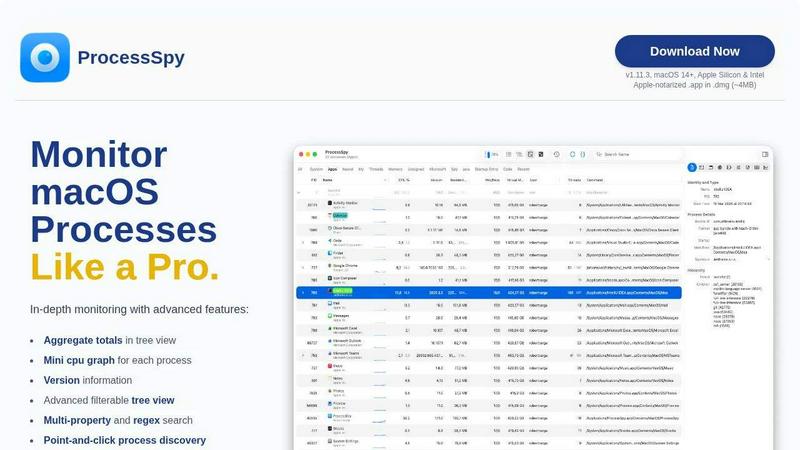
About ProcessSpy
Ever felt like your Mac's built-in Activity Monitor is hiding something? You're not alone. ProcessSpy is the powerful, native macOS tool designed to reveal the full story of what's running on your computer. Think of it as a detective for your system processes, giving you the deep insights that Apple's default tools keep hidden. It's the go-to alternative for users who need more than just a basic process list. Whether you're a developer debugging a tricky application, a power user trying to free up system resources, or just someone curious about what's happening under the hood, ProcessSpy is built for you. Its core value is clarity and control: it visualizes complex process relationships in an easy-to-understand tree, shows you exactly what files and connections each app is using, and provides the detailed information—like full command paths and version numbers—that is crucial for real troubleshooting. Created by a developer who needed to distinguish between multiple Java versions, ProcessSpy solves real problems with a clean, fast, and Mac-native interface that feels right at home on your desktop.
Features of ProcessSpy
Advanced Process Tree & Aggregate View
ProcessSpy doesn't just list processes; it shows them in a clear, hierarchical tree so you can see exactly which app launched which service. Even better, it calculates and displays real-time aggregate totals for CPU usage, memory consumption, and thread count for any branch of the tree. This means you can instantly see the total impact of an entire application and all its helper processes, not just the main app window, giving you a true understanding of your system's resource usage.
Multi-Property & Regex Search
Finding the exact process you need is incredibly fast and flexible. Go beyond simple name searches. ProcessSpy's quick-search bar supports regular expressions and can search across multiple properties simultaneously. For example, you can search for processes with "python" in the name AND a specific script path in the command line arguments. This precision saves you from scrolling through hundreds of entries and gets you the information you need in seconds.
JavaScript-Powered Custom Filters
For ultimate control, you can create your own custom filters using JavaScript. This feature allows you to build complex, conditional filters that the standard interface can't handle. You can filter processes based on any combination of properties—like CPU usage over a certain threshold, memory consumption, start time, or whether they were just launched—enabling you to create a truly personalized monitoring dashboard.
Comprehensive Process Inspection & Actions
Right-click on any process to access a wealth of information and useful actions. You can instantly kill unresponsive apps, inspect all open files and network connections, and view loaded dynamic libraries (Dylibs). The paid version unlocks even deeper inspection, allowing you to see environment variables, code signatures, entitlements, and the app's Info.plist contents, all crucial for advanced debugging and security analysis.
Use Cases of ProcessSpy
Debugging and Development Work
Developers can finally see the full picture. When an app isn't working correctly, ProcessSpy lets you verify the exact executable path and command-line arguments it launched with, check its environment variables, and see what other processes it spawned. This is invaluable for debugging issues related to specific library versions, configuration settings, or unexpected child processes that might be causing conflicts or errors.
System Performance Optimization
Is your Mac running slow or getting hot? Use ProcessSpy to identify resource hogs with precision. The tree view with aggregate totals makes it easy to spot not just a single greedy process, but an entire application family consuming resources. You can track CPU and memory history (paid feature) to see trends and pinpoint exactly when and which process caused a performance spike, helping you make informed decisions about what to quit or uninstall.
Security and Privacy Auditing
Curious about what a newly installed app is really doing? ProcessSpy acts as a transparency tool. You can monitor which files an application is accessing, what network connections it's making, and what other processes it launches. The ability to inspect entitlements and signatures (paid feature) helps you verify an app's claimed permissions and authenticity, giving you peace of mind about your system's security.
Managing Stubborn and Unresponsive Apps
When an app freezes and won't quit normally, Force Quit can sometimes leave behind hidden processes. ProcessSpy gives you the power to see and terminate every single process related to a stuck application, including any hidden daemons or agents. This ensures a clean exit, frees up locked resources, and can resolve issues where an app won't reopen properly because parts of it are still running in the background.
Frequently Asked Questions
Is ProcessSpy safe to install on my Mac?
Absolutely. ProcessSpy is designed with security in mind. It is officially Apple-notarized, which means Apple has scanned it for malicious content and approved it. It is distributed as a signed application inside a DMG disk image file, a standard and secure method for macOS software. It runs safely on both Intel-based Macs and newer Apple Silicon (M1/M2/M3) machines.
What versions of macOS does ProcessSpy support?
ProcessSpy is built for modern macOS systems. It officially supports macOS 14 (Sonoma) and newer, including the latest versions. It leverages native macOS APIs to ensure best performance and compatibility, so it is focused on supporting current and future operating systems from Apple.
What is the difference between the free and paid features?
The free version of ProcessSpy is incredibly powerful, offering the advanced tree view, multi-property search, JavaScript filters, and basic process inspection. The paid license unlocks professional-grade features like viewing environment variables, inspecting code signatures and entitlements, recording and exporting CPU/memory history, and having the app remember details of finished processes for later review.
How does the licensing work?
A single license for ProcessSpy costs $24.99 and is purchased through Gumroad. This license is per user, not per machine, so you can use it on all your personal Macs. The best part is that it includes lifetime updates, so you'll get all future feature additions and compatibility improvements at no extra cost.
Similar to ProcessSpy

SightRadar
Face recognition API, a drop-in replacement for AWS Rekognition. Index, search, compare and detect faces, billed per photo with no subscription.


Egmatic
No-code 2D game editor: visual node logic, drag-and-drop scenes, live preview. Exports to Windows, macOS, Linux, Android, iOS, Web.


laya.tools
Free directory of 950+ projects built on Laya, the open-source model that turns text into typed decisions. Ports, SDKs, agents and demos.

stackledge
Discover vetted SaaS apps, practical AI tools, and custom n8n workflows on a human-curated platform free from bot-scraped spam and dead links.

Sprite Sheet Maker
A free browser-based toolkit for creating, cutting, converting, and previewing sprite sheet animations.

Forms Plugin
The #1 Native Form Builder Plugin for Framer - No Code, No Embeds, No External Platforms.