KPI Studio
Paste your data, choose a chart, and export a video in under 60 seconds with no timelines or keyframes.
Visit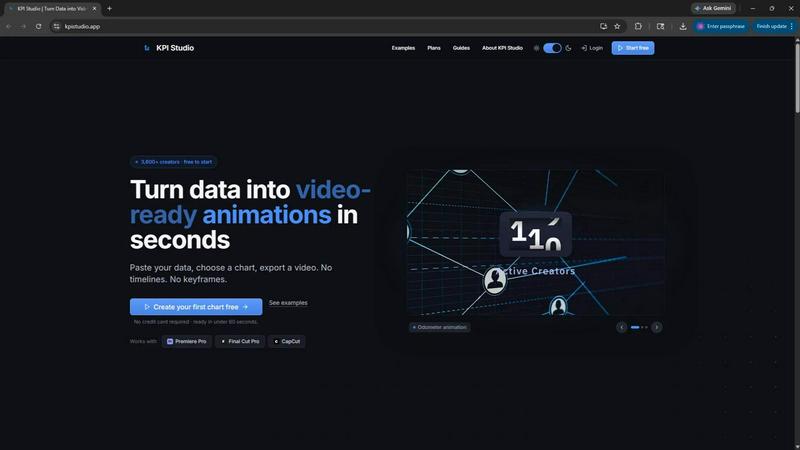
About KPI Studio
KPI Studio is a specialized tool built for data-driven video creators who need to include animated charts and metrics in their videos but do not have the time or skills for motion design. Whether you are a YouTuber breaking down your monthly analytics, a social media manager creating engaging Instagram stories, or an eLearning developer building course materials, KPI Studio lets you turn raw data into professional, video-ready animations in under 60 seconds. The traditional workflow is broken: screenshots look amateur, Canva templates lack flexibility, and After Effects takes hours of learning and keyframing. Hiring a freelancer is slow and expensive. KPI Studio removes that entire process. You simply paste your data, choose a chart type, customize the look, and export a fully animated video file. Exports include transparent background options, so your charts drop directly into Premiere Pro, Final Cut Pro, CapCut, or any other video editor with zero additional editing. The tool is built for creators on a publish schedule who need their charts ready today. With over 3,600 creators already using the platform, KPI Studio is the fast, simple, and reliable way to add professional data animations to any video project.
Features of KPI Studio
Paste Data, Get a Video
The core workflow is incredibly simple. You paste your numbers into the tool, choose from a library of chart types like count-up numbers, growing bar charts, or drawing line charts, and then customize the colors and style to match your brand. In under 60 seconds, you can export a fully animated, video-ready file. There are no timelines, no keyframes, and no complex setup. If your data changes, you simply paste the new numbers and re-export. This removes the painful process of redoing animations in traditional software.
Multiple Video Export Formats
KPI Studio supports a wide range of export formats to fit any editing workflow. You can export as MP4, GIF, MOV with transparency, or PNG sequences. The transparent background option is a game-changer because it allows your animated chart to drop directly onto your video timeline in Premiere Pro, Final Cut Pro, or CapCut without any additional compositing or masking. You also have the option to export as JSON for advanced workflows and custom pipelines, giving developers and power users deeper control.
Flexible Aspect Ratios for Any Platform
Every video platform has different requirements, and KPI Studio covers them all. You can export your animated charts in 16:9 widescreen for YouTube, 9:16 stories for Instagram and TikTok, 1:1 square for social media posts, and 4:3 standard for presentations and eLearning. This flexibility means you create your chart once and can repurpose it across multiple platforms without having to redo the animation. The tool automatically adapts the chart layout to the selected aspect ratio.
Real-Time Preview and Customization
Before you export, you see exactly what your animation will look like with a real-time preview. You can adjust colors, fonts, animation speed, and chart style instantly. This removes the guesswork from the creative process. You do not need to render a test file to see if the colors match your brand. The preview updates as you make changes, so you can iterate quickly and export with confidence. This feature is especially valuable for creators who need to match specific brand guidelines or client requirements.
Use Cases of KPI Studio
YouTube Analytics and Review Videos
YouTube creators who produce monthly analytics reviews or channel growth updates can use KPI Studio to animate their subscriber counts, view counts, and revenue numbers. Instead of showing a static screenshot of YouTube Studio, you can present a polished, animated count-up of your milestones. This keeps viewer attention and makes your data feel more dynamic and exciting. The transparent export allows you to overlay the animation directly onto your video footage or background.
Social Media Short-Form Content
For Instagram Reels, TikTok videos, and YouTube Shorts, animated charts are a powerful way to communicate data quickly. You can create a 9:16 animated bar chart comparing two metrics or a count-up showing a subscriber milestone. The motion grabs attention in the fast-scrolling feed, and the professional look builds credibility with your audience. KPI Studio makes it easy to produce these visuals in seconds, keeping your content calendar on track.
Business Presentations and Reports
Professionals who need to include data in PowerPoint or Google Slides presentations can benefit from KPI Studio. Instead of a static chart, you can embed an animated GIF or MP4 that shows numbers counting up or bars growing. This adds a layer of polish and engagement to quarterly reports, sales reviews, or investor updates. The export options include standard 4:3 and 16:9 aspect ratios that fit perfectly into slide decks.
eLearning and Educational Content
Course creators and instructional designers can use animated charts to illustrate key concepts, show progress over time, or compare data sets. The self-drawing line chart is perfect for showing trends in a course about data analysis or business metrics. The transparent background allows the chart to sit seamlessly on top of slides, screen recordings, or instructor videos. This makes the learning experience more visual and engaging without requiring advanced animation skills.
Frequently Asked Questions
Do I need any motion design experience to use KPI Studio?
No, you do not need any motion design experience at all. KPI Studio is built specifically for people who are not motion designers. You simply paste your data, choose a chart type, and export a video. There are no timelines, keyframes, or complex settings to learn. The entire process takes under 60 seconds, and the tool handles all the animation automatically.
What video editing software does KPI Studio work with?
KPI Studio works with all major video editing software. You can export with a transparent background as a MOV file and drop it directly into Premiere Pro, Final Cut Pro, DaVinci Resolve, CapCut, or any editor that supports alpha channels. You can also export as MP4, GIF, or PNG sequences for other workflows. The files are ready to use the moment you click export.
Can I change the data in my chart after I export it?
Yes, you can. One of the biggest advantages of KPI Studio is that you can easily update your data. If your numbers change, you simply go back to the tool, paste the new data, and re-export the animation. You do not need to redo any keyframes or animations. This saves you hours of work compared to traditional motion design software.
What types of charts can I create with KPI Studio?
KPI Studio offers several chart types designed for video. You can create count-up numbers that animate milestone values like subscriber counts or revenue totals. You can make growing bar charts that reveal comparisons between different metrics. You can also create drawing line charts that show trends over time as a line draws itself on screen. All chart types are fully animated and ready for video.
Pricing of KPI Studio
KPI Studio offers simple and transparent pricing with three options to fit different needs. The Free plan costs $0 per month and includes unlimited PNG exports, 3 free animated exports, all chart types, and real-time preview. This is perfect for trying the tool on your next video with no credit card required. The Creator Pack is a one-time purchase for $11.99. It includes everything in the Free plan plus 10 video exports in GIF, MP4, WebM, and MOV formats, no watermark, and 1080p export resolution. The credits do not expire, so you can use them when you need them. The Pro plan is the most popular option at $19.99 per month. It includes everything in the Free plan plus unlimited video exports in all formats, no watermark, 4K export resolution, and the ability to cancel anytime. This plan is built for creators who publish every week and need unlimited access to professional animated charts.
Similar to KPI Studio

Motiofy
Motiofy is an AI creative workspace that helps creators and teams turn ideas into polished visual stories.


CloutStack
Curated directory of tools for influencers engaged with the creator economy

IsThisAIImage
Free online AI image and deepfake checker. Upload a photo for AI-generated and deepfake scores, a clear verdict, and optional generator hints.
Merge Two Photos
Merge two photos free in your browser: side by side, stacked, overlay, or AI. Download a clean PNG, no watermark.