
GhostlyX Privacy-First Web Analytics
GhostlyX gives you clear website insights while keeping your visitors data private, with no cookies needed and easy setup.
Visit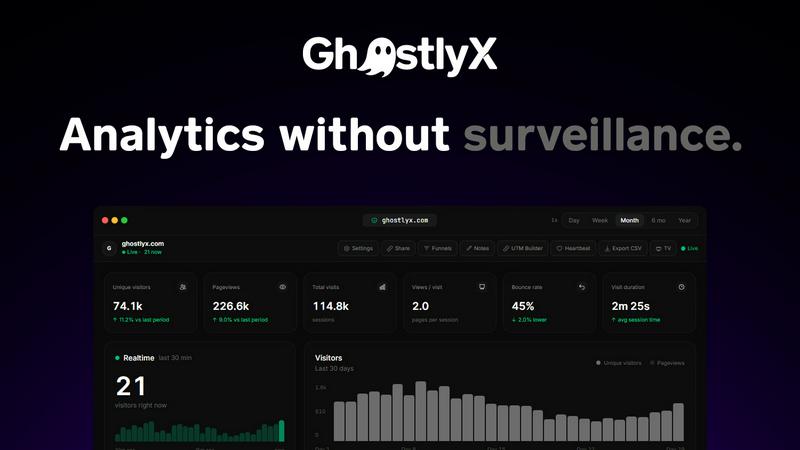
About GhostlyX Privacy-First Web Analytics
GhostlyX is a privacy-first web analytics platform designed to give you all the traffic insights you need without compromising your users privacy. For too long, website owners and marketers have faced a frustrating trade-off: either use powerful analytics tools that track users with cookies and fingerprinting, or choose privacy-compliant tools that leave you blind to your traffic. GhostlyX eliminates this dilemma entirely. It is built from the ground up to be fully compliant with GDPR, CCPA, and ePrivacy regulations without requiring any cookie banners or consent popups. The lightweight script is under 2kb, meaning it will not slow down your website. You get real-time visitor tracking, pageviews, top pages, referrer data, device information, and country-level insights. For teams that need deeper analysis, GhostlyX offers session replays, funnels, goals, UTM tracking, and built-in uptime monitoring. It works across unlimited websites from a single account, making it ideal for agencies, developers, and marketing teams. Setup is incredibly simple. You paste one script tag and you are live in about 30 seconds. There is a free tier available with no credit card required, so you can start exploring your data immediately. Trusted by teams at BugShot AI, CookieStack, Varsuite, and many others, GhostlyX is the analytics tool that respects both your visitors and your need for actionable data.
Features of GhostlyX Privacy-First Web Analytics
Real-Time Visitor Tracking and Dashboard
GhostlyX provides a clean, fast dashboard that shows you what is happening on your site right now. You can see the exact number of visitors currently online, watch traffic spike the moment an email campaign goes out, and view a live graph of visitor activity over the last 30 minutes. The real-time view is designed to be addictive and immediately useful, giving you instant feedback on your marketing efforts.
Lightweight and Privacy-Compliant Script
The GhostlyX tracking script is under 2kb, which is significantly smaller than most analytics tools. This means it will not slow down your website or affect your page load times. More importantly, the script uses no cookies, no fingerprinting, and no tracking methods that require user consent. You are fully GDPR, CCPA, and ePrivacy compliant out of the box, so you can remove those annoying cookie banners from your site.
Advanced Analytics for Teams
Beyond basic pageviews, GhostlyX offers powerful features for teams that need deeper insights. You can set up funnels to see where users drop off, create goals to track conversions, use UTM parameters to measure campaign performance, and even watch session replays to understand user behavior. The built-in uptime monitoring lets you keep an eye on your site and API status directly from the same dashboard.
Unlimited Sites and Simple Setup
With a single GhostlyX account, you can track unlimited websites. This is perfect for agencies managing multiple client sites, developers with side projects, or businesses with several domains. Setup takes about 30 seconds. You simply paste one script tag into the head of your website, and you are live. No complex configurations, no waiting for data to populate. It just works.
Use Cases of GhostlyX Privacy-First Web Analytics
Replacing Google Analytics for Privacy-Conscious Websites
Many website owners are looking to move away from Google Analytics due to privacy concerns and regulatory complexity. GhostlyX is an ideal replacement because it provides all the essential metrics you need pageviews, unique visitors, bounce rate, visit duration, top pages, and referrers without tracking personal data. You can make the switch in under a minute, and your users will no longer see cookie banners or consent popups.
Tracking Marketing Campaign Performance
Marketers can use GhostlyX to measure the effectiveness of their campaigns with UTM tracking. You can see exactly which sources, mediums, and campaigns are driving traffic to your site. The real-time view allows you to watch traffic spikes as they happen, giving you immediate feedback on email blasts, social media posts, or paid ads. This helps you optimize your marketing spend without compromising user privacy.
Agency and Multi-Site Management
Agencies managing multiple client websites will love GhostlyX because of the unlimited site support. You can add all your client sites to a single account and view each one individually or get an overview of all sites. The clean dashboard makes it easy to generate simple reports for clients, and the privacy-first approach means you are not exposing your clients to compliance risks. Setup for each new site takes just 30 seconds.
Monitoring Website Health and Uptime
GhostlyX includes built-in uptime monitoring, which is a feature not commonly found in analytics tools. You can monitor your main site, API endpoints, and documentation pages directly from the analytics dashboard. If a site goes down, you will see it immediately in the Heartbeat section. This makes GhostlyX a valuable tool for developers and site owners who want to keep an eye on both traffic and site reliability from one place.
Frequently Asked Questions
How is GhostlyX different from Google Analytics?
GhostlyX is fundamentally different because it is built with privacy as its core principle. It does not use cookies, fingerprinting, or any other tracking technology that requires user consent. This means you are fully compliant with GDPR, CCPA, and ePrivacy regulations out of the box, and you do not need to display cookie banners on your site. The script is also much lighter at under 2kb, which will not slow down your website. Google Analytics requires complex setup, cookie consent, and can negatively impact page speed.
Do I need to add a cookie banner or consent popup?
No, you do not. GhostlyX is designed to be fully privacy-compliant without any user consent mechanisms. Because it does not use cookies or fingerprinting, it does not fall under the tracking regulations that require consent banners. You can remove those annoying popups from your site and still get all the analytics data you need.
How long does it take to set up GhostlyX?
Setup takes about 30 seconds. You simply copy a single script tag and paste it into the head section of your website. There is no complex configuration, no waiting for data to start flowing, and no need to modify your existing codebase. Once the script is installed, you can immediately start seeing visitor data in your dashboard.
Is there a free tier available, and what are the limits?
Yes, there is a free tier available with no credit card required. You can start using GhostlyX immediately to track your website traffic. The free tier includes the core features you need to understand your audience. If you need more advanced features like session replays, funnels, or uptime monitoring for multiple sites, you can upgrade to a paid plan. You can cancel anytime.
Pricing of GhostlyX Privacy-First Web Analytics
GhostlyX offers a free tier that requires no credit card and includes core analytics features. For teams needing advanced functionality like session replays, funnels, goals, UTM tracking, and uptime monitoring, there are paid plans available. The exact pricing details for the paid tiers can be found on the GhostlyX pricing page. All plans support unlimited websites on a single account, and you can cancel your subscription at any time.
Explore more in this category:
Similar to GhostlyX Privacy-First Web Analytics
ASO Atlas
Real-time ASO tool with Apple Search Ads data for keyword research, rank tracking and opportunity scoring across 60+ storefronts.
Wisegrid
Spreadsheet-native work management with AI formulas, dashboards, automation, reporting, and project views for growing teams.

Mappit
Earth's daily zeitgeist, on a time-aware map. Breaking, corroborated stories from hundreds of cities. Drop pins, subscribe & share your places.

Photo to Excel
Turn table photos and screenshots into editable Excel files. Merge images, remove duplicates, preview free.


Kompy
Kompy gives you clean Walmart data as JSON through a simple REST API or MCP server, so you can build apps or AI agents that track prices, stock, and.
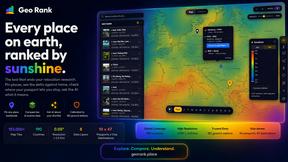
GeoRank
GeoRank helps you compare places worldwide on sunshine, cost, tax, and visa rules, then asks AI about your shortlist to simplify relocation research.