ChatGPT Image 2
Turn your ideas into stunning images and videos with ChatGPT Image 2, your all-in-one AI creative hub, now 50% off for a limited time.
Visit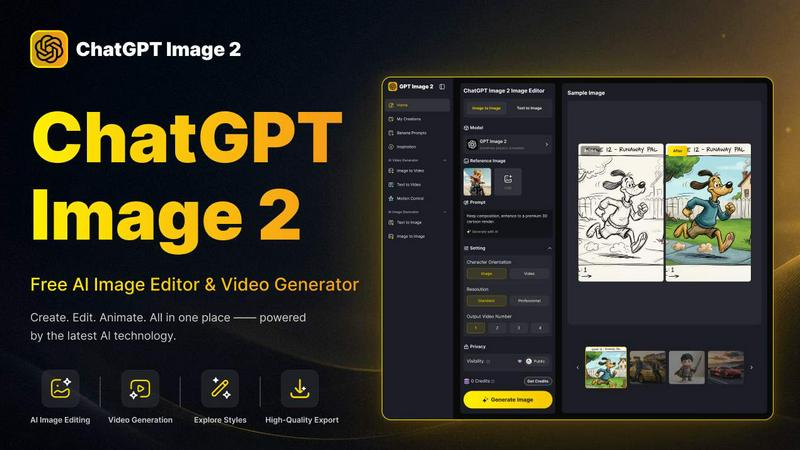
About ChatGPT Image 2
ChatGPT Image 2 is a powerful and free all-in-one workspace for AI image editing, image generation, and video creation. Designed for creators, marketers, designers, and anyone who needs high-quality visuals, this platform simplifies the entire creative process. You can generate images from text prompts, transform existing photos, edit visual details, and turn your creative ideas into polished image or video content all in one place. The tool supports a smooth creative workflow, allowing you to move from text to image, image to image, and image to video without switching between multiple tools. Whether you want to create a realistic image, explore different art styles, enhance an existing picture, or animate a visual into a short video, ChatGPT Image 2 provides an easy way to produce professional results. It is built for both quick inspiration and practical content production. The platform offers native 4K resolution for crisp commercial-grade output, near-perfect text rendering for marketing materials, and real-world knowledge for grounded, realistic visuals. You can generate artwork, social media visuals, product images, marketing assets, character concepts, posters, thumbnails, and short creative videos from text or image inputs. With features like AI virtual try-on, smart scene replacement, damaged photo restoration, and AI anime effects, this tool gives you incredible creative control. It is an independent platform that is beginner-friendly and encourages you to explore your creativity step by step. Start for free today and see how easy it is to create stunning visuals.
Features of ChatGPT Image 2
Native 4K Resolution for Commercial-Grade Output
ChatGPT Image 2 offers high native 4K resolution without relying on post-generation upscaling. This makes it ideal for advertising creatives, website banners, packaging designs, and all kinds of commercial visual assets. The production-ready output ensures final-quality visuals that meet professional standards for design teams. You can generate crisp, detailed images that look great in print and on screen.
Near-Perfect Text Rendering
This feature significantly improves text clarity, punctuation, and formatting in generated images. It is perfect for marketing posters, UI concepts, product packaging, and brand materials. Text stays neat and readable, fully integrated with the overall visual design. You no longer have to worry about garbled or distorted text ruining your creative projects. This makes ChatGPT Image 2 a reliable tool for professional communication.
Advanced AI Image Editor
The platform includes a comprehensive image editor with tools for fine-grained detailed editing. You can use Image to Image and Text to Image modes, and choose from different models like GPT image 2. The editor allows you to upload JPG, PNG, or WEBP images up to 10MB. You can adjust aspect ratios (1:1, 16:9, 9:16, 4:3, 3:4), select resolution (1K, 2K, 4K), and control the number of output images from 1 to 4. This gives you complete control over your creative output.
AI Video Generator with Motion Control
ChatGPT Image 2 includes a powerful AI video generator that supports both Image to Video and Text to Video workflows. You can turn static images into dynamic short videos and control the motion within your scenes. This feature allows you to animate your creative ideas, making them more engaging for social media, presentations, or marketing campaigns. The workflow is smooth and intuitive, perfect for beginners.
Use Cases of ChatGPT Image 2
AI Virtual Try-On for Fashion and E-commerce
You can keep the same person in an image but change their outfit to something completely different. For example, you can take a photo of a woman and change her outfit to a sexy black bodycon dress. This is perfect for fashion designers, online retailers, and stylists who want to showcase how different clothing items look on a model without needing a physical photoshoot. It saves time and money while providing realistic results.
Smart Scene Replacement for Content Creators
Replace the background of any image with a completely new setting. For instance, you can replace a riverfront with a Mediterranean seaside town. This is ideal for travel bloggers, filmmakers, and social media influencers who want to transport their subjects to different locations. The AI seamlessly blends the new background with the original subject, creating a natural and believable result. You can change the mood and setting of any photo in seconds.
AI Damaged Photo Restoration for Personal Projects
Restore old or damaged photos with ease. You can take a young girl's photo and remove any damage and degradation while preserving her facial features. This is a wonderful tool for preserving family memories, restoring historical images, or fixing old photographs that have been torn, scratched, or faded. The AI intelligently fills in missing details and repairs damage, bringing cherished memories back to life.
AI Anime Effect for Creative Art Projects
Turn any photo into a beautiful anime-style portrait. This is perfect for artists, gamers, and fans of anime who want to see themselves or their friends in a stylized, animated form. The AI applies the characteristic features of anime art, such as large eyes, soft shading, and vibrant colors, to your original image. You can use this for profile pictures, fan art, or just for fun creative exploration.
Frequently Asked Questions
Is ChatGPT Image 2 free to use?
Yes, ChatGPT Image 2 is a free AI image and video generator. You can start creating images and videos from text prompts without any upfront cost. The platform offers credits for generating content, and you can get more credits as you use the service. There is also a pricing page for users who want to access additional features or higher usage limits.
What file formats and sizes are supported for image uploads?
You can upload JPG, PNG, and WEBP images up to 10MB in size. The minimum width and height for uploaded images is 300 pixels. This ensures that the AI has enough detail to work with for editing and transformation tasks. The platform supports a wide range of common image formats, making it easy to work with your existing photos and graphics.
Can I control the resolution and aspect ratio of my generated images?
Absolutely. ChatGPT Image 2 gives you full control over the output. You can choose from aspect ratios like 1:1, 16:9, 9:16, 4:3, and 3:4. You can also select the resolution from 1K, 2K, or 4K. This flexibility allows you to create images optimized for different platforms, whether it is a square Instagram post, a widescreen YouTube thumbnail, or a high-resolution print ad.
How does the privacy and visibility setting work for my creations?
When you create an image, you can choose its privacy setting. You can set your creation to "Private" so only you can see it, or "Public" to share it with the community. There is also a "Reuse" setting that allows others to use your creation as a base for their own work, or you can set it to "Banned" to prevent any reuse. This gives you complete control over how your work is shared and used by others.
Similar to ChatGPT Image 2
Motiofy
Motiofy is an AI creative workspace that helps creators and teams turn ideas into polished visual stories.


CloutStack
Curated directory of tools for influencers engaged with the creator economy
IsThisAIImage
Free online AI image and deepfake checker. Upload a photo for AI-generated and deepfake scores, a clear verdict, and optional generator hints.
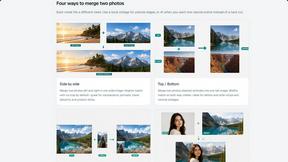
Merge Two Photos
Merge two photos free in your browser: side by side, stacked, overlay, or AI. Download a clean PNG, no watermark.