RemoveTexts vs Vailo AI
Side-by-side comparison to help you choose the right tool.

RemoveTexts
Effortlessly remove text and watermarks from images in seconds with our user-friendly AI tool, no design skills needed.
Last updated: March 11, 2026

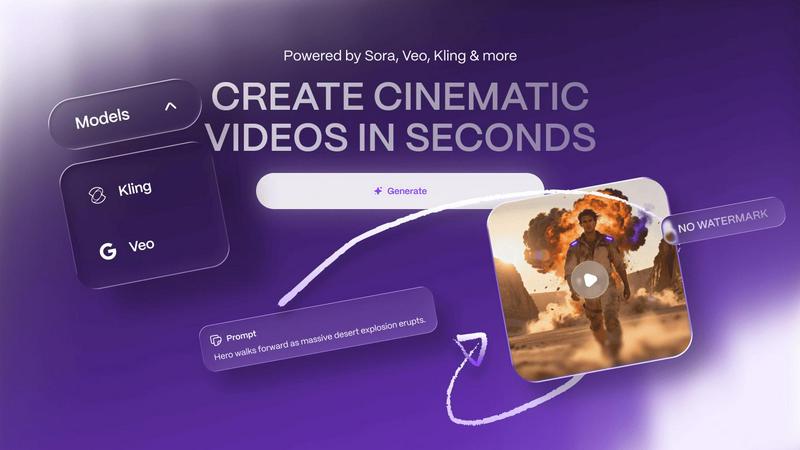
Vailo AI instantly creates beautiful, watermark-free videos and images from your simple text descriptions.
Last updated: February 28, 2026
Visual Comparison
RemoveTexts

Vailo AI
Feature Comparison
RemoveTexts
Paint to Remove
This feature allows users to brush over specific areas of text they wish to remove with precision. It provides control over the removal process, making it easy to target only the unwanted text while leaving the rest of the image intact.
Auto Remove All
Leverage the power of AI with the Auto Remove All feature that detects and removes every text element in an image automatically. This one-click solution is perfect for those who want to quickly clean up images without the need for manual adjustments.
Edit & Replace Text
With the Edit & Replace Text feature, users can not only remove unwanted text but also replace it with new text while matching the original font style. This is particularly useful for those who want to modify captions or add new information seamlessly.
Remove Objects
In addition to text removal, the Remove Objects feature allows users to erase unwanted visual elements, such as logos or people, from their images. This enhances the overall aesthetics of the photo without compromising quality.
Vailo AI
Image Studio
The Image Studio is your gateway to generating beautiful, authentic imagery in moments. No design skills are needed. Simply describe what you want to see in a text prompt, and Vailo AI will do the rest. This feature allows you to create images with natural texture and easy style, perfect for any project that requires high-quality visuals without the hassle of photoshoots or complex graphic design software.
Video Generation
Turn your ideas into motion with Vailo's powerful Video Generation tool. You can create cinematic-quality videos from a simple text description or by animating a static image. This feature is perfect for producing short films, social media clips, or product promos. It gives you access to top-tier AI models to generate professional videos in seconds, eliminating the need for filming, actors, or camera gear.
Edit Image & Video
Vailo AI isn't just for creation; it's for perfecting. The platform includes robust editing tools for both images and videos. You can refine your generated content, adjust styles, apply effects, and ensure every piece matches your vision. This all-in-one approach means you don't need to switch between different apps, keeping your entire creative workflow streamlined and efficient within Vailo's single workspace.
Motion Control & Upscaling
Add dynamic movement to your images with Motion Control, bringing still pictures to life with subtle, realistic motion. Furthermore, the Upscaling feature enhances the resolution and quality of your generated images and videos, ensuring they look sharp and professional even when enlarged. These advanced tools provide the finishing touches that elevate your content from good to studio-level great.
Use Cases
RemoveTexts
E-commerce Product Photos
Online sellers can use RemoveTexts to clean up product images by removing watermarks or distracting text, making their listings more appealing to potential buyers. This helps in creating a professional look that can increase sales.
Social Media Content
Content creators and marketers can utilize RemoveTexts to enhance their social media visuals by removing unwanted text from images, such as captions or watermarks from stock photos, ensuring their posts stand out in crowded feeds.
Legal Document Redaction
Professionals in legal fields can rely on RemoveTexts to redact sensitive information from documents by removing text while preserving the original layout and background. This ensures confidentiality while maintaining document integrity.
Personal Photo Editing
Everyday users can enhance their personal photos by removing date stamps, captions, or any unwanted text that detracts from the beauty of their images. This allows for cleaner, more visually appealing memories to share with friends and family.
Vailo AI
Social Media Marketing
Create eye-catching ads, promotional clips, and engaging posts for platforms like Instagram, TikTok, and Facebook. Vailo AI helps marketers and small business owners produce a high volume of professional-looking content quickly and affordably, keeping their social feeds fresh and engaging without a large production budget.
Product Visualization and Showcases
Designers and e-commerce brands can use Vailo to generate stunning visuals and videos of their products. Create realistic scenes, demonstrate features, or build storyboards for upcoming launches—all without the cost and time of organizing a physical photoshoot or video production.
Storyboarding for Filmmakers
Independent filmmakers and content creators can rapidly prototype scenes and visualize story ideas. By generating images and short video clips from text descriptions, Vailo serves as a powerful pre-visualization tool, helping to plan shots, convey concepts to teams, and secure funding for projects with compelling visual pitches.
Educational and Explainer Content
Teachers, trainers, and educators can create clear, engaging explainer videos and illustrative images to enhance learning materials. Transform complex concepts into easy-to-understand visual stories, making educational content more accessible and captivating for students of all ages.
Overview
About RemoveTexts
RemoveTexts is an innovative AI-powered online tool designed to effortlessly erase unwanted text and watermarks from images. It appeals to a broad audience, from marketers and designers to everyday users who need clean visuals without any hassle. With just a simple upload and a few clicks, users can achieve professional-level results in a matter of seconds. The primary value proposition of RemoveTexts lies in its ability to automate the tedious process of text removal, freeing users from the complexities of software like Photoshop. This tool utilizes advanced deep learning technology to analyze and reconstruct the surrounding image background, ensuring that the edited area appears seamless and natural. Whether you are looking to remove watermark logos, captions from screenshots, or any unwanted text, RemoveTexts delivers high-quality results without requiring any design skills. It is user-friendly, efficient, and perfect for anyone looking to enhance their images quickly and effectively.
About Vailo AI
Welcome to Vailo AI, your all-in-one creative studio powered by artificial intelligence! Imagine having a professional video and image creation suite right at your fingertips, ready to bring your ideas to life in seconds. Vailo AI is designed to transform simple text prompts or static images into stunning, cinematic-quality videos and visuals. Whether you're a complete beginner with no technical skills or a seasoned creator looking to speed up your workflow, Vailo makes it incredibly easy. The platform is built for creators, filmmakers, designers, marketers, and brands who want to produce engaging content like social media ads, product showcases, and storyboards without the need for expensive cameras, film crews, or complex editing software. The best part? You can start for free, with no watermarks on your creations, and access a powerful suite of tools that puts multiple premium AI models into one simple, intuitive platform. Vailo combines everything into one: one account, one workflow, and one subscription, making professional-grade content creation accessible to everyone.
Frequently Asked Questions
RemoveTexts FAQ
Is RemoveTexts free to use?
Yes, RemoveTexts is a free online tool that allows users to remove text from images without any costs involved. Simply upload your image and start editing.
What image formats are supported?
RemoveTexts supports JPG, PNG, and WebP image formats, allowing for a wide range of uploads. Ensure your image size is within the 10MB limit for optimal performance.
How quickly can I expect results?
RemoveTexts is designed for speed, with an average processing time of less than 30 seconds. Most users can expect their edited images ready to download almost instantly.
Can RemoveTexts handle complex backgrounds?
Absolutely! The AI technology used by RemoveTexts is adept at handling complex backgrounds, ensuring that text removal is seamless and the result looks as natural as possible. Your image quality remains intact with no visible artifacts.
Vailo AI FAQ
Is there a free plan to try Vailo AI?
Yes! Vailo AI offers a generous Free Plan to get you started. It includes 40 credits, plus 200 bonus credits upon signing up. You can use these to generate images and videos with all the premium models available on the platform. Best of all, your creations come with no watermark, so you can freely use what you make.
What can I create with the credits?
Credits are used to generate content. For example, on premium models, 400 credits can give you approximately 6 short videos (5 seconds each) or over 50+ images. The exact number varies based on the model and output length, but Vailo provides clear estimates so you can plan your projects effectively.
Who is the Creator Plan best suited for?
The Creator Plan, at $20 per month for 2500 credits, is ideal for active creators, social media managers, and small businesses with consistent content needs. It's perfect if you have some AI experience and a high demand for generations, offering up to 200 videos and 1000+ images monthly to fuel your creative pipeline.
Do I need any technical or design skills to use Vailo?
Not at all! Vailo AI is built to be beginner-friendly. The core process involves typing a text description of what you want to create. The platform's intuitive interface and ready-made templates guide you through each step, making it easy for anyone to generate professional imagery and videos without prior technical knowledge.
Alternatives
RemoveTexts Alternatives
RemoveTexts is an innovative AI-powered tool designed to effortlessly remove text from images in mere seconds, eliminating the need for complex software like Photoshop. It falls under the category of image editing solutions, specifically focused on text removal. Many users seek alternatives to RemoveTexts for various reasons, such as pricing, specific feature requirements, or compatibility with different platforms. When looking for an alternative, it’s essential to consider factors such as ease of use, the effectiveness of text removal, supported languages, and the overall quality of the output. Finding the right image editing tool that meets your needs can significantly enhance your workflow. It's important to evaluate how user-friendly the platform is, the speed at which it operates, and the range of features it offers. Additionally, checking for customer reviews and testimonials can provide valuable insights into the tool's reliability and performance. A good alternative should not only match your requirements but also provide an enjoyable editing experience.
Vailo AI Alternatives
Vailo AI is a powerful all-in-one creative studio that uses artificial intelligence to generate videos and images. It falls into the categories of generative art and AI assistants, making it easy for anyone to create professional-looking content from simple text or image prompts. People often explore alternatives to find a tool that better fits their specific needs. This could be due to budget constraints, a desire for different features, the need for a platform that works on a specific device, or simply wanting to compare options before committing. When looking for a different tool, consider what matters most for your projects. Key factors include the quality and style of the output, the types of AI models available, ease of use, pricing plans, and whether the platform offers the specific features you need, like text-to-video or image animation.