Orphiq vs The Ultimate Piano
Side-by-side comparison to help you choose the right tool.

Orphiq
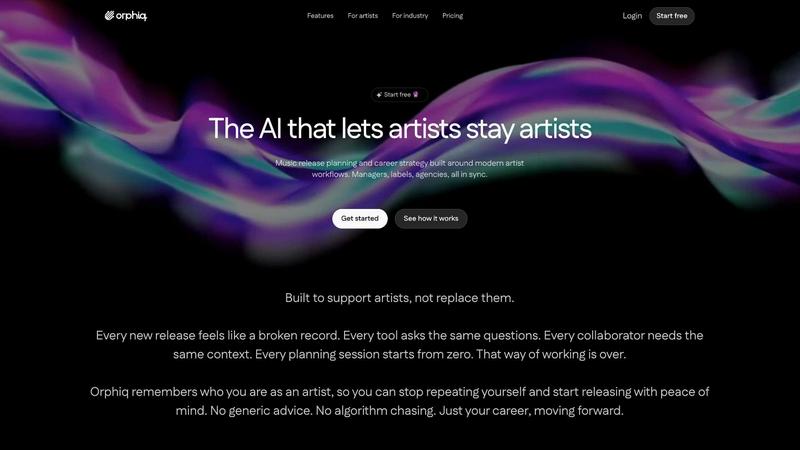
Orphiq is an AI workspace that simplifies music release planning and content creation for artists and their teams.
Last updated: February 26, 2026

The Ultimate Piano
Learn piano online with interactive tools, real-time feedback, and support for your MIDI keyboard.
Last updated: March 4, 2026
Visual Comparison
Orphiq
The Ultimate Piano

Feature Comparison
Orphiq
Persistent Creative Profile
Orphiq creates a lasting creative profile for each artist, allowing for seamless collaboration among team members. This profile stores essential details about the artist's music, brand, and goals, so artists no longer need to repeat themselves in every discussion.
AI-Powered Content Suggestions
The AI assistant, Apollo, offers personalized content suggestions based on the artist's style and brand. This ensures that promotional materials, social media posts, and other content resonate with the artist's audience, making it easier to maintain a consistent presence.
Comprehensive Release Planning
Orphiq provides a complete timeline for every release, encompassing all tasks from announcement to launch. Artists can set deadlines, involve their team, and keep everything organized in one central location, reducing stress and enhancing productivity.
Career Guidance AI
Apollo offers actionable recommendations tailored to the artist's goals and audience. This feature helps artists understand their next steps, whether they are seeking to grow their fanbase or navigate the complexities of the music industry.
The Ultimate Piano
Play Piano Online Instantly
Jump right into playing without any downloads or installations. Simply open your web browser and start making music. You can use your mouse to click keys, your computer keyboard as a piano, or connect a real MIDI keyboard for a more traditional playing experience. The tool features high-quality, realistic piano samples that make every note sound beautiful and authentic, encouraging you to play and explore.
MIDI Player with Falling Notes Visualization
Learn songs faster by watching them come to life. Upload any MIDI file, and you'll see the notes light up on the keyboard as they play, just like in popular learning apps. You have full control: slow down the tempo to a comfortable speed, loop tricky sections to practice them repeatedly, or even step through the song note-by-note to master every detail without feeling rushed.
Real-Time Chord Detection & Explorer
Unlock the secrets of harmony as you play. This smart feature listens to your playing and instantly displays the name of the chord you are creating on the screen. It’s a fantastic, hands-on way to learn how chords are built and how they relate to each other. The accompanying Chord Explorer lets you dive deeper into music theory, showing you the notes that make up any chord you select.
Integrated Audio & YouTube Player
Practice along with your favorite music seamlessly. You can upload your own MP3 files or paste a YouTube video link directly into the tool. Slow down the playback speed without changing the pitch to learn complex solos note-for-note. Use the A-B loop function to isolate and repeat a challenging four-bar phrase over and over until you nail it, turning any song into an interactive lesson.
Use Cases
Orphiq
Independent Artists Launching Their First Single
For independent musicians, Orphiq is a game-changer. It provides a structured approach to planning their first release, helping them manage tasks, create promotional content, and establish a brand identity without feeling overwhelmed.
Established Artists Planning a Global Rollout
Major label artists can utilize Orphiq to coordinate complex, multi-faceted releases across different markets. The platform streamlines communication among team members and ensures that everyone is aligned on strategy and execution.
Managers Seeking to Optimize Artist Strategies
Managers can leverage Orphiq to enhance their workflow with artists. By using Apollo's insights, they can make informed decisions about marketing strategies, engagement tactics, and future career moves, ultimately boosting the artist's success.
Labels and Agencies Managing Multiple Artists
For labels and agencies, Orphiq offers a centralized platform to manage multiple artists simultaneously. They can oversee release timelines, analyze performance data, and implement consistent strategies that align with each artist's unique brand.
The Ultimate Piano
The Complete Beginner's Starting Point
If you've never touched a piano before, this is your ideal launchpad. Start by learning the names of the notes with the helpful key labels. Use the "Kids Mode" with fun animal icons to make it engaging, or follow along with simple YouTube tutorials using the built-in player. The instant feedback from the tool helps you build confidence from your very first note.
The Song Learner's Practice Partner
Do you want to learn a specific song? Load the MIDI file or a YouTube tutorial of the piece. Use the falling notes to see exactly which keys to press and slow down difficult sections. Record yourself playing along with the MIDI recorder, then listen back to track your progress and identify areas that need a little more work.
The Music Theory Student's Visual Aid
Struggling to understand scales or chord progressions? Select a scale like the "Blues Scale in Ab" and see it highlighted across the keyboard while hearing it played. Use the Scale Trainer to get feedback on your accuracy and timing. Play random chords and use the real-time chord detection to learn their names, solidifying the connection between sound and theory.
The Busy Musician's On-the-Go Studio
Life is busy, but your practice doesn't have to stop. Since it works on tablets and smartphones, you can practice during your lunch break or while traveling. Connect a portable MIDI keyboard, use the metronome to work on your timing, or do some quick ear training exercises—all without needing your main computer or dedicated software.
Overview
About Orphiq
Orphiq is an innovative AI workspace designed specifically for music artists and their teams, including managers, labels, and agencies. The platform integrates essential functions such as release planning, content creation, and career guidance into a single, user-friendly experience. One of Orphiq's standout features is its ability to learn about the artist over time, creating a personalized creative profile that can be referenced by both team members and AI. This eliminates the need for artists to repeatedly provide context to collaborators for each new release. Whether you are an independent musician launching your first single or a major label artist coordinating a global rollout, Orphiq provides the tools necessary for efficient and effective project management. With features that enable near-instant professional rollouts, tailored content suggestions, and strategic career advice, Orphiq empowers artists to focus on what they love: making music.
About The Ultimate Piano
The Ultimate Piano is your all-in-one, browser-based piano studio, designed to make learning and practicing piano simple, effective, and fun. It's the perfect tool for anyone with a passion for music, from complete beginners taking their first steps to experienced players looking to sharpen their skills. Forget about complicated software installations—everything runs directly in your web browser. You can start playing instantly using your computer keyboard, mouse, or by connecting a real MIDI keyboard for an authentic feel. The platform combines beautiful, realistic piano sounds with powerful learning tools to help you visualize and understand music. Whether you want to learn chords, master scales, play along with your favorite songs, or even record your own performances, The Ultimate Piano provides a supportive and interactive environment. It’s like having a patient teacher, a full music theory book, and a personal practice room available anytime, anywhere, on any device.
Frequently Asked Questions
Orphiq FAQ
What does Orphiq do?
Orphiq is an AI workspace designed for music artists and their teams, offering tools for release planning, content creation, and career guidance. It learns about the artist over time, streamlining collaboration and enhancing the creative process.
Can Orphiq build a release plan for my next single?
Yes, Orphiq can create a comprehensive release plan tailored to your specific needs. It organizes all tasks and deadlines in one timeline, making it easy for you and your team to stay on track for a successful launch.
Does Orphiq help with social media and content planning?
Absolutely! Orphiq provides AI-generated content suggestions that are aligned with your music and brand, helping you plan social media posts and promotional materials in advance for a more consistent online presence.
Can managers, labels, and agencies use Orphiq?
Yes, Orphiq is designed for use by artists, managers, labels, and agencies alike. Its collaborative features ensure that everyone involved in an artist's career can benefit from the platform's insights and tools, leading to a more coordinated effort in achieving success.
The Ultimate Piano FAQ
Do I need to install anything to use Ultimate Piano?
No, you do not need to install any software! The Ultimate Piano is entirely browser-based. This means you can access it directly from your web browser (like Chrome, Safari, or Firefox) on your computer, tablet, or smartphone. Just visit the website, and you can start playing and practicing immediately.
Can I connect my MIDI keyboard?
Absolutely! Connecting a MIDI keyboard is highly recommended for the best experience. Simply plug your keyboard into your computer (usually via USB), and the Ultimate Piano will automatically detect it. You can then play with a realistic, weighted key feel. The tool also supports connecting a sustain pedal for more expressive playing.
What chords and scales can I learn?
The Ultimate Piano includes a comprehensive library for learning. You can explore and practice 14 different scale types, from major and minor to more advanced modes like Dorian and Mixolydian. The chord explorer covers a vast range, from basic triads (like C Major) to complex seventh and extended chords (like Gmaj7), giving you a deep understanding of harmony.
Can I practice along with my own songs?
Yes, you can! The built-in Audio Player allows you to upload your own MP3, WAV, or other audio files to play along with. Even better, the YouTube Player lets you paste a link to any YouTube video—like a song, tutorial, or performance—and practice directly alongside it. You can slow it down, set loops, and save markers for easy practice.
Alternatives
Orphiq Alternatives
Orphiq is an innovative AI workspace tailored for music artists and their teams, including managers, labels, and agencies. This platform integrates release planning, content creation, and career guidance into a cohesive system that evolves with the artist's journey. By streamlining communication and centralizing resources, Orphiq enhances collaboration and ensures that every team member has access to vital information. Users often seek alternatives to Orphiq for various reasons, such as pricing, specific features, or unique platform requirements. When exploring options, it’s important to consider factors like ease of use, the ability to provide personalized recommendations, and how well the platform supports your creative process. Look for alternatives that can effectively meet your needs as an artist or a team while offering the flexibility to adapt to your evolving career.
The Ultimate Piano Alternatives
The Ultimate Piano is a fantastic browser-based tool in the music education category. It lets you practice piano directly online with realistic sounds, interactive lessons, and MIDI support, making it a great choice for learners. People often look for alternatives for different reasons. Maybe they need an app for their phone or tablet, want a different set of learning features, or are exploring other pricing options. It's completely normal to shop around to find the perfect fit for your personal practice style and goals. When choosing an alternative, think about what matters most to you. Consider if you need mobile access, specific training tools like song libraries or rhythm exercises, and whether a one-time purchase or a subscription model works better for your budget. The best tool is the one you'll enjoy using regularly.