
Admanage AI vs The SaaS Ads Studio
Side-by-side comparison to help you choose the right tool.

AdManage AI empowers you to launch ads across multiple platforms 10 times faster, streamlining your advertising process.
Last updated: February 26, 2026

Effortlessly create and optimize profitable Google and Facebook Ads for your SaaS with our step-by-step system.
Last updated: February 28, 2026
Visual Comparison
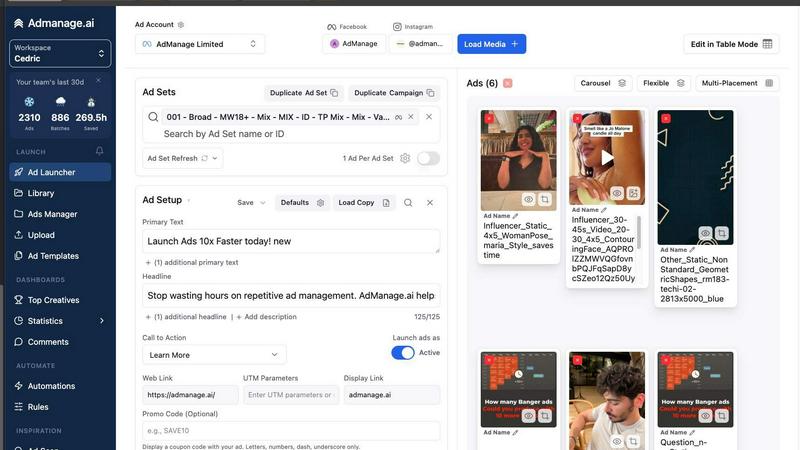
Admanage AI
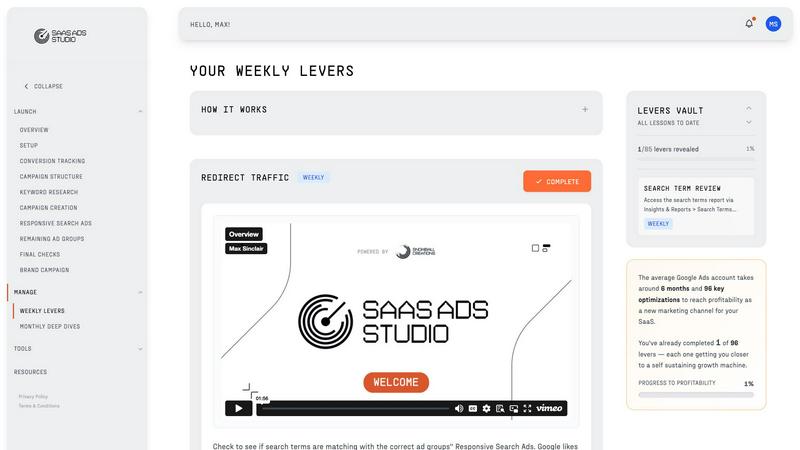
The SaaS Ads Studio
Feature Comparison
Admanage AI
Fast Ad Launching
Admanage AI enables users to launch ads up to 10 times faster than traditional methods. With its user-friendly interface, marketers can create and deploy campaigns in seconds, significantly increasing their productivity.
One-Click Templates
The platform provides one-click ad templates derived from top-performing ads. This feature allows marketers to standardize their ad execution, ensuring consistency and quality across various campaigns without the need for tedious manual input.
Automated Multi-Format Grouping
Admanage AI automatically groups ads into different formats, such as 9:16, 4:5, and 1:1. This automation saves time and reduces errors during the ad creation process, enabling marketers to focus on strategy and creative ideation.
Google Sheets Plugin
The free Google Sheets plugin allows for bulk ad launches directly from a spreadsheet, making it easy to manage multiple ad variations. This integration enhances the workflow and simplifies the ad management process for teams.
The SaaS Ads Studio
Guided Google + Facebook Ads Builder
This feature provides a step-by-step system that allows users to build profitable ad campaigns for both Google and Facebook. It simplifies the process, enabling users to set up conversion-tracked accounts without prior expertise.
Brand DNA Analysis
The platform automatically analyzes your website and messaging to create a unique Brand Profile. This profile powers various tools within the Studio, ensuring that all campaigns are tailored to reflect your brand's identity and target audience effectively.
Weekly Optimisation Tasks
Every week, users receive a simple to-do list of proven optimisation tasks for both Google and Facebook ads. This feature removes guesswork, allowing users to focus on executing clear actions that drive results.
AI-Powered Keyword Generation
Using a combination of your Brand DNA and extensive ad spend data, the Studio generates high-intent keyword clusters. This feature ensures that your campaigns target buyers specifically, minimizing waste and maximizing efficiency.
Use Cases
Admanage AI
Bulk Ad Launching
Performance marketers can utilize Admanage AI to launch hundreds of ads at once for new product collections or campaigns. This capability is particularly beneficial during high-demand seasons, allowing teams to respond quickly to market needs.
Creative Testing
Admanage AI is perfect for teams engaged in high-velocity creative testing. Marketers can easily experiment with different ad variations and formats, gathering performance data rapidly to refine their strategies.
Streamlined Campaign Management
With features like automated grouping and one-click templates, Admanage AI streamlines the management of complex campaigns. Marketers can maintain consistency and organization across multiple ad sets with minimal effort.
Enhanced Team Collaboration
Admanage AI's cloud integrations with tools like Drive and Dropbox facilitate collaboration among team members. This feature ensures that creative assets are easily accessible and that everyone is on the same page, improving overall workflow efficiency.
The SaaS Ads Studio
Launching Your First Ad Campaign
New users can easily launch their first Google or Facebook ad campaign in a weekend. The guided builder walks them through each step, making it accessible even for those with no prior experience in digital advertising.
Continuous Campaign Management
Once campaigns are launched, users can manage and optimise their ads weekly with actionable tasks. This allows for ongoing refinement and improvement of ad performance, leading to better results over time.
Data-Driven Decision Making
With the ability to upload real search term reports, users can gain structured insights from their data. This feature helps identify wasteful spending and expansion opportunities, enabling informed decisions that enhance ad effectiveness.
Tailored Audience Targeting
The platform supports users in creating data-driven prospecting and remarketing audiences on Facebook. This targeted approach ensures that ads reach the right people, increasing the chances of conversion and engagement.
Overview
About Admanage AI
Admanage AI is an innovative advertising management platform designed specifically for performance marketers who require a fast and efficient way to test creatives at scale. Traditional native Ads Managers can be slow and cumbersome, making it challenging to launch multiple ads simultaneously. With Admanage AI, marketers can streamline their ad workflow, launching hundreds of ads in just seconds. The platform supports high-velocity creative testing, allowing teams to operate at a pace that matches their strategic needs. It integrates smoothly with tools like Google Sheets, Drive, and Dropbox, ensuring a seamless experience. Designed for marketers at companies like Bolt, Naked Wines, and Reading.com, Admanage AI empowers users to maximize their advertising efforts while minimizing errors and manual work, ultimately allowing more time for strategic planning and creative development.
About The SaaS Ads Studio
The SaaS Ads Studio is a comprehensive platform designed to help B2B SaaS businesses launch and manage successful Google and Facebook Ads campaigns without the need for expensive agencies. Tailored for founders, solopreneurs, and small marketing teams, this all-in-one guided system simplifies the complexities of paid advertising, allowing users to avoid wasting budgets on inefficient campaigns. The core value proposition lies in providing professional-grade tools and expertise in a self-serve format that is both affordable and accessible. The platform guides users through a two-phase process: first, the "Launch" phase, where users can set up conversion-tracked accounts in just a weekend; followed by the "Manage" phase, which offers actionable weekly tasks to continuously improve ad performance. With proven systems that have successfully managed millions in ad spend, The SaaS Ads Studio empowers users to create a profitable advertising engine at their own pace.
Frequently Asked Questions
Admanage AI FAQ
How does Admanage AI improve ad launching speed?
Admanage AI leverages a fast user interface and automated features like one-click templates and bulk launching capabilities to significantly reduce the time needed to launch ads, allowing users to focus on strategy rather than execution.
Can I integrate Admanage AI with other tools?
Yes, Admanage AI seamlessly integrates with popular cloud storage services such as Google Drive, Dropbox, and Box. This makes it easy to upload and manage media assets directly within the platform.
Is Admanage AI suitable for beginners?
Absolutely! Admanage AI is designed with user-friendliness in mind, providing intuitive features that make it accessible to marketers at all levels, including those who are just starting in digital advertising.
What types of businesses can benefit from Admanage AI?
Admanage AI is ideal for performance marketing teams across various industries, including e-commerce, SaaS, and digital media. Companies looking to scale their ad operations and improve workflow efficiency will find great value in this platform.
The SaaS Ads Studio FAQ
How quickly can I launch my first campaign with The SaaS Ads Studio?
You can launch your first campaign in just a weekend. The platform offers a guided process that simplifies every step, making it user-friendly for beginners.
Do I need prior experience in advertising to use this platform?
No, The SaaS Ads Studio is designed for users of all experience levels. Its guided systems and clear instructions make it easy for anyone to set up and manage ad campaigns effectively.
What types of ads can I create with The SaaS Ads Studio?
You can create both Google Search ads and Facebook/Instagram ads. The platform provides tailored guidance for each ad type, ensuring that your campaigns are well-structured and targeted.
Is there support available if I have questions while using the platform?
Yes, The SaaS Ads Studio is designed to be user-friendly, and there are resources available to help you navigate any questions or challenges you might face while using the platform.
Alternatives
Admanage AI Alternatives
Admanage AI is a powerful advertising management tool designed to help marketers launch ads quickly and efficiently across multiple platforms, including Meta, TikTok, Pinterest, Google, YouTube, and Snapchat. As a part of the marketing category, it serves performance marketers who require a streamlined workflow for high-velocity creative testing. Users often seek alternatives to Admanage AI due to various reasons such as pricing structures, specific feature sets, and compatibility with their existing platforms. When searching for an alternative, it's essential to consider factors like ease of use, integration capabilities, and the ability to scale ad campaigns effectively while minimizing errors.
The SaaS Ads Studio Alternatives
The SaaS Ads Studio is a comprehensive platform designed specifically for B2B SaaS businesses, providing a step-by-step system for launching and managing profitable Google Ads campaigns. It caters to founders, solopreneurs, and small marketing teams who want to optimize their ad spend without the complexities often associated with digital advertising. Users often seek alternatives due to various reasons, including pricing, specific feature sets, or the need for different platform capabilities that better align with their business objectives. When considering alternatives, look for platforms that offer user-friendly interfaces, guided processes, and actionable insights. It's also important to evaluate the level of support provided, the flexibility of the tool to cater to different marketing strategies, and whether it can help you effectively track and optimize your ad performance as your business grows.