
Doodle Duel vs SVG to 3D
Side-by-side comparison to help you choose the right tool.

Doodle Duel
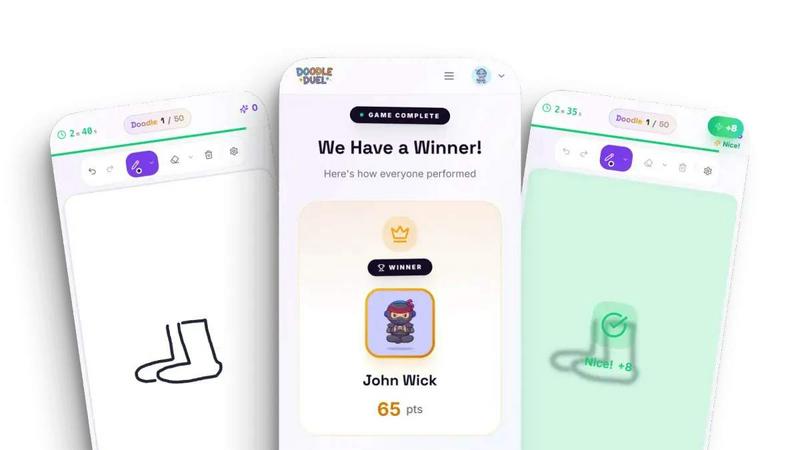
Compete in real-time drawing duels with friends as AI judges your creativity in this fun and free multiplayer game.
Last updated: February 28, 2026
SVG to 3D
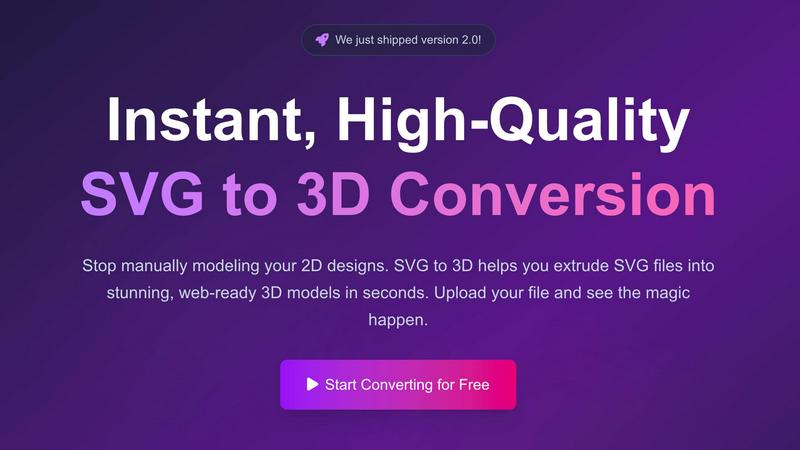
Easily transform your SVG designs into stunning 3D models in seconds with our fast, professional conversion tool.
Last updated: February 26, 2026
Visual Comparison
Doodle Duel
SVG to 3D
Feature Comparison
Doodle Duel
Easy Setup
Doodle Duel allows you to start playing in under a minute. With no account creation or downloads required, players can simply create a room and invite friends using a shared code. This seamless setup means you can jump straight into the action without any hassle.
Real-Time Drawing
The game features real-time drawing where everyone receives the same prompt and has only 60 seconds to sketch their interpretation. This fast-paced gameplay keeps the energy high and encourages friendly competition among players as they race against the clock.
AI Judging
Our advanced AI judges each drawing based on accuracy, creativity, and style. This ensures that every doodle is evaluated fairly and objectively, eliminating any bias from popularity contests. Players can trust that their efforts will be recognized based on merit.
Multiple Game Modes
Doodle Duel offers versatile gameplay options, allowing players to choose between conquering the solo arcade mode or engaging in multiplayer duels. This flexibility ensures that whether you want to practice alone or challenge friends, there is something for everyone.
SVG to 3D
One-Click to GLB for the Web
This feature allows users to export their 3D models as lightweight GLB files with just one click. These files are optimized for web development, making them ideal for integration into Three.js or React Three Fiber projects. This streamlines the process of adding 3D elements to websites, enhancing user engagement and aesthetic appeal.
3D-Print Ready
SVG to 3D supports clean STL exports, which are essential for 3D printing. Users can easily prepare their designs for fabrication without needing to deal with complex CAD software. This feature ensures that logos, artwork, and custom parts can be 3D printed effectively and accurately.
Fine-Tune Every Detail
With advanced controls, users can go beyond simple extrusion to adjust various attributes of their 3D models. This includes modifying thickness, adding intricate bevels, and applying realistic PBR materials. The real-time preview feature allows users to see changes instantly, ensuring that every detail meets their specifications.
Advanced Material System
The platform offers an advanced material system that enables users to apply realistic PBR materials, custom textures, and professional lighting effects to their 3D models. This capability elevates the quality and visual appeal of the models, setting them apart from those created by basic conversion tools.
Use Cases
Doodle Duel
Family Gatherings
Doodle Duel is perfect for family gatherings where everyone can participate, regardless of age or artistic ability. It fosters creativity and camaraderie, making family time more enjoyable and interactive.
Parties and Social Events
For parties and social events, Doodle Duel adds an element of fun and competition. Friends can gather around to challenge each other in drawing duels, leading to laughter and memorable moments that everyone will cherish.
Team Building
Doodle Duel can be a unique team-building activity for workplaces. Colleagues can engage in friendly drawing competitions that promote teamwork, creativity, and communication in a relaxed environment.
Educational Tool
Teachers can use Doodle Duel as an educational tool to encourage creativity in the classroom. It allows students to express their ideas visually while also learning how to work under pressure and think on their feet.
SVG to 3D
Create Interactive 3D Logos and Icons for Web
Web developers can leverage SVG to 3D to convert simple SVG icons into engaging 3D models that enhance the user experience on websites. These models can be integrated seamlessly into interactive projects, making them visually striking and dynamic.
From Digital Design to Physical Object
Designers can transform their 2D artwork into 3D printed objects using the STL export feature. Whether it’s logos, custom parts, or artistic creations, users can bring their designs to life and fabricate them without the need for complicated software.
Enhance Your UI/UX Designs
UI/UX designers can utilize SVG to 3D to add depth and realism to their mockups. By converting simple SVG elements into 3D models, they can impress clients and stakeholders with interactive presentations that showcase their designs in a more engaging manner.
Rapid Prototyping for 3D Projects
For creators looking to prototype quickly, SVG to 3D offers a fast solution to convert 2D designs into 3D models ready for testing and iteration. This enables teams to refine their concepts rapidly and efficiently, accelerating the design process.
Overview
About Doodle Duel
Doodle Duel is a fun and innovative real-time drawing game that combines creativity, competition, and laughter. It is designed for anyone who enjoys sketching, regardless of their artistic skills. Whether you're an experienced artist or a doodle novice, Doodle Duel invites you and up to 29 friends to engage in entertaining drawing battles without the need for accounts or downloads. The game kicks off with a prompt, and players must race against the clock to create their best interpretation within a limited timeframe. The unique twist is that an AI judge, powered by advanced technologies like Google Gemini or OpenAI, evaluates each submission, offering humorous yet fair feedback. This exciting blend of speed and creativity makes Doodle Duel the ideal choice for parties, family gatherings, or casual hangouts. With flexible gameplay modes, including solo arcade journeys and chaotic multiplayer duels, there's plenty of fun to be had for everyone involved.
About SVG to 3D
SVG to 3D is an innovative online tool designed to transform 2D SVG vector graphics into stunning 3D models effortlessly. This user-friendly platform eliminates the need for cumbersome software like Blender or C4D, allowing designers, developers, and 3D printing enthusiasts to convert their SVG files to high-quality 3D representations in seconds. The core value proposition lies in its simplicity and efficiency, enabling users to focus on creativity rather than complex modeling processes. With features tailored for professionals, SVG to 3D not only supports quick conversions but also offers advanced customization options for refining models. Whether you are looking to enhance your web projects with interactive 3D elements, create captivating 3D logos, or prepare designs for 3D printing, SVG to 3D makes the entire workflow fast and intuitive, empowering users to bring their visions to life.
Frequently Asked Questions
Doodle Duel FAQ
Do I need to download the app to play Doodle Duel?
No, Doodle Duel is a browser-based game and does not require any downloads. You can start playing instantly by creating a room and sharing the code with friends.
How many players can participate in a game?
You can invite up to 29 friends to join you in a drawing duel, making it a great option for large gatherings. The game allows real-time competition with multiple players.
How does the AI judging work?
The AI evaluates each drawing based on three criteria: accuracy, creativity, and style. Players receive scores that reflect these aspects, ensuring fair and objective results for each round.
Can I play Doodle Duel alone?
Yes, Doodle Duel offers a solo arcade mode where you can conquer 50 levels of increasing difficulty. This mode allows you to practice your drawing skills and improve your scores on the global leaderboards.
SVG to 3D FAQ
How do I get started with SVG to 3D?
To get started, simply upload your SVG file by dragging and dropping it into the tool or selecting it from your device. Once uploaded, you can adjust settings and preview your 3D model before exporting it.
What file formats can I export my 3D model in?
You can export your 3D models in multiple formats including GLB, GLTF, OBJ, and STL. This flexibility allows you to use the models in various applications, whether for web development or 3D printing.
Is there a limit on the file size I can upload?
Yes, the maximum file size for uploads is 5 MB. This ensures that the conversion process remains fast and efficient while accommodating most SVG files.
Is my data secure when using SVG to 3D?
Absolutely! Your files are processed locally in your browser whenever possible, ensuring that your designs remain private and secure. There are no uploads to external servers, keeping your data safe.
Alternatives
Doodle Duel Alternatives
Doodle Duel is an exciting multiplayer drawing game that invites players to compete in real-time sketching battles. With the help of an AI judge, participants can showcase their creativity as they interpret various prompts, making it a fun option for anyone who loves to doodle, whether they are seasoned artists or beginners. This game falls under the category of AI-assisted entertainment, combining creativity with competition in a dynamic format. Users often seek alternatives to Doodle Duel for a variety of reasons, such as pricing, unique features, or compatibility with different platforms. It's important to consider what aspects are most important to you when exploring options, whether it's the quality of graphics, the number of players allowed, or the ease of access without downloads. When choosing an alternative, look for games that offer similar interactive experiences, engaging prompts, and user-friendly interfaces to ensure a fun time with friends and family.
SVG to 3D Alternatives
SVG to 3D is an innovative tool designed to transform your 2D SVG vector graphics into high-quality 3D models. It falls under the category of AI Assistants, making the design process more accessible for users ranging from web developers to 3D printing enthusiasts. While SVG to 3D offers a streamlined solution for converting designs, users often seek alternatives for various reasons, such as pricing, feature sets, or specific platform compatibility. When choosing an alternative, consider factors like ease of use, output quality, and whether the tool integrates well with your existing software or workflow. It's essential to look for options that provide similar functionality, such as one-click exports for web development or support for 3D printing formats, while also accommodating your unique project needs.