
Renderly vs Sovideo
Side-by-side comparison to help you choose the right tool.

Renderly
Renderly automates video production, enabling you to generate thousands of personalized videos quickly and.
Last updated: February 26, 2026

Create professional AI images and videos in one place using top models like Sora 2 and Veo 3.
Last updated: February 28, 2026
Visual Comparison
Renderly

Sovideo
Feature Comparison
Renderly
API-First Video Generation
Renderly boasts a RESTful API designed for high-volume video generation. This feature enables seamless integration with existing workflows and allows developers to create dynamic video content programmatically. With comprehensive documentation and support for webhooks and SDKs, getting started with Renderly is straightforward and intuitive.
Template Management
The template management system in Renderly allows users to create and manage a centralized library of video templates. Each template can be configured using JSON, enabling variable replacements for dynamic content. This flexibility ensures that users can easily customize their video outputs to meet various requirements, making video production faster and more efficient.
Scalable Infrastructure
Renderly operates on a cloud-native infrastructure that automatically scales to accommodate varying workloads. Whether you need to render a single video or thousands simultaneously, Renderly’s auto-scaling capabilities ensure consistent performance without compromising on quality. This is particularly beneficial for enterprises with fluctuating video production needs.
Credit-Based Billing
With Renderly, you only pay for what you render. Its transparent credit-based pricing model allows users to manage their video production costs effectively. Additionally, volume discounts are available for enterprises, making Renderly one of the most cost-effective solutions on the market, with potential savings of up to 90% compared to competitors.
Sovideo
All-in-One AI Studio
Sovideo combines both AI image and AI video generation in one platform. You never have to switch between different apps or websites. Whether you need a background image for a social post or a full marketing video, you can create it all here using the industry's top models like Sora 2, Veo 3, Seedream 4.5, and Nano Banana Pro, streamlining your entire creative workflow from start to finish.
Top-Tier AI Models
Access the most advanced AI models on the market directly within Sovideo. For video, choose between OpenAI's Sora 2 or Google's Veo 3. For images, leverage powerful generators like Seedream 4.5. This gives you the flexibility to select the best tool for your specific project, ensuring you get the highest quality output possible without needing technical expertise about the underlying technology.
Simple Prompt-Based Creation
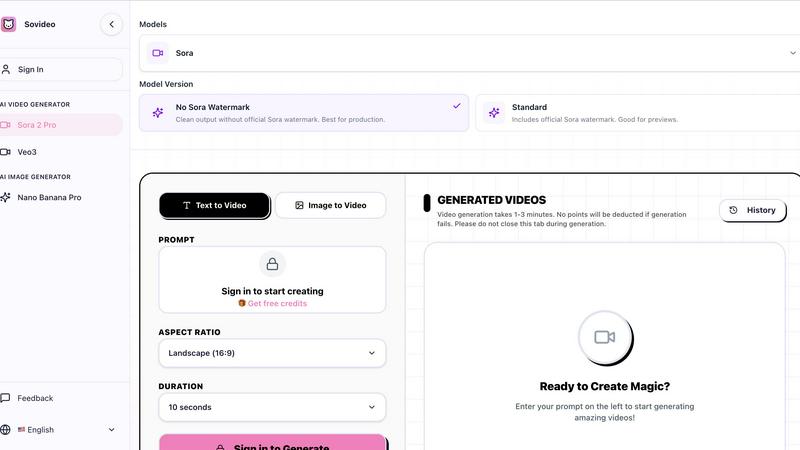
Creating is as easy as typing what you imagine. Just enter a text prompt describing your scene, character, or action, and Sovideo's AI handles the complex rendering. The platform offers helpful controls like aspect ratio selection (e.g., Landscape 16:9) and video duration settings (like 10 or 15 seconds), giving you guidance to shape your creation without overwhelming you with complicated settings.
Web-Based & Accessible
Sovideo is entirely cloud-based and runs in your web browser. There is no software to download, install, or update. This means you can access your creative studio from any device with an internet connection. Start a project on your office computer and continue editing it on your home laptop or tablet, with all your work and history saved securely in your account.
Use Cases
Renderly
Personalized Marketing Campaigns
Renderly is an excellent tool for creating personalized marketing videos. Businesses can use the platform to generate tailored video messages for individual customers, enhancing engagement and conversion rates. This level of personalization helps brands stand out in a crowded marketplace.
Bulk Social Media Content Creation
For social media managers, Renderly simplifies the process of creating bulk content. Users can generate a large number of videos in one go, ensuring consistent branding and messaging across platforms. This feature saves time and effort, allowing teams to focus on strategy and engagement.
Data-Driven Motion Graphics
Renderly supports the creation of data-driven motion graphics, making it a valuable tool for businesses that rely on real-time data visualization. Users can automate the generation of informative videos that present data dynamically, aiding in better decision-making and communication.
Event Highlights and Recaps
Event organizers can use Renderly to quickly produce highlight videos and recaps. By leveraging templates and automated rendering, teams can create engaging summaries of events, making it easier to share key moments with attendees and on social media platforms.
Sovideo
Social Media Content Creation
Quickly generate eye-catching videos and images for platforms like TikTok, Instagram, and YouTube. Create trending ASMR clips, engaging shorts, or stunning visual posts to grow your audience and increase engagement, all without needing a camera, filming equipment, or advanced editing skills.
Marketing & Advertising
Produce professional marketing videos, product demonstrations, and promotional assets for your business or clients. Sovideo enables small teams and entrepreneurs to create high-quality ad content quickly and cost-effectively, helping to tell compelling brand stories and drive campaigns.
Concept Art & Illustration
Bring your creative ideas to life as visual concepts. Writers, game developers, and designers can use Sovideo to generate unique characters, scenes, and illustrative assets from textual descriptions, helping to visualize stories, pitch ideas, and inspire further development.
Educational & Explainer Content
Create clear and engaging explainer videos or educational content. Teachers, coaches, and content creators can transform complex topics into easy-to-understand visual narratives using AI-generated scenes and sequences, making learning more interactive and accessible.
Overview
About Renderly
Renderly is an innovative video infrastructure platform designed to revolutionize video production for developers and creators alike. It provides a powerful API that enables users to automate video creation at scale, eliminating the need for tedious manual rendering. Whether you are looking to produce personalized videos, generate bulk content for social media, or create data-driven motion graphics, Renderly has you covered. The platform employs a template-driven approach, allowing users to transform JSON data into thousands of unique videos effortlessly. With its robust infrastructure, Renderly supports enterprises seeking to enhance their video marketing efforts, offering a reliable and cost-effective solution. By leveraging Renderly, teams can focus on creativity and strategy while the platform handles the heavy lifting of video rendering.
About Sovideo
Sovideo is your all-in-one creative studio powered by artificial intelligence, designed to make professional visual content creation simple and accessible. It's a web-based platform that brings together the world's most advanced AI models for generating both stunning images and captivating videos, all within a single, easy-to-use workspace. Whether you're a complete beginner, a marketer, a small business owner, or part of a content team, Sovideo removes the technical complexity. You don't need to be a professional designer or video editor. With simple text prompts, you can describe your idea and transform it into high-quality visuals in just minutes. The platform runs directly in your web browser—no software to download or install. This cloud-based approach means you can start a project on your laptop at home and seamlessly pick it up later on your tablet at a cafe. By unifying top-tier models like Sora 2 for video and Seedream 4.5 for images, Sovideo saves you time, reduces production costs, and empowers you to experiment and create at a scale that was previously impossible. It's built for the future, making professional-grade AI visual creation a reality for everyone.
Frequently Asked Questions
Renderly FAQ
What types of videos can I create with Renderly?
With Renderly, you can create a wide range of videos including personalized marketing videos, bulk social media content, data-driven motion graphics, and event highlights. The platform's flexible templates accommodate various video types and styles.
How does the credit-based billing work?
Renderly uses a credit-based billing model where you only pay for the videos you render. This means that you can manage your spending effectively, and there are also volume discounts available for larger projects or frequent users.
Is Renderly suitable for small businesses?
Absolutely! While Renderly is designed with enterprises in mind, its flexible pricing and scalable infrastructure make it an excellent choice for small businesses looking to enhance their video production capabilities without breaking the bank.
How can I get started with Renderly?
Getting started with Renderly is simple. You can sign up for an account on their website, access the comprehensive documentation, and begin building your video projects using the API and template management tools. The platform's user-friendly design ensures that both developers and non-technical users can create videos easily.
Sovideo FAQ
How do I start creating with Sovideo?
Getting started is easy! Simply visit the Sovideo website and sign up for an account. Once you're signed in, you'll see the creation dashboard. Choose between generating a video or an image, type your idea into the prompt box, adjust simple settings like aspect ratio, and click generate. Your creation will be ready in a few minutes.
What AI models are available on Sovideo?
Sovideo provides access to several leading AI models. For video generation, you can use OpenAI's Sora 2 or Google's Veo 3. For image generation, options include Seedream 4.5 and Nano Banana Pro. You can select the model that best suits your project's needs directly within the platform's interface.
Is there a watermark on the generated videos?
It depends on your choice. When using the Sora model, you can select the "No Sora Watermark" version for clean output suitable for final production. Alternatively, you can choose the "Standard" version, which includes the official Sora watermark, useful for creating previews and drafts.
How long does it take to generate a video?
Video generation typically takes between 1 to 3 minutes. The platform will show you the progress, and it's important not to close the browser tab during this time. If a generation fails, no credits will be deducted from your account, so you can try again with peace of mind.
Alternatives
Renderly Alternatives
Renderly is a powerful video infrastructure platform designed to automate video production through code. It caters to developers and content creators by enabling them to generate thousands of videos in a matter of minutes using its robust API or user-friendly online editor. This makes Renderly an invaluable tool for those looking to streamline their video creation process, particularly for personalized content, bulk social media posts, or data-driven motion graphics. Users often seek alternatives to Renderly for various reasons, including pricing concerns, desired features, or specific platform requirements. When looking for an alternative, it's essential to consider factors such as ease of use, scalability, technical support, and the specific functionalities that align with your video production needs. Finding a solution that matches your workflow and budget can significantly enhance your video creation experience.
Sovideo Alternatives
Sovideo is an all-in-one AI creative studio that specializes in generating professional images and videos. It falls into the category of AI-powered visual content creation tools, designed to make high-quality design and video production accessible to everyone through simple text prompts. People often explore alternatives to find a tool that better fits their specific needs. Common reasons include budget constraints, as pricing models can vary widely. Some users might need features that Sovideo doesn't offer, or they may prefer a desktop application over a purely browser-based platform. It's all about finding the right fit for your unique creative workflow and goals. When choosing an alternative, consider what matters most for your projects. Think about the types of visuals you create most often—do you need stronger image generation, more advanced video editing, or perhaps a different style of AI art? Also, evaluate the cost, ease of use, and whether the platform supports the kind of collaboration or integration your team requires.