
Nano Banana Pro vs Sketch To
Side-by-side comparison to help you choose the right tool.

Nano Banana Pro
Create stunning 4K AI images and edit them easily with fast, professional-grade tools.
Last updated: February 28, 2026
Sketch To
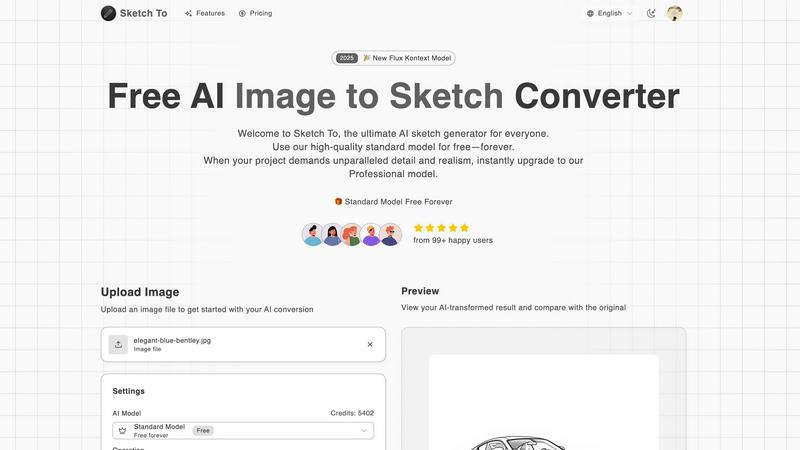
Sketch To instantly transforms your photos into beautiful AI sketches for any creative project.
Last updated: March 2, 2026
Visual Comparison
Nano Banana Pro

Sketch To
Feature Comparison
Nano Banana Pro
Perfect Character Consistency
One of the biggest challenges in AI art is keeping a character looking the same across multiple images. Nano Banana Pro solves this! Its advanced multi-image understanding technology ensures that the character you design—with their specific hair, eyes, and style—remains perfectly consistent. This is ideal for creating storyboards, comic strips, or a series of social media posts featuring your unique mascot or avatar, saving you hours of manual adjustment.
Lightning-Fast Image Generation
Time is precious, and Nano Banana Pro respects yours. Powered by an optimized architecture and the Gemini 3 Pro engine, it generates images a remarkable 15% faster than many other tools. This means you can iterate on ideas quickly, try different prompts, and get your perfect visual without long waits. It supercharges your creative workflow, letting you focus on ideas instead of loading screens.
Advanced Image-to-Image Editing
Go beyond text prompts! With the Nano Banana Edit feature, you can upload your own photos (up to 10 at a time) and transform them using AI. Want to turn a portrait into a painting, add a fantasy background to a vacation photo, or reimagine a product shot? Simply upload your image, describe the changes you want, and let the AI work its magic while preserving the key elements of your original picture.
Crystal-Clear Text Rendering
Finally, an AI image generator that can spell! Nano Banana Pro features an enhanced text engine that renders readable, high-fidelity text within your images. This is a game-changer for creating posters, logos, social media graphics with quotes, album covers, or any visual where text is a central element. Say goodbye to garbled, nonsensical letters and hello to professional, usable graphics.
Sketch To
Dual-Purpose AI Conversion
Sketch To isn't just a one-trick tool. It features two powerful conversion modes. The "Image to Sketch" mode turns your photos into beautiful artistic sketches, while the "Sketch to Image" mode performs the opposite magic, transforming your simple line drawings into rich, detailed, and realistic images. This versatility makes it a complete creative suite for all kinds of artistic exploration and project needs.
Multiple Artistic Styles
Unleash your creativity with a wide variety of pre-set artistic styles. Choose from classic options like Pencil Sketch, Charcoal, and Ink Sketch to more expressive forms like Watercolor, Comic Sketch, or Colored Pencil. This allows you to match the output perfectly to your vision, whether you want a rough concept sketch or a polished piece of digital art, all without needing any technical drawing skills.
Free-to-Start with Trial Credits
Getting started with AI art has never been easier or more affordable. Sketch To offers a powerful Standard Model that is free to try. New users receive trial credits immediately upon signing up, allowing you to experiment with conversions and see the quality firsthand. This model is perfect for hobbies, social media, and learning, ensuring there's no risk or commitment when you begin your creative journey.
Professional-Grade Pro Model
For projects where quality is non-negotiable, Sketch To offers a world-class Professional Model. This advanced AI engine delivers unparalleled detail, texture, accuracy, and realism in every conversion. It's designed for commercial use, professional portfolios, and any project where the highest fidelity output is required. You can switch to this model instantly whenever your work demands it.
Use Cases
Nano Banana Pro
Social Media Content Creation
Keep your feeds fresh and engaging! Use Nano Banana Pro to generate unique, eye-catching images for your Instagram posts, Twitter headers, YouTube thumbnails, and TikTok stories. Describe the vibe you want, choose from 11 different aspect ratios (perfect for any platform's dimensions), and create consistent, on-brand visuals that will make your profile stand out and attract more followers.
Marketing and Advertising Material
Create professional marketing assets in minutes, not days. Design compelling banners, email headers, product mockups, and ad visuals without needing a graphic designer. The tool's ability to maintain character consistency is perfect for building a recognizable brand character, while the high-resolution 4K output ensures your materials look sharp and professional everywhere.
Character and Concept Design
Ideal for writers, game developers, and illustrators. Bring your fictional characters to life with detailed, consistent portraits. You can generate multiple views, expressions, and scenes featuring the same character, which is invaluable for creating visual references for stories, video games, tabletop RPGs, or animation pre-production, helping you visualize and share your ideas clearly.
Personal Art and Photo Enhancement
Unleash your personal creativity! Transform your ordinary photos into extraordinary artwork in any style you can imagine—from Pixar-style 3D caricatures to hyper-realistic fantasy scenes. Use the Image-to-Image editing to reimagine family portraits, create unique gifts, or simply experiment with artistic styles for fun, turning your memories and ideas into shareable masterpieces.
Sketch To
Social Media Content Creation
Create eye-catching and unique visuals for your Instagram, Facebook, or TikTok feeds. Transform personal photos into artistic sketches for a branded look, or generate photorealistic images from simple concepts to illustrate your posts. It's a quick and easy way to produce professional-looking content that stands out from the crowd and engages your audience.
Student Projects and Learning
Students can use Sketch To to add a creative flair to presentations, art assignments, or history projects. Turning a portrait into a sketch for an art class or visualizing a story idea by converting a drawing into a realistic scene are simple tasks. The tool helps demonstrate concepts visually and makes learning more interactive and fun.
Professional Concept Visualization
Designers, architects, and artists can use the "Sketch to Image" function to rapidly prototype ideas. Quickly convert rough concept sketches into realistic previews of a product, building, or character. This accelerates the feedback and iteration process, helping teams and clients visualize the final result long before production begins.
Personal Art and Hobby Exploration
If you've ever wanted to try digital art but felt intimidated by complex software, Sketch To is your perfect starting point. Experiment with different artistic styles, turn family photos into hand-drawn-looking portraits, or bring your imaginative doodles to life. It’s a low-pressure, joyful way to explore your creativity and create personalized artwork.
Overview
About Nano Banana Pro
Welcome to the future of AI-powered creativity! Nano Banana Pro is a professional-grade AI image generator designed to make stunning visual creation accessible to everyone. Whether you're a social media creator, a marketing professional, a game designer, or just someone with a big imagination, this tool is your new best friend. At its core, Nano Banana Pro uses the powerful Gemini 3 Pro image preview technology to transform your simple text descriptions or existing photos into breathtaking, high-quality images. Imagine typing a sentence like "a cyberpunk cat drinking coffee in a neon-lit alley" and getting a beautiful, 4K-ready image in seconds. That's the magic it offers. It's trusted by over 10,000 creators because it combines incredible power with remarkable ease of use. You don't need to be a tech expert or a professional artist. With support for both Text-to-Image and advanced Image-to-Image editing, Nano Banana Pro gives you a full suite of tools to bring any vision to life, from character designs and marketing banners to personal art projects, all with incredible speed and consistency.
About Sketch To
Sketch To is your friendly, all-in-one AI art studio that makes creating stunning artwork simple and accessible for everyone. At its heart, it's a magical two-way tool. You can take any photograph and instantly transform it into a beautiful, detailed sketch in styles like pencil, charcoal, or watercolor. Or, you can work in reverse and watch as your simple doodles and drawings are brought to life as stunning, photorealistic images. It's designed to be incredibly easy to use, with no complicated software to download or install—everything happens right in your web browser.
Whether you're a complete beginner looking to explore digital art for fun, a student working on a creative project, a social media enthusiast wanting unique content, or a professional artist or designer needing high-quality assets, Sketch To is built for you. The best part is how it grows with you. You can start creating amazing art for free right away using the high-quality Standard Model, which includes trial credits for new users. When your projects demand the absolute best in detail and realism—like for commercial work or professional portfolios—you can instantly upgrade to the world-class Professional Model. This flexible approach removes all barriers, letting you focus purely on bringing your creative visions to life in just a few simple clicks.
Frequently Asked Questions
Nano Banana Pro FAQ
What is the difference between Nano Banana Pro and Nano Banana Flash?
Nano Banana Pro is the flagship model focused on delivering the highest quality images with perfect character consistency and advanced editing features like Image-to-Image transformation. Nano Banana Flash is a different, faster model optimized for speed, likely sacrificing some detail for quicker generation times. Pro is best for detailed, consistent work, while Flash is for rapid ideation.
How does the Image-to-Image editing work?
It's simple! You start by uploading an existing photo or image (you can upload up to 10). Then, you provide a text prompt describing how you want to change it—like "turn this into a watercolor painting" or "add a castle in the background." The AI then reimagines your uploaded image based on your instructions, blending your original content with your new creative vision.
What image formats and sizes does it support?
Nano Banana Pro generates high-quality images suitable for 4K resolution. The output format is PNG, which supports transparency for more flexible design work. You have full control over the aspect ratio, with 11 options ranging from a standard square (1:1) to an ultra-wide cinematic format (21:9), ensuring you get the perfect dimensions for any project.
Is there a free trial or free credits?
Yes! New users receive 8 free credits to try out the platform and generate their first images. This is a great way to explore the features, test different prompts, and see the quality of Nano Banana Pro for yourself before committing to a paid plan. Just sign up to claim your free credits and start creating.
Sketch To FAQ
How do I start using Sketch To?
Starting is easy and free! Simply visit the Sketch To website and sign up for an account. As a new user, you will automatically receive trial credits to use with our high-quality Standard Model. From there, you can upload an image, choose your desired conversion type (Image to Sketch or Sketch to Image), select a style, and click "Generate" to see the magic happen instantly.
What is the difference between the Standard and Professional models?
The Standard Model is a powerful, free-to-start option perfect for personal projects, social media, and hobbies. It delivers clean, artistic results. The Professional Model is a premium upgrade that uses a more advanced AI to provide world-class realism, extreme detail, and superior texture accuracy. It is ideal for commercial work, professional art, and any project where the highest quality is essential.
What file formats and sizes do you support?
You can upload common image files like JPG and PNG to get started. The current upload limit for a single file is 5MB. After processing, you can download your transformed creation in high resolution, making it suitable for everything from web use to printing.
Do I need to install any software?
No installation is required at all! Sketch To is a completely web-based application that runs in your browser. This means you can access it and create from any device—be it a computer, tablet, or smartphone—as long as you have an internet connection. It’s designed for maximum convenience and accessibility.
Alternatives
Nano Banana Pro Alternatives
Nano Banana Pro is a popular AI image generator in the design and creative tools category. It's known for helping users create high-quality 4K images quickly, with a strong focus on features like character consistency and fast generation speeds. People often explore other options for various reasons. This could be due to budget constraints, a need for different specific features, or because they require a tool that works on a particular device or operating system. It's a normal part of finding the perfect creative software fit. When looking at other tools, consider what matters most for your projects. Key factors include the quality and resolution of the images, the speed of generation, any unique editing capabilities, and of course, the overall cost and value. Finding a balance between power and ease-of-use is essential for a smooth creative workflow.
Sketch To Alternatives
Sketch To is a popular AI-powered tool in the image and photo category that specializes in transforming photos into artistic sketches and sketches into realistic images. It's a fantastic starting point for anyone looking to explore AI art creation. People often look for alternatives to tools like this for various reasons. You might need a different set of features, prefer a different pricing model like a one-time purchase, or require software that works on a specific device or operating system. It's completely normal to shop around to find the perfect fit for your creative workflow and budget. When choosing an alternative, consider what's most important for your projects. Think about the types of art styles you need, whether you want a mobile app or a desktop program, and how you prefer to pay—whether through a subscription, a free plan with limits, or a single purchase. The best tool is the one that feels easy and exciting for you to use.