
Img Editor vs Shrinkpad
Side-by-side comparison to help you choose the right tool.

Img Editor
Turn your ideas into stunning AI images effortlessly with Img Editor's advanced and intuitive technology.
Last updated: February 28, 2026

Shrinkpad
Shrinkpad quickly compresses your images and videos on Mac to save space and time.
Last updated: February 28, 2026
Visual Comparison
Img Editor

Shrinkpad
Feature Comparison
Img Editor
Text-to-Image Generation
This is the heart of Img Editor. Simply type a description of the image you want into the prompt box. You can be as simple or as detailed as you like. The advanced AI then interprets your words and generates a completely original image that matches your vision. You can try example prompts provided or let your own imagination run wild to create anything from photorealistic scenes to abstract digital art.
Advanced Image Customization
Before you generate an image, Img Editor gives you control over the final output. You can select the aspect ratio (like square 1:1 for Instagram or wide 16:9 for banners) to fit your project. More importantly, you can choose the image quality, from Standard 1K up to Ultra Quality 4K for incredibly detailed, professional-grade results, ensuring your creation looks perfect wherever you use it.
Prompt Generator & Inspiration Gallery
If you're ever stuck for ideas, Img Editor has you covered. The built-in Prompt Generator can help you craft effective descriptions. Furthermore, you can browse the public Gallery to see what other users have created. You can click on any prompt in the gallery to use it yourself, which is a fantastic way to learn how to write better prompts and discover new creative possibilities you hadn't considered.
Community Engagement & Bonus Rewards
Img Editor encourages sharing and inspiration. After generating an image, you can submit it to the public Gallery for review. When your submission is approved, you earn 10 extra free image generations! This system rewards your creativity and helps build a vibrant community where everyone can learn from and inspire each other, making the creative process more collaborative and rewarding.
Shrinkpad
Smart Batch Compression
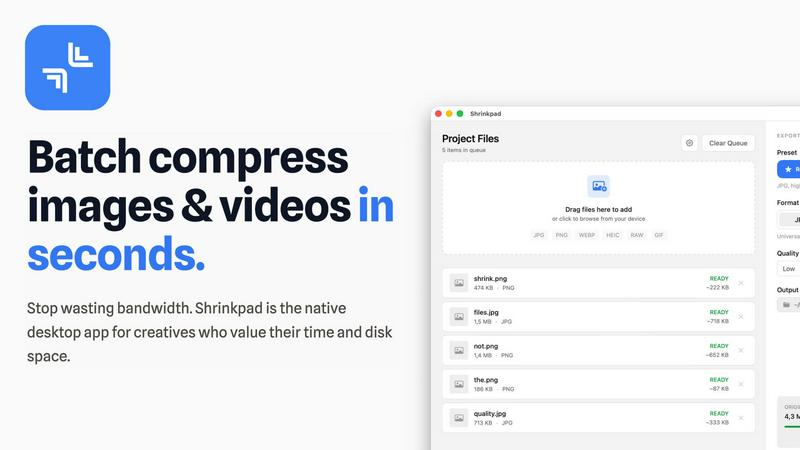
Shrinkpad makes handling large projects effortless with its powerful batch processing. You can drag and drop thousands of images and videos at once, and the app will process them all in a single queue. It automatically analyzes each file's visual complexity to apply the perfect compression ratio, aiming to reduce size without creating noticeable artifacts. This means you can compress an entire project's assets in minutes, not hours, saving you from the tedious work of optimizing files one by one.
Intelligent Folder Mode
Stop dragging files individually. With Folder Mode, you simply drop any folder onto Shrinkpad, and it instantly scans and detects all supported media files inside, including those in subfolders. It smartly identifies over 30 image formats (including RAW files) and all major video formats, adding them to your batch list while safely ignoring non-media files. This feature is perfect for organizing and optimizing exported assets from tools like Figma or Photoshop in one fell swoop.
Privacy-First Local Processing
Your files are your business. Shrinkpad ensures complete privacy by performing all compression work directly on your Mac. Nothing is ever uploaded to the cloud. This not only keeps your sensitive client work or personal projects secure but also means the process is lightning-fast, unhindered by your internet upload speed. You get powerful optimization without ever sacrificing control over your data.
Pro-Grade Format Support
Shrinkpad is built to handle the real-world mix of files that creatives use daily. It supports a wide array of formats out of the box, including JPG, PNG, WEBP, AVIF, HEIC, MP4, and MOV. You can even process images and videos together in the same batch. The app is fully optimized for Apple Silicon Macs, using multi-threaded compression to deliver blazing-fast performance and help you reclaim disk space efficiently.
Use Cases
Img Editor
Social Media Content Creation
Quickly generate eye-catching graphics, story backgrounds, or promotional art for your Instagram, Facebook, or Twitter pages. Describe the mood, theme, and elements you need, and Img Editor will produce unique visuals that help your posts stand out, all without needing a graphic designer or expensive stock photos.
Concept Art & Brainstorming
Writers, game developers, and designers can use Img Editor to visualize characters, settings, or objects from their stories or projects. It's a powerful brainstorming tool to rapidly prototype ideas and explore different artistic styles before committing to a final design, saving immense time and effort.
Personal Art Projects & Gifts
Create custom artwork for your home, like a landscape of your dream vacation spot, or design a one-of-a-kind piece of art as a personalized gift. You can generate portraits in unique styles, abstract pieces for decoration, or illustrations for personal stories, making your creative ideas tangible.
Marketing & Blog Illustrations
Bloggers, small business owners, and marketers can generate custom featured images, blog graphics, ad banners, and product concept visuals. This ensures you have original, relevant imagery that perfectly matches your article's topic or brand's message, enhancing your professional appearance.
Shrinkpad
Web Designers & Developers
If you're building a website or app, large images and videos are the biggest culprits for slow load times. Shrinkpad helps you quickly optimize all your visual assets in bulk, significantly reducing bundle sizes. This leads to faster website performance and improved user experience, with many users seeing better Lighthouse scores. It's the perfect final step before deploying your project.
Photographers & Content Creators
Modern cameras and phones create massive files. Shrinkpad is ideal for photographers who need to archive hundreds of high-resolution shots or content creators managing gigabytes of video footage. You can compress your media library to save vast amounts of storage space while preserving the quality needed for portfolios, client delivery, or social media, all without ever uploading private content online.
Designers Preparing Assets
Designers often export assets at 2x or 4x resolution for various uses, resulting in unnecessarily large files. Instead of manually re-exporting from Figma, Sketch, or Photoshop, you can export everything at full size and let Shrinkpad handle the bulk optimization and renaming. This saves hours of repetitive busywork, ensuring your project files are lean and organized.
Teams & Small Studios
For teams collaborating on projects, sharing large asset folders can be a bandwidth nightmare. Shrinkpad's Team license allows multiple users to quickly optimize files before sharing them via email, cloud storage, or project management tools. This streamlines collaboration, saves on storage costs, and keeps everyone's local drives clutter-free.
Overview
About Img Editor
Img Editor is a revolutionary, free AI-powered platform that makes professional-grade image creation accessible to everyone. Whether you're a complete beginner with no design experience, a professional artist, a marketer, or just someone with a creative idea, Img Editor empowers you to bring your vision to life. At its core, it uses cutting-edge artificial intelligence to generate stunning, unique images from simple text descriptions. You just tell the AI what you want to see, and it creates a visual masterpiece in seconds. Beyond generation, it also offers tools to modify and enhance existing images. The best part? It's incredibly generous, offering 10 free image generations every single day. You can even earn bonus generations by sharing your creations with the community. Img Editor removes the traditional barriers of cost, complex software, and required artistic skill, making it the perfect starting point for anyone's creative journey.
About Shrinkpad
Shrinkpad is your all-in-one desktop solution for quickly and easily reducing the size of your photos and videos, right on your Mac. If you're tired of large media files eating up your precious storage space or slowing down your website, this app is for you. It's designed to be incredibly simple: just drag and drop your files—or even entire folders—into the app, choose your settings, and let Shrinkpad compress them in seconds. The best part? Everything happens locally on your computer. Your files are never uploaded to the cloud, which means complete privacy for your work and no waiting for slow internet connections. Whether you're a photographer with hundreds of high-res shots, a designer preparing assets for a project, or a content creator managing lots of video clips, Shrinkpad helps you save gigabytes of space while keeping the visual quality you need. It's the fast, private, and powerful way to optimize your media. It's the native desktop app built for creatives who value their time, disk space, and the security of their work.
Frequently Asked Questions
Img Editor FAQ
Is Img Editor really free to use?
Yes, Img Editor is fundamentally free. Every user receives 10 free image generations per day without any cost or credit card required. You can use the platform regularly with this daily allowance. You can also earn additional free generations by participating in the community, such as submitting your approved images to the public Gallery.
How do I get better results from the AI?
Being specific in your text prompt is key. Instead of "a dog," try "a fluffy golden retriever puppy playing in a sunlit autumn park." Use the example prompts and the Gallery for inspiration. Also, experiment with the settings like Aspect Ratio and Image Quality to match your intended use, as higher quality settings produce more detailed results.
What can I do with the images I create?
You own the images you generate with Img Editor. You can use them for personal projects, social media, blogs, presentations, and even for commercial purposes like marketing your small business. Always ensure your prompts and the resulting images comply with the platform's content guidelines.
What is the "Submit to Gallery" feature?
This feature allows you to share your generated image with the Img Editor community. When you submit an image, it goes for review. Once approved, it appears in the public Gallery where others can see it and be inspired. As a reward for sharing, you instantly receive 10 extra free image generations added to your account.
Shrinkpad FAQ
Can I use Shrinkpad for free?
Yes! Shrinkpad offers a Free Starter plan that lets you try the core compression features at no cost. This plan allows you to process up to 10 files per batch, supports common formats like JPG and PNG, and has a maximum file size limit of 1GB. It's a great way to test the app and see how much space you can save before deciding to upgrade.
What file formats does Shrinkpad support?
Shrinkpad supports a wide range of image and video formats. For images, it handles JPG, PNG, WEBP, AVIF, HEIC, and even professional RAW camera formats. For video, it supports major formats like MP4 and MOV. The app automatically detects over 30 different media formats when you use Folder Mode.
Does Shrinkpad support video compression?
Absolutely! Shrinkpad isn't just for images. It fully supports compressing video files like MP4 and MOV. You can even mix images and videos in the same batch queue, and Shrinkpad will apply the optimal compression settings for each file type, helping you save huge amounts of space on large video clips.
Are my files uploaded to the cloud?
No, never. Privacy is a core principle of Shrinkpad. All processing happens 100% locally on your Mac. Your files are never sent to or stored on any external server. This ensures your sensitive work remains completely confidential and also makes the compression process very fast, as it doesn't depend on your internet connection.
Alternatives
Img Editor Alternatives
Img Editor is a free AI image generation platform in the image and photo category. It lets anyone create or edit stunning visuals using simple text descriptions, making professional-looking graphics accessible to all. People often look for different tools for various reasons. Some might need more advanced features for complex projects, while others may require a tool that works on a specific device or operating system. Budget, daily usage limits, and the desire for different artistic styles are also common factors in the search. When choosing a different tool, consider what matters most for your projects. Think about your budget, how many images you need to create regularly, and the specific features you'll use. It's also helpful to find a platform with an interface you find intuitive, so you can bring your ideas to life without a steep learning curve.
Shrinkpad Alternatives
Shrinkpad is a Mac application designed for image and video compression. It falls into the category of media optimization tools, helping users reduce file sizes directly on their computer without using the cloud. People often look for different tools for various reasons. Maybe they need a solution that works on Windows or a mobile device, or they are looking for a free option or a tool with more specialized editing features. It's a common and smart step to explore what else is available. When choosing a different tool, consider what's most important for your workflow. Key things to think about include whether the tool works on your operating system, if it handles batch processing, how it manages your privacy, and of course, your budget.