Facejam vs Shrinkpad
Side-by-side comparison to help you choose the right tool.

Facejam
Transform your selfies into stunning professional headshots in minutes with FaceJam's easy AI-powered tool.
Last updated: February 26, 2026

Shrinkpad
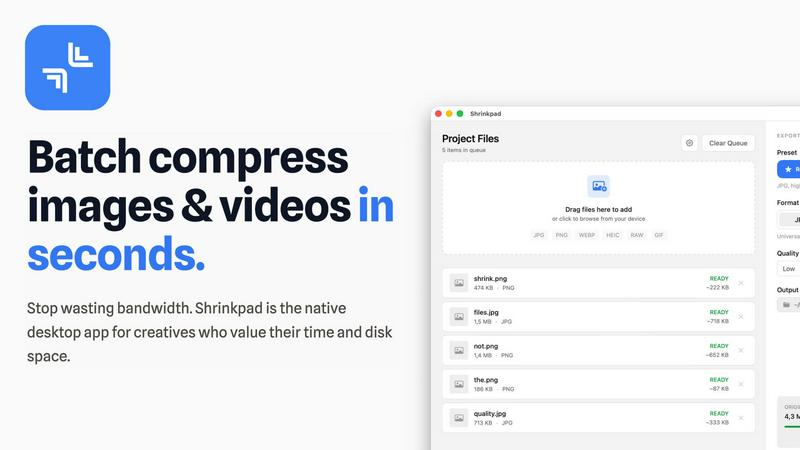
Shrinkpad quickly compresses your images and videos on Mac to save space and time.
Last updated: February 28, 2026
Visual Comparison
Facejam

Shrinkpad
Feature Comparison
Facejam
100+ Professional Styles
FaceJam offers an impressive selection of over 100 styles designed specifically for various industries. From real estate to corporate settings, users can find the perfect look that resonates with their professional image, allowing for quick selections tailored to specific career paths.
Quick and Easy Process
The process of generating headshots with FaceJam is incredibly straightforward. Simply upload a few selfies, choose your desired template, and let the AI do the rest. Most users receive polished headshots in a matter of minutes, eliminating the lengthy and often cumbersome process of traditional photography.
High-Resolution Images
Every headshot generated through FaceJam is delivered in high resolution, ensuring that your images are suitable for professional use across multiple platforms. Whether for LinkedIn, resumes, or personal websites, you can rest assured that your photos will look crisp and clear.
Complete Ownership and Privacy
FaceJam prioritizes user privacy, granting you full ownership and commercial rights to the images you create. Your uploaded photos are used solely to generate your headshots and are never shared or used to improve the AI model, giving you peace of mind about your data security.
Shrinkpad
Smart Batch Compression
Shrinkpad makes handling large projects effortless with its powerful batch processing. You can drag and drop thousands of images and videos at once, and the app will process them all in a single queue. It automatically analyzes each file's visual complexity to apply the perfect compression ratio, aiming to reduce size without creating noticeable artifacts. This means you can compress an entire project's assets in minutes, not hours, saving you from the tedious work of optimizing files one by one.
Intelligent Folder Mode
Stop dragging files individually. With Folder Mode, you simply drop any folder onto Shrinkpad, and it instantly scans and detects all supported media files inside, including those in subfolders. It smartly identifies over 30 image formats (including RAW files) and all major video formats, adding them to your batch list while safely ignoring non-media files. This feature is perfect for organizing and optimizing exported assets from tools like Figma or Photoshop in one fell swoop.
Privacy-First Local Processing
Your files are your business. Shrinkpad ensures complete privacy by performing all compression work directly on your Mac. Nothing is ever uploaded to the cloud. This not only keeps your sensitive client work or personal projects secure but also means the process is lightning-fast, unhindered by your internet upload speed. You get powerful optimization without ever sacrificing control over your data.
Pro-Grade Format Support
Shrinkpad is built to handle the real-world mix of files that creatives use daily. It supports a wide array of formats out of the box, including JPG, PNG, WEBP, AVIF, HEIC, MP4, and MOV. You can even process images and videos together in the same batch. The app is fully optimized for Apple Silicon Macs, using multi-threaded compression to deliver blazing-fast performance and help you reclaim disk space efficiently.
Use Cases
Facejam
Professional Networking
FaceJam is perfect for professionals looking to create impactful LinkedIn profiles or resumes. With tailored headshots, users can present themselves more confidently and attractively to potential employers and connections.
Corporate Team Photos
Companies can utilize FaceJam to generate uniform and polished headshots for their entire team. This ensures a cohesive look for company directories, pitch decks, and marketing materials, enhancing the overall professional image of the organization.
Personal Branding for Creatives
For artists, entrepreneurs, and influencers, FaceJam provides a way to maintain a consistent and professional visual identity across various social media platforms and personal websites. This helps establish credibility and recognition in their respective fields.
Real Estate and Consulting
Real estate agents and consultants can benefit from industry-specific styles offered by FaceJam. These tailored looks help professionals stand out in competitive markets, making their profiles more appealing to clients and prospects.
Shrinkpad
Web Designers & Developers
If you're building a website or app, large images and videos are the biggest culprits for slow load times. Shrinkpad helps you quickly optimize all your visual assets in bulk, significantly reducing bundle sizes. This leads to faster website performance and improved user experience, with many users seeing better Lighthouse scores. It's the perfect final step before deploying your project.
Photographers & Content Creators
Modern cameras and phones create massive files. Shrinkpad is ideal for photographers who need to archive hundreds of high-resolution shots or content creators managing gigabytes of video footage. You can compress your media library to save vast amounts of storage space while preserving the quality needed for portfolios, client delivery, or social media, all without ever uploading private content online.
Designers Preparing Assets
Designers often export assets at 2x or 4x resolution for various uses, resulting in unnecessarily large files. Instead of manually re-exporting from Figma, Sketch, or Photoshop, you can export everything at full size and let Shrinkpad handle the bulk optimization and renaming. This saves hours of repetitive busywork, ensuring your project files are lean and organized.
Teams & Small Studios
For teams collaborating on projects, sharing large asset folders can be a bandwidth nightmare. Shrinkpad's Team license allows multiple users to quickly optimize files before sharing them via email, cloud storage, or project management tools. This streamlines collaboration, saves on storage costs, and keeps everyone's local drives clutter-free.
Overview
About Facejam
FaceJam is an innovative AI-driven tool designed to transform your selfies into stunning, studio-quality headshots in just minutes. Whether you're a professional seeking to enhance your online presence or someone looking to create a polished image for various platforms, FaceJam is your go-to solution. Users can upload a few photos, select from over 50 unique styles tailored to different industries, and generate high-resolution headshots without the need for a professional photographer. With FaceJam, you eliminate the hassle of scheduling appointments, commuting, and waiting for edits, all while ensuring that your images look authentic and professional. The platform is perfect for anyone looking to elevate their personal branding, making it an ideal choice for job seekers, realtors, consultants, and creatives alike. Your privacy is paramount, as your uploaded photos remain yours, ensuring a secure and trustworthy experience.
About Shrinkpad
Shrinkpad is your all-in-one desktop solution for quickly and easily reducing the size of your photos and videos, right on your Mac. If you're tired of large media files eating up your precious storage space or slowing down your website, this app is for you. It's designed to be incredibly simple: just drag and drop your files—or even entire folders—into the app, choose your settings, and let Shrinkpad compress them in seconds. The best part? Everything happens locally on your computer. Your files are never uploaded to the cloud, which means complete privacy for your work and no waiting for slow internet connections. Whether you're a photographer with hundreds of high-res shots, a designer preparing assets for a project, or a content creator managing lots of video clips, Shrinkpad helps you save gigabytes of space while keeping the visual quality you need. It's the fast, private, and powerful way to optimize your media. It's the native desktop app built for creatives who value their time, disk space, and the security of their work.
Frequently Asked Questions
Facejam FAQ
How does your AI headshot generator work?
FaceJam operates via a simple two-step process: upload your selfies and select your preferred style template. The AI utilizes your images to create realistic headshots that look as if they were taken by a professional photographer.
What do you do with my uploaded photos?
The photos you upload are exclusively used to create your AI-generated headshots. FaceJam ensures that your images are not used for any other purposes, maintaining your privacy and ownership of the content.
How many good photos can I expect?
FaceJam guarantees at least one high-quality image in every package. Depending on the quality of the selfies you provide and adherence to guidelines, many users receive multiple excellent photos, often ranging from five to ten or more.
Can I use FaceJam for LinkedIn, resumes, and business profiles?
Absolutely! FaceJam is specifically designed for creating professional headshots suitable for LinkedIn, resumes, job applications, and corporate profiles. It simplifies the process of obtaining high-quality images for any professional setting.
Shrinkpad FAQ
Can I use Shrinkpad for free?
Yes! Shrinkpad offers a Free Starter plan that lets you try the core compression features at no cost. This plan allows you to process up to 10 files per batch, supports common formats like JPG and PNG, and has a maximum file size limit of 1GB. It's a great way to test the app and see how much space you can save before deciding to upgrade.
What file formats does Shrinkpad support?
Shrinkpad supports a wide range of image and video formats. For images, it handles JPG, PNG, WEBP, AVIF, HEIC, and even professional RAW camera formats. For video, it supports major formats like MP4 and MOV. The app automatically detects over 30 different media formats when you use Folder Mode.
Does Shrinkpad support video compression?
Absolutely! Shrinkpad isn't just for images. It fully supports compressing video files like MP4 and MOV. You can even mix images and videos in the same batch queue, and Shrinkpad will apply the optimal compression settings for each file type, helping you save huge amounts of space on large video clips.
Are my files uploaded to the cloud?
No, never. Privacy is a core principle of Shrinkpad. All processing happens 100% locally on your Mac. Your files are never sent to or stored on any external server. This ensures your sensitive work remains completely confidential and also makes the compression process very fast, as it doesn't depend on your internet connection.
Alternatives
Facejam Alternatives
Facejam is an innovative tool designed to transform your selfies into stunning, studio-quality headshots using AI technology. It falls within the image and photo category, providing users with over 50 different styles to choose from, tailored for various professional needs. Many users seek alternatives to Facejam for reasons such as pricing, specific feature sets, or platform compatibility. When considering alternatives, it's essential to look for ease of use, the variety of styles offered, the quality of the final images, and the speed at which you can receive your results. These factors will help ensure you find a solution that meets your individual or professional needs.
Shrinkpad Alternatives
Shrinkpad is a Mac application designed for image and video compression. It falls into the category of media optimization tools, helping users reduce file sizes directly on their computer without using the cloud. People often look for different tools for various reasons. Maybe they need a solution that works on Windows or a mobile device, or they are looking for a free option or a tool with more specialized editing features. It's a common and smart step to explore what else is available. When choosing a different tool, consider what's most important for your workflow. Key things to think about include whether the tool works on your operating system, if it handles batch processing, how it manages your privacy, and of course, your budget.