Prompt Builder vs QuickData.ai
Side-by-side comparison to help you choose the right tool.

Prompt Builder
Create, refine, and manage AI prompts effortlessly in one tool, producing optimized results for any model in seconds.
Last updated: April 13, 2026

QuickData.ai
Automate rent roll and T12 data entry into Excel to underwrite multifamily deals ten times faster.
Last updated: March 1, 2026
Visual Comparison
Prompt Builder
QuickData.ai
Feature Comparison
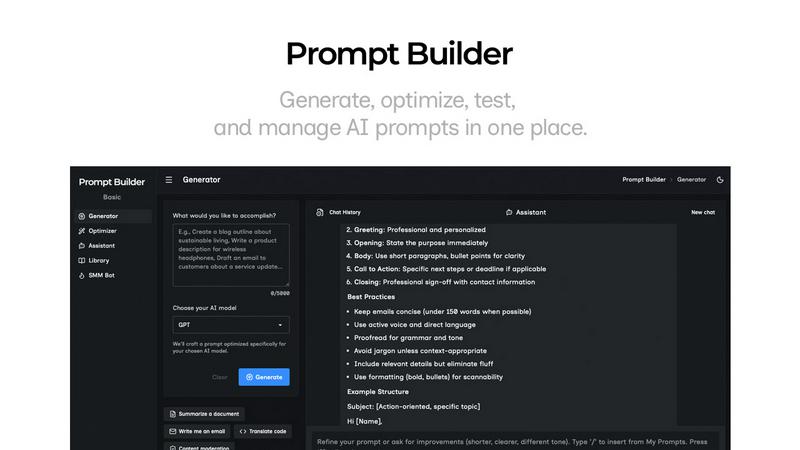
Prompt Builder
Prompt Generator
The Prompt Generator feature allows users to input their ideas and select a target AI model for optimization. It produces a professional-grade prompt that can be further refined through an interactive chat interface, making it easy to create tailored prompts quickly.
Chat Refinement
Built directly into the workspace, the chat refinement feature enables users to iterate on their prompts in real-time. This functionality supports fast adjustments and improvements, allowing for a seamless editing experience that enhances prompt quality based on immediate feedback.
Prompt Optimizer
The Prompt Optimizer takes existing prompts and enhances them for clarity and effectiveness. Users can paste prompts or select from their Library to generate clearer and more refined versions, ensuring that the prompts yield better results across different AI models.
Prompt Library
With the Prompt Library, users can save, organize, and reuse their best prompts conveniently. This feature allows for easy access to frequently used prompts, community-contributed prompts, and efficient management through search and category filters, ensuring users never lose track of their valuable resources.
QuickData.ai
AI-Powered Data Extraction
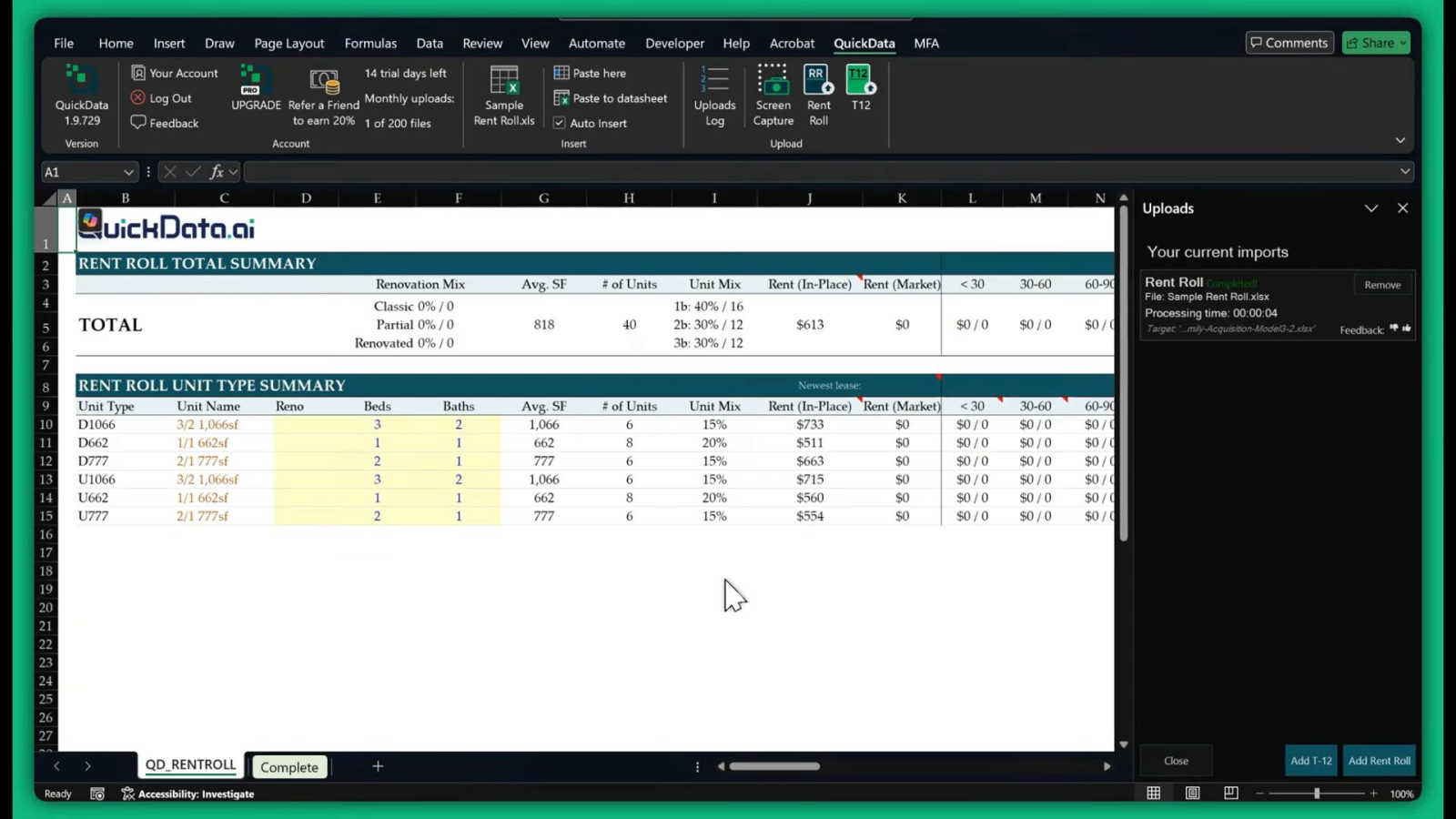
This is the heart of QuickData.ai. Using advanced artificial intelligence, the tool intelligently scans and understands documents like rent rolls, T12s, and offering memorandums. It identifies key data points such as unit numbers, square footage, rent amounts, expenses, and income figures, then accurately extracts them without any manual typing from you. This feature handles the most time-consuming part of your job with precision.
Seamless Excel Integration
QuickData.ai works directly inside Microsoft Excel as an add-in. There's no need to switch between different software or learn a complicated new platform. Once installed, you can pull data from your documents and have it populate your own custom Excel underwriting models instantly. This keeps all your work in one place and leverages the tools you already know and use every day.
Support for Key Multifamily Documents
The tool is expertly trained on the specific document types multifamily professionals use daily. It reliably extracts data from Rent Rolls (for unit-level details), T12/T3 statements (for historical operating income and expenses), and Offering Memorandums (for summarized property financials). This targeted capability ensures high accuracy and relevance for your underwriting needs.
Fast Setup and Easy Onboarding
Getting started with QuickData.ai is designed to be quick and stress-free. The setup process takes just minutes, and the team offers free, personalized 1:1 onboarding sessions to help you get the most out of the tool from day one. You can start your 14-day free trial immediately and cancel anytime, making it easy to experience the benefits with no long-term commitment.
Use Cases
Prompt Builder
Content Creation
Prompt Builder is an invaluable tool for content creators who need to generate high-quality written material quickly. By utilizing the tool's features, they can produce optimized prompts for blog posts, articles, and social media content tailored to their target audience.
Educational Purposes
Educators can leverage Prompt Builder to create engaging prompts for lessons and assignments. The tool's ability to refine prompts based on specific educational goals ensures that students receive clear and targeted instructions that enhance their learning experience.
Marketing Campaigns
Marketers can use Prompt Builder to develop compelling ad copy, social media posts, and promotional materials. The platform's ability to generate model-specific prompts allows for creating effective campaigns that resonate with diverse audiences across various platforms.
Research and Development
Research professionals can benefit from Prompt Builder by generating prompts that guide their inquiries or data analysis. The tool helps in framing questions or topics for exploration, ensuring that the prompts are precise and relevant to their research objectives.
QuickData.ai
For Acquisitions Teams Analyzing New Deals
Acquisitions analysts can use QuickData.ai to rapidly populate their underwriting models with data from seller-provided documents. Instead of taking a full day to input data from a rent roll and T12, they can do it in under an hour, allowing them to analyze more potential deals, move faster in competitive markets, and make better-informed investment decisions.
For Broports and Investment Summaries
Brokers preparing marketing materials or investment summaries for a listing can use QuickData.ai to quickly pull accurate, up-to-date figures from the property's financials. This ensures their reports are data-rich and professional, created in a fraction of the usual time, helping them serve clients more effectively and win more listings.
For Lenders and Debt Underwriting
Lenders underwriting a loan for a multifamily property need to verify income and expenses quickly. QuickData.ai automates the extraction of this data from the borrower's submitted T12s and rent rolls, populating the lender's own analysis templates. This speeds up the due diligence process, reduces manual error risk, and leads to faster loan decisions.
For Accounting Firms and Due Diligence
Accounting firms conducting financial due diligence for clients can use QuickData.ai to efficiently gather and organize historical operating data from a property's financial statements. This automation allows auditors and analysts to focus on higher-value tasks like variance analysis and identifying discrepancies, rather than data transcription.
Overview
About Prompt Builder
Prompt Builder is an innovative prompt engineering workspace designed to help users craft, test, and save prompts efficiently. Ideal for AI enthusiasts, content creators, and professionals who utilize various AI models, this tool streamlines the process of creating effective prompts tailored to specific models like GPT, Claude, Gemini, and more. With Prompt Builder, users can quickly generate a solid first draft of a prompt, refine it in an interactive chat environment, and save multiple versions for future use. This capability not only enhances productivity but also improves the quality of outputs generated by AI models. The built-in Optimizer feature allows for quick enhancements of existing prompts, ensuring users achieve the best results without the hassle of rewriting. Overall, Prompt Builder empowers users to turn their ideas into actionable prompts in a matter of seconds, revolutionizing the way prompts are developed and utilized across various AI applications.
About QuickData.ai
Welcome to QuickData.ai, your intelligent assistant for multifamily real estate underwriting! If you're a professional in commercial real estate, you know the pain of manual data entry. Spending hours, or even days, meticulously typing numbers from rent rolls, T12 statements, and offering memorandums into Excel models is not just tedious—it's a major bottleneck. QuickData.ai is here to change that. It's a powerful, AI-powered Excel add-in built specifically for acquisitions teams, brokers, lenders, and accounting firms. Its core mission is simple: to save you an immense amount of time and eliminate costly manual errors. The tool works by automatically extracting critical financial and unit-level data directly from your PDF and Excel documents and placing it neatly into your existing Excel underwriting templates. This means you can go from a stack of documents to a fully populated analysis in minutes, not days. Think of QuickData.ai as a dedicated data assistant that works at lightning speed, right inside the familiar environment of Microsoft Excel. It empowers you to evaluate more deals with greater confidence and accuracy, fundamentally transforming your workflow and boosting your productivity.
Frequently Asked Questions
Prompt Builder FAQ
What AI models does Prompt Builder support?
Prompt Builder supports a wide range of AI models, including GPT, Claude, Gemini, Llama, Mistral, DeepSeek, Grok, and Perplexity. This extensive compatibility allows users to generate prompts tailored for their preferred model.
How does the chat refinement feature work?
The chat refinement feature allows users to interactively edit and improve their prompts in real-time. After generating a draft, users can engage in a chat to make adjustments, ensuring that the final prompt is precisely tailored to their needs.
Can I save and reuse prompts?
Yes, users can save their prompts in the Prompt Library for easy access and reuse. The library organizes prompts by category and model, allowing for efficient management and retrieval of valuable resources.
Is there a free version available?
Prompt Builder offers a free trial that includes 25 assistant requests per month, allowing users to explore its features without the need for a credit card. This trial helps potential users evaluate the platform before committing to a paid plan.
QuickData.ai FAQ
What types of documents can QuickData.ai read?
QuickData.ai is specifically designed for multifamily real estate documents. It can accurately extract data from PDF and Excel files containing Rent Rolls (listing units and rents), T12/T3 Operating Statements (showing monthly income and expenses), and Offering Memorandums (OMs) which summarize property financials and details.
Do I need to change my Excel model to use QuickData.ai?
No, that's the beauty of it! QuickData.ai is built to work with your existing Excel underwriting templates. The AI extracts the data and places it into your spreadsheet's structure. You maintain full control over your models and formulas; QuickData.ai simply automates the tedious data entry step.
How accurate is the AI data extraction?
The AI is highly accurate as it is specifically trained on multifamily real estate documents. It understands the common formats and terminology used in rent rolls and financial statements. For added peace of mind, it's always good practice to do a quick spot-check of the imported data, but the tool drastically reduces both time spent and error rates compared to manual entry.
Is there a free trial available?
Yes! QuickData.ai offers a full 14-day free trial so you can test the tool with your own documents and workflows. You can request the Excel add-in and start the trial immediately. The trial includes free 1:1 onboarding to ensure you get started successfully, and you can cancel anytime.
Alternatives
Prompt Builder Alternatives
Prompt Builder is a versatile tool designed to help users generate, optimize, test, and manage AI prompts efficiently. As part of the AI Assistants category, it serves as a comprehensive workspace where users can craft prompts tailored to various AI models like GPT, Claude, and others. Despite its robust features, users often seek alternatives for reasons such as pricing, specific feature sets, or compatibility with different platforms, which can vary significantly based on individual needs and preferences. When choosing an alternative to Prompt Builder, it's essential to consider several factors. Look for tools that offer similar functionalities, such as prompt generation and optimization, along with community resources like reusable prompts and templates. Additionally, evaluate the user experience, customer support, and integration capabilities with the AI models you intend to use. Understanding your unique requirements will help you find a solution that best fits your workflow.
QuickData.ai Alternatives
QuickData.ai is an AI-powered Excel add-in designed for commercial real estate professionals. It automates the manual data entry of rent rolls and T12 statements into Excel models, helping teams underwrite multifamily deals much faster. Users often explore alternatives for various reasons. These can include budget constraints, a need for different features, or a preference for a platform that works outside of Excel. It's a normal part of finding the perfect tool for your specific workflow. When evaluating other options, focus on what matters most for your deals. Key considerations are accuracy in data extraction, compatibility with your existing documents and software, the overall time savings offered, and of course, the value for your investment.