
LLMWise vs QuickData.ai
Side-by-side comparison to help you choose the right tool.

LLMWise
LLMWise offers a single API to access and compare top AI models like GPT and Claude, with pay-per-use pricing and free.
Last updated: February 26, 2026

QuickData.ai
Automate rent roll and T12 data entry into Excel to underwrite multifamily deals ten times faster.
Last updated: March 1, 2026
Visual Comparison
LLMWise

QuickData.ai
Feature Comparison
LLMWise
Smart Routing
LLMWise employs advanced smart routing technology that automatically selects the optimal model based on the type of prompt you send. For example, coding queries can be directed to GPT, while creative writing prompts can be sent to Claude. This feature ensures that you always receive the best response for your specific needs.
Compare & Blend
The compare and blend feature allows you to run prompts across multiple models side-by-side. You can see how different models respond to the same query, which helps identify the best performer. The blend function synthesizes the strongest parts of each model's output into a single, cohesive answer, enhancing quality and coherence.
Always Resilient
LLMWise's circuit-breaker failover mechanism guarantees that your application remains operational even if one of the AI providers goes down. This feature reroutes your requests to backup models, ensuring uninterrupted service and reliability for your applications.
Test & Optimize
With built-in benchmarking suites and batch testing capabilities, LLMWise enables you to optimize your AI interactions for speed, cost, and reliability. Automated regression checks ensure that any changes in performance are quickly identified, allowing for continuous improvement and trustworthy results.
QuickData.ai
AI-Powered Data Extraction
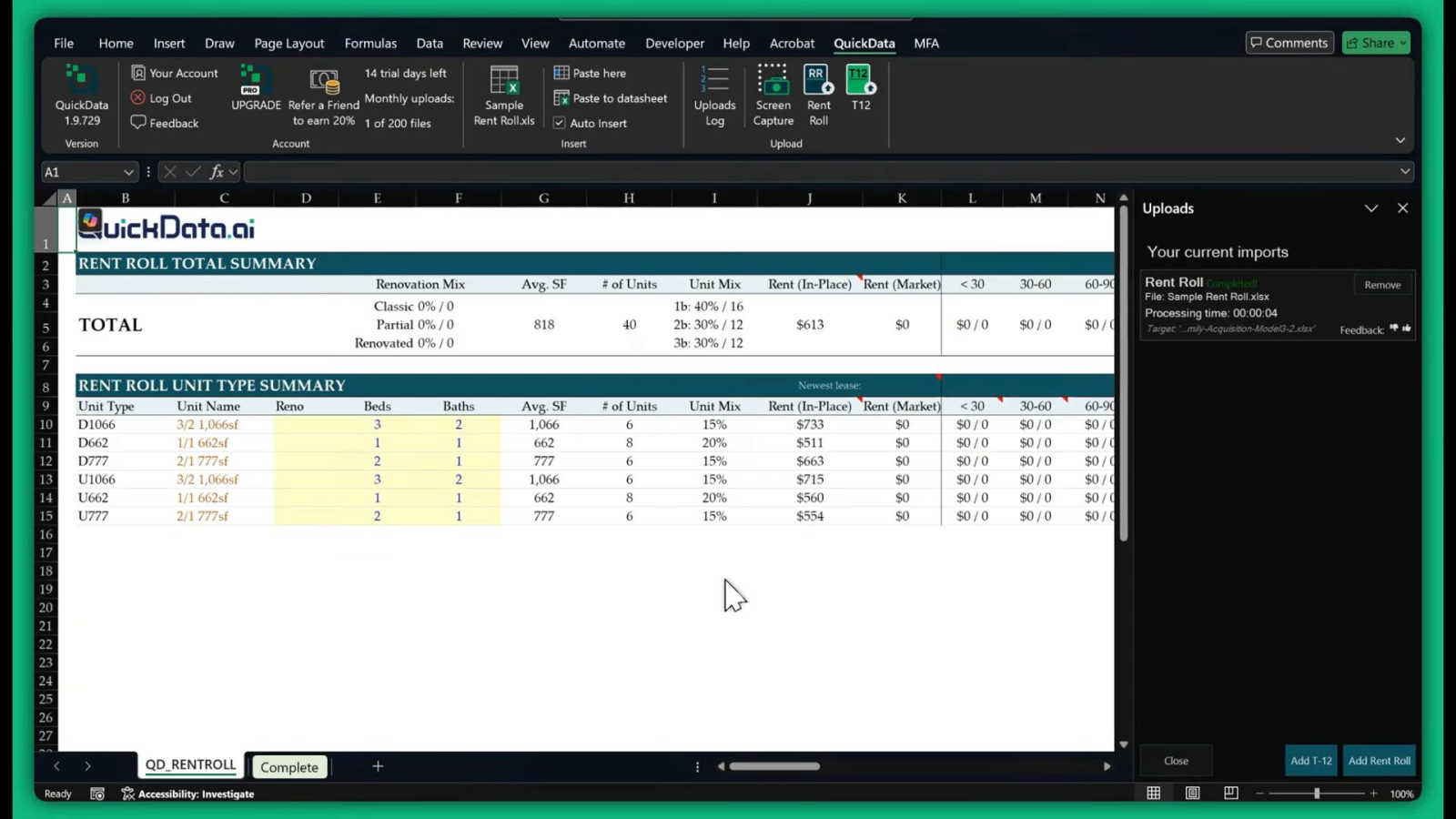
This is the heart of QuickData.ai. Using advanced artificial intelligence, the tool intelligently scans and understands documents like rent rolls, T12s, and offering memorandums. It identifies key data points such as unit numbers, square footage, rent amounts, expenses, and income figures, then accurately extracts them without any manual typing from you. This feature handles the most time-consuming part of your job with precision.
Seamless Excel Integration
QuickData.ai works directly inside Microsoft Excel as an add-in. There's no need to switch between different software or learn a complicated new platform. Once installed, you can pull data from your documents and have it populate your own custom Excel underwriting models instantly. This keeps all your work in one place and leverages the tools you already know and use every day.
Support for Key Multifamily Documents
The tool is expertly trained on the specific document types multifamily professionals use daily. It reliably extracts data from Rent Rolls (for unit-level details), T12/T3 statements (for historical operating income and expenses), and Offering Memorandums (for summarized property financials). This targeted capability ensures high accuracy and relevance for your underwriting needs.
Fast Setup and Easy Onboarding
Getting started with QuickData.ai is designed to be quick and stress-free. The setup process takes just minutes, and the team offers free, personalized 1:1 onboarding sessions to help you get the most out of the tool from day one. You can start your 14-day free trial immediately and cancel anytime, making it easy to experience the benefits with no long-term commitment.
Use Cases
LLMWise
Software Development
Developers can use LLMWise to streamline their coding processes. By routing coding queries directly to the best-performing model, they can save time and improve the accuracy of their code. This is particularly useful for debugging and getting quick suggestions.
Content Creation
Writers and marketers can leverage LLMWise for creative writing tasks. By using the blend feature, they can combine different creative aspects from various models to generate unique content that stands out and meets their audience's needs.
Language Translation
LLMWise can be a powerful tool for language translation. By routing translation tasks to specialized models like Gemini, users can achieve more accurate and contextually relevant translations, improving communication across language barriers.
Research and Analysis
For researchers needing insights from diverse perspectives, LLMWise facilitates analysis by comparing outputs from various models. This ensures comprehensive evaluations and richer insights, making it easier to draw conclusions from data.
QuickData.ai
For Acquisitions Teams Analyzing New Deals
Acquisitions analysts can use QuickData.ai to rapidly populate their underwriting models with data from seller-provided documents. Instead of taking a full day to input data from a rent roll and T12, they can do it in under an hour, allowing them to analyze more potential deals, move faster in competitive markets, and make better-informed investment decisions.
For Broports and Investment Summaries
Brokers preparing marketing materials or investment summaries for a listing can use QuickData.ai to quickly pull accurate, up-to-date figures from the property's financials. This ensures their reports are data-rich and professional, created in a fraction of the usual time, helping them serve clients more effectively and win more listings.
For Lenders and Debt Underwriting
Lenders underwriting a loan for a multifamily property need to verify income and expenses quickly. QuickData.ai automates the extraction of this data from the borrower's submitted T12s and rent rolls, populating the lender's own analysis templates. This speeds up the due diligence process, reduces manual error risk, and leads to faster loan decisions.
For Accounting Firms and Due Diligence
Accounting firms conducting financial due diligence for clients can use QuickData.ai to efficiently gather and organize historical operating data from a property's financial statements. This automation allows auditors and analysts to focus on higher-value tasks like variance analysis and identifying discrepancies, rather than data transcription.
Overview
About LLMWise
LLMWise is a groundbreaking platform designed to simplify the complexities of using multiple AI language models. With LLMWise, you can access every major LLM—such as OpenAI, Anthropic, Google, Meta, xAI, and DeepSeek—through a single API. This means no more juggling multiple subscriptions and API keys, as LLMWise intelligently routes your prompts to the most suitable model for each task. Whether you're looking for the best model for coding, creative writing, or translation, LLMWise ensures you get the optimal output without the hassle. Ideal for developers and teams, this tool is built to enhance productivity while reducing costs, making it easier to leverage the latest advancements in AI technology. By blending outputs and comparing responses, users can achieve superior results that would be challenging to obtain from a single model alone.
About QuickData.ai
Welcome to QuickData.ai, your intelligent assistant for multifamily real estate underwriting! If you're a professional in commercial real estate, you know the pain of manual data entry. Spending hours, or even days, meticulously typing numbers from rent rolls, T12 statements, and offering memorandums into Excel models is not just tedious—it's a major bottleneck. QuickData.ai is here to change that. It's a powerful, AI-powered Excel add-in built specifically for acquisitions teams, brokers, lenders, and accounting firms. Its core mission is simple: to save you an immense amount of time and eliminate costly manual errors. The tool works by automatically extracting critical financial and unit-level data directly from your PDF and Excel documents and placing it neatly into your existing Excel underwriting templates. This means you can go from a stack of documents to a fully populated analysis in minutes, not days. Think of QuickData.ai as a dedicated data assistant that works at lightning speed, right inside the familiar environment of Microsoft Excel. It empowers you to evaluate more deals with greater confidence and accuracy, fundamentally transforming your workflow and boosting your productivity.
Frequently Asked Questions
LLMWise FAQ
What types of models can I access with LLMWise?
LLMWise provides access to over 62 models from 20 different providers, including popular names like OpenAI, Anthropic, Google, and Meta. This wide range allows users to choose the best model for every specific task.
Is there a subscription fee for using LLMWise?
No, LLMWise operates on a pay-per-use model. You can start with 20 free credits and choose to pay only for what you use, eliminating the burden of recurring subscription fees.
How does the failover mechanism work?
LLMWise features a circuit-breaker failover system that reroutes requests to backup models when a primary provider goes down. This ensures that your applications remain operational and reliable, even during outages.
Can I bring my own API keys to LLMWise?
Yes, LLMWise allows users to bring their own API keys. This feature enables you to utilize existing accounts with your preferred AI providers while benefiting from LLMWise's intelligent routing and orchestration capabilities.
QuickData.ai FAQ
What types of documents can QuickData.ai read?
QuickData.ai is specifically designed for multifamily real estate documents. It can accurately extract data from PDF and Excel files containing Rent Rolls (listing units and rents), T12/T3 Operating Statements (showing monthly income and expenses), and Offering Memorandums (OMs) which summarize property financials and details.
Do I need to change my Excel model to use QuickData.ai?
No, that's the beauty of it! QuickData.ai is built to work with your existing Excel underwriting templates. The AI extracts the data and places it into your spreadsheet's structure. You maintain full control over your models and formulas; QuickData.ai simply automates the tedious data entry step.
How accurate is the AI data extraction?
The AI is highly accurate as it is specifically trained on multifamily real estate documents. It understands the common formats and terminology used in rent rolls and financial statements. For added peace of mind, it's always good practice to do a quick spot-check of the imported data, but the tool drastically reduces both time spent and error rates compared to manual entry.
Is there a free trial available?
Yes! QuickData.ai offers a full 14-day free trial so you can test the tool with your own documents and workflows. You can request the Excel add-in and start the trial immediately. The trial includes free 1:1 onboarding to ensure you get started successfully, and you can cancel anytime.
Alternatives
LLMWise Alternatives
LLMWise is an innovative API that provides seamless access to various large language models (LLMs) like GPT, Claude, and Gemini, among others. It simplifies the process of leveraging AI for different tasks by employing smart routing, which automatically selects the best model suited for each prompt. This makes LLMWise a powerful tool for developers and businesses looking to harness the capabilities of multiple AI providers without the hassle of managing different systems. Users often seek alternatives to LLMWise due to factors such as pricing structures, specific feature sets, or compatibility with their existing platforms. When searching for an alternative, it's essential to consider aspects like the range of available models, ease of integration, reliability, and cost-effectiveness. Ensuring that the alternative can meet your specific requirements will help you make a more informed choice.
QuickData.ai Alternatives
QuickData.ai is an AI-powered Excel add-in designed for commercial real estate professionals. It automates the manual data entry of rent rolls and T12 statements into Excel models, helping teams underwrite multifamily deals much faster. Users often explore alternatives for various reasons. These can include budget constraints, a need for different features, or a preference for a platform that works outside of Excel. It's a normal part of finding the perfect tool for your specific workflow. When evaluating other options, focus on what matters most for your deals. Key considerations are accuracy in data extraction, compatibility with your existing documents and software, the overall time savings offered, and of course, the value for your investment.