OGimagen vs qtrl.ai
Side-by-side comparison to help you choose the right tool.

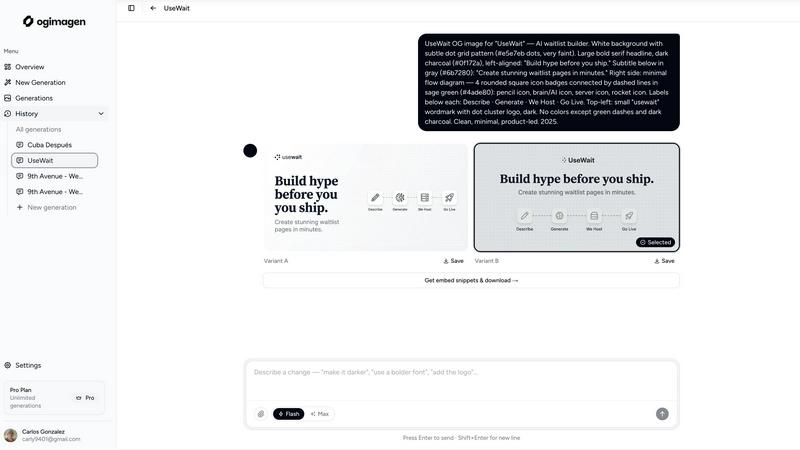
OGimagen effortlessly generates stunning Open Graph images and meta tags for social media in seconds, enhancing your web content's visibility.
Last updated: March 11, 2026

qtrl.ai
Scale your QA testing with AI agents while keeping full control and oversight.
Last updated: March 4, 2026
Visual Comparison
OGimagen
qtrl.ai

Feature Comparison
OGimagen
Easy Image Generation
OGimagen allows you to create stunning OG images by simply entering your title, description, brand color, and style preset. This user-friendly approach means anyone, regardless of design skills, can produce eye-catching social cards in just a few clicks.
Multiple Variants for Each Platform
With OGimagen, you receive two distinct image variants optimized for different social media platforms, including Facebook, Twitter, and LinkedIn. This ensures that your content looks its best, no matter where it is shared, enhancing your brand's visibility and professionalism.
Framework-Specific Meta Tags
After generating your images, OGimagen provides ready-to-paste meta tag snippets tailored to various web frameworks like Next.js, Astro, and Svelte. This feature saves developers time and effort, allowing them to seamlessly integrate images into their projects.
MCP Integration
OGimagen supports integration with multiple coding platforms, including Claude Code and Cursor. This means you can generate images directly from your coding environment, making it easier to work efficiently and maintain a smooth workflow without switching between different tools.
qtrl.ai
Enterprise-Grade Test Management
qtrl provides a robust, centralized foundation for all your QA activities. You can create, organize, and manage test cases, plan comprehensive test runs, and trace everything back to specific requirements. This ensures full visibility and creates detailed audit trails, which is essential for teams that need to meet compliance standards. It supports both manual testing workflows and automated processes, all in one organized place.
Progressive AI Automation
This feature allows you to adopt AI at your own pace. You can start by writing simple, high-level test instructions in plain English, and qtrl will execute them precisely. As you gain confidence, you can let qtrl's AI suggest and generate automated tests for you. Every AI-generated step is fully reviewable and editable, so you maintain complete oversight and control throughout your automation journey.
Autonomous QA Agents
qtrl's AI-powered agents act like intelligent team members that can execute testing tasks. You can instruct them to run tests on-demand or set them to run continuously. They operate across multiple browsers and real environments—not simulations—following the rules and permissions you set. This allows you to scale your test execution massively without a proportional increase in manual effort.
Adaptive Memory & Governance
The platform builds a living knowledge base of your application by learning from every test run, exploration, and identified issue. This "Adaptive Memory" makes test generation smarter and more context-aware over time. Crucially, all this happens within a governance-first framework. You have full visibility into agent actions, can set permission levels, and your secrets are kept encrypted and secure, never exposed to the AI.
Use Cases
OGimagen
Bloggers Enhancing Social Shares
Bloggers can use OGimagen to create appealing preview images for their posts. By generating professional-looking OG images, they can increase engagement and shares on social media, driving more traffic to their websites.
Marketers Promoting Campaigns
Digital marketers can leverage OGimagen to produce customized images for marketing campaigns. With tailored visuals, they can enhance their brand messaging and capture audience attention more effectively across different platforms.
Developers Streamlining Workflows
Developers can integrate OGimagen into their coding environments to quickly generate OG images without leaving their workflow. This feature allows them to focus on coding while ensuring that their projects incorporate high-quality visuals.
Businesses Improving Brand Presence
Businesses can utilize OGimagen to create consistent and professional images for their social media links. By ensuring that all shared content features polished visuals, they can strengthen their brand identity and enhance their online presence.
qtrl.ai
Scaling Beyond Manual Testing
For QA teams overwhelmed by repetitive manual checks, qtrl offers a smooth path forward. Teams can begin by structuring their existing manual test cases in the platform. Then, they can progressively automate the most tedious and high-value tests using AI, freeing up human testers to focus on more complex, exploratory work and significantly increasing test coverage and speed.
Modernizing Legacy QA Workflows
Companies stuck with outdated, siloed, or script-heavy automation frameworks can use qtrl to consolidate and modernize. The platform brings test management and execution into a single, user-friendly interface. Teams can gradually replace brittle scripts with AI-generated tests that are easier to maintain, reducing the long-term cost and complexity of test automation.
Ensuring Governance in Enterprise QA
Enterprises in regulated industries (like finance or healthcare) that require strict audit trails and compliance can trust qtrl. The platform provides full traceability from requirements to test execution, detailed logs of all AI agent activities, and enterprise-grade security. This allows large organizations to harness the power of AI for QA without sacrificing the control and documentation they need.
Supporting Product-Led Engineering Teams
Fast-moving product teams that need to ensure quality with every release can integrate qtrl into their CI/CD pipelines. Developers and QA can collaborate in one platform to create tests, get continuous quality feedback, and run automated checks across multiple environments. This helps ship features faster with confidence, maintaining a high bar for quality.
Overview
About OGimagen
OGimagen is a cutting-edge tool designed to simplify the creation of Open Graph images, enhancing your online presence with striking visuals. Whether you're a blogger, marketer, or developer, OGimagen helps you generate professional-quality social media cards in mere seconds, powered by advanced artificial intelligence. This tool allows you to create visually appealing images tailored for platforms like Facebook, Twitter, and LinkedIn, ensuring your links stand out when shared. With OGimagen, you can easily fill in a simple form with your content details, and the AI will produce two pixel-perfect image variants ready for use. This means you can improve your click-through rates on social platforms with minimal effort, making your online content look polished and engaging. Plus, with the ability to integrate with various coding workflows, OGimagen is perfect for developers looking to streamline their processes while maintaining high visual standards.
About qtrl.ai
qtrl.ai is a modern, intelligent QA platform designed to help software teams scale their quality assurance efforts the smart way. It's built for teams who are tired of choosing between slow, manual testing and complex, brittle automation. qtrl provides a single, centralized hub where you can organize all your test cases, plan detailed test runs, and see exactly how your testing maps back to requirements. This gives engineering leads and QA managers crystal-clear visibility into what's been tested, what's passing, and where potential risks might be hiding.
What truly sets qtrl apart is its thoughtful, progressive approach to AI. Instead of forcing you into a risky "black-box" AI system from day one, qtrl lets you start simple with solid test management. When you're ready, you can gradually introduce powerful, trustworthy AI automation. The platform's autonomous agents can generate real browser tests from plain English instructions, keep those tests updated as your application changes, and run them at scale. This makes qtrl perfect for product-led engineering teams, QA groups moving beyond manual processes, companies modernizing old workflows, and any enterprise that needs strict compliance and audit trails. Ultimately, qtrl bridges the gap, offering a trusted, controlled path to faster and more intelligent quality assurance.
Frequently Asked Questions
OGimagen FAQ
What exactly is an OG image?
An OG image, or Open Graph image, is a visual representation that appears when a link is shared on social media platforms. It helps attract attention and encourages users to click on the shared content.
How does AI generation work?
OGimagen uses artificial intelligence to analyze the information you provide, such as titles and descriptions, to generate visually appealing images that are optimized for specific social media platforms, ensuring you get the best results with minimal effort.
What's the difference between Starter, Growth, and Pro?
The Starter plan offers ten image generations for a one-time fee, while the Growth plan provides 25 generations with additional hosting. The Pro plan includes 50 generations per month, MCP integration, and permanent CDN hosting, catering to different user needs and scales.
Can I cancel Pro at any time?
Yes, you can cancel your Pro subscription at any time. This flexibility allows you to use the service according to your needs without being locked into a long-term contract.
qtrl.ai FAQ
How does qtrl.ai's AI work? Is it a "black box"?
No, qtrl is designed to be transparent and trustworthy. Its AI does not make hidden decisions. When it generates test steps from your instructions, you can see, review, and edit every single action it proposes. You have full visibility into what the autonomous agents are doing, and they operate only within the rules and permissions you define, ensuring you are always in control.
Can I use qtrl if my team only does manual testing right now?
Absolutely! qtrl is built for progression. You can start by using it as a powerful test management tool to organize your manual test cases, plans, and runs. When you feel ready to explore automation, the AI features are right there for you to start using gradually. There's no need to change your entire process overnight.
What kind of tests can the Autonomous QA Agents run?
The agents run real, end-to-end tests in actual browser environments (like Chrome or Firefox). They interact with your web application just like a human would—clicking buttons, filling forms, and validating content. They are not simulations, so you get accurate results that reflect the true user experience across different browsers and test environments.
How does qtrl handle security and sensitive data?
Security is a top priority. qtrl uses enterprise-ready security practices. Sensitive data like passwords and API keys are stored as encrypted environment variables and secrets. Crucially, these secrets are never exposed to or accessible by the AI agents during test execution, keeping your sensitive information completely safe.
Alternatives
OGimagen Alternatives
OGimagen is an AI-powered generator designed to create stunning Open Graph images quickly and efficiently. As a tool in the Dev Tools category, it allows users to produce high-quality social media cards that are compatible with various frameworks, enhancing the visual appeal of shared links. This capability is particularly valuable for improving click-through rates on social media platforms. Users often seek alternatives to OGimagen for various reasons, including pricing, specific feature sets, or the need for compatibility with different platforms. When looking for an alternative, consider factors such as ease of use, customization options, integration capabilities, and overall value for your specific needs. Finding the right tool can significantly enhance your content's presentation and engagement on social media.
qtrl.ai Alternatives
qtrl.ai is a modern QA platform in the automation and dev tools category. It helps software teams scale their testing efforts by combining structured test management with intelligent AI agents. This approach allows teams to automate tests while maintaining full control and governance over the entire quality assurance process. Users often explore alternatives for various reasons. These can include budget constraints, the need for different feature sets, or specific platform requirements like integration with existing tools. Some teams might be looking for a simpler entry point or a solution tailored to a very niche testing methodology. When evaluating different options, it's wise to consider a few key areas. Look at how the platform balances automation power with ease of use and control. Check if it can grow with your team's needs and whether it provides the visibility and reporting that your managers require. The right fit should align with your team's current workflow while offering a clear path to more advanced testing.