QRelix vs RemoveTexts
Side-by-side comparison to help you choose the right tool.

Create, customize, and track powerful QR codes for free with real-time analytics and print-ready quality.
Last updated: March 11, 2026

RemoveTexts
Effortlessly remove text and watermarks from images in seconds with our user-friendly AI tool, no design skills needed.
Last updated: March 11, 2026
Visual Comparison
QRelix
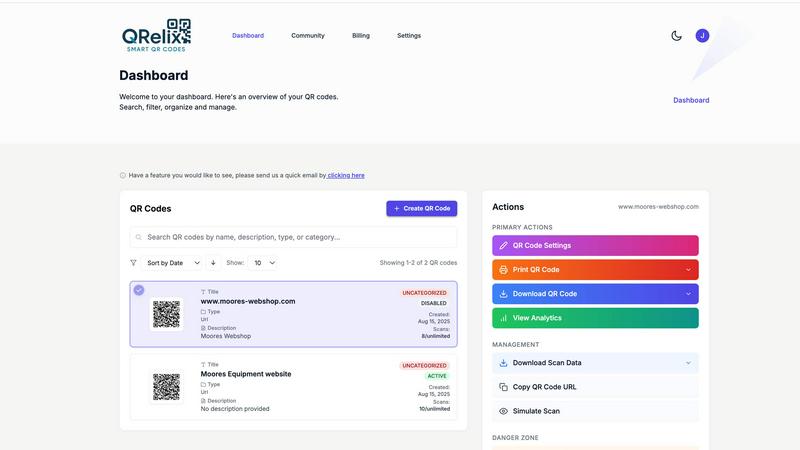
RemoveTexts

Feature Comparison
QRelix
Dynamic QR Codes & Real-Time Updates
Never worry about a printed QR code leading to outdated information again. QRelix creates dynamic QR codes, which means the destination link behind the code can be changed at any time from your dashboard. Update a menu, switch a promotion, or correct a link—all without touching your printed materials. This feature saves you time, money, and ensures your audience always gets the right information.
Comprehensive Real-Time Analytics
Understand your audience with detailed, real-time scan analytics. For every QR code you create, QRelix tracks key metrics like the total number of scans, the location (down to the city level), the type of device used (iOS, Android, etc.), and the exact time of each scan. This data is invaluable for measuring campaign success, understanding customer behavior, and making informed decisions to optimize your marketing efforts.
Advanced Customization & Branding
Make your QR codes an extension of your brand. QRelix offers deep customization options, allowing you to change the colors of the QR code and its background, add a central logo, and adjust the style of the code's dots. You can then export your design as a 300 DPI SVG file, which is a vector format that ensures crisp, high-quality printing on anything from small business cards to large billboards.
Mirrored QR & Password Protection
Two powerful features for control and versatility. The Mirrored QR feature lets you take any existing QR code (even one you didn't create) and "mirror" it through QRelix. This allows you to apply your own branding and tracking to it. Password Protection adds a layer of security, letting you restrict access to the QR code's content. Users must enter a password you set before they can see the linked information, perfect for exclusive offers or private documents.
RemoveTexts
Paint to Remove
This feature allows users to brush over specific areas of text they wish to remove with precision. It provides control over the removal process, making it easy to target only the unwanted text while leaving the rest of the image intact.
Auto Remove All
Leverage the power of AI with the Auto Remove All feature that detects and removes every text element in an image automatically. This one-click solution is perfect for those who want to quickly clean up images without the need for manual adjustments.
Edit & Replace Text
With the Edit & Replace Text feature, users can not only remove unwanted text but also replace it with new text while matching the original font style. This is particularly useful for those who want to modify captions or add new information seamlessly.
Remove Objects
In addition to text removal, the Remove Objects feature allows users to erase unwanted visual elements, such as logos or people, from their images. This enhances the overall aesthetics of the photo without compromising quality.
Use Cases
QRelix
Marketing Campaigns & Customer Engagement
Marketers can use QRelix to create trackable QR codes for print ads, flyers, and product packaging. Link to special landing pages, promotional videos, or customer surveys. The dynamic nature means A/B testing is easy, and the real-time analytics provide clear proof of campaign performance and customer engagement, helping to justify marketing spend and refine strategies.
Restaurants & Hospitality
Modernize the customer experience with QR codes on tables. Use QRelix to create codes that link directly to digital menus, feedback forms, or loyalty program sign-ups. The ability to update menu items or daily specials dynamically is a huge advantage. For hotels, codes can provide instant Wi-Fi access, room service menus, or local attraction guides without physical handouts.
Event Management
Simplify event logistics and enhance attendee interaction. Place QR codes on tickets for quick check-in, on signage to link to schedules or speaker bios, and on promotional materials to drive registrations for future events. The tracking data helps event organizers understand attendee flow and interest, providing insights for planning more successful events next time.
Retail & Product Packaging
Retail teams can add QR codes to product tags, shelves, or receipts. These codes can link to detailed product information, video tutorials, warranty registration, or inventory checkers. For packaging, a code can tell a brand's story, link to assembly instructions, or encourage social media sharing. Dynamic codes allow information to be updated long after the product leaves the shelf.
RemoveTexts
E-commerce Product Photos
Online sellers can use RemoveTexts to clean up product images by removing watermarks or distracting text, making their listings more appealing to potential buyers. This helps in creating a professional look that can increase sales.
Social Media Content
Content creators and marketers can utilize RemoveTexts to enhance their social media visuals by removing unwanted text from images, such as captions or watermarks from stock photos, ensuring their posts stand out in crowded feeds.
Legal Document Redaction
Professionals in legal fields can rely on RemoveTexts to redact sensitive information from documents by removing text while preserving the original layout and background. This ensures confidentiality while maintaining document integrity.
Personal Photo Editing
Everyday users can enhance their personal photos by removing date stamps, captions, or any unwanted text that detracts from the beauty of their images. This allows for cleaner, more visually appealing memories to share with friends and family.
Overview
About QRelix
QRelix is your all-in-one, free platform for creating powerful and professional QR codes. Designed for marketers, business owners, event planners, and anyone looking to bridge the physical and digital worlds, QRelix makes the process simple and effective. Forget about static, boring codes that you can't change once printed. With QRelix, you can generate dynamic QR codes for almost anything - websites, contact details, Wi-Fi logins, social media profiles, files, and much more. The best part? You can update where the code points to anytime without needing to reprint it. Every code you create is trackable, giving you real-time insights into who is scanning, from where, and on what device. Plus, you can fully customize each code with your brand's colors and logo, exporting it in a high-quality, print-ready format perfect for business cards, posters, or packaging. Start completely free with no credit card required and discover how easy it is to transform your outreach with smart, adaptable QR codes.
About RemoveTexts
RemoveTexts is an innovative AI-powered online tool designed to effortlessly erase unwanted text and watermarks from images. It appeals to a broad audience, from marketers and designers to everyday users who need clean visuals without any hassle. With just a simple upload and a few clicks, users can achieve professional-level results in a matter of seconds. The primary value proposition of RemoveTexts lies in its ability to automate the tedious process of text removal, freeing users from the complexities of software like Photoshop. This tool utilizes advanced deep learning technology to analyze and reconstruct the surrounding image background, ensuring that the edited area appears seamless and natural. Whether you are looking to remove watermark logos, captions from screenshots, or any unwanted text, RemoveTexts delivers high-quality results without requiring any design skills. It is user-friendly, efficient, and perfect for anyone looking to enhance their images quickly and effectively.
Frequently Asked Questions
QRelix FAQ
Is QRelix really free to use?
Yes, QRelix is 100% free to get started and offers a powerful set of features at no cost. You can create an account, design custom QR codes, access dynamic updates, and view basic analytics without ever providing a credit card. This makes it easy for anyone to try the platform and see its value for their business or personal projects.
What is a dynamic QR code and why is it better?
A dynamic QR code is one where the destination URL can be changed after the code is created and printed. This is far superior to a static code, which is permanently fixed. With QRelix's dynamic codes, you can correct typos, update promotions, or change linked content anytime from your online dashboard, giving you maximum flexibility and preventing wasted printed materials.
Can I track who scans my QR codes?
QRelix provides detailed analytics on scans, but it focuses on aggregated, anonymous data to protect user privacy. You can see metrics like the total number of scans, the geographic location (city/country), the type of device used (e.g., iPhone, Samsung Android), and the time of the scan. It does not collect or display personally identifiable information like specific names or email addresses from scans.
What file format do I get for printing?
QRelix allows you to export your customized QR codes as 300 DPI SVG files. SVG is a vector format, which means it can be scaled to any size without losing quality or becoming pixelated. This "print-ready" format is the industry standard for professional printing on materials like business cards, brochures, large posters, and product packaging, ensuring your codes always look sharp.
RemoveTexts FAQ
Is RemoveTexts free to use?
Yes, RemoveTexts is a free online tool that allows users to remove text from images without any costs involved. Simply upload your image and start editing.
What image formats are supported?
RemoveTexts supports JPG, PNG, and WebP image formats, allowing for a wide range of uploads. Ensure your image size is within the 10MB limit for optimal performance.
How quickly can I expect results?
RemoveTexts is designed for speed, with an average processing time of less than 30 seconds. Most users can expect their edited images ready to download almost instantly.
Can RemoveTexts handle complex backgrounds?
Absolutely! The AI technology used by RemoveTexts is adept at handling complex backgrounds, ensuring that text removal is seamless and the result looks as natural as possible. Your image quality remains intact with no visible artifacts.
Alternatives
QRelix Alternatives
QRelix is a dynamic QR code generator and analytics platform designed for marketing professionals. It allows users to create trackable, customizable codes that can be updated at any time, with detailed insights into scan performance. People often explore alternatives for various reasons. Some may need a different pricing structure, more advanced enterprise features, or a platform that integrates with their specific tech stack. Others might prioritize a simpler interface or different export formats. When evaluating other options, consider your core needs. Key factors include the types of QR codes offered, the depth of analytics, customization and branding tools, file export quality, and overall ease of use. Finding the right balance of these elements will lead you to the best tool for your campaigns.
RemoveTexts Alternatives
RemoveTexts is an innovative AI-powered tool designed to effortlessly remove text from images in mere seconds, eliminating the need for complex software like Photoshop. It falls under the category of image editing solutions, specifically focused on text removal. Many users seek alternatives to RemoveTexts for various reasons, such as pricing, specific feature requirements, or compatibility with different platforms. When looking for an alternative, it’s essential to consider factors such as ease of use, the effectiveness of text removal, supported languages, and the overall quality of the output. Finding the right image editing tool that meets your needs can significantly enhance your workflow. It's important to evaluate how user-friendly the platform is, the speed at which it operates, and the range of features it offers. Additionally, checking for customer reviews and testimonials can provide valuable insights into the tool's reliability and performance. A good alternative should not only match your requirements but also provide an enjoyable editing experience.