Phishly vs WA Reminders
Side-by-side comparison to help you choose the right tool.

Phishly
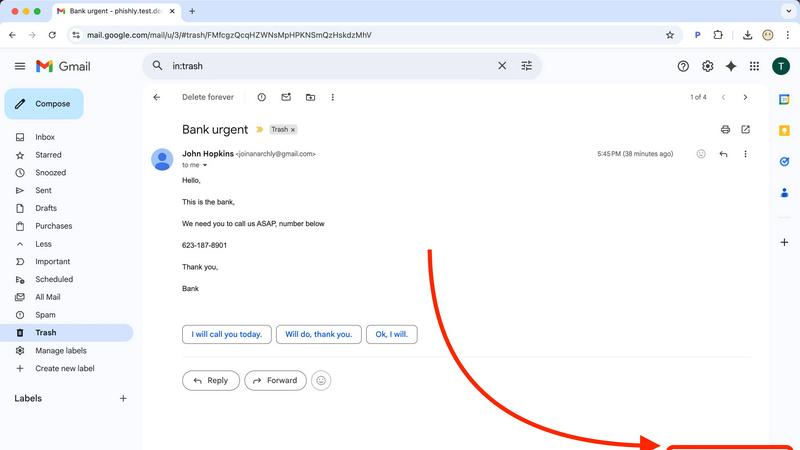
Phishly helps you detect phishing emails effortlessly with AI-powered scanning in your browser and Gmail.

WA Reminders
Schedule WhatsApp messages from your calendar to save time and never miss a client reminder.
Last updated: April 4, 2026
Visual Comparison
Phishly
WA Reminders

Feature Comparison
Phishly
AI-Powered Analysis
Phishly utilizes cutting-edge artificial intelligence to analyze emails for phishing threats. It evaluates multiple indicators such as domain authenticity and language urgency to provide reliable insights about potential risks.
Risk Assessment Categories
When Phishly scans an email, it categorizes the risk level as Safe, Medium Risk, or High Risk. This clear classification helps users quickly understand the threat level and decide how to proceed with the email in question.
User-Friendly Interface
With an intuitive design, Phishly is easy to use, even for those without technical expertise. The Chrome extension integrates seamlessly with Gmail, allowing users to scan emails with a single click, making email security accessible to everyone.
Privacy Protection
Phishly is committed to protecting user privacy. It only analyzes emails that you specifically choose to scan, ensuring that your personal data and email content remain confidential and secure from unwanted scrutiny.
WA Reminders
Seamless WhatsApp Linking
Linking your WhatsApp account is as easy as using WhatsApp Web. You simply scan a QR code with your phone, and you're connected. This secure process means WA Reminders acts as a bridge to schedule messages, but all conversations remain in your official WhatsApp app. You don't need to share passwords or use a separate phone number, keeping your communication personal and secure.
Schedule from Google Calendar
This feature integrates your scheduling directly into a tool you already use. You can schedule a WhatsApp reminder by just adding an internationally formatted phone number to the title or description of any Google Calendar event. When the event time arrives, WA Reminders automatically sends the message. It's perfect for those who already manage their appointments in Calendar, eliminating the need to switch between apps.
Schedule from the WA Reminders App
For more direct control, you can schedule messages from the WA Reminders app itself. A major benefit here is the automatic contact list import. The app pulls your full contact list from your phone, so you don't have to manually type in numbers. You can easily select a contact, type your message, set the date and time, and let the app handle the rest.
Recurring Message Scheduling
WA Reminders understands that many reminders happen on a regular basis. You can set up messages to repeat daily, weekly, monthly, or on a custom schedule. This is ideal for weekly class reminders, monthly payment follow-ups, or regular check-ins. You can set it once and forget it, ensuring your clients receive consistent communication without you lifting a finger each time.
Use Cases
Phishly
Individual Email Security
For everyday users, Phishly offers peace of mind by allowing them to scan suspicious emails before clicking on links or downloading attachments. This simple step can prevent falling victim to phishing scams.
Small Business Protection
Small businesses often lack extensive IT resources. Phishly provides a straightforward solution for these businesses to protect their employees from phishing attacks, enhancing overall security without needing complex systems.
Educational Institutions
Teachers and students can use Phishly to verify the legitimacy of emails received from unknown senders. This is crucial in protecting sensitive information and maintaining a safe digital environment in educational settings.
Remote Workers Safety
As remote work becomes increasingly common, Phishly is an essential tool for remote employees. It helps them identify phishing attempts in their emails, safeguarding their personal and corporate data while working from home.
WA Reminders
Reducing No-Shows for Appointments
Clinics, salons, and consultants can dramatically reduce missed appointments. By scheduling a friendly reminder message for the day before or a few hours before an appointment, clients are much more likely to confirm, reschedule, or show up on time. This saves lost revenue and keeps daily schedules running smoothly for the business owner.
Automating Payment Follow-Ups
Freelancers, coaches, and small service providers can use WA Reminders to send polite payment reminders. When an invoice is due, a scheduled message can be sent directly to the client's WhatsApp, providing a convenient and personal nudge that often leads to faster payments, improving cash flow without awkward conversations.
Managing Class or Workshop Reminders
Fitness trainers, tutors, and workshop organizers can schedule recurring reminders for their weekly sessions. A message sent to all registered participants a day before the class improves attendance rates. This ensures everyone is prepared and informed, leading to better engagement and client satisfaction.
Streamlining Customer Follow-Ups
Small shops or service businesses can schedule follow-up messages after a purchase or service is completed. A simple "How was your experience?" or "Thank you for your purchase!" message sent a day later shows customers you care, helps gather feedback, and encourages repeat business, all through automated yet personal communication.
Overview
About Phishly
Phishly is an innovative AI-powered phishing detection platform designed to enhance your email security effortlessly. Available as a convenient Chrome extension for Gmail and a user-friendly web tool, Phishly allows users to scan emails with ease. Simply open any email in Gmail and click "Scan with Phishly," or paste suspicious emails directly on our website for instant analysis. Our advanced AI technology identifies various phishing indicators, including suspicious domains, urgent language, spoofed senders, and social engineering tactics. The platform provides clear risk assessments to help users understand the threat level of potential phishing attempts, categorized as Safe, Medium Risk, or High Risk, along with detailed explanations. Phishly is perfect for individuals and small businesses seeking straightforward phishing protection without the complexity often associated with enterprise solutions. We prioritize user privacy by analyzing only the emails you choose to scan, ensuring your data remains secure. With no technical knowledge required, Phishly is free to use and delivers instant answers when you need to verify the legitimacy of an email.
About WA Reminders
WA Reminders is a smart, user-friendly tool designed to help you schedule WhatsApp messages in advance. It works seamlessly with both your personal WhatsApp and WhatsApp Business accounts. The core idea is simple: stop worrying about forgetting to send important messages and let automation handle your reminders. You can schedule messages directly within the WA Reminders app or, even more conveniently, by simply adding details to events in your Google Calendar. This powerful sync means your existing workflow doesn't have to change. The main goal is to save you precious time and significantly reduce missed appointments, or "no-shows," by ensuring clients receive timely, automated reminders directly from your own WhatsApp number. This product is the perfect solution for independent professionals like therapists and consultants, clinics, small shops, and any business that relies on appointments and follow-ups. If your time is valuable and you want to communicate more reliably with your clients, WA Reminders is the tool for you. It brings efficiency to your communication, allowing you to focus on running your business while it handles the important task of sending reminders.
Frequently Asked Questions
Phishly FAQ
How does Phishly work?
Phishly analyzes emails using AI technology to detect phishing indicators. By assessing aspects like sender authenticity and the language used, it provides a risk assessment to help users understand potential threats.
Is Phishly free to use?
Yes, Phishly is completely free to use. There are no hidden fees or subscriptions, making it accessible for everyone, from individuals to small businesses looking for effective phishing protection.
Do I need technical skills to use Phishly?
No, Phishly is designed to be user-friendly for individuals without technical skills. Its intuitive interface allows anyone to scan emails easily and receive instant feedback on their safety.
How does Phishly protect my privacy?
Phishly only analyzes the emails that you explicitly choose to scan. This ensures that your personal data and email content remain private and secure, with no unauthorized access to your information.
WA Reminders FAQ
How will my WhatsApp reminder messages look?
Your messages will appear to the recipient exactly as if you sent them manually from your own WhatsApp account. They will see your name, profile picture, and the message content you scheduled. The conversation will continue in your main WhatsApp chat thread, allowing you to reply naturally to any responses they send back.
Can I send reminders directly from Google Calendar?
Yes, absolutely! This is a key feature. You can schedule a WhatsApp message by simply creating an event in your Google Calendar and including a phone number (in international format, like +1234567890) in the event title or description. WA Reminders will detect this and send the reminder at the event's scheduled time.
Do you have a Calendly integration?
Yes, WA Reminders works with Calendly through Google Calendar integration. When you connect your Calendly to your Google Calendar, any appointment booked will create a calendar event. As long as the client's phone number is included in that event (which Calendly can be set up to do), WA Reminders will automatically send a WhatsApp reminder based on that event.
Can I import or use the contacts from my phone?
Yes. When you use the WA Reminders app to schedule a message, it automatically imports and syncs your phone's full contact list. This means you can easily select any contact to send a reminder to without having to manually enter their phone number, saving you time and preventing errors.