Phishly vs ScopeSnap
Side-by-side comparison to help you choose the right tool.

Phishly
Phishly helps you detect phishing emails effortlessly with AI-powered scanning in your browser and Gmail.

ScopeSnap
ScopeSnap uses AI to turn your project notes into clear scopes and client-ready proposals in minutes.
Last updated: March 18, 2026
Visual Comparison
Phishly
ScopeSnap

Feature Comparison
Phishly
AI-Powered Analysis
Phishly utilizes cutting-edge artificial intelligence to analyze emails for phishing threats. It evaluates multiple indicators such as domain authenticity and language urgency to provide reliable insights about potential risks.
Risk Assessment Categories
When Phishly scans an email, it categorizes the risk level as Safe, Medium Risk, or High Risk. This clear classification helps users quickly understand the threat level and decide how to proceed with the email in question.
User-Friendly Interface
With an intuitive design, Phishly is easy to use, even for those without technical expertise. The Chrome extension integrates seamlessly with Gmail, allowing users to scan emails with a single click, making email security accessible to everyone.
Privacy Protection
Phishly is committed to protecting user privacy. It only analyzes emails that you specifically choose to scan, ensuring that your personal data and email content remain confidential and secure from unwanted scrutiny.
ScopeSnap
AI-Powered Scope Breakdown
Simply paste in your discovery call transcripts, client emails, or rough notes. ScopeSnap's AI analyzes this unstructured information and automatically generates a structured project backlog for you. It identifies key epics, breaks them down into individual scope items or tasks, and even flags open questions and underlying assumptions that need to be resolved. This gives you a powerful head start, ensuring you don't miss important requirements buried in your notes.
Interactive Scope Refinement Board
The generated scope is presented on a clear, interactive board where you can easily review, edit, and organize everything. You can drag and drop items, assign them to different roles (like front-end, back-end, design), add detailed descriptions, and set time estimates. This visual workspace makes it simple to iteratively refine the project scope with your team until every feature is well-understood and confidently estimated.
Intelligent Estimation Assistant
ScopeSnap helps you move from vague guesses to data-informed estimates. As you build your structured backlog, you can assign effort estimates to each task. The tool helps you spot inconsistencies and gaps, ensuring your final project estimate is comprehensive and accurate. This reduces the risk of under-quoting and helps set clear, realistic expectations with your client from the very beginning.
Automated Proposal & SOW Generation
Once your scope is finalized and estimated, ScopeSnap turns it all into a professional document with a single click. It automatically generates a polished Proposal or Statement of Work (SOW) that clearly outlines the project objectives, detailed scope of work, timelines, costs, and terms. This document is fully formatted and ready to send to your client, saving you hours of drafting and formatting from scratch.
Use Cases
Phishly
Individual Email Security
For everyday users, Phishly offers peace of mind by allowing them to scan suspicious emails before clicking on links or downloading attachments. This simple step can prevent falling victim to phishing scams.
Small Business Protection
Small businesses often lack extensive IT resources. Phishly provides a straightforward solution for these businesses to protect their employees from phishing attacks, enhancing overall security without needing complex systems.
Educational Institutions
Teachers and students can use Phishly to verify the legitimacy of emails received from unknown senders. This is crucial in protecting sensitive information and maintaining a safe digital environment in educational settings.
Remote Workers Safety
As remote work becomes increasingly common, Phishly is an essential tool for remote employees. It helps them identify phishing attempts in their emails, safeguarding their personal and corporate data while working from home.
ScopeSnap
For Freelance Developers
As a solo developer, you wear many hats and time is your most valuable asset. ScopeSnap helps you quickly convert notes from a client discovery call into a structured scope and a formal proposal. This makes you look highly professional, ensures you capture all requirements, and protects you from scope creep by having a clear, agreed-upon document before any work begins.
For Small Software Agencies
Small agency teams need to scope projects efficiently to win business without draining resources. ScopeSnap provides a centralized platform for your team to collaborate on scope definition. Project managers can input discovery notes, developers can review and estimate tasks, and the final SOW is generated consistently, improving your pitch quality and operational speed.
For Technical Consultants
Consultants who advise clients on software projects need to provide clear roadmaps and implementation plans. ScopeSnap is perfect for analyzing client needs and ambitions, then structuring them into a phased, actionable project plan with estimates. This delivers immense value to the client in the consulting phase and sets the stage for a successful engagement.
For Responding to RFPs (Request for Proposal)
When a potential client sends a detailed Request for Proposal, dissecting it can be overwhelming. You can paste the RFP document into ScopeSnap. The AI will help parse the requirements, suggest a breakdown of work, and identify areas needing clarification. This accelerates your response time and helps you submit a more thorough and competitive proposal.
Overview
About Phishly
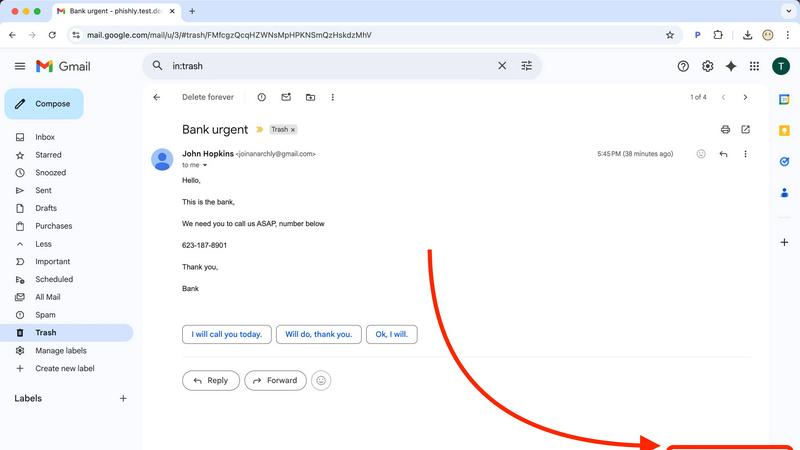
Phishly is an innovative AI-powered phishing detection platform designed to enhance your email security effortlessly. Available as a convenient Chrome extension for Gmail and a user-friendly web tool, Phishly allows users to scan emails with ease. Simply open any email in Gmail and click "Scan with Phishly," or paste suspicious emails directly on our website for instant analysis. Our advanced AI technology identifies various phishing indicators, including suspicious domains, urgent language, spoofed senders, and social engineering tactics. The platform provides clear risk assessments to help users understand the threat level of potential phishing attempts, categorized as Safe, Medium Risk, or High Risk, along with detailed explanations. Phishly is perfect for individuals and small businesses seeking straightforward phishing protection without the complexity often associated with enterprise solutions. We prioritize user privacy by analyzing only the emails you choose to scan, ensuring your data remains secure. With no technical knowledge required, Phishly is free to use and delivers instant answers when you need to verify the legitimacy of an email.
About ScopeSnap
ScopeSnap is an AI-powered tool designed specifically for freelance developers, consultants, and software agencies. It solves one of the most challenging and time-consuming parts of the job: turning messy, unstructured discovery notes into a clear project scope, accurate estimates, and professional, client-ready proposals. The traditional process is slow, risky, and easy to get wrong, often leading to missed requirements, vague scopes, and projects that run over budget. ScopeSnap simplifies this entire workflow. You start by feeding it your raw notes from calls, emails, or transcripts. Its AI then helps you break down the project idea into structured epics and tasks, surfaces important questions and assumptions, and allows for collaborative refinement. Once your scope is solid and estimated, ScopeSnap automatically generates a polished Statement of Work or proposal document you can send directly to your client. It's built to transform hours of tedious work into a process that takes minutes, giving you confidence in your estimates and clarity in your client agreements.
Frequently Asked Questions
Phishly FAQ
How does Phishly work?
Phishly analyzes emails using AI technology to detect phishing indicators. By assessing aspects like sender authenticity and the language used, it provides a risk assessment to help users understand potential threats.
Is Phishly free to use?
Yes, Phishly is completely free to use. There are no hidden fees or subscriptions, making it accessible for everyone, from individuals to small businesses looking for effective phishing protection.
Do I need technical skills to use Phishly?
No, Phishly is designed to be user-friendly for individuals without technical skills. Its intuitive interface allows anyone to scan emails easily and receive instant feedback on their safety.
How does Phishly protect my privacy?
Phishly only analyzes the emails that you explicitly choose to scan. This ensures that your personal data and email content remain private and secure, with no unauthorized access to your information.
ScopeSnap FAQ
What kind of input does ScopeSnap need to get started?
ScopeSnap is designed to work with the raw, messy notes you already have. You can paste in text from discovery call transcripts (using tools like Otter.ai or Rev), email threads with the client, bullet-point notes from a meeting, or even a voice memo transcript. The AI is built to find structure and requirements within this unstructured data.
How accurate are the AI-generated scope and estimates?
The AI provides an excellent starting point by identifying potential tasks and epics from your notes. However, the estimates and final scope require your expert review. ScopeSnap is an assistant, not a replacement for your judgment. You refine the generated backlog, adjust tasks, and set the estimates based on your experience, ensuring the final output is accurate and reliable.
Can I collaborate with my team on a scope in ScopeSnap?
Yes, ScopeSnap supports collaboration. You can invite team members to review the AI-generated scope board. They can help edit tasks, ask questions, assign roles, and contribute to the estimates. This makes it a great tool for ensuring the entire project team is aligned before the proposal is sent to the client.
What formats can I export the final proposal in?
ScopeSnap automatically generates a polished, well-formatted document ready for client delivery. You can typically export this document as a PDF or a shareable link. This allows you to maintain a professional appearance and makes it easy for clients to review, sign, and return the proposal or Statement of Work.