
Never Drop vs Phishly
Side-by-side comparison to help you choose the right tool.

Never Drop
NeverDrop instantly captures contacts and crafts personalized follow-ups, ensuring you never lose a lead at events.
Last updated: February 28, 2026

Phishly
Phishly helps you detect phishing emails effortlessly with AI-powered scanning in your browser and Gmail.
Visual Comparison
Never Drop

Phishly
Feature Comparison
Never Drop
Smart Business Card Scanning
Never Drop allows users to effortlessly scan any business card using their smartphones. The app employs advanced AI-powered Optical Character Recognition (OCR) technology to extract critical contact details, including names, companies, titles, phone numbers, and emails, in just seconds. This feature saves time and reduces the chances of errors that often occur with manual data entry.
Automatic Email Enrichment
Many business cards contain generic email addresses or may lack them entirely. Never Drop addresses this issue by automatically finding and verifying work emails based on the name and company information extracted from the card. This feature ensures that your contact profiles are complete and accurate, eliminating guesswork and manual LinkedIn searches.
Personalized AI Drafting
After scanning a business card and adding context about the conversation, Never Drop generates a personalized follow-up email in under two minutes. The AI drafts emails based on your voice notes and the specifics of your interaction, ensuring that each follow-up feels genuine and tailored rather than generic. Users can review and tweak these emails before sending them with just one tap.
Team Collaboration Dashboard
Never Drop is designed for teams, allowing users to organize scans by event, reassign leads among team members, and track overall activity from a centralized dashboard. This feature promotes collaboration and ensures that no lead falls through the cracks, keeping your sales efforts aligned and efficient.
Phishly
AI-Powered Analysis
Phishly utilizes cutting-edge artificial intelligence to analyze emails for phishing threats. It evaluates multiple indicators such as domain authenticity and language urgency to provide reliable insights about potential risks.
Risk Assessment Categories
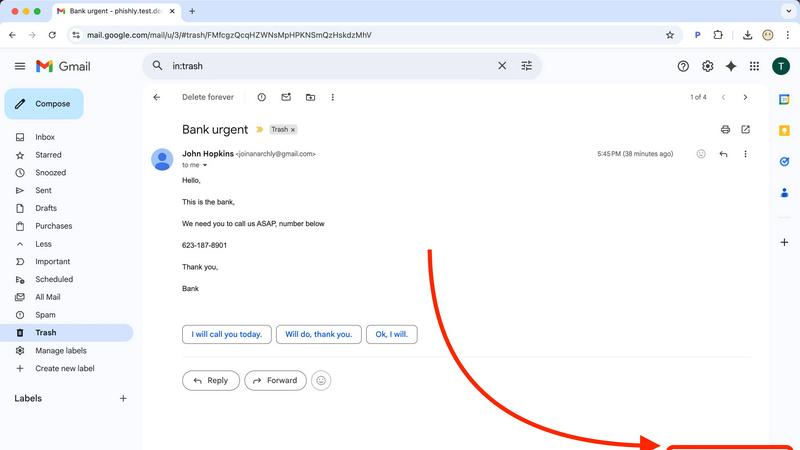
When Phishly scans an email, it categorizes the risk level as Safe, Medium Risk, or High Risk. This clear classification helps users quickly understand the threat level and decide how to proceed with the email in question.
User-Friendly Interface
With an intuitive design, Phishly is easy to use, even for those without technical expertise. The Chrome extension integrates seamlessly with Gmail, allowing users to scan emails with a single click, making email security accessible to everyone.
Privacy Protection
Phishly is committed to protecting user privacy. It only analyzes emails that you specifically choose to scan, ensuring that your personal data and email content remain confidential and secure from unwanted scrutiny.
Use Cases
Never Drop
Trade Shows
At bustling trade shows, sales teams can quickly scan business cards from potential clients, add context about their conversations, and send follow-up emails while still engaging with other attendees. This rapid response can significantly increase conversion rates.
Networking Events
Networking events often involve numerous interactions in a short period. Never Drop enables users to capture leads seamlessly, ensuring they can follow up with personalized messages that reference specific discussions, enhancing rapport with potential clients.
Conferences
Conferences provide valuable opportunities for sales outreach, and with Never Drop, attendees can collect and manage leads efficiently. By organizing scans by event, teams can track their follow-up efforts and measure success post-conference.
Business Dinners
Even in more intimate settings like business dinners, Never Drop proves useful. Users can scan cards and add personal insights about their conversations, making follow-up communications more meaningful and impactful.
Phishly
Individual Email Security
For everyday users, Phishly offers peace of mind by allowing them to scan suspicious emails before clicking on links or downloading attachments. This simple step can prevent falling victim to phishing scams.
Small Business Protection
Small businesses often lack extensive IT resources. Phishly provides a straightforward solution for these businesses to protect their employees from phishing attacks, enhancing overall security without needing complex systems.
Educational Institutions
Teachers and students can use Phishly to verify the legitimacy of emails received from unknown senders. This is crucial in protecting sensitive information and maintaining a safe digital environment in educational settings.
Remote Workers Safety
As remote work becomes increasingly common, Phishly is an essential tool for remote employees. It helps them identify phishing attempts in their emails, safeguarding their personal and corporate data while working from home.
Overview
About Never Drop
Never Drop is a cutting-edge lead-capture app tailored for sales teams who thrive in high-energy environments like trade shows, conferences, and networking events. Its primary goal is to streamline the process of collecting and managing leads, making it easier for sales professionals to convert connections into clients. By allowing users to scan business cards directly with their smartphones, Never Drop eliminates the hassle of manual entry and the risk of losing essential contact information. Once a card is scanned, users can enhance the data with voice notes or text context about their interactions, ensuring that they remember important details about each lead. With advanced AI capabilities, the app generates personalized follow-up emails in under two minutes, helping teams maintain momentum and responsiveness. Integrated seamlessly with popular CRMs such as HubSpot, Never Drop keeps your sales pipeline organized and ready for action. Say goodbye to lost leads and hello to efficient follow-ups that can turn a simple handshake into a closed deal.
About Phishly
Phishly is an innovative AI-powered phishing detection platform designed to enhance your email security effortlessly. Available as a convenient Chrome extension for Gmail and a user-friendly web tool, Phishly allows users to scan emails with ease. Simply open any email in Gmail and click "Scan with Phishly," or paste suspicious emails directly on our website for instant analysis. Our advanced AI technology identifies various phishing indicators, including suspicious domains, urgent language, spoofed senders, and social engineering tactics. The platform provides clear risk assessments to help users understand the threat level of potential phishing attempts, categorized as Safe, Medium Risk, or High Risk, along with detailed explanations. Phishly is perfect for individuals and small businesses seeking straightforward phishing protection without the complexity often associated with enterprise solutions. We prioritize user privacy by analyzing only the emails you choose to scan, ensuring your data remains secure. With no technical knowledge required, Phishly is free to use and delivers instant answers when you need to verify the legitimacy of an email.
Frequently Asked Questions
Never Drop FAQ
What is Never Drop?
Never Drop is a lead-capture app designed for sales teams at events. It allows users to scan business cards, add voice or text context, and automatically generate personalized follow-up emails in under two minutes, enriching contacts with verified work emails and syncing everything to your CRM.
How does business card scanning work?
Simply take a photo of any business card with the Never Drop mobile app. The app uses AI-powered OCR to extract contact details such as name, company, title, phone, and email in seconds. Users can also enter details manually if they prefer.
What types of events is Never Drop suitable for?
Never Drop is ideal for trade shows, conferences, networking events, meetups, and business dinners. It helps users efficiently capture leads and follow up quickly, organizing scans by event for easier tracking.
Do I need the mobile app?
Yes, the mobile app is essential for scanning business cards, recording voice context, and triggering follow-ups on the go. The web dashboard complements the app by allowing team management, scan reviews, and billing configuration. Both platforms work seamlessly together.
Phishly FAQ
How does Phishly work?
Phishly analyzes emails using AI technology to detect phishing indicators. By assessing aspects like sender authenticity and the language used, it provides a risk assessment to help users understand potential threats.
Is Phishly free to use?
Yes, Phishly is completely free to use. There are no hidden fees or subscriptions, making it accessible for everyone, from individuals to small businesses looking for effective phishing protection.
Do I need technical skills to use Phishly?
No, Phishly is designed to be user-friendly for individuals without technical skills. Its intuitive interface allows anyone to scan emails easily and receive instant feedback on their safety.
How does Phishly protect my privacy?
Phishly only analyzes the emails that you explicitly choose to scan. This ensures that your personal data and email content remain private and secure, with no unauthorized access to your information.