One More Shot AI vs Seedance 2 AI Video Generator
Side-by-side comparison to help you choose the right tool.

One More Shot AI
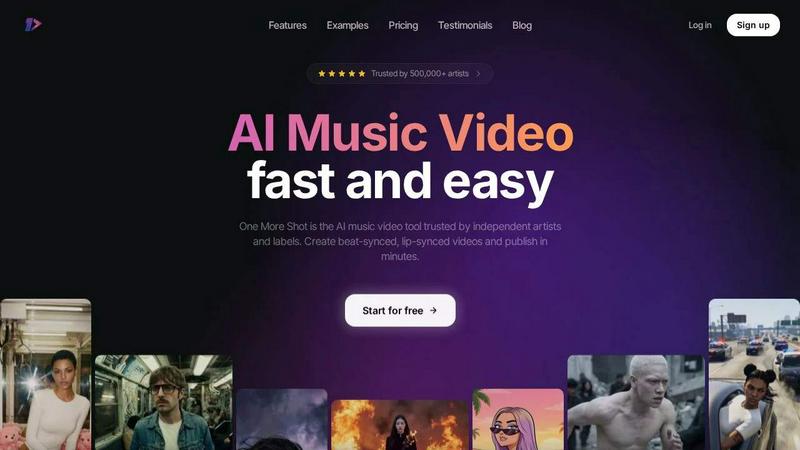
One More Shot AI instantly creates professional, lip-synced music videos from your songs so you can share your music visually in minutes.
Last updated: April 4, 2026

Seedance 2 AI Video Generator
Create stunning videos from text, images, or clips quickly with Seedance 2 AI Video Generator for effortless.
Last updated: March 1, 2026
Visual Comparison
One More Shot AI
Seedance 2 AI Video Generator

Feature Comparison
One More Shot AI
AI Artist & Identity Consistency
Create a virtual, consistent artist identity for your videos using just a single photo or a simple text description. This feature ensures that your generated character looks the same across every scene and video, building a recognizable brand for your music. It's perfect for generating social media content and full music videos with a cohesive and professional appearance, eliminating the worry of inconsistent avatars.
Auto Video Generation
Think of this as your automated AI production crew. Simply input your song and a reference photo, and the platform's AI agents take over. They handle the complex tasks of scene creation, timing, and visual storytelling to deliver a complete, beat-synced music video automatically. It's the fastest way to go from an audio track to a shareable visual experience without any manual editing.
Precise Project Mode Editing
For creators who love hands-on control, Project Mode offers granular, frame-by-frame editing. You can start from scratch or dive into an auto-generated video to modify individual shots, adjust timing, change visuals, and fine-tune the narrative. This advanced workflow gives you the power of a full video editor tailored specifically for music synchronization and AI-generated content.
Top-Tier AI Lip-Sync (Seedance 2.0)
One More Shot AI hosts the best lip-syncing technology available to make singing scenes look incredibly natural. The latest Seedance 2.0 model ensures the avatar's mouth movements are perfectly synchronized with the vocals in your track. This attention to detail is crucial for creating believable performance videos that captivate your audience and enhance credibility.
Seedance 2 AI Video Generator
Text-to-Video Generation
Seedance 2.0 offers a powerful text-to-video feature that allows users to create videos directly from written prompts. This capability enables a seamless transition from concept to visual representation, making it easier to bring ideas to life without needing extensive video editing skills.
Image-to-Video Conversion
This feature transforms still images into dynamic video content. Users can upload reference images, which Seedance 2.0 uses to maintain style consistency and create visually appealing clips, enhancing the storytelling aspect of the project.
Video-to-Video Restyling
Seedance 2.0 provides the ability to modify existing video footage effortlessly. By using source clips, users can apply different styles or themes, allowing for a quick and effective restyling process that keeps the essence of the original video while introducing fresh elements.
Multimodal Input Support
The platform supports multiple input modes, including text, images, and videos, giving users maximum flexibility in how they create their content. This versatility ensures that creators can tailor their video generation process to fit their specific needs and preferences.
Use Cases
One More Shot AI
Promoting New Music Releases
Independent artists and labels can use One More Shot AI to quickly create a compelling music video to accompany a new single or album release. Instead of waiting weeks for production, you can generate a professional, beat-synced video in minutes to share on Spotify, YouTube, and social media, driving immediate listener engagement and streams.
Creating Social Media Content
Generate short, impactful clips in vertical, square, or horizontal formats perfect for platforms like TikTok, Instagram Reels, and YouTube Shorts. You can easily repurpose a full song into multiple eye-catching snippets that highlight the best hooks, helping to grow your audience and promote your music virally on social media.
Developing an Artist's Visual Brand
Build a consistent and recognizable visual identity across all your content. By using the AI Artist feature, musicians can create a virtual persona that appears in all videos, lyric visuals, and promotional material. This strengthens brand recall and gives fans a cohesive visual experience tied directly to the music.
Visualizing Songs from AI Music Platforms
If you create music using platforms like Suno or Udio, One More Shot AI is the perfect next step. You can seamlessly take your AI-generated track and turn it into a complete audio-visual package. It solves the challenge of "now I have a song, but I need a video," making it easy to present finished, marketable content.
Seedance 2 AI Video Generator
Marketing Campaigns
Seedance 2.0 is an excellent tool for marketers looking to create promotional videos quickly. By leveraging the text-to-video feature, they can generate engaging advertisements that capture attention and drive conversions with minimal effort.
Social Media Content Creation
Content creators can utilize Seedance 2.0 to produce eye-catching videos for social media platforms. With the ability to create videos from images or text prompts, users can maintain a consistent posting schedule and keep their audience engaged.
Educational Videos
Educators can benefit from Seedance 2.0 by creating informative video content based on lesson plans or educational materials. The platform’s ease of use allows teachers to produce high-quality instructional videos without extensive technical knowledge.
Product Demonstrations
Businesses can use Seedance 2.0 to create impactful product demo videos. By transforming existing footage or images into polished clips, companies can effectively showcase their products’ features and benefits, enhancing customer understanding and interest.
Overview
About One More Shot AI
One More Shot AI is your all-in-one creative partner for transforming music into stunning visual stories. It's a web and mobile platform designed specifically for musicians, creators, and music marketers who want to produce professional-looking music videos without the complexity, cost, and time of traditional video production. Imagine having a full AI production crew at your fingertips, ready to bring your song to life. The core magic of One More Shot AI lies in its ability to intelligently analyze your track's rhythm, energy, and mood to generate visuals that move perfectly in sync with the beat. Whether you're an independent artist promoting a new single, a content creator looking for engaging social media clips, or a label needing quick visual assets, this tool simplifies the entire process. You can start with a super simple workflow—just upload your song and a reference image—and get a complete video in minutes. For those who want more control, advanced editing modes allow for detailed, scene-by-scene customization. With support for multiple formats (vertical, horizontal, square) and top-tier features like AI lip-sync, it's the trusted solution for over 500,000 artists to enhance their music promotion and artist branding effortlessly.
About Seedance 2 AI Video Generator
Seedance 2 AI Video Generator is a cutting-edge tool designed to streamline the video creation process for creators, marketers, and agencies. By harnessing advanced AI technology, this innovative platform allows users to transform text prompts, images, and existing footage into high-quality cinematic videos quickly and effortlessly. Seedance 2.0 is built for those who need fast video output without the burden of extensive editing, making it an ideal choice for time-sensitive projects. Its user-friendly interface and robust features enable users to maintain control over video style, motion, and quality, ensuring that every output is polished and professional. With Seedance 2, you can elevate your storytelling and marketing strategies by producing engaging videos that resonate with your audience.
Frequently Asked Questions
One More Shot AI FAQ
What do I need to start creating a video?
Getting started is very simple! You primarily need your audio track (in a common format like MP3) and an idea for the visual. This can be a reference photo for the AI Artist, a text prompt describing the scene, or both. The platform guides you through an intuitive process from there. No prior video editing experience is required.
How good is the lip-syncing feature?
The lip-syncing, powered by the latest Seedance 2.0 model, is state-of-the-art and designed to look completely natural. It accurately matches mouth movements to the vocals and lyrics in your song. This high-quality sync is a key strength that makes performance videos believable and engaging for viewers.
Can I edit the videos after they are generated?
Absolutely! While the Auto Video feature creates a complete video for you, you have full creative freedom. You can use the Precise Project Mode to edit any auto-generated video. This allows for scene-by-scene changes, timing adjustments, adding new shots, or even starting a video completely from scratch with fine-grained control.
What formats can I export my video in?
One More Shot AI supports multiple export formats to fit all your distribution needs. You can create videos in vertical (9:16) for TikTok/Reels, horizontal (16:9) for YouTube, and square (1:1) for Instagram posts. This flexibility ensures your content looks perfect on every platform.
Seedance 2 AI Video Generator FAQ
What formats does Seedance 2.0 support for video output?
Seedance 2.0 generates videos in the universal MP4 (H.264) format, ensuring compatibility across various platforms and devices.
Can I generate audio along with my video?
Yes, Seedance 2.0 includes audio synthesis capabilities, allowing for synchronized audio generation alongside video creation, providing a complete audiovisual experience in a single pass.
What resolutions can I create videos in with Seedance 2.0?
Users can create videos in resolutions up to 1080p, ensuring high-definition output suitable for professional use and various distribution channels.
Is Seedance 2.0 suitable for beginners?
Absolutely! Seedance 2.0 is designed with user-friendliness in mind, making it accessible for beginners while still offering advanced features for more experienced users.
Alternatives
One More Shot AI Alternatives
One More Shot AI is a tool in the content creation category that helps musicians and artists turn their songs into AI-generated music videos. It’s designed to make video production fast and accessible by syncing visuals to the music's beat and mood. People often look for different tools for various reasons. Maybe they need a different price point, specific features like more control over animation styles, or a platform that works better on their preferred device. It’s a common step in finding the perfect creative partner for your projects. When you're comparing options, think about what matters most for your music. Consider how easy the tool is to use, the quality and style of the videos it creates, and whether it can keep a consistent look for your artist brand across different scenes. The goal is to find a solution that feels right for your creative workflow.
Seedance 2 AI Video Generator Alternatives
Seedance 2 AI Video Generator is a powerful tool designed to convert text prompts, images, and video clips into stunning cinematic videos effortlessly. It falls under the category of video creation software, providing users with an all-in-one workflow for generating polished clips quickly and effectively. With its smooth extensions and easy prompt control, Seedance 2 aims to streamline the video-making process for creators of all skill levels. However, users often explore alternatives due to various factors such as pricing, specific feature sets, or compatibility with different platforms. When searching for an alternative, consider what features are most important to you, whether it’s ease of use, the ability to customize your videos, or pricing plans that fit your budget. Evaluating these aspects will help you find a tool that meets your unique video creation needs.