
OC Maker vs Seedream 4.0
Side-by-side comparison to help you choose the right tool.

OC Maker
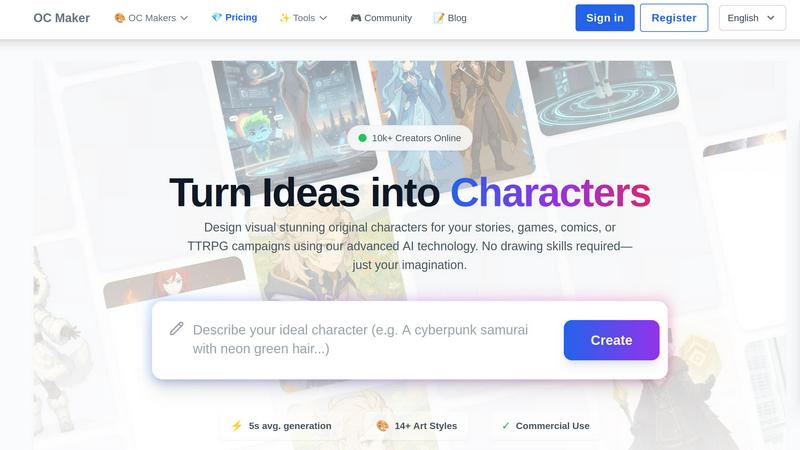
OC Maker lets you create unique characters for any project with AI, no drawing skills needed.
Last updated: March 1, 2026

Seedream 4.0
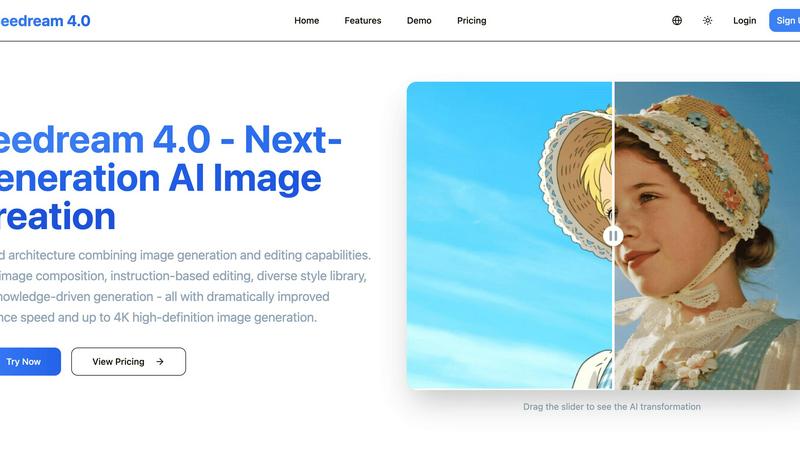
Seedream 4.0 is your easy AI tool that creates and edits stunning pictures from simple text instructions.
Last updated: March 1, 2026
Visual Comparison
OC Maker
Seedream 4.0
Feature Comparison
OC Maker
Lightning-Fast AI Character Generation
At the heart of OC Maker is its powerful AI engine that generates complete, original characters from your text descriptions in mere seconds. With an average generation time of just five seconds, you can iterate on ideas rapidly, experimenting with different prompts and styles until you find the perfect visual for your character. This speed turns the character creation process from a daunting task into an exciting, on-demand creative session.
Diverse and Specialized Art Style Library
OC Maker boasts an extensive library of over 14 distinct art styles and themed universes. You are not limited to a generic look; you can generate characters in specific fandoms like Anime, Sonic, Genshin Impact, One Piece, or photorealistic styles. This ensures your character perfectly fits the visual aesthetic of your project, whether it's for a comic book, a game mod, or a piece of fan art, all without needing to master those art styles yourself.
Suite of Creative Power Tools
OC Maker is more than just a character generator; it's a full creative suite. It includes additional professional AI tools like an AI Video generator to animate your creations, an AI Headshot tool for professional portraits, a Face Swap feature for photos and videos, and an Image-to-Prompt tool to reverse-engineer styles. These tools allow you to edit, enhance, and bring your static characters to life in dynamic ways.
Commercial Use License
A standout feature for creators looking to monetize their work is OC Maker's commercial use policy. Characters and assets you create using the platform can be used in commercial projects, such as indie games, published books, merchandise, or client commissions. This makes it a viable and powerful tool for professional creators and small studios who need high-quality, original character art without the cost of hiring an illustrator.
Seedream 4.0
Unified Generation & Editing
This is the core magic of Seedream 4.0. Unlike other tools that force you to switch between different apps, everything happens in one place. You can start from scratch with text-to-image creation or upload any photo and edit it using the same simple, instruction-based system. This seamless workflow makes your creative process smooth and intuitive, letting you focus on your ideas instead of learning complex software.
Instruction-Based Editing
Editing is as simple as having a conversation. Just tell the AI what you want to change using plain English. You can say "make the sky more dramatic," "add a rainbow," or "change the style to watercolor painting," and Seedream 4.0 will understand and apply your request precisely. This "what you say is what you get" approach makes advanced photo editing feel effortless and fun for anyone.
Diverse Style Library
Unlock a world of artistic styles at your fingertips. Whether you're generating a new image or stylizing an existing photo, Seedream 4.0 offers a vast library of professional styles. Instantly transform your work into cyberpunk, watercolor, oil painting, anime, and many more. This feature allows you to experiment and develop a unique visual language for your projects without needing to be an expert artist.
Knowledge-Driven Generation
Seedream 4.0 is smart. It understands context and relationships, making it fantastic for creating accurate and beautiful educational or professional content. Need a detailed diagram of a plant cell, a historical scene, or a professional chart? Describe it in your prompt, and the AI will generate a knowledgeable and precise illustration. This makes it an invaluable tool for teachers, students, marketers, and content creators.
Use Cases
OC Maker
For Writers and Authors
Writers can finally see the characters from their novels, short stories, or fan fiction come to life. By generating a visual reference, authors can maintain consistent descriptions, share their vision with cover artists, and deepen their connection to their own creations. It's an invaluable tool for brainstorming character appearances based on personality traits and backstories described in their writing.
For Tabletop Role-Playing Game (TTRPG) Players
Players and Game Masters for games like Dungeons & Dragons can create instant visual tokens and portraits for their player characters (PCs) and non-player characters (NPCs). Designing a unique elf wizard, a grizzled dwarf warrior, or a mysterious campaign villain becomes a quick and engaging part of session preparation, enhancing immersion at the gaming table.
For Digital Artists and Content Creators
Artists can use OC Maker as a powerful brainstorming and sketching tool to overcome creative block, generate base concepts to paint over, or create consistent character sheets for comics and webtoons. Social media content creators and streamers can design unique avatars, mascots, and branded characters to build their personal or channel's visual identity.
For Game Developers and Indie Studios
Small indie game development teams with limited art budgets can use OC Maker to generate concept art, character sprites, and promotional assets. The ability to create characters in specific styles and use them commercially allows developers to prototype visually and create assets for their games more efficiently and cost-effectively.
Seedream 4.0
Social Media Content Creation
Easily generate eye-catching and unique graphics for your Instagram posts, Facebook ads, or TikTok videos. Describe the perfect image for your brand message, or quickly edit product photos to make them pop. With fast generation and high-quality 4K output, you can maintain a consistent and professional visual feed that engages your audience.
Personal Photo Enhancement
Breathe new life into your personal photos. Fix old pictures, remove unwanted objects from the background, change the weather in a vacation shot, or apply fun artistic filters to portraits. Seedream 4.0 acts like your personal photo editor, allowing you to perfect your memories with simple instructions, no technical expertise needed.
Concept Art & Brainstorming
Perfect for writers, game designers, and creative professionals to visualize ideas. Quickly generate concept art for characters, environments, or items based on descriptive text. You can also use the multi-image composition feature to blend references and explore different visual directions, accelerating the early creative stages of any project.
Educational Material Design
Teachers and students can create custom, accurate illustrations for presentations, study guides, and reports. Generate diagrams of scientific processes, historical events, or mathematical concepts. The knowledge-driven generation ensures visuals are not only beautiful but also factually helpful for enhancing learning and communication.
Overview
About OC Maker
OC Maker is an innovative AI-powered creative platform that makes designing unique Original Characters (OCs) fast, easy, and accessible to everyone. Whether you're a writer dreaming up a protagonist, a game developer needing concept art, an artist seeking inspiration, or a fan creating for a specific fandom, OC Maker is your perfect creative partner. The core magic of OC Maker is its ability to transform your written ideas—your "prompts"—into stunning visual characters in an average of just five seconds, with no drawing skills required.
The platform is built to serve a wide range of creative needs. It offers over 14 specialized art styles, from popular anime and photorealistic looks to specific universes like Sonic, Genshin Impact, and Cuphead. Beyond just generating a single image, OC Maker provides a suite of professional tools to edit, animate, and perfect your creations, including AI video, face swap, and AI headshot generators. With support for commercial use, it's a powerful solution for professionals and hobbyists alike to bring their imaginative ideas to life for stories, games, comics, or TTRPG campaigns.
About Seedream 4.0
Welcome to Seedream 4.0, your new creative partner! This tool is a revolutionary all-in-one AI studio designed to make professional image creation and editing accessible to everyone. Have you ever had a brilliant idea for a picture but didn't know how to draw it? Or wanted to fix a photo but found editing software confusing? Seedream 4.0 is here to help. It combines two powerful abilities into one simple platform: generating brand-new images from your text descriptions and editing your existing photos with simple instructions. Imagine typing "a cozy cabin in a snowy forest at dusk" and watching a beautiful 4K image appear in seconds. Or uploading a portrait and saying "make the background a sunset beach" and seeing it happen instantly. Built for complete beginners, hobbyists, and professional creators alike, Seedream 4.0 removes technical barriers with its easy-to-use interface, lightning-fast processing, and stunning high-definition results. It’s the perfect tool to bring your imagination to life, quickly and easily, without any prior artistic skill required.
Frequently Asked Questions
OC Maker FAQ
Do I need any artistic skill to use OC Maker?
No, you do not need any drawing or artistic skill whatsoever. OC Maker is specifically designed to make character creation accessible to everyone. All you need is your imagination and the ability to describe your character idea in words using the prompt system. The AI handles the complex task of turning that description into a visual artwork.
What is an "OC Maker Prompt" and how do I write a good one?
An OC Maker Prompt is the text description you provide to the AI to generate your character. A good prompt is detailed and specific. Instead of "a knight," try "a young female knight with silver armor scarred from battle, bright green eyes, and long red hair in a braid, standing in a misty forest, fantasy style." Mention key details like appearance, clothing, colors, setting, and mood for the best results.
Can I create a full-body character with OC Maker?
Absolutely. OC Maker's generators are optimized to create complete character visualizations, including full-body designs. When writing your prompt, you can specify poses, stances, and full-body descriptions to guide the AI. Many of the featured art styles and themed universe generators are built to produce coherent full-character artwork suitable for reference sheets.
Are the characters I create really free for commercial use?
Yes, according to the provided information, OC Maker states that creations come with a license for commercial use. This means you can typically use the characters you generate in projects you intend to sell, such as books, games, or merchandise. However, it is always a good practice to double-check the platform's current Terms of Service for the most detailed and up-to-date licensing information.
Seedream 4.0 FAQ
Can I try Seedream 4.0 for free?
Yes! You can experience Seedream 4.0 by using the demo tools available on the website. This allows you to test the core image generation and editing features. To access the full suite of capabilities, including high-resolution 4K downloads and all style templates, you can choose one of the affordable subscription plans.
How does Seedream 4.0 work?
Seedream 4.0 uses a powerful next-generation AI model. For generation, you simply type a description of what you want to see. The AI interprets your text and creates a brand-new image. For editing, you upload a photo and then type instructions for how to change it. The AI then applies those changes directly to your image, all within the same easy-to-use platform.
What makes Seedream 4.0 different from other AI tools?
Seedream 4.0 stands out with its unified architecture, combining top-tier image generation and advanced editing in one simple tool. Its instruction-based editing is incredibly intuitive, allowing for precise changes with just a sentence. Additionally, it offers dramatically improved speed, knowledge-driven generation for accuracy, and the ability to create stunning images up to 4K resolution.
Can I use the images I create commercially?
The provided context does not specify the commercial usage rights for generated images. It is very important to check the official Seedream 4.0 Terms of Service or License Agreement on their website for detailed information on copyright, ownership, and what you are allowed to do with the images you create using their service.
Alternatives
OC Maker Alternatives
OC Maker is an AI-powered platform in the image and photo category, designed to help you create and customize unique characters quickly. It's a fantastic tool for bringing your creative ideas to life, especially if you're new to character design. People often look for other options for various reasons. You might be exploring different price points, need a specific feature that works better for your project, or prefer a tool that runs on a different device or platform. It's completely normal to shop around to find the perfect fit for your creative workflow. When choosing another tool, consider what matters most to you. Think about the art styles you need, how easy the tool is to use, your budget, and whether you can use your creations commercially. A good alternative should feel intuitive and help you achieve your vision without frustration.
Seedream 4.0 Alternatives
Seedream 4.0 is a popular all-in-one AI image generator and editor that makes creating and modifying pictures from simple text descriptions easy. It falls into the category of AI-powered creative tools, designed to help anyone produce stunning visuals without needing advanced technical or artistic skills. People often explore other options for various reasons. You might be looking for a different pricing plan, specific features that better match your workflow, or a tool that works on a different platform like your mobile device. It's completely normal to shop around to find the perfect fit for your creative projects and budget. When you're comparing different tools, focus on what matters most to you. Consider the quality and resolution of the images you can create, how easy the interface is to use, and the specific types of editing or generation features you need. Also, think about the cost and whether it offers a free trial so you can test it out first.