Marauder Bot vs Prompt Builder
Side-by-side comparison to help you choose the right tool.

Marauder Bot
Ace technical interviews instantly with a stealth Chrome extension that solves questions for you.
Last updated: March 1, 2026

Prompt Builder
Create, refine, and manage AI prompts effortlessly in one tool, producing optimized results for any model in seconds.
Last updated: April 13, 2026
Visual Comparison
Marauder Bot
Prompt Builder
Feature Comparison
Marauder Bot
Instant AI-Powered Analysis
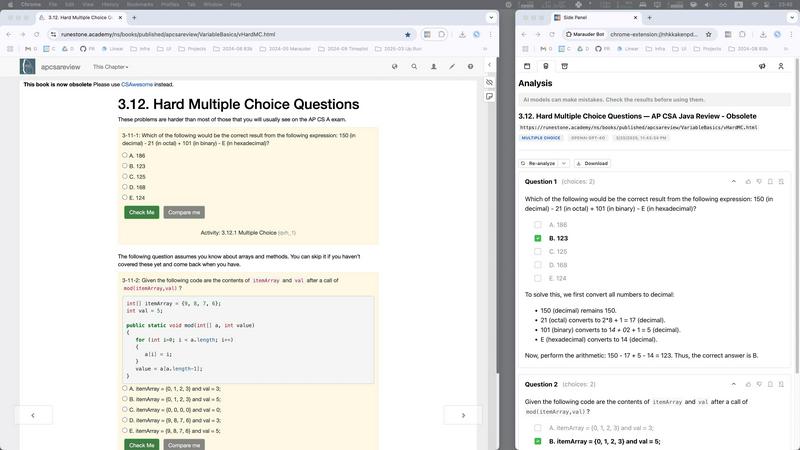
Marauder Bot uses the most advanced AI models, including OpenAI GPT-5.2, Claude Sonnet 4.5, and Gemini 3 Pro, to instantly analyze and solve problems. Simply open the extension, and it automatically scans all your open browser tabs. Select a page with a technical question, and the AI will parse the content, identify the problem, and generate an optimal solution complete with step-by-step explanations, test cases, and complexity analysis, all in seconds.
Stealth Mode for Discreet Practice
Practice with peace of mind using Stealth Mode. This feature allows the Marauder Bot extension to operate in a separate window, making its assistance completely undetectable even if someone is screen-sharing with you. This ensures you can use it as a powerful learning tool during your private study sessions without any worry, focusing purely on understanding the material.
Multi-Language & Multi-Question Support
Whether your challenge is in JavaScript, Python, Java, C++, SQL, TypeScript, or another language, Marauder Bot is optimized to handle it. It expertly tackles both complex algorithm questions and tricky multiple-choice assessments. For algorithms, it provides full code solutions. For MCQs, it delivers the correct answer backed by a clear, concise explanation, helping you learn the "why" behind each option.
Advanced Tools for Comprehensive Learning
Beyond basic answers, Marauder Bot includes tools to deepen your understanding. It can perform Image-to-Text OCR to read problems from screenshots or images. You can regenerate answers to see different solution approaches, export analyses to JSON for later review, and track your recent problem history directly in Chrome to monitor your progress and revisit past solutions.
Prompt Builder
Prompt Generator
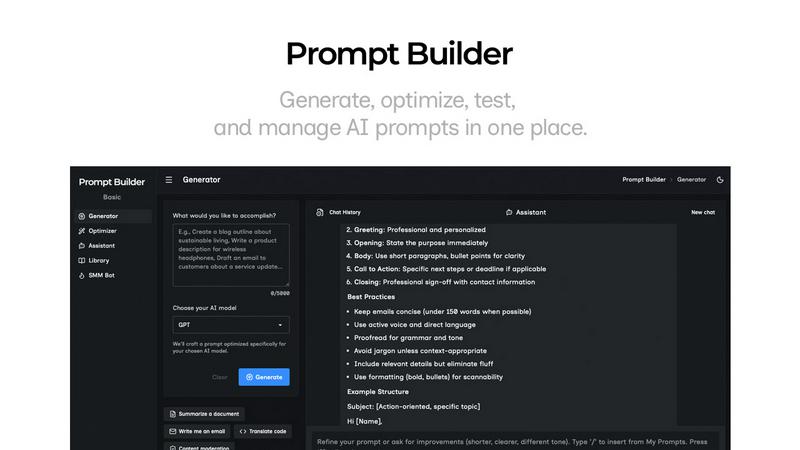
The Prompt Generator feature allows users to input their ideas and select a target AI model for optimization. It produces a professional-grade prompt that can be further refined through an interactive chat interface, making it easy to create tailored prompts quickly.
Chat Refinement
Built directly into the workspace, the chat refinement feature enables users to iterate on their prompts in real-time. This functionality supports fast adjustments and improvements, allowing for a seamless editing experience that enhances prompt quality based on immediate feedback.
Prompt Optimizer
The Prompt Optimizer takes existing prompts and enhances them for clarity and effectiveness. Users can paste prompts or select from their Library to generate clearer and more refined versions, ensuring that the prompts yield better results across different AI models.
Prompt Library
With the Prompt Library, users can save, organize, and reuse their best prompts conveniently. This feature allows for easy access to frequently used prompts, community-contributed prompts, and efficient management through search and category filters, ensuring users never lose track of their valuable resources.
Use Cases
Marauder Bot
Accelerating Interview Preparation
If you're preparing for software engineering interviews, time is your most valuable resource. Use Marauder Bot to quickly work through vast question banks on platforms like LeetCode or HackerRank. When you hit a wall on a difficult problem, get an instant solution and breakdown. This allows you to learn patterns and techniques more efficiently, covering more ground in your study schedule and walking into interviews with greater confidence.
Understanding Complex Solution Explanations
Sometimes, even after reading an official solution, the logic can be hard to follow. Marauder Bot is perfect for these moments. Paste the problem or navigate to it, and let the AI provide a beginner-friendly, step-by-step walkthrough. This helps demystify advanced algorithms and data structure concepts, turning confusion into clear understanding and solidifying your knowledge.
Practicing Under Simulated Test Conditions
Simulate real online assessments by timing yourself on practice tests. Use Marauder Bot's Stealth Mode to check your answers afterward without leaving the test environment. This workflow helps you identify knowledge gaps immediately and review explanations in context, creating an effective feedback loop that mimics real test-taking while ensuring your practice remains a genuine learning experience.
Aiding with Homework and Coding Assignments
For students tackling challenging coding homework or project-based assignments, Marauder Bot can serve as a powerful learning aid. When you're stuck on a specific function or logic error, use it to generate a working solution or alternative approach. Study the provided code and explanation to understand the underlying principles, helping you complete your assignment while genuinely learning the material.
Prompt Builder
Content Creation
Prompt Builder is an invaluable tool for content creators who need to generate high-quality written material quickly. By utilizing the tool's features, they can produce optimized prompts for blog posts, articles, and social media content tailored to their target audience.
Educational Purposes
Educators can leverage Prompt Builder to create engaging prompts for lessons and assignments. The tool's ability to refine prompts based on specific educational goals ensures that students receive clear and targeted instructions that enhance their learning experience.
Marketing Campaigns
Marketers can use Prompt Builder to develop compelling ad copy, social media posts, and promotional materials. The platform's ability to generate model-specific prompts allows for creating effective campaigns that resonate with diverse audiences across various platforms.
Research and Development
Research professionals can benefit from Prompt Builder by generating prompts that guide their inquiries or data analysis. The tool helps in framing questions or topics for exploration, ensuring that the prompts are precise and relevant to their research objectives.
Overview
About Marauder Bot
Marauder Bot is your brilliant, discreet companion for acing online technical interviews and coding assessments. It's a powerful AI-powered Chrome extension that acts like a secret tutor, helping you solve coding challenges and multiple-choice questions instantly, right from your browser. Imagine getting stuck on a complex algorithm during your practice—with one click, Marauder Bot opens a convenient side panel, detects the problem on your screen, and delivers a detailed, step-by-step solution with clear explanations. It's built specifically for anyone preparing for technical interviews, coding tests, or online assessments, whether you're a student, a career changer, or a seasoned developer brushing up on skills. The core value of Marauder Bot is empowering you to save precious study time, understand complex solutions faster, and build unshakable confidence. Instead of spending hours stuck on a single problem, you can use Marauder Bot to quickly grasp the concept and move on to mastering others, making your interview preparation efficient and effective.
About Prompt Builder
Prompt Builder is an innovative prompt engineering workspace designed to help users craft, test, and save prompts efficiently. Ideal for AI enthusiasts, content creators, and professionals who utilize various AI models, this tool streamlines the process of creating effective prompts tailored to specific models like GPT, Claude, Gemini, and more. With Prompt Builder, users can quickly generate a solid first draft of a prompt, refine it in an interactive chat environment, and save multiple versions for future use. This capability not only enhances productivity but also improves the quality of outputs generated by AI models. The built-in Optimizer feature allows for quick enhancements of existing prompts, ensuring users achieve the best results without the hassle of rewriting. Overall, Prompt Builder empowers users to turn their ideas into actionable prompts in a matter of seconds, revolutionizing the way prompts are developed and utilized across various AI applications.
Frequently Asked Questions
Marauder Bot FAQ
How does Marauder Bot work?
It's simple! First, install the Marauder Bot Chrome extension. When you encounter a technical question online, click the extension icon to open its side panel. The bot will list all your open web pages. Select the one with your coding challenge or multiple-choice question. Marauder Bot's AI will then read the page content, identify the problem, and generate a detailed solution with explanations directly in the panel for you to study and learn from.
What type of questions can Marauder Bot answer?
Marauder Bot is specialized for technical content. It excels at solving algorithm and data structure problems (like those on LeetCode) and answering technical multiple-choice questions (common in online assessments). It supports popular programming languages including Python, Java, JavaScript, C++, SQL, and more. It's designed for coding challenges, not for general knowledge or non-technical quizzes.
What is stealth mode?
Stealth Mode is a special feature that lets Marauder Bot run in a separate, detached browser window. This means its interface and activity are completely separate from your main browser window where you're taking a practice test. If you were to share your main screen, the Marauder Bot window would not be visible, allowing for discreet and private use during your study sessions.
Isn't it the same as ChatGPT or other AI chatbots?
Not quite! While both use AI, Marauder Bot is a specialized tool built specifically for technical interview prep. It integrates directly into your browser to automatically detect and parse questions from coding websites with one click, eliminating the need for manual copying and pasting. It's also fine-tuned to provide structured, step-by-step coding solutions and explanations in a format ideal for learning, all within a discreet and convenient sidebar.
Prompt Builder FAQ
What AI models does Prompt Builder support?
Prompt Builder supports a wide range of AI models, including GPT, Claude, Gemini, Llama, Mistral, DeepSeek, Grok, and Perplexity. This extensive compatibility allows users to generate prompts tailored for their preferred model.
How does the chat refinement feature work?
The chat refinement feature allows users to interactively edit and improve their prompts in real-time. After generating a draft, users can engage in a chat to make adjustments, ensuring that the final prompt is precisely tailored to their needs.
Can I save and reuse prompts?
Yes, users can save their prompts in the Prompt Library for easy access and reuse. The library organizes prompts by category and model, allowing for efficient management and retrieval of valuable resources.
Is there a free version available?
Prompt Builder offers a free trial that includes 25 assistant requests per month, allowing users to explore its features without the need for a credit card. This trial helps potential users evaluate the platform before committing to a paid plan.
Alternatives
Marauder Bot Alternatives
Marauder Bot is a powerful AI assistant designed specifically for technical interview preparation. It's a Chrome extension that uses advanced AI to instantly solve coding challenges and multiple-choice questions right in your browser, acting as a discreet study companion. People often look for different tools for various reasons. Some might need a solution that works on a different browser or platform, while others may be exploring options based on their budget or specific feature requirements, like integration with certain learning platforms. When searching for a similar tool, it's helpful to consider a few key points. Look for something that accurately solves the types of technical problems you face, is easy and discreet to use during your study sessions, and fits comfortably within your needs for platform compatibility and pricing.
Prompt Builder Alternatives
Prompt Builder is a versatile tool designed to help users generate, optimize, test, and manage AI prompts efficiently. As part of the AI Assistants category, it serves as a comprehensive workspace where users can craft prompts tailored to various AI models like GPT, Claude, and others. Despite its robust features, users often seek alternatives for reasons such as pricing, specific feature sets, or compatibility with different platforms, which can vary significantly based on individual needs and preferences. When choosing an alternative to Prompt Builder, it's essential to consider several factors. Look for tools that offer similar functionalities, such as prompt generation and optimization, along with community resources like reusable prompts and templates. Additionally, evaluate the user experience, customer support, and integration capabilities with the AI models you intend to use. Understanding your unique requirements will help you find a solution that best fits your workflow.