Looktara vs poseup
Side-by-side comparison to help you choose the right tool.

Looktara
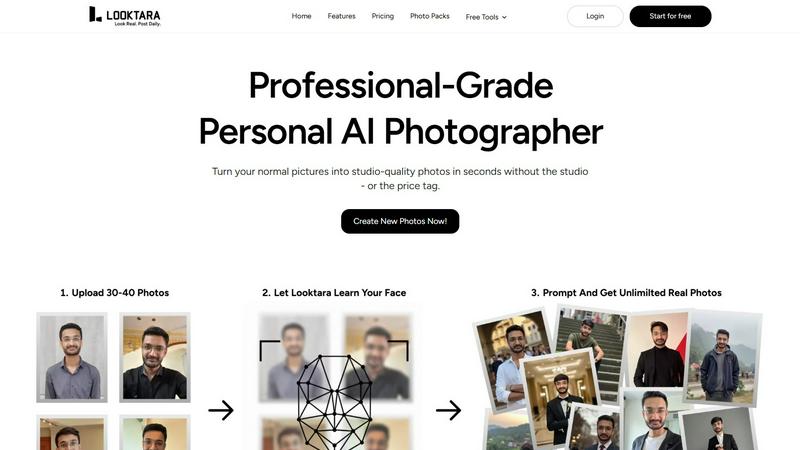
Looktara creates your personal AI model to generate stunning, professional photos tailored to your style and brand.
Last updated: February 28, 2026

poseup
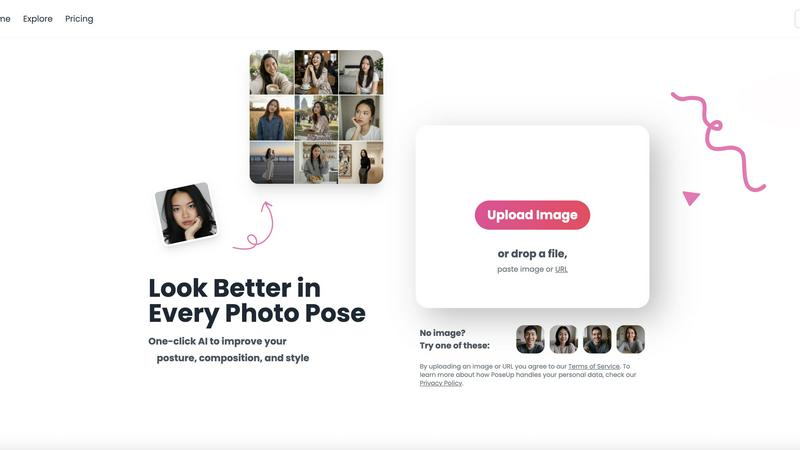
PoseUp uses AI to instantly fix your posture and improve any photo with one click.
Last updated: February 28, 2026
Visual Comparison
Looktara
poseup
Feature Comparison
Looktara
Personal AI Model Training
Looktara uses a unique approach by training a private, encrypted AI model exclusively on your likeness. This ensures that the photos generated are not only realistic but also uniquely representative of you, allowing for a personalized photography experience.
Fast Photo Generation
Once your AI model is ready, you can generate brand new solo photos in just about 5 seconds. This quick turnaround allows you to create specific visuals on demand, saving you time and effort, which is perfect for busy professionals and creators.
Customizable Image Styles
With Looktara, you have full creative control over the style, mood, and scene of each photo. Whether you need an authoritative headshot or a friendly image, you can tailor the output to perfectly match your message and branding.
High-Quality Authenticity
Looktara delivers high-quality photos that avoid the common pitfalls of AI-generated images, such as fake skin and awkward poses. The results are naturally expressive and visually appealing, making your online presence more authentic and engaging.
poseup
One-Click AI Pose Enhancement
This is the heart of PoseUp. With just one click after uploading your image, the AI automatically analyzes your current pose. It identifies subtle issues like slumped shoulders, an awkward head tilt, or unbalanced positioning and makes intelligent adjustments to create a more natural, confident, and aesthetically pleasing posture. It's like having instant, gentle guidance to help you stand your best.
Automatic Posture Correction
Go beyond just looking good and feel the confidence of great posture. PoseUp's technology specifically scans for postural alignment in your photos. It can suggest corrections to straighten your back, align your shoulders, and improve your overall stance. This feature is perfect for making professional headshots look more authoritative or simply helping you appear more poised and self-assured in any casual snapshot.
Smart Composition Optimization
A great photo is about more than just the subject. PoseUp's AI also evaluates the overall composition of your image. It considers elements like framing, balance, and visual flow to ensure you are positioned ideally within the shot. This helps your photos have that "professional" pop, making them more engaging and visually appealing whether they're for a portfolio or your Instagram grid.
Versatile Scene Support
PoseUp is designed to work brilliantly across all the different types of photos you take in real life. The AI is trained to enhance poses in a wide variety of scenarios, including casual lifestyle moments, outdoor adventures, professional headshot settings, fitness photos, and even cozy coffee shop work shots. No matter the backdrop, you can trust PoseUp to help you look your best.
Use Cases
Looktara
Professional Headshots
Looktara is ideal for creating polished and professional headshots that can be used on platforms like LinkedIn. With the ability to customize the tone and style, you can ensure that your image aligns perfectly with your professional branding.
Social Media Content
For creators and influencers, Looktara provides the perfect solution for generating eye-catching images for social media platforms such as Instagram and Twitter. You can create diverse content that resonates with your audience while maintaining a consistent brand image.
Marketing Materials
Businesses can leverage Looktara to produce high-quality images for marketing campaigns, brochures, and websites. By generating tailored visuals that reflect your brand’s identity, you can enhance your marketing efforts without the need for costly photoshoots.
Personal Projects
Whether you are working on a personal blog, a portfolio, or any creative project, Looktara helps you create stunning visuals that represent your personality. You can generate images that are not only visually appealing but also convey your unique story.
poseup
Polishing Professional Headshots
Make a powerful first impression on LinkedIn, company websites, or professional portfolios. PoseUp can transform a good headshot into a great one by correcting posture, ensuring a confident stance, and optimizing the composition. This helps you project an image of competence, approachability, and professionalism without the cost of a photoshoot reshoot.
Elevating Social Media Content
For influencers, content creators, or anyone who shares photos online, standing out is key. PoseUp helps you create consistently high-quality, engaging content for platforms like Instagram and TikTok. Enhance your selfies, improve couple pose ideas for photos with a partner, and ensure every photo you post looks balanced, confident, and visually curated.
Improving Everyday Personal Photos
Perfect for family gatherings, vacations, or casual outings with friends. Not everyone is a natural in front of the camera. PoseUp helps everyone look their best in those spontaneous moments by fixing awkward angles and subtle posture mistakes. It ensures your personal photo albums are filled with pictures where everyone looks happy, natural, and photo-ready.
Enhancing Fitness & Wellness Portfolios
For trainers, athletes, or fitness enthusiasts, showcasing form and confidence is crucial. PoseUp can analyze fitness photos to suggest posture improvements that highlight strength and proper alignment. This is ideal for creating more compelling before/after shots, demonstrating exercise techniques, or building a motivational personal brand online.
Overview
About Looktara
Looktara is your personal AI photographer, designed to create stunning, professional-grade photos tailored specifically to you. In today's digital landscape, there is a growing demand for high-quality, on-brand images for social media, professional profiles, and marketing efforts. Looktara addresses this need by providing a seamless and cost-effective solution that eliminates the hassle of traditional photoshoots. The process is incredibly user-friendly: simply upload around 30 photos of yourself, and Looktara will train a private, encrypted AI model based solely on your likeness in about 10 minutes. After that, generating new solo photos is as easy as typing a text prompt describing your desired scene, style, or mood, which takes only about 5 seconds. The uniqueness of Looktara lies in its ability to produce authentic results, avoiding the "plastic skin" and "uncanny valley" effects often seen in other AI image generators. This means you can present yourself online with consistency and confidence, whether for professional headshots, warm client stories, or relaxed behind-the-scenes images. Looktara is perfect for professionals, creators, and anyone who wants to showcase their best self online.
About poseup
Have you ever looked at a photo and thought, "I look good, but something just isn't right?" Maybe your posture seems a bit slouched, your head is at an odd angle, or the photo just doesn't have that polished, professional feel. That's the exact problem PoseUp was created to solve. PoseUp is a friendly, AI-powered photo assistant that helps you look your absolute best with a single click. It's a free online tool that acts like having a professional photographer's expert eye instantly available to guide you.
Simply upload your photo, and PoseUp's intelligent AI gets to work. It automatically analyzes your image to improve your pose, gently correct your posture, and optimize the overall composition for maximum visual appeal. The core promise is beautifully simple: to transform your ordinary photos into professional-looking masterpieces effortlessly, without any need for technical photography skills or expensive equipment.
Whether you're a social media enthusiast aiming for perfect selfies, a professional in need of a polished headshot, a content creator wanting more engaging shots, or someone just trying to capture better family memories, PoseUp is designed for you. It removes all the guesswork, helping anyone achieve confident, balanced, and stunning photo results in just seconds.
Frequently Asked Questions
Looktara FAQ
How does Looktara ensure my privacy?
Looktara prioritizes your privacy by training a private, encrypted AI model based solely on the photos you upload. This means that your images are not shared or used for any other purpose without your consent.
Can I use Looktara for commercial purposes?
Yes, Looktara's generated images can be used for commercial purposes, making it a great tool for businesses looking to enhance their professional presence with high-quality visuals.
What types of images can I create with Looktara?
You can create a variety of images, including professional headshots, casual portraits, marketing visuals, and social media content, all tailored to fit your desired style and mood.
How long does it take to generate a photo?
Once your personal AI model is set up, generating a new photo takes approximately 5 seconds, allowing for quick and efficient image creation at any time.
poseup FAQ
How does PoseUp work?
PoseUp uses advanced artificial intelligence to analyze the key points and composition of the photo you upload. The AI is trained on principles of flattering poses, good posture, and strong photographic composition. It then makes intelligent, subtle adjustments to your posture and positioning within the frame, outputting an enhanced version of your image that looks more professional and polished.
Is PoseUp free to use?
Yes, PoseUp offers a free online tool that you can start using immediately by uploading an image. The website also mentions you can "Get 50 free credits," indicating there may be a credit-based system for additional processing or premium features. The core one-click enhancement is accessible for free to help everyone improve their photos.
What kind of photos work best with PoseUp?
PoseUp works best with clear photos where the subject (especially a person) is the main focus. It is versatile and supports various scenes like headshots, full-body shots, casual lifestyle photos, outdoor adventures, and fitness pictures. For optimal results, use well-lit images in common formats like JPG or PNG, under 5MB in size.
Will the edited photo look natural?
Absolutely. The goal of PoseUp is to provide gentle, effective guidance, not to create unrealistic or distorted edits. The AI makes subtle adjustments to improve your natural pose and posture, ensuring the final result looks like a better version of you, not an artificial or heavily "photoshopped" image. The changes are designed to be believable and authentic.
Alternatives
Looktara Alternatives
Looktara is a cutting-edge platform that utilizes artificial intelligence to create personalized and professional-grade photos tailored to your unique likeness. As an innovative solution in the realm of generative art, it addresses the growing need for high-quality images for various applications such as social media profiles, marketing materials, and professional branding. Many users seek alternatives to Looktara due to factors like pricing, specific feature sets, or platform compatibility. When looking for an alternative, consider aspects such as the quality of the generated images, user privacy, and ease of use. It's also important to evaluate the level of customization available, as well as the overall reputation and reliability of the service. With these factors in mind, you can find a solution that fits your specific needs and enhances your online presence.
poseup Alternatives
PoseUp is a free online tool that uses artificial intelligence to instantly improve your photos. It falls into the category of AI photo enhancement and editing software. Its main job is to analyze your image and automatically fix your posture and optimize your pose with a single click, helping you look more confident and polished. People often look for alternatives to tools like PoseUp for a few common reasons. They might need more advanced editing features beyond posture correction, prefer a downloadable app over a web tool, or require a solution that works on a specific device like a smartphone. Sometimes, users are simply exploring the market to compare what different options offer. When choosing an alternative, it's helpful to consider what's most important for your photos. Think about whether you need a simple one-click solution or more manual control. Check if the tool works on your preferred platform, like your phone or computer, and understand its pricing model, whether it's free, a one-time purchase, or a subscription.