
LLMWise vs QuickImg
Side-by-side comparison to help you choose the right tool.

LLMWise
LLMWise offers a single API to access and compare top AI models like GPT and Claude, with pay-per-use pricing and free.
Last updated: February 26, 2026
QuickImg
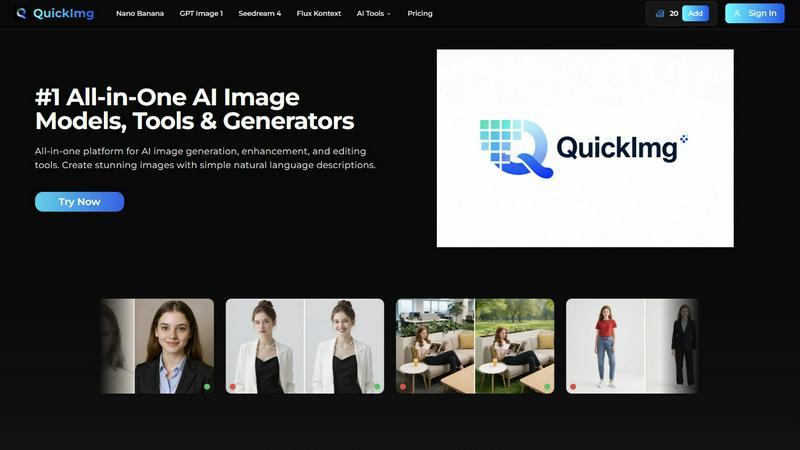
Create stunning AI images easily with our all-in-one platform for generation, editing, and enhancement.
Last updated: February 28, 2026
Visual Comparison
LLMWise

QuickImg
Feature Comparison
LLMWise
Smart Routing
LLMWise employs advanced smart routing technology that automatically selects the optimal model based on the type of prompt you send. For example, coding queries can be directed to GPT, while creative writing prompts can be sent to Claude. This feature ensures that you always receive the best response for your specific needs.
Compare & Blend
The compare and blend feature allows you to run prompts across multiple models side-by-side. You can see how different models respond to the same query, which helps identify the best performer. The blend function synthesizes the strongest parts of each model's output into a single, cohesive answer, enhancing quality and coherence.
Always Resilient
LLMWise's circuit-breaker failover mechanism guarantees that your application remains operational even if one of the AI providers goes down. This feature reroutes your requests to backup models, ensuring uninterrupted service and reliability for your applications.
Test & Optimize
With built-in benchmarking suites and batch testing capabilities, LLMWise enables you to optimize your AI interactions for speed, cost, and reliability. Automated regression checks ensure that any changes in performance are quickly identified, allowing for continuous improvement and trustworthy results.
QuickImg
All-in-One AI Model Hub
QuickImg gives you instant access to multiple cutting-edge AI models in a single dashboard. Instead of signing up for separate services, you can choose from top models like Nano Banana Pro for advanced text rendering, GPT Image 1 for superior detail, or Seedream 4 for ultra-fast 4K generation. This means you can always pick the perfect tool for your specific task, whether it's creating a logo or editing a portrait, all without ever leaving the platform.
Natural Language Image Creation & Editing
Forget about learning complex prompt engineering. With QuickImg, you create and edit images using simple, everyday language. Just type what you want, like "a cat wearing a pirate hat on a rainbow," or "remove the trash can from this park photo." Our AI understands your description and handles all the technical details, making professional image generation accessible to complete beginners and saving time for experts.
One-Click Professional Editing Tools
Transform your images in seconds with our suite of one-click AI tools. Effortlessly remove unwanted text or watermarks, change backgrounds with precision, upscale image resolution to 4K, or convert photos to transparent PNGs. These tools simplify complex editing workflows that normally require expensive software, allowing you to achieve polished, professional results with just a single click.
Ready-to-Use Templates & Guides
Jumpstart your creativity with a wide collection of ready-to-use templates designed for common scenarios like social media posts, product photos, or blog graphics. Combined with our simple 3-step guide (Describe, Generate, View), these templates help you overcome creative block and produce stunning visuals instantly, even if you've never designed anything before.
Use Cases
LLMWise
Software Development
Developers can use LLMWise to streamline their coding processes. By routing coding queries directly to the best-performing model, they can save time and improve the accuracy of their code. This is particularly useful for debugging and getting quick suggestions.
Content Creation
Writers and marketers can leverage LLMWise for creative writing tasks. By using the blend feature, they can combine different creative aspects from various models to generate unique content that stands out and meets their audience's needs.
Language Translation
LLMWise can be a powerful tool for language translation. By routing translation tasks to specialized models like Gemini, users can achieve more accurate and contextually relevant translations, improving communication across language barriers.
Research and Analysis
For researchers needing insights from diverse perspectives, LLMWise facilitates analysis by comparing outputs from various models. This ensures comprehensive evaluations and richer insights, making it easier to draw conclusions from data.
QuickImg
Social Media Content Creation
Constantly need fresh, eye-catching visuals for Instagram, Facebook, or TikTok? QuickImg is your perfect partner. Generate unique graphics, create engaging anime-style avatars from your photos, or design cohesive posts using templates. Keep your feed vibrant and your audience engaged without needing a graphic designer or expensive software.
Small Business Marketing
Small business owners can use QuickImg to create professional marketing materials on a budget. Generate high-quality product images, remove distracting backgrounds for clean e-commerce photos, design promotional graphics, and create a consistent brand character with the AI Character Generator. Elevate your brand's visual appeal quickly and affordably.
Personal Project Enhancement
Bring your personal creative projects to life! Turn your beloved pet into a humorous human character, transform vacation photos into stunning anime artwork, or restore and upscale old, blurry family pictures. QuickImg makes creative exploration and photo restoration fun, easy, and incredibly satisfying for any hobbyist.
Blog & Website Illustration
Bloggers and website owners can easily generate custom featured images, illustrations, and icons that match their article's content. Need a specific graphic about "future technology" or a transparent PNG logo? Just describe it to QuickImg. This saves hours searching stock photo sites and ensures you have unique, relevant visuals for every post.
Overview
About LLMWise
LLMWise is a groundbreaking platform designed to simplify the complexities of using multiple AI language models. With LLMWise, you can access every major LLM—such as OpenAI, Anthropic, Google, Meta, xAI, and DeepSeek—through a single API. This means no more juggling multiple subscriptions and API keys, as LLMWise intelligently routes your prompts to the most suitable model for each task. Whether you're looking for the best model for coding, creative writing, or translation, LLMWise ensures you get the optimal output without the hassle. Ideal for developers and teams, this tool is built to enhance productivity while reducing costs, making it easier to leverage the latest advancements in AI technology. By blending outputs and comparing responses, users can achieve superior results that would be challenging to obtain from a single model alone.
About QuickImg
Welcome to QuickImg, your friendly and all-in-one creative studio for everything AI images! Imagine having the power to create stunning artwork, fix blurry photos, or edit any picture just by describing what you want in plain English. That's exactly what QuickImg offers. It's a powerful yet simple platform that brings together the world's best AI image models and editing tools in one easy-to-use place. No more juggling multiple complicated apps or learning complex technical jargon. Whether you want to generate a brand-new image from your imagination, remove an unwanted object, change a background, or upscale an old photo to 4K quality, you can do it all here. The magic lies in our advanced AI models like Nano Banana Pro and GPT Image 1, which understand your everyday language and turn your ideas into professional-quality visuals. Designed for absolutely everyone—social media lovers, small business owners, bloggers, and creative hobbyists—QuickImg is built to help you turn your vision into reality quickly, easily, and affordably. Start creating today and see how simple professional image creation can be!
Frequently Asked Questions
LLMWise FAQ
What types of models can I access with LLMWise?
LLMWise provides access to over 62 models from 20 different providers, including popular names like OpenAI, Anthropic, Google, and Meta. This wide range allows users to choose the best model for every specific task.
Is there a subscription fee for using LLMWise?
No, LLMWise operates on a pay-per-use model. You can start with 20 free credits and choose to pay only for what you use, eliminating the burden of recurring subscription fees.
How does the failover mechanism work?
LLMWise features a circuit-breaker failover system that reroutes requests to backup models when a primary provider goes down. This ensures that your applications remain operational and reliable, even during outages.
Can I bring my own API keys to LLMWise?
Yes, LLMWise allows users to bring their own API keys. This feature enables you to utilize existing accounts with your preferred AI providers while benefiting from LLMWise's intelligent routing and orchestration capabilities.
QuickImg FAQ
Do I need any design experience to use QuickImg?
Absolutely not! QuickImg is specifically designed for users of all skill levels, especially beginners. You don't need any prior design or technical experience. Our platform uses natural language processing, so you can create and edit images simply by typing what you want in plain English. The intuitive interface and one-click tools guide you every step of the way.
What AI models are available on QuickImg?
QuickImg partners with leading AI developers to give you access to a powerful suite of models in one place. This includes Google's Nano Banana Pro for advanced text, OpenAI's GPT Image 1 for superior detail, ByteDance's Seedream 4 for fast 4K generation, and Flux Kontext for precise editing. You can choose the best model for your specific task directly within the platform.
Can I edit my existing photos with QuickImg?
Yes, definitely! QuickImg is not just a generator; it's a full editing suite. You can upload any existing photo and use our AI tools to enhance it. Remove unwanted objects or text, change the background, upscale the resolution, recolor elements, or even change the clothing on a person. It's a powerful photo editor powered by AI.
How do I get started and is there a free trial?
Getting started is easy. Just visit the QuickImg website and you can begin exploring the tools. You can describe an idea or upload an image to try out the basic functions. For full access to all AI models and premium features, you can choose a plan that fits your needs. Keep an eye out for special offers like the limited-time discount for new users!
Alternatives
LLMWise Alternatives
LLMWise is an innovative API that provides seamless access to various large language models (LLMs) like GPT, Claude, and Gemini, among others. It simplifies the process of leveraging AI for different tasks by employing smart routing, which automatically selects the best model suited for each prompt. This makes LLMWise a powerful tool for developers and businesses looking to harness the capabilities of multiple AI providers without the hassle of managing different systems. Users often seek alternatives to LLMWise due to factors such as pricing structures, specific feature sets, or compatibility with their existing platforms. When searching for an alternative, it's essential to consider aspects like the range of available models, ease of integration, reliability, and cost-effectiveness. Ensuring that the alternative can meet your specific requirements will help you make a more informed choice.
QuickImg Alternatives
QuickImg is a user-friendly, all-in-one platform for creating and editing AI images. It falls into the category of AI assistants, designed to help anyone generate stunning visuals, enhance photos, and make edits using simple language commands. It brings together powerful AI models in one place to simplify the creative process. People often explore other options for various reasons. They might be looking for a different pricing model, such as a free tier with more credits or a one-time purchase. Others may need a tool that specializes in one specific area, like ultra-realistic portraits or vector graphics, or they might prefer an application that works directly on their computer or within another software they already use. When considering other platforms, it's helpful to think about what matters most for your projects. Key factors include the quality and style of the AI image generation, the types of editing tools available, how easy the interface is to use, and of course, the overall cost and subscription structure. Finding the right fit depends on balancing these elements with your personal creative goals and budget.