Learniverse vs RocketShare
Side-by-side comparison to help you choose the right tool.

Learniverse
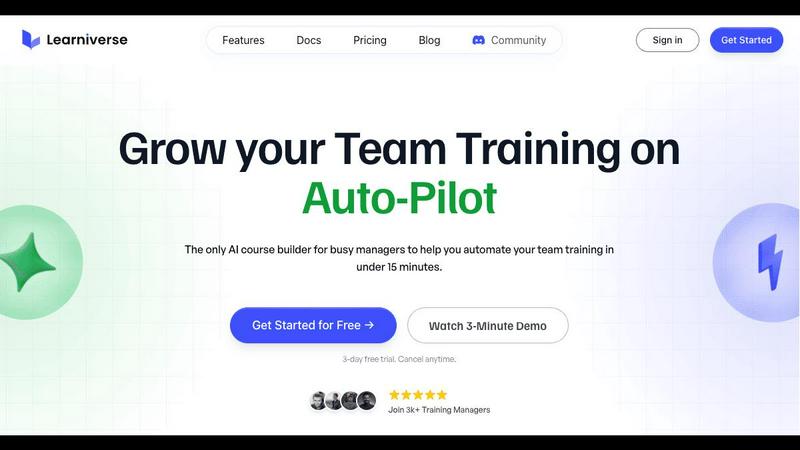
Learniverse turns your documents into automated training courses in minutes.
Last updated: February 28, 2026

RocketShare
Share your files with total privacy using encryption we can't even access.
Last updated: March 4, 2026
Visual Comparison
Learniverse
RocketShare

Feature Comparison
Learniverse
AI-Powered Course Creation
Simply upload your existing materials like PDFs, videos, or documents, and watch as Learniverse's AI assistant automatically builds a structured course. It creates interactive lessons, generates relevant quizzes for knowledge checks, and sets up progress tracking—all without you needing any design or technical skills. You can even chat with the AI to describe a new module or process, and it will build the content for you on the fly.
Branded Academy Portal
Launch a professional and polished training hub that reflects your company's identity. Learniverse allows you to fully customize your academy with your logo, brand colors, and even your own domain. This creates a cohesive and credible learning experience for your team, moving away from generic, impersonal platforms to a portal that looks and feels uniquely yours.
Automated Progress & Analytics
Gain clear insights into your team's learning journey without the headache of manual spreadsheets. The built-in analytics dashboard lets you easily track who has completed courses, identify where learners are getting stuck, monitor engagement levels, and see assessment results. This data helps you understand the impact of your training and make informed decisions to improve it.
Centralized Knowledge Hub
End the scavenger hunt for information across Slack, emails, and shared drives. Learniverse acts as a single source of truth for all your training content. By aggregating scattered knowledge into one organized platform, you ensure your team always has access to consistent, up-to-date procedures and information, drastically reducing confusion and errors.
RocketShare
Zero-Knowledge Encryption
This is the cornerstone of RocketShare's security. Your files are encrypted on your own computer or phone before they are uploaded. The encryption key never leaves your possession, meaning RocketShare's servers only receive and store data that is completely unreadable to them or anyone else. This guarantees that your privacy is absolute, as even the platform itself has "zero knowledge" of your file contents.
Client-Side Encryption
Building on the zero-knowledge model, client-side encryption means the entire encryption process happens locally on your device. You don't have to trust the security of an online server because the file is already locked and protected before it ever touches the internet. This gives you full control and peace of mind from the very first step.
Flexible Sharing Modes
RocketShare offers two main ways to send files to fit different needs. Use "Cloud Share" for convenient, asynchronous sharing where files are stored encrypted on secure EU-based servers for the recipient to download. Or, choose "Local Share" for a fast, peer-to-peer transfer that sends files directly between devices without them being stored online, perfect for very large files or when you need maximum speed.
EU-Based Data Storage
For users concerned with data sovereignty and regulations like GDPR, RocketShare stores all cloud-shared file data on servers located within the European Union. This provides an additional layer of legal and privacy assurance, ensuring your data is housed under some of the world's strictest data protection frameworks.
Use Cases
Learniverse
Onboarding New Employees
Speed up and standardize the onboarding process for every new hire. Instead of overwhelming them with a disorganized mix of documents and links, create a seamless onboarding academy in Learniverse. New employees can progress through structured modules, complete interactive quizzes, and access all essential company knowledge in one engaging portal, leading to faster ramp-up times.
Compliance & Safety Training
Ensure critical compliance, safety, and procedural training is consistently delivered and completed. Easily transform policy PDFs and safety manuals into mandatory courses with built-in assessments. The tracking features provide auditable proof of completion, giving managers peace of mind that their team is informed and compliant with necessary regulations.
Product & Process Updates
Quickly disseminate new information when products or internal processes change. Instead of sending a long, easily ignored email, use Learniverse to instantly create a short, focused training module. Drop in a recording of the announcement meeting or the updated process document, and let AI build a micro-course to get the entire team aligned in minutes.
Customer & Partner Education
Extend your training beyond internal teams to customers or external partners. Launch a branded external academy to educate your clients on how to use your products effectively or train franchisees on standard operating procedures. This professional approach enhances the user experience and ensures consistent knowledge across your entire ecosystem.
RocketShare
Legal Professionals and Law Firms
Lawyers can securely share sensitive case files, client contracts, and legal briefs with absolute confidentiality. RocketShare's zero-knowledge encryption ensures attorney-client privilege is technically enforced, as no third party can intercept or access the documents, providing a secure channel for critical communications.
Creative Professionals (Photographers/Videographers)
Photographers and videographers can deliver high-resolution client galleries or raw video footage without fear of unauthorized access or piracy. The platform allows them to send huge files easily while guaranteeing that their creative intellectual property is protected end-to-end, building trust with their clients.
Healthcare and Medical Practices
Healthcare providers can use RocketShare to exchange sensitive patient records, lab results, or medical imaging in a compliant manner. The strong encryption helps meet privacy standards by ensuring patient data is inaccessible during transfer and storage, safeguarding personal health information.
Business Teams and Accountants
Teams working on confidential projects, financial reports, or business strategies can collaborate safely. Accountants can share tax documents and financial statements with clients, knowing the data is encrypted before it leaves their computer, preventing any potential data breaches or leaks.
Overview
About Learniverse
Learniverse is your all-in-one, AI-powered training assistant designed to eliminate the chaos of creating and managing team training. If you're tired of juggling scattered Google Docs, outdated videos, and endless SOPs, Learniverse is here to help. It's built specifically for busy training managers, educators, and team leaders who need to get their team up to speed quickly without spending weeks on manual course setup. The core magic of Learniverse is its ability to take your existing knowledge—whether it's in PDFs, documents, video recordings, or even just ideas—and automatically transform it into a complete, interactive, and branded learning academy. This means you can go from a pile of documents to a professional training portal in just minutes, not weeks. The platform handles the heavy lifting of design, structure, and quiz creation, freeing you to focus on what truly matters: delivering consistent, engaging training that your team will actually complete and enjoy.
About RocketShare
RocketShare is a secure file-sharing platform built for anyone who values their privacy. It's designed to let you send files of any size with complete confidence, knowing that your data is protected from the moment you upload it. The core promise is simple: no one, not even the team at RocketShare, can ever access the content of your files. This is achieved through a powerful technology called zero-knowledge encryption. Here's how it works: your files are encrypted directly on your own device before they are ever sent over the internet. The key to unlock them stays with you, often built right into the shareable link you send. This means RocketShare's servers only ever handle scrambled, unreadable data. It offers enterprise-grade security in a beautifully simple, self-serve package that anyone can use. Whether you're a freelancer, a creative professional, or part of a large business team, RocketShare ensures your sensitive documents, client work, and intellectual property remain truly private. With options to share via the cloud or through a fast local connection, and with all data stored securely within the European Union, RocketShare is the perfect tool for combining top-tier security with effortless simplicity.
Frequently Asked Questions
Learniverse FAQ
How does the AI create a course from my documents?
Learniverse's AI analyzes the content you upload, such as PDFs, videos, or text documents. It identifies key topics, concepts, and logical flow within the material. Then, it automatically structures this information into digestible lessons, generates summaries, and creates relevant quiz questions to reinforce learning. You maintain full control to edit and refine the AI's output.
Can I customize the look of the training academy?
Absolutely! A core feature of Learniverse is its custom branding. You can upload your company logo, select your brand's color scheme, and apply these elements across the entire learning portal. For an even more professional touch, you can connect your own custom domain so the academy lives at a URL like training.yourcompany.com.
What kind of analytics and reports are available?
Learniverse provides a straightforward dashboard with essential metrics. You can see overall course completion rates, track individual learner progress, identify modules with low engagement, and review quiz scores. These insights help you understand what training is effective and where your team might need additional support or content clarification.
Is there a free trial available?
Yes, Learniverse offers a 7-day free trial. This allows you to explore the platform, test the AI course creation with your own materials, and experience the setup process firsthand with no commitment. The trial includes access to core features so you can confidently evaluate if it's the right solution for your team's training needs.
RocketShare FAQ
How does RocketShare's encryption work?
RocketShare uses a method called zero-knowledge, client-side encryption. When you select a file to share, our application on your device immediately encrypts it using a unique key before it is uploaded. This key is what decrypts the file, and it is never sent to our servers. Often, this key is embedded in the download link you share. This means we only handle encrypted data that we cannot read or access.
What is the difference between Cloud Share and Local Share?
Cloud Share uploads your encrypted file to our secure servers in the EU, generating a link you can send. The recipient can download it anytime. Local Share creates a direct, peer-to-peer connection between your device and the recipient's device for the transfer. The file never passes through our servers, making it faster for large files and keeping it entirely off the cloud.
Is RocketShare really free to use?
Yes, you can start using RocketShare's core secure sharing features without providing a credit card. This allows you to experience the privacy and simplicity of the platform firsthand. We believe in making true security accessible to everyone from the start.
Where are my files stored?
For files shared via Cloud Share, the encrypted data is stored on our secure servers located within the European Union. For Local Share transfers, files are sent directly between devices and are not stored on any server. In both cases, the actual content of your files remains encrypted and inaccessible to anyone without the unique key.
Alternatives
Learniverse Alternatives
Learniverse is an AI-powered Learning Management System (LMS) that helps teams quickly turn their existing documents and knowledge into automated, branded training courses. It falls into the productivity and management category, focusing on making course creation fast and simple so teams can focus on effective training instead of complex setup. People often explore other options for various reasons. Your budget, the specific features your team needs, or the desire for a platform that integrates with different tools can all lead you to look at what else is available. It's a normal part of finding the perfect fit for your organization's unique training goals. When evaluating different platforms, consider what matters most for your success. Look at the ease of creating and updating content, the ability to customize the learning portal to match your brand, and the depth of reporting to track your team's progress. Finding a tool that feels intuitive and grows with your needs is key.
RocketShare Alternatives
RocketShare is a secure file-sharing service in the productivity and management category. It stands out by using zero-knowledge encryption, meaning your files are encrypted on your device before upload, and not even the company can access them. This makes it a top choice for sending highly sensitive documents, client work, or confidential business files. People often look for alternatives to tools like RocketShare for various reasons. You might need a different pricing plan, specific collaboration features like real-time editing, or a platform that integrates with other software you use. Sometimes, a simpler or more familiar interface is the main goal. When choosing an alternative, focus on what matters most for your tasks. Key considerations are the level of security and privacy offered, the maximum file size you can send, how long your shared links remain active, and where in the world your data is stored. Balancing these factors with ease of use will help you find the right fit.