ImaginePro vs SparkPix
Side-by-side comparison to help you choose the right tool.

ImaginePro
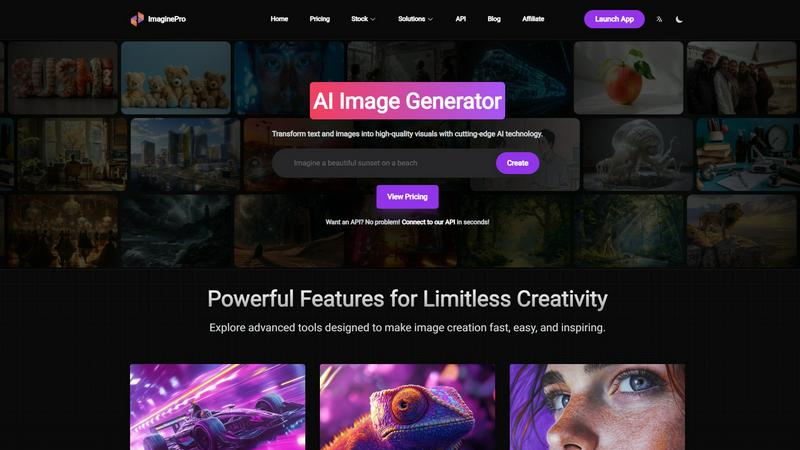
ImaginePro transforms your words into stunning, high-quality images with user-friendly controls and powerful AI.
Last updated: March 1, 2026

SparkPix
Edit any photo online for free by simply typing what you want, like removing a background or restoring an old picture.
Last updated: March 11, 2026
Visual Comparison
ImaginePro
SparkPix

Feature Comparison
ImaginePro
Instant Masterpieces
Create professional-quality images in mere seconds using cutting-edge AI models. This feature is ideal for generating everything from social media content to marketing materials, ensuring you never run out of creative ideas. Whether you need visuals for a campaign or a personal project, Instant Masterpieces allows you to make an impact quickly and effectively.
Creative Control
With the Creative Control feature, you can fine-tune your images with precise references to style, colors, and effects. This enables you to adjust every detail until the result matches your vision perfectly. Whether you want a specific color palette or a unique artistic effect, this feature allows you to personalize your images to fit your project precisely.
High-Quality Images
ImaginePro guarantees the generation of lifelike, high-resolution images that truly stand out. This feature is especially valuable for commercial use or any personal projects that require a polished finish. You can confidently use these visuals in your marketing materials, websites, or portfolios, knowing they meet professional standards.
Background Removal
Effortlessly eliminate backgrounds from your images using the Background Removal feature. This tool is perfect for creating product images for e-commerce, professional headshots, and social media content. It enables you to focus solely on the subject, ensuring your visuals are clean, professional, and ready for any application.
SparkPix
AI Photo Editor with Text Commands
This is the heart of SparkPix. Instead of hunting for tools and sliders, you simply type what you want to happen. For example, you can type "remove the background and put me on a beach" or "make this photo look like a vintage oil painting." The AI interprets your text prompt and applies the precise edits automatically, delivering results in under 30 seconds. It's intuitive, fast, and opens up editing possibilities you might never have tried with traditional software.
Background Remover
Get a clean, transparent background with just one click. This tool is perfect for creating professional portraits, standout product photos for your online store, or fun social media content. It handles complex scenes with detailed edges, like hair or fur, remarkably well. You can also go beyond simple removal by using the text editor to command a background change, instantly placing your subject in a primeval forest or a sleek office.
Photo Restoration & Enhancement
Breathe new life into your old memories. SparkPix can repair damaged photos by fixing scratches, tears, and severe fading. It also includes a powerful enhancer that can sharpen blurry details, boost colors, reduce digital noise, and upscale images to HD quality—all in one simple step. It's like having a digital restoration expert and a professional retoucher working for you instantly.
AI Image Generator & Style Transfer
Unleash your creativity by generating brand new images from text descriptions at high 1K, 2K, and 4K resolutions. Plus, transform any existing photo into various artistic styles. Choose from over 15 effects, including anime, watercolor, pencil sketch, and oil painting, to give your pictures a unique, artistic flair with a single click.
Use Cases
ImaginePro
E-Commerce Product Images
ImaginePro can be a game-changer for e-commerce businesses looking to create eye-catching product images. By using the AI-powered image generation and background removal features, you can produce high-quality visuals that highlight your products, making them more appealing to potential customers.
Social Media Content Creation
For social media managers, ImaginePro serves as an invaluable resource for crafting engaging visuals. Whether you need promotional graphics, infographics, or engaging posts, the platform allows you to create stunning images quickly, helping you maintain a consistent and dynamic online presence.
Marketing Materials
Marketers can leverage ImaginePro to generate compelling visuals for campaigns, advertisements, and brochures. The ability to produce high-resolution images that align with your brand's identity means you can create professional marketing materials that capture attention and drive engagement.
Digital Art and Photography
Digital artists and photographers can use ImaginePro to enhance their creative workflows. The platform's AI capabilities, combined with editing tools like text behind image, allow artists to explore new styles and concepts, making it easier to produce visually striking artwork or photography projects.
SparkPix
Restoring Family Photo Archives
Anyone with old, damaged family photos can use SparkPix to preserve their heritage. Simply upload a scanned photo of a faded or scratched portrait and use prompts like "restore this damaged old photo" or "colorize this black and white image." The AI will repair damage and add realistic color, bringing precious memories back to life for future generations without needing professional services.
Creating E-commerce Product Photos
Small business owners and online sellers can create stunning product imagery without a studio. Use the background remover for clean, white-background shots required by Amazon or Shopify. Then, use the AI editor to generate professional mockups by describing scenes like "a person holding this perfume bottle in a luxury bedroom setting," creating high-quality marketing assets in minutes.
Enhancing Social Media Content
Social media managers, influencers, and everyday users can make their posts pop. Quickly remove unwanted objects or people from a vacation shot, enhance a slightly blurry group photo, or apply a trendy art style to a portrait for a unique profile picture. SparkPix helps you create polished, engaging content that stands out in any feed with minimal effort.
Preparing Official Documents
Need a passport, visa, or professional LinkedIn headshot fast? SparkPix acts as an online passport photo maker. Upload a selfie and use a prompt like "generate a professional headshot with formal attire and a blue background." The AI will create a compliant, high-quality photo suitable for official documents and professional profiles, saving you a trip to a photo booth.
Overview
About ImaginePro
ImaginePro is your ultimate AI-powered creative studio, meticulously crafted to transform your ideas into breathtaking, professional-quality visuals within seconds. It serves as a powerful text-to-image generator, enabling users—from beginners to experienced designers—to effortlessly create high-resolution images just by providing simple written prompts. ImaginePro harnesses advanced AI technology to produce lifelike visuals that are perfect for various applications, such as social media posts, marketing materials, and personal projects. The platform goes beyond basic image generation, offering an array of essential editing tools, including instant background removal and a unique "text behind image" feature. This makes ImaginePro an indispensable toolkit for anyone in need of stunning visuals, whether you are a social media manager, e-commerce store owner, blogger, marketer, or digital artist. With a user-friendly web interface, customizable style presets, and precise control over your designs, ImaginePro empowers you to create polished, commercial-ready results without any prior design experience. Simply describe your concept, and watch as ImaginePro brings it to life.
About SparkPix
SparkPix is your friendly, all-in-one AI photo editor that makes professional-level editing as simple as typing a sentence. Forget about complex software like Photoshop that requires years of skill to master. With SparkPix, you just upload your photo, describe the change you want in plain English, and our powerful AI does the rest in under 30 seconds. It's designed for absolutely everyone—from social media enthusiasts and small business owners to genealogy hobbyists and creative professionals who want to save time. Whether you're looking to remove an unwanted photobomber, restore a precious family heirloom, create a stunning product mockup, or just have fun turning a photo into an anime masterpiece, SparkPix handles it with ease. The best part? You can start for free with 5 credits to test the magic, with no credit card required. Accessible directly from your web browser on any device, SparkPix puts the future of photo editing at your fingertips, making creativity limitless and completely approachable.
Frequently Asked Questions
ImaginePro FAQ
What types of images can I create with ImaginePro?
You can create a wide range of images, including product visuals, social media graphics, digital art, and marketing materials. The platform is designed to cater to various needs, ensuring you can generate compelling visuals for any project.
Do I need design experience to use ImaginePro?
No, you do not need any prior design experience to use ImaginePro. The user-friendly interface and intuitive features are designed to make image creation accessible for everyone, from beginners to seasoned designers.
Can I customize the images I create?
Yes, ImaginePro offers extensive customization options. You can adjust styles, colors, and effects to fine-tune your images, ensuring they meet your specific vision and requirements.
Is there an API available for ImaginePro?
Yes, ImaginePro provides an API that allows developers to integrate its powerful image generation capabilities into their applications. This feature is perfect for creating automated content pipelines or enhancing existing workflows with AI-generated visuals.
SparkPix FAQ
Is SparkPix really free to start?
Yes, absolutely! You can sign up and receive 5 free credits to try out the platform with no credit card required. This lets you test several edits and see how the AI works. After that, affordable plans are available if you need more credits for larger projects.
What kind of edits can I do by typing?
You can do almost anything you can imagine! Common and powerful edits include removing or changing backgrounds, restoring old photos, colorizing black and white images, removing unwanted objects or people, enhancing image quality, and applying artistic filters. The more specific your description, the better the AI can execute your vision.
Do I need to download any software?
No, you do not. SparkPix is entirely web-based. This means you can access it directly from your internet browser on any device, whether you're using a desktop computer, an iPhone, or an Android phone. There's no installation required, and you can start editing immediately.
How accurate is the background remover?
The AI-powered background remover is highly accurate, even with complex subjects like frizzy hair, pet fur, or intricate objects. It uses advanced machine learning to distinguish between the subject and the background, providing a clean cut-out. For the best results, use photos with good contrast between the subject and its original background.
Alternatives
ImaginePro Alternatives
ImaginePro is an innovative tool designed to turn your written ideas into stunning visuals using AI technology. As a powerful image and photo creation platform, it caters to a wide range of users, including marketers, bloggers, and digital artists. Many users seek alternatives to ImaginePro for various reasons, including pricing concerns, feature sets, or specific platform requirements. When looking for an alternative, consider the features that are most important to you, such as ease of use, quality of generated images, and additional editing capabilities. It's also essential to assess whether the platform meets your specific needs, whether you're creating social media content, e-commerce visuals, or personal projects.
SparkPix Alternatives
SparkPix is an AI-powered online photo editor that lets you transform images simply by typing your requests. It falls into the category of web-based, beginner-friendly image editing tools, designed for anyone who wants professional-looking edits without needing complex software like Photoshop. People often search for alternatives for various reasons. Some might need a different pricing structure or more free credits, while others may be looking for specific features not offered, like advanced layer editing or integration with other platforms. The need for a desktop app, different artistic filters, or higher resolution exports can also prompt the search for other options. When evaluating other tools, consider what matters most for your projects. Key factors include the cost and credit system, the range of AI features (like background removal or style transfer), the output quality and resolution, and whether the platform works on your preferred device. Prioritizing these aspects will help you find the best fit for your creative needs.