Image to Music AI vs Sovideo
Side-by-side comparison to help you choose the right tool.

Image to Music AI
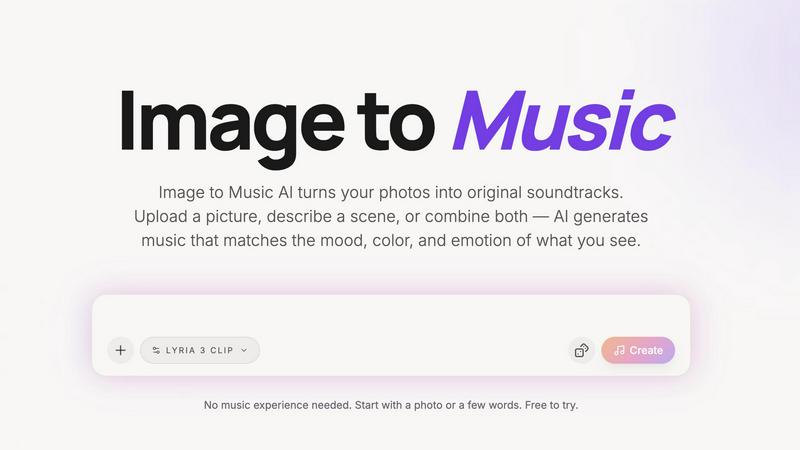
Turn any photo into a unique AI soundtrack that matches its mood and emotion.
Last updated: April 13, 2026

Sovideo
Create professional AI images and videos in one place using top models like Sora 2 and Veo 3.
Last updated: February 28, 2026
Visual Comparison
Image to Music AI
Sovideo
Feature Comparison
Image to Music AI
Dual Input Modes: Photo & Text
Start your creative process in the way that suits you best. You can directly upload any photo—a landscape, portrait, or abstract art—and let the AI interpret its visual story. Alternatively, if you have a scene in mind but no picture, simply type a description like "a quiet coffee shop at dawn." For the ultimate control, you can even combine both, using an image as the foundation and adding text prompts to fine-tune the direction.
Full Creative Control with Prompts
While the AI is brilliant at interpreting images, you remain the director. After uploading your photo, you can use text prompts to steer the genre, tempo, and instrumentation of your generated track. Want that serene mountain photo to have an epic orchestral feel instead of ambient piano? Just adjust the prompt. This feature ensures the final music aligns perfectly with your creative vision, not just the AI's first interpretation.
Side-by-Side Track Comparison
Making decisions is easy when you can compare your options. This feature allows you to generate multiple music tracks from the same single image and prompt. You can then listen to these different versions side-by-side to instantly hear which one best captures the mood you're after. It takes the guesswork out of creation and helps you confidently select the perfect soundtrack.
Downloadable, Royalty-Free Audio
Once you've found your perfect track, you can download it directly with no hidden requirements or complicated licensing. The audio output is yours to use in your projects, providing royalty-free background music for videos, podcasts, presentations, or personal enjoyment. This makes it a practical and reliable tool for creators who need ready-to-use, original music.
Sovideo
All-in-One AI Studio
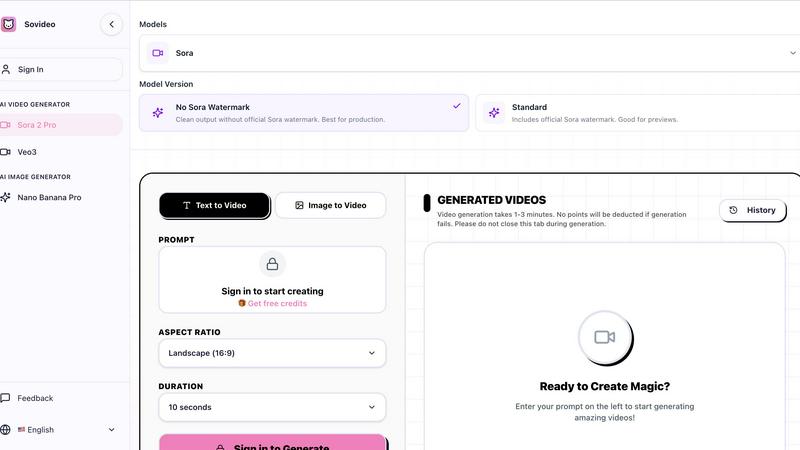
Sovideo combines both AI image and AI video generation in one platform. You never have to switch between different apps or websites. Whether you need a background image for a social post or a full marketing video, you can create it all here using the industry's top models like Sora 2, Veo 3, Seedream 4.5, and Nano Banana Pro, streamlining your entire creative workflow from start to finish.
Top-Tier AI Models
Access the most advanced AI models on the market directly within Sovideo. For video, choose between OpenAI's Sora 2 or Google's Veo 3. For images, leverage powerful generators like Seedream 4.5. This gives you the flexibility to select the best tool for your specific project, ensuring you get the highest quality output possible without needing technical expertise about the underlying technology.
Simple Prompt-Based Creation
Creating is as easy as typing what you imagine. Just enter a text prompt describing your scene, character, or action, and Sovideo's AI handles the complex rendering. The platform offers helpful controls like aspect ratio selection (e.g., Landscape 16:9) and video duration settings (like 10 or 15 seconds), giving you guidance to shape your creation without overwhelming you with complicated settings.
Web-Based & Accessible
Sovideo is entirely cloud-based and runs in your web browser. There is no software to download, install, or update. This means you can access your creative studio from any device with an internet connection. Start a project on your office computer and continue editing it on your home laptop or tablet, with all your work and history saved securely in your account.
Use Cases
Image to Music AI
For Content Creators & Musicians
Vloggers, YouTubers, and social media creators can generate unique, royalty-free background music in minutes. Simply use a keyframe from your video as the input image, and get a custom soundtrack that matches the visual mood perfectly, elevating your content without copyright worries or expensive production costs.
For Filmmakers and Animators
Storyboard a scene and turn it into a temporary or even final score. Filmmakers and animators can upload concept art, storyboard frames, or scene stills to quickly generate atmospheric music that matches the intended emotion, helping to pitch ideas, set the tone during editing, or inspire the final composition.
For Marketing and Advertising
Create cohesive audio branding and custom jingles that visually and sonically represent a brand or campaign. Advertisers can use product photos, brand imagery, or campaign visuals to generate original music that reinforces the brand's identity, making for memorable and emotionally resonant commercials or online ads.
For Personal Memory and Art Projects
Transform personal photos—like a wedding picture, a travel landscape, or a child's drawing—into a personalized musical piece. It's a novel way to commemorate memories, create gifts, or add an auditory dimension to art projects and mood boards, making feelings associated with an image tangible through sound.
Sovideo
Social Media Content Creation
Quickly generate eye-catching videos and images for platforms like TikTok, Instagram, and YouTube. Create trending ASMR clips, engaging shorts, or stunning visual posts to grow your audience and increase engagement, all without needing a camera, filming equipment, or advanced editing skills.
Marketing & Advertising
Produce professional marketing videos, product demonstrations, and promotional assets for your business or clients. Sovideo enables small teams and entrepreneurs to create high-quality ad content quickly and cost-effectively, helping to tell compelling brand stories and drive campaigns.
Concept Art & Illustration
Bring your creative ideas to life as visual concepts. Writers, game developers, and designers can use Sovideo to generate unique characters, scenes, and illustrative assets from textual descriptions, helping to visualize stories, pitch ideas, and inspire further development.
Educational & Explainer Content
Create clear and engaging explainer videos or educational content. Teachers, coaches, and content creators can transform complex topics into easy-to-understand visual narratives using AI-generated scenes and sequences, making learning more interactive and accessible.
Overview
About Image to Music AI
Image to Music AI is a revolutionary tool that transforms your visual world into a unique auditory experience. It's designed for anyone who wants to create original music but doesn't know where to start or lacks musical training. The core idea is beautifully simple: upload any photo or type a description of a scene, and the AI will analyze it to generate a matching soundtrack. It reads the mood, colors, textures, and energy from your image—like a warm sunset, a chaotic cityscape, or a misty forest—and composes a piece of music that captures that exact feeling. This process bridges the gap between what you see and what you feel, making music creation as easy as sharing a picture. Whether you're a content creator needing a quick soundtrack, a filmmaker visualizing a scene, or someone wanting to turn a cherished memory into a song, this tool provides a fast, intuitive, and powerful way to bring your visuals to life with sound. Best of all, it's built to be accessible, offering a free starting point so you can experiment and discover the magic of turning images into music.
About Sovideo
Sovideo is your all-in-one creative studio powered by artificial intelligence, designed to make professional visual content creation simple and accessible. It's a web-based platform that brings together the world's most advanced AI models for generating both stunning images and captivating videos, all within a single, easy-to-use workspace. Whether you're a complete beginner, a marketer, a small business owner, or part of a content team, Sovideo removes the technical complexity. You don't need to be a professional designer or video editor. With simple text prompts, you can describe your idea and transform it into high-quality visuals in just minutes. The platform runs directly in your web browser—no software to download or install. This cloud-based approach means you can start a project on your laptop at home and seamlessly pick it up later on your tablet at a cafe. By unifying top-tier models like Sora 2 for video and Seedream 4.5 for images, Sovideo saves you time, reduces production costs, and empowers you to experiment and create at a scale that was previously impossible. It's built for the future, making professional-grade AI visual creation a reality for everyone.
Frequently Asked Questions
Image to Music AI FAQ
How does Image to Music AI work?
The process is simple and happens in three steps. First, you upload a photo or describe a scene. The AI then analyzes the visual elements of your input, such as colors, composition, and perceived mood. Finally, it uses this analysis to compose an original piece of music that sonically represents those elements, delivering a track to you in just 2 to 5 minutes.
Do I need any music experience to use this?
Absolutely not! Image to Music AI is designed specifically for people with no music theory or production knowledge. The entire point is to make creation accessible. You start with what you already understand—a picture or a feeling—and the AI handles the complex task of composition. It's as easy as uploading a photo and hitting "create."
What kind of music genres can it create?
The tool supports a wide and growing range of genres to match diverse visuals and moods. This includes piano solos, guitar ballads, orchestral scores, EDM, jazz, blues, cinematic ambience, folk, R&B, Latin pop, Afropop, reggaeton, and even 8-bit chiptune. You can often guide the genre using the text prompt feature alongside your image.
Can I use the music I create for commercial projects?
Yes, the audio tracks you generate and download are royalty-free, meaning you can use them in your commercial projects like YouTube videos, podcasts, advertisements, and presentations without worrying about copyright strikes or additional fees. Always check the latest terms of service for specific details regarding licensing.
Sovideo FAQ
How do I start creating with Sovideo?
Getting started is easy! Simply visit the Sovideo website and sign up for an account. Once you're signed in, you'll see the creation dashboard. Choose between generating a video or an image, type your idea into the prompt box, adjust simple settings like aspect ratio, and click generate. Your creation will be ready in a few minutes.
What AI models are available on Sovideo?
Sovideo provides access to several leading AI models. For video generation, you can use OpenAI's Sora 2 or Google's Veo 3. For image generation, options include Seedream 4.5 and Nano Banana Pro. You can select the model that best suits your project's needs directly within the platform's interface.
Is there a watermark on the generated videos?
It depends on your choice. When using the Sora model, you can select the "No Sora Watermark" version for clean output suitable for final production. Alternatively, you can choose the "Standard" version, which includes the official Sora watermark, useful for creating previews and drafts.
How long does it take to generate a video?
Video generation typically takes between 1 to 3 minutes. The platform will show you the progress, and it's important not to close the browser tab during this time. If a generation fails, no credits will be deducted from your account, so you can try again with peace of mind.
Alternatives
Image to Music AI Alternatives
Image to Music AI is a creative tool in the audio and content creation space. It uses artificial intelligence to generate original music tracks based on the visuals and mood of a photo you upload or a scene you describe. This makes it easy for anyone to create custom soundtracks without needing musical training. People often explore other options for various reasons. Some might be looking for a different pricing model, such as a one-time purchase instead of a subscription. Others may need specific features, like longer audio outputs, more control over the musical structure, or integration with other creative software they use. The platform you work on, like a mobile app versus a desktop website, can also influence the search. When choosing a different tool, consider what matters most for your projects. Think about the quality and style of music it produces, how much creative control you have over the output, and the cost structure. Also, check how easy it is to use and whether you can legally use the generated music for your intended purpose, like in videos or podcasts.
Sovideo Alternatives
Sovideo is an all-in-one AI creative studio that specializes in generating professional images and videos. It falls into the category of AI-powered visual content creation tools, designed to make high-quality design and video production accessible to everyone through simple text prompts. People often explore alternatives to find a tool that better fits their specific needs. Common reasons include budget constraints, as pricing models can vary widely. Some users might need features that Sovideo doesn't offer, or they may prefer a desktop application over a purely browser-based platform. It's all about finding the right fit for your unique creative workflow and goals. When choosing an alternative, consider what matters most for your projects. Think about the types of visuals you create most often—do you need stronger image generation, more advanced video editing, or perhaps a different style of AI art? Also, evaluate the cost, ease of use, and whether the platform supports the kind of collaboration or integration your team requires.