
HuntingPad vs Zovo
Side-by-side comparison to help you choose the right tool.

HuntingPad
HuntingPad organizes your job search and gives you AI insights to land more interviews.
Last updated: March 1, 2026

Zovo offers 20 privacy-focused Chrome extensions for developers and writers, all from a single dedicated creator.
Last updated: February 26, 2026
Visual Comparison
HuntingPad
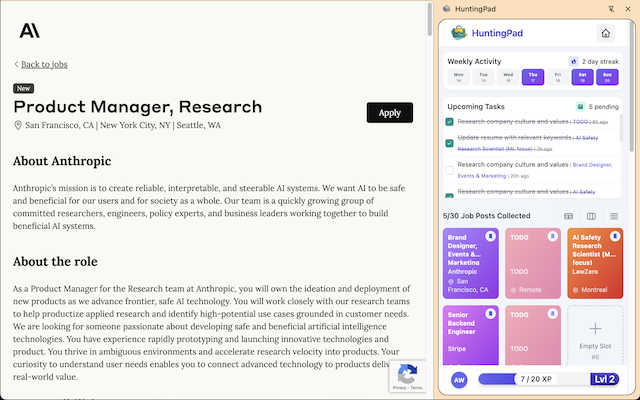
Zovo

Feature Comparison
HuntingPad
One-Click Job Capture
Stop copying and pasting or taking messy screenshots. With HuntingPad installed, you can save any job posting from LinkedIn, Indeed, Glassdoor, or a company's career page directly to your dashboard with a single click. All the key details—job title, company, link, and date—are captured automatically, so you never lose track of a potential opportunity.
Automatic Application Tracking
HuntingPad automatically organizes every job you save and tracks the status of each application. You can easily mark positions as "Saved," "Applied," "Interviewing," or "Offered." This creates a clear, visual pipeline of your entire job search, eliminating the guesswork and outdated spreadsheets that cause so much stress and confusion.
AI-Powered Insights & Suggestions
Go beyond simple tracking. HuntingPad's AI analyzes the jobs you save and your resume to provide actionable insights. It can suggest the best times to follow up, recommend small tweaks to tailor your resume for a specific role, and even help you craft a more personalized cover letter, giving you a significant edge over other applicants.
Smart Reminders & Deadlines
Never miss a critical follow-up or application deadline again. HuntingPad sets intelligent reminders for you based on your activity. It will notify you when it's time to check in on an application or when a saved job posting is about to expire, ensuring you stay proactive and organized without having to remember every detail yourself.
Zovo
BeLikeNative
BeLikeNative is an innovative writing tool that helps users express themselves like native speakers. With one keystroke, it instantly rewrites text in 80 different languages, making it perfect for non-native speakers who want to improve their writing skills. This extension is designed to work seamlessly across various platforms, ensuring that your writing is polished and professional, no matter where you are.
Tab Suspender Pro
Tab Suspender Pro is a powerful extension aimed at saving memory by automatically suspending inactive tabs. By detecting which tabs are not in use, it reduces your browser's memory consumption, leading to a smoother and faster browsing experience. This feature is particularly beneficial for users who tend to keep many tabs open at once, as it helps maintain optimal performance without manual intervention.
JSON Formatter Pro
JSON Formatter Pro is essential for anyone working with JSON data. This tool formats, validates, and explores JSON files locally, providing a beautification option as well as minification. Users can also utilize a tree explorer feature to navigate complex JSON structures more easily. It supports YAML and CSV conversions, making it versatile for various data handling tasks.
Clipboard History Pro
Clipboard History Pro ensures that users never lose important copied text again. With the ability to store up to 10,000 clips, this extension allows for instant searching and smart pasting of previously copied content. This feature is ideal for users who frequently copy and paste information, providing them with a reliable history of their clipboard activity.
Use Cases
HuntingPad
The High-Volume Applicant
For professionals applying to 100+ roles, organization is non-negotiable. HuntingPad is perfect for this user, providing a single dashboard to manage the entire flood of applications. It prevents you from accidentally applying to the same company twice, helps you prioritize which roles to follow up on, and ensures no opportunity slips through the cracks due to sheer volume.
The Career Changer or Pivot
When you're exploring roles in a new industry or function, you're researching many different companies and types of jobs. HuntingPad helps you categorize and compare these diverse opportunities easily. You can add custom notes on why a role is interesting, track which resume version you used, and use AI insights to better align your experience with each new field.
The Busy Professional with Limited Time
If you're job searching while employed, your time is extremely limited. HuntingPad maximizes efficiency by cutting out manual data entry and tab management. You can quickly save jobs during a short break and then batch-process applications later. The smart reminders ensure you stay on top of your search without it consuming your evenings and weekends.
The Organized Networker
For those who leverage their network heavily, tracking conversations is key. While HuntingPad primarily captures job posts, its tracking system is ideal for logging which roles came from a referral, which recruiter you spoke to at which company, and what the next steps are. This creates a unified record that connects your networking efforts directly to your applications.
Zovo
Enhancing Writing Skills
BeLikeNative is perfect for students, professionals, and anyone looking to refine their writing. Whether drafting emails, essays, or reports, users can rely on its real-time rewriting capabilities to achieve a native-like fluency in their writing, making communication clearer and more effective.
Managing Browser Memory
For users who work with numerous tabs, Tab Suspender Pro is a game-changer. It allows seamless management of browser memory, automatically suspending tabs that are not currently needed. This enhances overall browser performance, making multitasking more efficient without the frustration of sluggishness.
Working with JSON Data
Developers and data analysts will find JSON Formatter Pro indispensable. It simplifies the process of handling JSON files, allowing for quick formatting and validation. The tree explorer view makes it easier to understand complex data structures, streamlining workflow and facilitating better data manipulation.
Organizing Clipboard Data
Clipboard History Pro is particularly useful for writers, researchers, and anyone who frequently copies text. By keeping a detailed history of clipboard items, users can quickly retrieve and utilize past content without the fear of losing important information. This increases productivity and reduces time spent searching for previously copied text.
Overview
About HuntingPad
HuntingPad is a powerful Chrome extension designed to be your ultimate job search command center. It transforms the chaotic, overwhelming process of finding a new job into an organized, efficient, and strategic campaign. Instead of juggling countless browser tabs, spreadsheets, and bookmarks, HuntingPad works directly inside your browser where you already look for jobs. With just one click, you can save any job posting from any website. The tool then automatically tracks every application, stores important details, and provides smart, AI-powered insights to help you improve your chances. It's built for ambitious professionals—from developers tracking specific tech stacks to managers organizing multiple opportunities—who are applying to 50, 100, or even 150 roles and need a system that scales with their effort. The core promise is simple: stop letting administrative tasks be a full-time job. HuntingPad helps you get more interviews with less effort, turning your job search from a stressful burden into a streamlined strategic advantage.
About Zovo
Zovo is a unique suite of 20 Chrome extensions developed by Michael Lip, a solo developer with over 10 years of experience and an impressive track record of earning more than $400,000 on Upwork, maintaining a 100% success rate. The primary goal of Zovo is to empower users by providing essential tools that enhance their browsing experience while ensuring complete data privacy. The flagship extension, BeLikeNative, helps over 3,300 users write like native speakers with just one keystroke, supporting 80 languages. Zovo’s collection includes a variety of tools such as Tab Suspender Pro, JSON Formatter Pro, and Clipboard History Pro, all designed to improve productivity without compromising user data. With a community-driven approach, users can vote on features and actively shape the development roadmap. New extensions are released monthly, and many tools are also available for free online at zovo.one, making Zovo an invaluable resource for anyone looking to optimize their browser experience.
Frequently Asked Questions
HuntingPad FAQ
Is HuntingPad really free to start?
Yes! You can install the HuntingPad Chrome extension and start using its core organizing and tracking features completely free, with no credit card required. This allows you to save jobs, track applications, and set up your dashboard in seconds to immediately bring order to your search.
How does the AI-powered insight feature work?
The AI analyzes the text of the job descriptions you save and compares it to the information in your uploaded resume. It then provides tailored suggestions, such as highlighting key skills you should emphasize or recommending optimal times to send a follow-up email based on typical hiring cycles, to help strengthen your application.
Do I have to manually enter all my past applications?
No, you don't. While you can manually add roles, HuntingPad is designed to work from the moment you install it. You start fresh by saving new jobs with one click. This forward-looking approach is often the easiest way to get organized quickly, rather than trying to rebuild a past history of applications.
Is my data safe and private with HuntingPad?
Absolutely. Your job search data is sensitive. HuntingPad is built with security in mind. Your information is stored securely, and the tool is designed as a personal command center to help you. It does not share your personal data or application details with companies or other third parties.
Zovo FAQ
What types of extensions does Zovo offer?
Zovo offers a suite of 20 Chrome extensions that cater to various needs, including writing assistance, memory management, data formatting, and clipboard management. Each extension is designed to enhance the user experience while prioritizing privacy.
How does Zovo ensure user privacy?
Zovo is committed to a privacy-first approach, ensuring that all data remains on the user's device. There is no data harvesting or sharing with third parties, and the developer has no investors, which means user habits are not monetized.
Can I request new features for Zovo extensions?
Absolutely! Zovo encourages user feedback and feature requests. You can submit your ideas directly, and the most requested features are prioritized for development, ensuring that the tools evolve based on actual user needs.
Is there a community I can join?
Yes! Zovo has an active Discord community where users can connect, share feedback, and discuss new features. This community-driven approach allows for a collaborative environment where users can influence the direction of future extensions.
Alternatives
HuntingPad Alternatives
HuntingPad is a Chrome extension in the productivity and management category, designed to organize your job search. It helps you save job postings, track applications, and get AI-powered resume tips, all from your browser. People often look for alternatives for different reasons. Maybe they need a tool that works on mobile or integrates with other apps. Others might be looking for a different price point or a specific feature that fits their unique workflow. When choosing a different tool, think about what matters most for your job hunt. Consider if you need cross-platform access, the types of insights you want, and how much automation you need to save time. The right tool should make your search feel less chaotic and more strategic.
Zovo Alternatives
Zovo is a suite of 20 privacy-first Chrome extensions designed specifically for developers and writers. This collection includes tools like JSON Formatter, Tab Suspender, and Clipboard History, all aimed at enhancing productivity and management while ensuring user privacy. The extensions, created by a seasoned solo developer, are tailored to streamline workflows and improve efficiency. Users often seek alternatives to Zovo for various reasons, including pricing, specific features, or compatibility with their preferred platforms. When looking for an alternative, consider factors such as the range of features offered, the privacy policies in place, and whether the tool aligns with your specific needs. It’s also essential to evaluate the support and community engagement available, as these can significantly impact your experience and satisfaction.