HuntingPad vs rfpaihub
Side-by-side comparison to help you choose the right tool.

HuntingPad organizes your job search and gives you AI insights to land more interviews.
Last updated: March 1, 2026

rfpaihub
Find and compare the best AI tools to write RFPs and proposals faster with less manual work.
Last updated: April 13, 2026
Visual Comparison
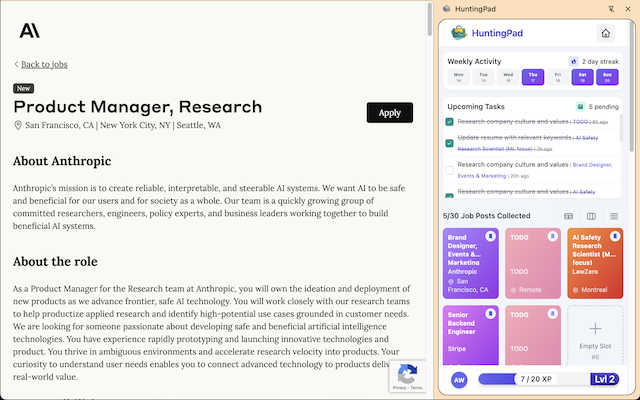
HuntingPad
rfpaihub

Feature Comparison
HuntingPad
One-Click Job Capture
Stop copying and pasting or taking messy screenshots. With HuntingPad installed, you can save any job posting from LinkedIn, Indeed, Glassdoor, or a company's career page directly to your dashboard with a single click. All the key details—job title, company, link, and date—are captured automatically, so you never lose track of a potential opportunity.
Automatic Application Tracking
HuntingPad automatically organizes every job you save and tracks the status of each application. You can easily mark positions as "Saved," "Applied," "Interviewing," or "Offered." This creates a clear, visual pipeline of your entire job search, eliminating the guesswork and outdated spreadsheets that cause so much stress and confusion.
AI-Powered Insights & Suggestions
Go beyond simple tracking. HuntingPad's AI analyzes the jobs you save and your resume to provide actionable insights. It can suggest the best times to follow up, recommend small tweaks to tailor your resume for a specific role, and even help you craft a more personalized cover letter, giving you a significant edge over other applicants.
Smart Reminders & Deadlines
Never miss a critical follow-up or application deadline again. HuntingPad sets intelligent reminders for you based on your activity. It will notify you when it's time to check in on an application or when a saved job posting is about to expire, ensuring you stay proactive and organized without having to remember every detail yourself.
rfpaihub
Comprehensive Tool Comparison
RFP AI Hub lets you side-by-side compare dozens of AI-powered tools in one place. You can filter and sort them based on what matters most to you, such as key features, specific industries they serve, and their pricing models. This takes the guesswork out of your search and helps you quickly identify the top contenders that fit your budget and workflow requirements.
Curated Categories & Tags
The platform organizes tools into clear, helpful categories like RFP Response, Proposal Writing, and Security Questionnaire Automation. This means you can immediately dive into the section most relevant to your primary challenge. Tags provide further detail, helping you find tools with specific capabilities like knowledge base management or document generation.
Free Access & No Account Required
You can start using RFP AI Hub right away without any sign-up forms or costs. The entire directory is freely accessible, allowing you to browse, compare, and research tools at your own pace. This commitment to being a free resource makes it an unbiased starting point for anyone looking to improve their proposal process.
Actionable Guides & Resources
Beyond just listings, RFP AI Hub provides valuable educational content like its "How to Choose the Right Tool" guide and detailed blog posts. These resources break down complex decisions into simple steps, explaining how different tools cater to different workflows (like structured questionnaires vs. narrative proposals), empowering you to make a confident choice.
Use Cases
HuntingPad
The High-Volume Applicant
For professionals applying to 100+ roles, organization is non-negotiable. HuntingPad is perfect for this user, providing a single dashboard to manage the entire flood of applications. It prevents you from accidentally applying to the same company twice, helps you prioritize which roles to follow up on, and ensures no opportunity slips through the cracks due to sheer volume.
The Career Changer or Pivot
When you're exploring roles in a new industry or function, you're researching many different companies and types of jobs. HuntingPad helps you categorize and compare these diverse opportunities easily. You can add custom notes on why a role is interesting, track which resume version you used, and use AI insights to better align your experience with each new field.
The Busy Professional with Limited Time
If you're job searching while employed, your time is extremely limited. HuntingPad maximizes efficiency by cutting out manual data entry and tab management. You can quickly save jobs during a short break and then batch-process applications later. The smart reminders ensure you stay on top of your search without it consuming your evenings and weekends.
The Organized Networker
For those who leverage their network heavily, tracking conversations is key. While HuntingPad primarily captures job posts, its tracking system is ideal for logging which roles came from a referral, which recruiter you spoke to at which company, and what the next steps are. This creates a unified record that connects your networking efforts directly to your applications.
rfpaihub
For Sales Teams Drowning in RFPs
Sales teams burdened by repetitive RFP questions can use RFP AI Hub to find software that automates answer retrieval and draft generation. This cuts response time dramatically, allowing them to submit more high-quality proposals and focus on building client relationships instead of manual copy-pasting.
For Proposal Managers Seeking Consistency
Proposal managers struggling with inconsistent messaging and scattered content libraries can find tools that centralize approved answers. RFP AI Hub directs them to platforms with strong knowledge base features, ensuring every response is on-brand and accurate, improving win rates.
For Security Teams Handling Vendor Assessments
IT and security teams inundated with complex security questionnaires (like SIG or CAIQ) can discover specialized automation tools. RFP AI Hub helps them identify software that maps standard security controls to questionnaire questions, streamlining compliance and vendor risk assessments.
For Startups Evaluating Their First Tool
Startups and growing companies entering the world of formal proposals for the first time can use RFP AI Hub as their research hub. It provides a clear overview of the market, explains different tool types in simple terms, and helps them find a cost-effective solution that scales with their growth.
Overview
About HuntingPad
HuntingPad is a powerful Chrome extension designed to be your ultimate job search command center. It transforms the chaotic, overwhelming process of finding a new job into an organized, efficient, and strategic campaign. Instead of juggling countless browser tabs, spreadsheets, and bookmarks, HuntingPad works directly inside your browser where you already look for jobs. With just one click, you can save any job posting from any website. The tool then automatically tracks every application, stores important details, and provides smart, AI-powered insights to help you improve your chances. It's built for ambitious professionals—from developers tracking specific tech stacks to managers organizing multiple opportunities—who are applying to 50, 100, or even 150 roles and need a system that scales with their effort. The core promise is simple: stop letting administrative tasks be a full-time job. HuntingPad helps you get more interviews with less effort, turning your job search from a stressful burden into a streamlined strategic advantage.
About rfpaihub
RFP AI Hub is your ultimate, free guide to navigating the world of AI-powered proposal tools. If you've ever felt overwhelmed by the sheer number of software options for handling RFPs, security questionnaires, or sales proposals, this platform is designed for you. It's not a tool you use to write proposals itself; instead, it's a comprehensive, curated directory that helps you find the right tool for your specific needs. Think of it as a friendly, expert matchmaker for sales, proposal, and security teams. Its main value is saving you countless hours of research by allowing you to easily compare different software based on features, pricing, industry focus, and use cases. Whether you're a solo professional or part of a large enterprise team, RFP AI Hub provides the clear, step-by-step guidance you need to make an informed decision and transform your response process from a stressful scramble into a streamlined, efficient operation.
Frequently Asked Questions
HuntingPad FAQ
Is HuntingPad really free to start?
Yes! You can install the HuntingPad Chrome extension and start using its core organizing and tracking features completely free, with no credit card required. This allows you to save jobs, track applications, and set up your dashboard in seconds to immediately bring order to your search.
How does the AI-powered insight feature work?
The AI analyzes the text of the job descriptions you save and compares it to the information in your uploaded resume. It then provides tailored suggestions, such as highlighting key skills you should emphasize or recommending optimal times to send a follow-up email based on typical hiring cycles, to help strengthen your application.
Do I have to manually enter all my past applications?
No, you don't. While you can manually add roles, HuntingPad is designed to work from the moment you install it. You start fresh by saving new jobs with one click. This forward-looking approach is often the easiest way to get organized quickly, rather than trying to rebuild a past history of applications.
Is my data safe and private with HuntingPad?
Absolutely. Your job search data is sensitive. HuntingPad is built with security in mind. Your information is stored securely, and the tool is designed as a personal command center to help you. It does not share your personal data or application details with companies or other third parties.
rfpaihub FAQ
What is RFP response software?
RFP response software is a specialized platform that helps teams answer Requests for Proposals much faster and more consistently. It works by creating a central library of your best past answers and using smart technology (like AI) to automatically find and suggest those answers for new questions, drastically reducing manual work.
How does AI improve the RFP process?
AI supercharges the RFP process by acting as a smart assistant. It automatically matches new questions to your existing answer library, generates first-draft responses for you to review, and even suggests improvements. This automation typically helps teams cut their total response time by 40 to 60 percent.
What types of tools does RFP AI Hub compare?
RFP AI Hub compares AI-powered tools across several key categories. This includes software for RFP Response, general Proposal Writing, Security Questionnaire Automation, Knowledge Base tools, Document Generation systems, and Contract or Bid Management platforms.
Is RFP AI Hub free to use?
Yes, absolutely! RFP AI Hub is completely free to use as a directory. You can browse, compare, and filter all the tools without creating an account or paying anything. Tool vendors can also list their products on the platform for free, which helps keep the directory comprehensive and unbiased.
Alternatives
HuntingPad Alternatives
HuntingPad is a Chrome extension in the productivity and management category, designed to organize your job search. It helps you save job postings, track applications, and get AI-powered resume tips, all from your browser. People often look for alternatives for different reasons. Maybe they need a tool that works on mobile or integrates with other apps. Others might be looking for a different price point or a specific feature that fits their unique workflow. When choosing a different tool, think about what matters most for your job hunt. Consider if you need cross-platform access, the types of insights you want, and how much automation you need to save time. The right tool should make your search feel less chaotic and more strategic.
rfpaihub Alternatives
RFP AI Hub is a helpful online resource that helps you discover and compare AI-powered tools for RFP and proposal writing. It falls into the category of productivity and management platforms, acting as a guide to help you find the right software for your needs. People often look for alternatives for several common reasons. They might need a tool with a specific feature not listed, find that the available options don't fit their budget, or require a platform that integrates with other software they already use. It's a normal part of finding the perfect fit for your team's workflow. When searching for an alternative, focus on what matters most for your projects. Consider the core features you need, like automated response generation or security questionnaire handling. Also, think about your team's size, your budget, and how easy the tool is to learn and use. Taking these steps will lead you to a great solution.