
Gomotion vs SimpleDraw
Side-by-side comparison to help you choose the right tool.

Gomotion
Turn your words into stunning motion graphics in seconds with simple AI prompts.
Last updated: February 28, 2026
SimpleDraw
Easily create accurate floor plans and scale drawings online with SimpleDraw, no experience or downloads needed.
Last updated: March 1, 2026
Visual Comparison
Gomotion

SimpleDraw
Feature Comparison
Gomotion
Transform Words Into Motion
This is the heart of Gomotion's simplicity. Just type a simple text prompt describing how you want your text, logo, or graphic to move. Forget about manually setting keyframes. Describe cinematic effects like a "slow fade-in" or a "dynamic bounce," and Gomotion instantly generates the animation for you. It's perfect for animating titles, captions, and logos with professional flair, making it ideal for product demos and creators who want great results without the technical hassle.
Narrative Mode for Full Stories
Take your ideas further with Narrative Mode. This powerful feature allows you to turn a full script into a complete, animated story. Gomotion intelligently syncs your narrative with images and video clips, creating end-to-end videos that are ready to publish. You can create compelling ads, short explainer videos, or social media stories in just minutes, not days, by simply providing the story you want to tell.
Brand Kit Import & Consistency
Maintaining a consistent brand identity across all your videos is effortless. With Gomotion, you can import your entire brand kit—logos, colors, fonts—in just one click. Once imported, the AI uses these assets to generate animations that perfectly match your brand's style. This ensures every social media post, product launch video, or ad looks professionally on-brand without any manual design work from you.
Create Complex Animations & Charts
Gomotion isn't just for simple text moves. It can handle sophisticated animations that would normally require expert skills. You can generate animated charts and graphs directly from your data, perfect for creating impactful explainer videos, simulations, and business presentations. This feature transforms dry numbers into engaging visual stories that capture and hold your audience's attention.
SimpleDraw
Accurate Measurements & Scale Drawing
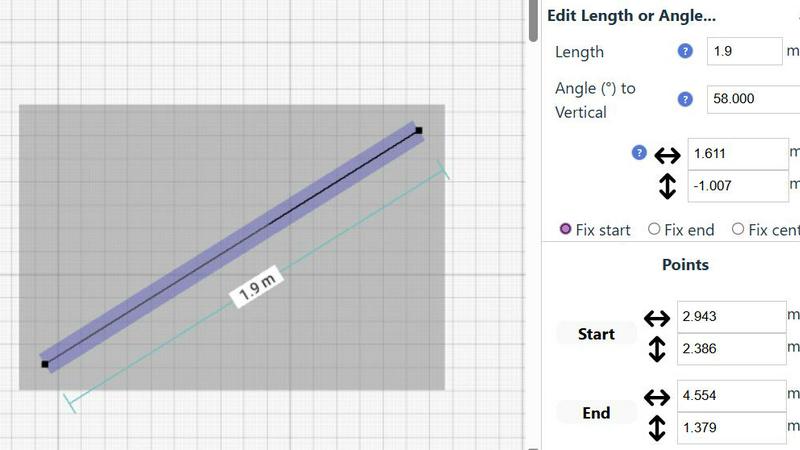
SimpleDraw provides precise measurements and smart alignment features that ensure your drawings are accurate and to scale. This capability is crucial for creating detailed and reliable plans, whether for a simple room layout or a complex renovation project.
Specialized Floor Plan Creator
With a dedicated Floor Plan Mode, SimpleDraw allows you to create detailed floor plans complete with walls, doors, windows, and furniture. This feature is tailored for users who want to visualize their spaces accurately before making any physical changes.
Smart Alignment System
The smart alignment system assists users in positioning points and lines exactly where needed. By providing visual cues, it helps ensure that your drawings are precise, and if adjustments are necessary, you can zoom in for greater accuracy.
Comprehensive Measurement System
SimpleDraw features a comprehensive measurement system that offers fine controls over which measurements are displayed. You can choose between metric or standard US units, and contextual measurements are dynamically shown as you work, providing clarity and precision at every step.
Use Cases
Gomotion
Social Media Ads & Content
Create scroll-stopping ads and content for platforms like Instagram, TikTok, and Facebook in minutes. Use a prompt to animate your product shot, bring your text call-to-action to life, or use Narrative Mode to craft a short, compelling brand story. Gomotion ensures your videos are optimized and look perfect on any mobile or desktop screen, helping you engage your audience effectively.
Product Demos & Launches
Showcase your product's features with dynamic, easy-to-understand animations. Animate text to highlight key benefits, create smooth transitions between features, or simulate how your product works. This professional touch makes your demos more engaging and memorable for potential customers, boosting excitement during launch campaigns.
Business Presentations & Explainer Videos
Transform boring slides and data into captivating presentations. Use Gomotion to animate charts, illustrate complex concepts with simple shapes, and add professional motion to your title slides. This keeps your audience engaged and helps communicate your message more clearly, whether you're pitching to clients or training your team.
Website & Landing Page Headers
Make a powerful first impression with an animated hero section on your website. Create a looping background animation, animate your headline text to draw the eye, or add subtle motion to your logo. Gomotion helps you build modern, dynamic websites that stand out and encourage visitors to stay and explore.
SimpleDraw
Kitchen & Bathroom Floor Plans
When planning a kitchen or bathroom renovation, SimpleDraw allows you to create accurate floor plans that visualize layouts before any work begins. This helps ensure your design meets your needs and fits the space effectively.
Room Layouts & Furniture Planning
If you are redesigning a bedroom, living room, or office, SimpleDraw makes it easy to see how furniture will fit within the space. You can experiment with different layouts to find the perfect arrangement without any physical effort.
House & Apartment Plans
SimpleDraw enables you to create complete floor plans for your home or rental listings. This feature is invaluable for space planning, helping you visualize how different areas of your house will work together before you start any renovations.
Community-Driven Development
By joining SimpleDraw's community, you can contribute to its ongoing development. User feedback shapes future features, ensuring that the tool evolves based on the needs and requests of its users, fostering a collaborative environment.
Overview
About Gomotion
Gomotion is your friendly AI motion designer, here to make professional animation simple and accessible for everyone. Think of it as the perfect blend of powerful animation software and the easy, prompt-based magic of modern AI. If you've ever been intimidated by complex tools like Adobe After Effects or wished you could create eye-catching videos without spending hours learning or doing manual work, Gomotion is your solution. It's built for marketers, small business owners, content creators, and even designers who want to speed up their workflow. The core idea is beautifully simple: you just describe what you want in words or upload an image, and Gomotion's advanced AI brings it to life with smooth, engaging motion. This means you can skip the confusing keyframes and daunting interfaces. Create stunning, brand-consistent animations for social media ads, website headers, product demos, and presentations in seconds. Gomotion empowers you to turn static ideas into dynamic stories, making high-quality motion graphics a practical, everyday tool for your creative projects.
About SimpleDraw
SimpleDraw is your ultimate online solution for creating precise and accurate scale drawings effortlessly. This free tool combines the traditional feel of pen and paper with the advanced capabilities of digital design, making it perfect for casual users, DIY enthusiasts, and homeowners alike. Whether you are sketching out a new furniture arrangement, planning a garden layout, or preparing for a home renovation, SimpleDraw simplifies the process by providing an intuitive interface that is easy to navigate. With its main value proposition of offering professional-grade accuracy and a suite of useful features, SimpleDraw eliminates the complexities often associated with professional CAD software. It runs seamlessly in your web browser, requiring no downloads, installations, or sign-ups. You can dive right into creating your drawings with just a few clicks, transforming your ideas into clear, scaled plans without the usual headaches.
Frequently Asked Questions
Gomotion FAQ
Who is Gomotion for?
Gomotion is designed for anyone who needs to create engaging video content but doesn't have the time or skills to learn complex animation software. It's perfect for marketers, entrepreneurs, content creators, social media managers, educators, and even designers looking to prototype ideas quickly. If you have a story to tell or a product to promote, Gomotion is for you.
Do I need any design or animation experience?
Not at all! Gomotion is built specifically for beginners. Its core philosophy is to replace complex technical steps with simple text prompts. You guide the AI with your ideas in plain English (like "make the logo spin gently"), and it handles all the intricate animation work. The interface is clean and intuitive, making the process straightforward from your first click.
What can I create with Gomotion?
You can create a wide variety of motion graphics, including animated text and titles, logo animations, social media video ads, short explainer videos, animated charts for presentations, website header animations, and product demo videos. The tools like Narrative Mode and chart animation allow for both simple and quite sophisticated projects.
How does the Brand Kit import work?
The Brand Kit feature allows you to upload and save your core brand assets—such as your logo file, brand color codes, and font choices—directly into your Gomotion account. Once saved, the AI will reference these assets when generating animations. For example, if you prompt it to "animate our company slogan," it will automatically use your brand's font and colors, ensuring every creation is instantly on-brand.
SimpleDraw FAQ
How do I start using SimpleDraw?
Getting started with SimpleDraw is simple. Just visit the website, and you can begin drawing immediately without any downloads or sign-ups.
Is SimpleDraw really free to use?
Yes, SimpleDraw is completely free. There are no hidden fees or subscriptions, allowing you to use all features without any cost.
Can I save my drawings?
Yes, SimpleDraw allows you to save your drawings directly in your web browser. You can revisit and edit them anytime without losing your progress.
What types of projects can I create with SimpleDraw?
You can create a wide range of projects, including floor plans for homes, room layouts, garden designs, and even furniture arrangements. Its versatility makes it suitable for various DIY and planning needs.
Alternatives
Gomotion Alternatives
Gomotion is a fantastic AI-powered tool in the design software category that lets anyone create professional motion graphics using simple text prompts. It turns ideas into animated videos in seconds, making complex animation accessible without needing advanced skills. People often look for other options for a few common reasons. They might need a tool that fits a specific budget, offers different features like more manual control, or works on a different platform like a mobile app. It's completely normal to explore what else is out there to find the perfect fit for your unique projects and workflow. When you're comparing tools, think about what matters most for you. Consider how easy the tool is to learn, the quality and style of animations it produces, and whether it can handle the types of projects you do regularly. The goal is to find software that feels empowering and helps you bring your creative ideas to life efficiently.
SimpleDraw Alternatives
SimpleDraw is a user-friendly online tool designed for creating accurate scale drawings and floor plans. It stands out in the design tools category as a resource for casual users, DIY enthusiasts, and homeowners who seek to visualize their projects without the steep learning curve typically associated with professional CAD software. Users often seek alternatives to SimpleDraw due to various reasons, including the need for additional features, platform compatibility, or even pricing concerns. When selecting an alternative, consider factors such as ease of use, the range of functionalities offered, and whether the tool meets your specific design needs, ensuring it aligns with your project goals and workflow preferences.