DigitalMagicWand vs QuickData.ai
Side-by-side comparison to help you choose the right tool.

DigitalMagicWand
DigitalMagicWand empowers you to effortlessly create, transform, and analyze visuals, audio, video, and text with cutting-edge AI tools.
Last updated: March 18, 2026

QuickData.ai
Automate rent roll and T12 data entry into Excel to underwrite multifamily deals ten times faster.
Last updated: March 1, 2026
Visual Comparison
DigitalMagicWand

QuickData.ai
Feature Comparison
DigitalMagicWand
Accurate AI Detector for Text
Our Accurate AI Detector for Text provides a one-click solution to determine if a piece of text was written by a human or generated by an AI tool like ChatGPT or Claude. You receive precise confidence scores that indicate the likelihood of AI generation, making it an essential tool for editors, educators, and anyone needing clarity in content authenticity.
Undetectable AI Text Humanizer
The Undetectable AI Text Humanizer transforms machine-generated text into natural, human-like writing. Using proprietary algorithms, it removes AI detection patterns while maintaining the original message, making it ideal for academic papers, creative writing, and professional communications without losing the essence of your content.
Digital Ear™: Convert Piano Tracks to MIDI
Digital Ear™ is a specialized tool that converts piano performances into MIDI files with unmatched accuracy. Perfect for musicians and producers, this tool captures the nuances of solo piano playing and changes the way you interact with music, allowing for seamless integration into your digital audio workstation.
UnMixIt™ Pro: Stems for Musicians & DJs
UnMixIt™ Pro allows users to isolate individual elements of a track—vocals, drums, bass, and more—with studio-grade precision. This feature is essential for DJs, music producers, and audio professionals, providing the flexibility to create remixes, mashups, or restore archival recordings without any hassle.
QuickData.ai
AI-Powered Data Extraction
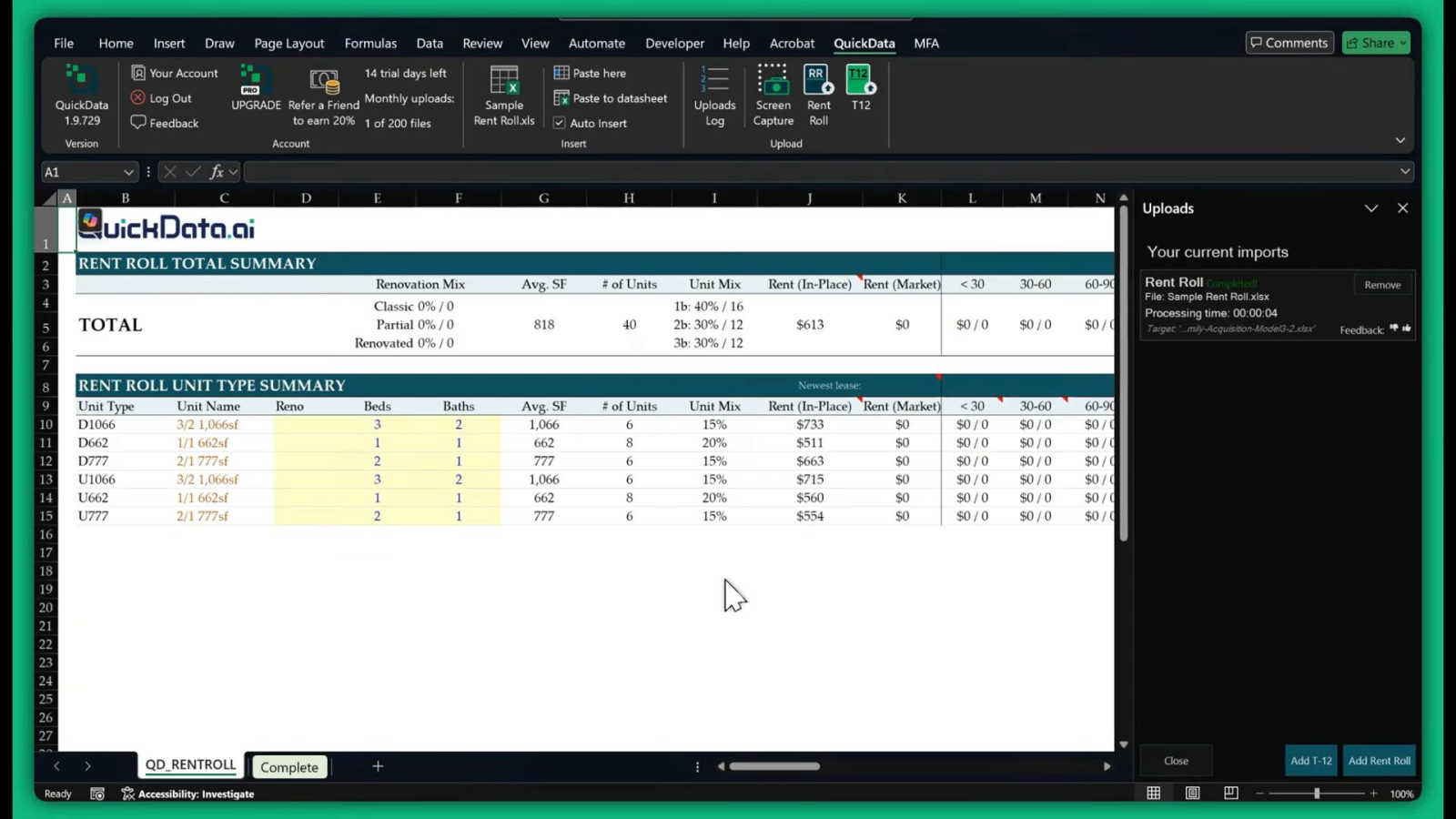
This is the heart of QuickData.ai. Using advanced artificial intelligence, the tool intelligently scans and understands documents like rent rolls, T12s, and offering memorandums. It identifies key data points such as unit numbers, square footage, rent amounts, expenses, and income figures, then accurately extracts them without any manual typing from you. This feature handles the most time-consuming part of your job with precision.
Seamless Excel Integration
QuickData.ai works directly inside Microsoft Excel as an add-in. There's no need to switch between different software or learn a complicated new platform. Once installed, you can pull data from your documents and have it populate your own custom Excel underwriting models instantly. This keeps all your work in one place and leverages the tools you already know and use every day.
Support for Key Multifamily Documents
The tool is expertly trained on the specific document types multifamily professionals use daily. It reliably extracts data from Rent Rolls (for unit-level details), T12/T3 statements (for historical operating income and expenses), and Offering Memorandums (for summarized property financials). This targeted capability ensures high accuracy and relevance for your underwriting needs.
Fast Setup and Easy Onboarding
Getting started with QuickData.ai is designed to be quick and stress-free. The setup process takes just minutes, and the team offers free, personalized 1:1 onboarding sessions to help you get the most out of the tool from day one. You can start your 14-day free trial immediately and cancel anytime, making it easy to experience the benefits with no long-term commitment.
Use Cases
DigitalMagicWand
Enhance Your Creative Writing
With the Accurate AI Detector for Text and the Undetectable AI Text Humanizer, writers can ensure their work maintains authenticity while exploring AI-generated ideas. This combination is perfect for authors looking to refine their narrative voice while being aware of AI influences.
Professional Audio Production
Musicians and audio professionals can leverage Digital Ear™ for precise MIDI transcription and UnMixIt™ for isolating tracks. These tools streamline the audio production process, enabling artists to focus on creativity rather than technical limitations.
Effortless Image Creation
Using our AI Image Generation tools, users can create stunning visuals from simple text descriptions. This feature is particularly beneficial for marketers, social media managers, and designers who need high-quality images quickly and easily without extensive design skills.
Streamlined Content Editing
Content editors and marketers can utilize the AI Image Editor and Instant Background Removal features to enhance and customize images efficiently. These tools allow for quick adjustments, making it easy to create professional content for websites, social media, and promotional materials.
QuickData.ai
For Acquisitions Teams Analyzing New Deals
Acquisitions analysts can use QuickData.ai to rapidly populate their underwriting models with data from seller-provided documents. Instead of taking a full day to input data from a rent roll and T12, they can do it in under an hour, allowing them to analyze more potential deals, move faster in competitive markets, and make better-informed investment decisions.
For Broports and Investment Summaries
Brokers preparing marketing materials or investment summaries for a listing can use QuickData.ai to quickly pull accurate, up-to-date figures from the property's financials. This ensures their reports are data-rich and professional, created in a fraction of the usual time, helping them serve clients more effectively and win more listings.
For Lenders and Debt Underwriting
Lenders underwriting a loan for a multifamily property need to verify income and expenses quickly. QuickData.ai automates the extraction of this data from the borrower's submitted T12s and rent rolls, populating the lender's own analysis templates. This speeds up the due diligence process, reduces manual error risk, and leads to faster loan decisions.
For Accounting Firms and Due Diligence
Accounting firms conducting financial due diligence for clients can use QuickData.ai to efficiently gather and organize historical operating data from a property's financial statements. This automation allows auditors and analysts to focus on higher-value tasks like variance analysis and identifying discrepancies, rather than data transcription.
Overview
About DigitalMagicWand
DigitalMagicWand™ is a revolutionary online platform designed to empower creators, professionals, and hobbyists alike with AI-powered tools for image, audio, video, and text processing. Whether you're an artist, musician, content creator, or a business professional, DigitalMagicWand is here to simplify your digital content creation process. Our intuitive applications leverage advanced artificial intelligence technologies, allowing you to enhance, transform, and create with unprecedented ease and efficiency. From generating stunning visuals from simple text prompts to transcribing audio into MIDI files, our suite of tools eliminates barriers to creativity. With DigitalMagicWand, you can focus on what matters most—bringing your ideas to life. Explore our diverse range of applications, and watch your creative possibilities expand!
About QuickData.ai
Welcome to QuickData.ai, your intelligent assistant for multifamily real estate underwriting! If you're a professional in commercial real estate, you know the pain of manual data entry. Spending hours, or even days, meticulously typing numbers from rent rolls, T12 statements, and offering memorandums into Excel models is not just tedious—it's a major bottleneck. QuickData.ai is here to change that. It's a powerful, AI-powered Excel add-in built specifically for acquisitions teams, brokers, lenders, and accounting firms. Its core mission is simple: to save you an immense amount of time and eliminate costly manual errors. The tool works by automatically extracting critical financial and unit-level data directly from your PDF and Excel documents and placing it neatly into your existing Excel underwriting templates. This means you can go from a stack of documents to a fully populated analysis in minutes, not days. Think of QuickData.ai as a dedicated data assistant that works at lightning speed, right inside the familiar environment of Microsoft Excel. It empowers you to evaluate more deals with greater confidence and accuracy, fundamentally transforming your workflow and boosting your productivity.
Frequently Asked Questions
DigitalMagicWand FAQ
What is DigitalMagicWand?
DigitalMagicWand is an online platform offering a suite of AI-powered tools for processing images, audio, video, and text, designed to enhance and simplify the content creation process.
How can I use the AI Text Tools?
The AI Text Tools allow you to check if text is AI-generated, humanize machine-written content, and enhance your writing. Just choose the tool, upload your text, and follow the simple prompts to get started.
Is there a learning curve to using DigitalMagicWand?
No, DigitalMagicWand is designed to be beginner-friendly! With intuitive interfaces and step-by-step guidance, anyone can quickly learn to use our tools, no technical skills required.
Can I use DigitalMagicWand for commercial purposes?
Yes! DigitalMagicWand's tools can be used for both personal and commercial projects, making it a versatile choice for freelancers, businesses, and educational institutions looking to create high-quality digital content.
QuickData.ai FAQ
What types of documents can QuickData.ai read?
QuickData.ai is specifically designed for multifamily real estate documents. It can accurately extract data from PDF and Excel files containing Rent Rolls (listing units and rents), T12/T3 Operating Statements (showing monthly income and expenses), and Offering Memorandums (OMs) which summarize property financials and details.
Do I need to change my Excel model to use QuickData.ai?
No, that's the beauty of it! QuickData.ai is built to work with your existing Excel underwriting templates. The AI extracts the data and places it into your spreadsheet's structure. You maintain full control over your models and formulas; QuickData.ai simply automates the tedious data entry step.
How accurate is the AI data extraction?
The AI is highly accurate as it is specifically trained on multifamily real estate documents. It understands the common formats and terminology used in rent rolls and financial statements. For added peace of mind, it's always good practice to do a quick spot-check of the imported data, but the tool drastically reduces both time spent and error rates compared to manual entry.
Is there a free trial available?
Yes! QuickData.ai offers a full 14-day free trial so you can test the tool with your own documents and workflows. You can request the Excel add-in and start the trial immediately. The trial includes free 1:1 onboarding to ensure you get started successfully, and you can cancel anytime.
Alternatives
DigitalMagicWand Alternatives
DigitalMagicWand is an innovative platform that harnesses the power of artificial intelligence to enhance and create various forms of digital content, including images, audio, video, and text. As part of the AI Assistants category, it offers users a comprehensive suite of tools designed to streamline the creative process and improve the quality of their digital projects. However, users often seek alternatives for a variety of reasons, such as pricing concerns, specific feature requirements, or compatibility with different platforms. When searching for an alternative, it's essential to consider factors like the range of tools available, ease of use, customer support, and overall value for money to ensure you find the best fit for your needs.
QuickData.ai Alternatives
QuickData.ai is an AI-powered Excel add-in designed for commercial real estate professionals. It automates the manual data entry of rent rolls and T12 statements into Excel models, helping teams underwrite multifamily deals much faster. Users often explore alternatives for various reasons. These can include budget constraints, a need for different features, or a preference for a platform that works outside of Excel. It's a normal part of finding the perfect tool for your specific workflow. When evaluating other options, focus on what matters most for your deals. Key considerations are accuracy in data extraction, compatibility with your existing documents and software, the overall time savings offered, and of course, the value for your investment.