
Decode This Text vs Phishly
Side-by-side comparison to help you choose the right tool.

Decode This Text
Decode This Text provides quick, human-like analyses to clarify confusing conversations in just 30 seconds.
Last updated: February 28, 2026

Phishly
Phishly helps you detect phishing emails effortlessly with AI-powered scanning in your browser and Gmail.
Visual Comparison
Decode This Text

Phishly
Feature Comparison
Decode This Text
Conversation Analysis
With Decode This Text, you can easily paste a conversation or describe the situation at hand to receive a comprehensive analysis. The tool examines the words, tone, and context to reveal what is truly happening beneath the surface. This feature provides clarity that can be crucial in various communication scenarios.
Tone Detection
The tool measures the emotional tone of messages, helping you understand whether the sender is being cold, sarcastic, or friendly. This feature helps prevent misunderstandings by allowing you to interpret the emotional temperature of a message accurately, ensuring you respond appropriately.
Response Suggestions
Not sure how to reply to a message? Decode This Text offers three well-crafted response options—calm, direct, or firm—tailored to the context of your conversation. This feature empowers you to communicate confidently without second-guessing your words.
Screenshot Upload
For those who prefer visual input, Decode This Text allows users to upload screenshots of their chats. This feature means you don't have to type out the conversation manually, making the tool even more convenient and accessible.
Phishly
AI-Powered Analysis
Phishly utilizes cutting-edge artificial intelligence to analyze emails for phishing threats. It evaluates multiple indicators such as domain authenticity and language urgency to provide reliable insights about potential risks.
Risk Assessment Categories
When Phishly scans an email, it categorizes the risk level as Safe, Medium Risk, or High Risk. This clear classification helps users quickly understand the threat level and decide how to proceed with the email in question.
User-Friendly Interface
With an intuitive design, Phishly is easy to use, even for those without technical expertise. The Chrome extension integrates seamlessly with Gmail, allowing users to scan emails with a single click, making email security accessible to everyone.
Privacy Protection
Phishly is committed to protecting user privacy. It only analyzes emails that you specifically choose to scan, ensuring that your personal data and email content remain confidential and secure from unwanted scrutiny.
Use Cases
Decode This Text
Understanding Mixed Signals
When you receive a message that leaves you confused about someone’s feelings or intentions, Decode This Text can help clarify the situation. By analyzing the conversation, you can understand whether someone is truly interested or simply preoccupied.
Navigating Professional Communication
If you receive a terse email from your boss or a colleague, this tool can help decipher the underlying tone and intent. It ensures you respond appropriately, maintaining professionalism and avoiding potential misunderstandings in the workplace.
Resolving Relationship Conflicts
Decode This Text is perfect for those seeking to understand their partner's emotions better. If you are unsure why your significant other has been distant or unresponsive, this tool can provide insights into their behavior and suggest ways to communicate effectively.
Enhancing Friendships
Friendships can sometimes be complicated. If you notice a friend has become less responsive, Decode This Text can help you determine if they are genuinely busy or if there are deeper issues at play. This helps maintain healthy relationships by promoting open and honest communication.
Phishly
Individual Email Security
For everyday users, Phishly offers peace of mind by allowing them to scan suspicious emails before clicking on links or downloading attachments. This simple step can prevent falling victim to phishing scams.
Small Business Protection
Small businesses often lack extensive IT resources. Phishly provides a straightforward solution for these businesses to protect their employees from phishing attacks, enhancing overall security without needing complex systems.
Educational Institutions
Teachers and students can use Phishly to verify the legitimacy of emails received from unknown senders. This is crucial in protecting sensitive information and maintaining a safe digital environment in educational settings.
Remote Workers Safety
As remote work becomes increasingly common, Phishly is an essential tool for remote employees. It helps them identify phishing attempts in their emails, safeguarding their personal and corporate data while working from home.
Overview
About Decode This Text
Decode This Text is an innovative tool designed to help individuals decipher the true meaning behind often cryptic messages. Whether it's an ambiguous email from your boss, a vague text from a friend, or a confusing message from a client, this tool provides clarity when communication becomes murky. By simply pasting the conversation or describing the context, users receive a thorough analysis of the underlying intentions, emotional tone, and the best ways to respond. This makes Decode This Text ideal for anyone looking to enhance their communication skills, improve relationships, and eliminate misunderstandings. With a user-friendly interface and quick response time, you can feel confident in your interactions without the stress of overanalyzing every word. Users appreciate the tool's anonymity, ensuring that no human ever reads their texts, which allows for an unbiased and private analysis of their conversations.
About Phishly
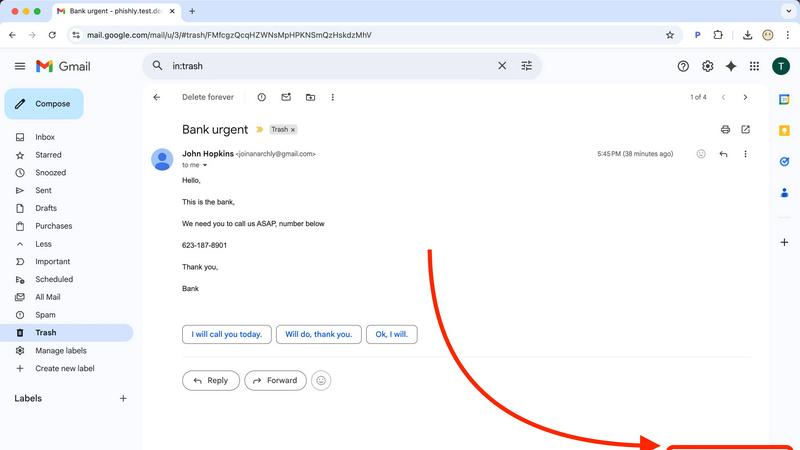
Phishly is an innovative AI-powered phishing detection platform designed to enhance your email security effortlessly. Available as a convenient Chrome extension for Gmail and a user-friendly web tool, Phishly allows users to scan emails with ease. Simply open any email in Gmail and click "Scan with Phishly," or paste suspicious emails directly on our website for instant analysis. Our advanced AI technology identifies various phishing indicators, including suspicious domains, urgent language, spoofed senders, and social engineering tactics. The platform provides clear risk assessments to help users understand the threat level of potential phishing attempts, categorized as Safe, Medium Risk, or High Risk, along with detailed explanations. Phishly is perfect for individuals and small businesses seeking straightforward phishing protection without the complexity often associated with enterprise solutions. We prioritize user privacy by analyzing only the emails you choose to scan, ensuring your data remains secure. With no technical knowledge required, Phishly is free to use and delivers instant answers when you need to verify the legitimacy of an email.
Frequently Asked Questions
Decode This Text FAQ
How does Decode This Text ensure my privacy?
Decode This Text guarantees that your conversations are 100% anonymous. No human ever reads your texts, ensuring complete confidentiality and privacy in your analysis.
Can I use Decode This Text for professional communication?
Absolutely! Decode This Text is designed to aid in both personal and professional contexts. You can analyze emails, messages, and any other communication to better understand the intent and emotional tone.
What if I don’t want to type out my messages?
No problem! Decode This Text allows you to upload screenshots of your conversations. This feature makes it easier for you to get insights without the hassle of typing everything out.
How quickly can I expect a response?
Decode This Text provides analyses in approximately 30 seconds. This quick turnaround allows you to get the clarity you need without waiting, making it a perfect solution for urgent communication needs.
Phishly FAQ
How does Phishly work?
Phishly analyzes emails using AI technology to detect phishing indicators. By assessing aspects like sender authenticity and the language used, it provides a risk assessment to help users understand potential threats.
Is Phishly free to use?
Yes, Phishly is completely free to use. There are no hidden fees or subscriptions, making it accessible for everyone, from individuals to small businesses looking for effective phishing protection.
Do I need technical skills to use Phishly?
No, Phishly is designed to be user-friendly for individuals without technical skills. Its intuitive interface allows anyone to scan emails easily and receive instant feedback on their safety.
How does Phishly protect my privacy?
Phishly only analyzes the emails that you explicitly choose to scan. This ensures that your personal data and email content remain private and secure, with no unauthorized access to your information.