DataPhotos.AI vs RemoveTexts
Side-by-side comparison to help you choose the right tool.

DataPhotos.AI
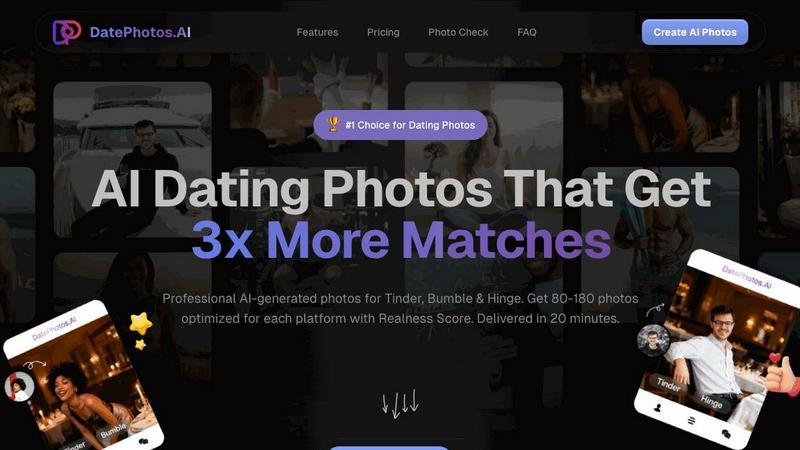
Turn your selfies into 80-180 professional AI dating photos in 20 minutes to get more matches.
Last updated: February 28, 2026

RemoveTexts
Effortlessly remove text and watermarks from images in seconds with our user-friendly AI tool, no design skills needed.
Last updated: March 11, 2026
Visual Comparison
DataPhotos.AI
RemoveTexts

Feature Comparison
DataPhotos.AI
Massive Photo Generation & Scene Variety
Upload just 5 to 20 of your selfies, and DataPhotos.AI will generate an impressive 80 to 180 brand-new photos for you. This isn't just a filter; the AI creates entirely new images of you placed into a diverse range of over 40 lifestyle scenes. You'll get photos at the beach, in coffee shops, at the gym, on urban streets, in professional settings, and on outdoor adventures. Each scene even includes 3 different poses, giving you incredible variety to showcase different facets of your personality and interests, which is key to getting noticed.
Realness Scoring for Quality Control
One of the biggest concerns with AI photos is that they can look unnatural or "off." DataPhotos.AI tackles this head-on by giving every single generated photo a "Realness Score" from 0 to 100. This score helps you instantly identify the best, most natural-looking photos. You can sort your entire gallery by this score and quickly download only the ones that look perfectly authentic. On average, photos score above 85, ensuring they blend seamlessly with your real pictures.
Lighting & Angle Optimization
The AI doesn't just place you in a scene; it intelligently works to make you look your best. It automatically adjusts lighting conditions and camera angles to create flattering, professional-quality results. This means you get photos with perfect golden-hour lighting or ideal gym lighting without any technical knowledge required. It's like having a professional photographer and editor working together to highlight your best features in every shot.
Free Regeneration & Fast Delivery
If you're not completely happy with how a particular photo turned out, you don't have to settle. DataPhotos.AI allows free regeneration of photos you don't like. You get 10 free regeneration chances per project at no extra cost. Furthermore, the entire process is remarkably fast. While a traditional photoshoot takes 1-2 weeks and other AI tools take 24-48 hours, DataPhotos.AI delivers your full portfolio of 80-180 photos in just 20 to 30 minutes.
RemoveTexts
Paint to Remove
This feature allows users to brush over specific areas of text they wish to remove with precision. It provides control over the removal process, making it easy to target only the unwanted text while leaving the rest of the image intact.
Auto Remove All
Leverage the power of AI with the Auto Remove All feature that detects and removes every text element in an image automatically. This one-click solution is perfect for those who want to quickly clean up images without the need for manual adjustments.
Edit & Replace Text
With the Edit & Replace Text feature, users can not only remove unwanted text but also replace it with new text while matching the original font style. This is particularly useful for those who want to modify captions or add new information seamlessly.
Remove Objects
In addition to text removal, the Remove Objects feature allows users to erase unwanted visual elements, such as logos or people, from their images. This enhances the overall aesthetics of the photo without compromising quality.
Use Cases
DataPhotos.AI
Creating a Standout Dating Profile from Scratch
Perfect for someone new to dating apps or restarting their profile, DataPhotos.AI provides everything you need. If you lack good, recent photos or your current pictures are all selfies, you can quickly generate a full, diverse portfolio. This gives you a complete set of attractive, conversation-starting photos that show you in various interesting settings, instantly making your profile more engaging and trustworthy.
Enhancing an Existing Profile with Better Photos
Maybe you already have a dating profile, but it's not getting the matches you want. Often, the issue is photo quality or lack of variety. You can use DataPhotos.AI to generate specific types of photos you're missing—like a great gym shot, a smart professional photo, or a fun travel picture—to fill the gaps in your existing profile. This targeted upgrade can significantly increase your profile's appeal.
Saving Time and Money vs. a Photoshoot
Hiring a professional photographer for dating photos can cost hundreds of dollars and require scheduling, traveling, and waiting weeks for edits. DataPhotos.AI delivers a larger quantity of photos in more varied scenes for a much lower cost and in under 30 minutes. It's the ideal solution for anyone who wants professional-looking results but has a limited budget or needs photos immediately.
Building Confidence with Flattering Photos
Many people feel they aren't photogenic or hate taking pictures. DataPhotos.AI helps by generating photos where you look your best. The AI optimizes lighting and angles to create consistently flattering images. Seeing yourself in these high-quality, diverse photos can be a huge confidence booster, making you feel more positive and excited about putting yourself out there on dating apps.
RemoveTexts
E-commerce Product Photos
Online sellers can use RemoveTexts to clean up product images by removing watermarks or distracting text, making their listings more appealing to potential buyers. This helps in creating a professional look that can increase sales.
Social Media Content
Content creators and marketers can utilize RemoveTexts to enhance their social media visuals by removing unwanted text from images, such as captions or watermarks from stock photos, ensuring their posts stand out in crowded feeds.
Legal Document Redaction
Professionals in legal fields can rely on RemoveTexts to redact sensitive information from documents by removing text while preserving the original layout and background. This ensures confidentiality while maintaining document integrity.
Personal Photo Editing
Everyday users can enhance their personal photos by removing date stamps, captions, or any unwanted text that detracts from the beauty of their images. This allows for cleaner, more visually appealing memories to share with friends and family.
Overview
About DataPhotos.AI
DataPhotos.AI is your personal AI photographer designed specifically for dating apps like Tinder, Bumble, and Hinge. It solves a common modern problem: the need for a great variety of high-quality, authentic-looking photos to make your profile stand out, without the high cost and time commitment of a traditional photoshoot. The process is incredibly simple. You just upload 5 to 20 of your selfies. The advanced AI then learns your unique facial features, style, and look. In about 20 to 30 minutes, it generates a massive portfolio of 80 to 180 professional-quality photos for you. These aren't just simple edits; they are completely new images of you placed into over 40 different lifestyle scenes, from working out at the gym and enjoying a coffee shop to relaxing on a beach or going on a travel adventure. The main value proposition is clear: get a huge variety of optimized, authentic-looking dating photos that are proven to help you get up to 3x more matches, all for a fraction of the price and time of hiring a photographer or using slower AI tools. It's the fastest, smartest, and most affordable way to upgrade your dating profile and boost your confidence.
About RemoveTexts
RemoveTexts is an innovative AI-powered online tool designed to effortlessly erase unwanted text and watermarks from images. It appeals to a broad audience, from marketers and designers to everyday users who need clean visuals without any hassle. With just a simple upload and a few clicks, users can achieve professional-level results in a matter of seconds. The primary value proposition of RemoveTexts lies in its ability to automate the tedious process of text removal, freeing users from the complexities of software like Photoshop. This tool utilizes advanced deep learning technology to analyze and reconstruct the surrounding image background, ensuring that the edited area appears seamless and natural. Whether you are looking to remove watermark logos, captions from screenshots, or any unwanted text, RemoveTexts delivers high-quality results without requiring any design skills. It is user-friendly, efficient, and perfect for anyone looking to enhance their images quickly and effectively.
Frequently Asked Questions
DataPhotos.AI FAQ
How does DataPhotos.AI work?
The process is simple and has three easy steps. First, you upload 5 to 20 clear selfies of yourself. Second, our advanced AI analyzes your photos to learn your unique appearance, style, and features. Third, in about 20 to 30 minutes, the AI generates a new gallery of 80 to 180 professional-quality photos of you in over 40 different scenes and poses. You then review them, using the Realness Score to pick the best ones, and download your favorites.
Are the AI-generated photos realistic?
Yes, they are designed to be highly realistic. Each photo receives a "Realness Score" from 0 to 100 based on AI analysis of how natural it looks. The average score is above 85, and most users find a large number of photos that are indistinguishable from real photographs. The scoring system allows you to easily filter and select only the most authentic-looking images for your profile.
What kind of photos should I upload for the best results?
For optimal results, upload 5-20 clear, well-lit selfies. Use photos with a neutral background where your face is clearly visible. Include a variety of angles (front, slight side) and expressions (smiling, neutral). Avoid hats, sunglasses, or extreme filters that obscure your face. Following these simple guidelines helps the AI learn your likeness accurately for the best output.
How do you protect my privacy and data?
DataPhotos.AI takes your privacy seriously. The uploaded photos are used solely to train a personalized AI model for your project and generate your images. This model is typically deleted after a short period. For full details on how your data is handled, stored, and protected, please refer to the comprehensive Privacy Policy available on the DataPhotos.AI website.
RemoveTexts FAQ
Is RemoveTexts free to use?
Yes, RemoveTexts is a free online tool that allows users to remove text from images without any costs involved. Simply upload your image and start editing.
What image formats are supported?
RemoveTexts supports JPG, PNG, and WebP image formats, allowing for a wide range of uploads. Ensure your image size is within the 10MB limit for optimal performance.
How quickly can I expect results?
RemoveTexts is designed for speed, with an average processing time of less than 30 seconds. Most users can expect their edited images ready to download almost instantly.
Can RemoveTexts handle complex backgrounds?
Absolutely! The AI technology used by RemoveTexts is adept at handling complex backgrounds, ensuring that text removal is seamless and the result looks as natural as possible. Your image quality remains intact with no visible artifacts.
Alternatives
DataPhotos.AI Alternatives
DataPhotos.AI is a service that uses artificial intelligence to create professional-looking dating profile photos from your selfies. It falls into the category of AI-powered tools designed to help people improve their online dating presence quickly and affordably. People often look for alternatives for various reasons. Some might be on a tighter budget and need a different price point. Others might want features like more photo styles, different editing tools, or support for social media platforms beyond just dating apps. It's also common to simply want to compare options before making a decision. When choosing an alternative, consider what matters most to you. Look at the quality and realism of the AI-generated photos, the number of photos you receive, the cost, and how long the process takes. Also, check if the service offers any special features, like tips for choosing the best photos or guarantees about privacy and security.
RemoveTexts Alternatives
RemoveTexts is an innovative AI-powered tool designed to effortlessly remove text from images in mere seconds, eliminating the need for complex software like Photoshop. It falls under the category of image editing solutions, specifically focused on text removal. Many users seek alternatives to RemoveTexts for various reasons, such as pricing, specific feature requirements, or compatibility with different platforms. When looking for an alternative, it’s essential to consider factors such as ease of use, the effectiveness of text removal, supported languages, and the overall quality of the output. Finding the right image editing tool that meets your needs can significantly enhance your workflow. It's important to evaluate how user-friendly the platform is, the speed at which it operates, and the range of features it offers. Additionally, checking for customer reviews and testimonials can provide valuable insights into the tool's reliability and performance. A good alternative should not only match your requirements but also provide an enjoyable editing experience.