
Daily vs Never Drop
Side-by-side comparison to help you choose the right tool.

Daily helps you organize your thoughts and plan your day with simple, stress free clarity.

Never Drop
NeverDrop instantly captures contacts and crafts personalized follow-ups, ensuring you never lose a lead at events.
Last updated: February 28, 2026
Visual Comparison
Daily
Never Drop

Feature Comparison
Daily
The Brain Dump Capture
Daily understands that great ideas and urgent tasks don't arrive neatly organized. That's why it features a simple, always-available capture tool. Whenever a thought, task, or reminder pops into your head, you can instantly jot it down in Daily. There's no need to assign it a date, project, or tag right away. This "brain dump" functionality allows you to clear your mental RAM instantly, trusting that the item is safely stored and can be dealt with later when you are in a planning mindset, freeing you to focus on your current activity.
The Intentional Today View
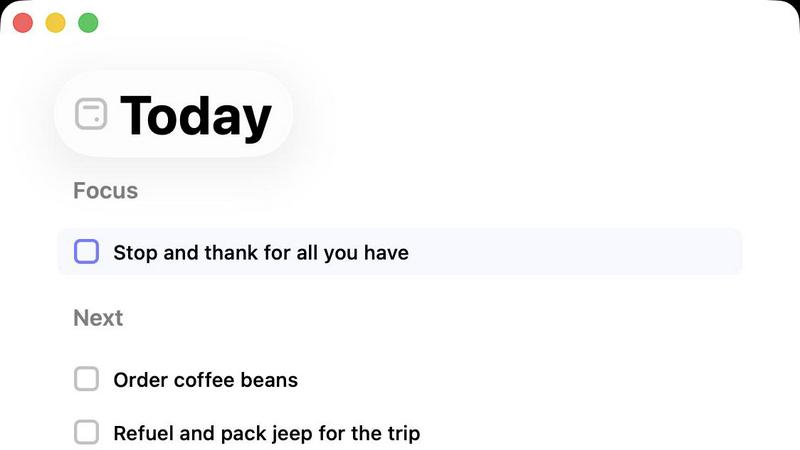
This is the heart of Daily's philosophy. Unlike traditional planners that show every upcoming task, the Today view is a clean, curated list containing only the items you have deliberately chosen to focus on for this specific day. Each morning (or the night before), you review your master list and consciously decide what deserves your energy and attention today. This creates a protective boundary, shielding you from the anxiety of an endless, overwhelming list and allowing you to start your day with clarity and purpose on what truly matters now.
Gentle Task Carry-Over
Life doesn't always go as planned, and Daily is built with compassion for that reality. If you don't complete everything on your Today list, there's no shame or harsh penalty. At the end of the day, unfinished tasks that you still deem important don't just vanish; they are gently carried forward. They return to your master list, ready for you to reconsider tomorrow. This feature removes the guilt of an unfinished to-do list and encourages a sustainable, realistic approach to productivity where tasks are moved forward with intention, not panic.
Purposefully Simple Design
Daily is meticulously crafted to avoid feature bloat. It forgoes complex calendars, color-coding, sub-tasks, and integrations that can become a distraction. The interface is clean, minimal, and intuitive. This deliberate simplicity is a core feature that reduces cognitive load and decision fatigue. You spend less time organizing and managing your system and more time actually doing the work that matters, supported by a tool that feels calm and unobtrusive rather than demanding.
Never Drop
Smart Business Card Scanning
Never Drop allows users to effortlessly scan any business card using their smartphones. The app employs advanced AI-powered Optical Character Recognition (OCR) technology to extract critical contact details, including names, companies, titles, phone numbers, and emails, in just seconds. This feature saves time and reduces the chances of errors that often occur with manual data entry.
Automatic Email Enrichment
Many business cards contain generic email addresses or may lack them entirely. Never Drop addresses this issue by automatically finding and verifying work emails based on the name and company information extracted from the card. This feature ensures that your contact profiles are complete and accurate, eliminating guesswork and manual LinkedIn searches.
Personalized AI Drafting
After scanning a business card and adding context about the conversation, Never Drop generates a personalized follow-up email in under two minutes. The AI drafts emails based on your voice notes and the specifics of your interaction, ensuring that each follow-up feels genuine and tailored rather than generic. Users can review and tweak these emails before sending them with just one tap.
Team Collaboration Dashboard
Never Drop is designed for teams, allowing users to organize scans by event, reassign leads among team members, and track overall activity from a centralized dashboard. This feature promotes collaboration and ensures that no lead falls through the cracks, keeping your sales efforts aligned and efficient.
Use Cases
Daily
For the Overwhelmed Professional
A professional juggling meetings, emails, and project deadlines can use Daily to capture every "to-do" that arises during a hectic workday without breaking flow. At the start of each day, they can use the Today view to select the 3-5 most critical tasks that will drive their work forward, ensuring they make progress on important goals instead of just reacting to urgencies. The simple design prevents the planner itself from becoming another source of work.
For the Creative with a Scattered Mind
Artists, writers, and creators often have bursts of ideas alongside daily life admin. Daily acts as a trusted second brain. They can dump creative ideas, research notes, and personal reminders all in one place. Later, during a planning session, they can sift through these notes and intentionally pick one creative action to focus on for the day, protecting time for deep work without forgetting other responsibilities.
For Someone Building Better Habits
Someone focusing on mental health, mindfulness, or building new routines can use Daily to prioritize their well-being. They can list tasks like "10-minute meditation," "evening walk," or "call a friend" alongside work items. By consciously moving these well-being tasks into the Today view each day, they give them equal importance, creating a balanced and intentional daily plan that supports overall life satisfaction, not just output.
For the Student Managing Coursework
A student can use Daily to capture assignments, reading reminders, and study goals as professors announce them. Instead of a stressful, long-term syllabus list, they can use the Today view each morning to decide what specific chapters to read, what study block to attend, and what assignment step to complete that day. This makes large projects feel manageable and reduces procrastination by focusing only on the immediate, actionable steps.
Never Drop
Trade Shows
At bustling trade shows, sales teams can quickly scan business cards from potential clients, add context about their conversations, and send follow-up emails while still engaging with other attendees. This rapid response can significantly increase conversion rates.
Networking Events
Networking events often involve numerous interactions in a short period. Never Drop enables users to capture leads seamlessly, ensuring they can follow up with personalized messages that reference specific discussions, enhancing rapport with potential clients.
Conferences
Conferences provide valuable opportunities for sales outreach, and with Never Drop, attendees can collect and manage leads efficiently. By organizing scans by event, teams can track their follow-up efforts and measure success post-conference.
Business Dinners
Even in more intimate settings like business dinners, Never Drop proves useful. Users can scan cards and add personal insights about their conversations, making follow-up communications more meaningful and impactful.
Overview
About Daily
Daily is a gentle, intentional to-do list and daily planner designed for anyone who feels overwhelmed by the constant pressure to do more. In a world that glorifies busyness, Daily offers a different path: clarity over chaos, focus over frenzy. It's built for the person whose mind is full of tasks, reminders, and ideas, making it hard to know where to start. Instead of adding to the noise with complex project views and endless notifications, Daily provides a quiet digital space to simply put things down. You can unload everything from your mind as it comes, without the immediate pressure to categorize or prioritize. Then, when you're ready to plan your day, you can review your list with fresh eyes and consciously choose only what truly matters for today. Its core value is reducing mental clutter to restore a calm, grounded sense of focus. By showing you only what needs your attention now in its "Today" view, Daily helps you let go of what's no longer important and gently carry forward what is. It’s purposefully simple, offering just enough structure to support meaningful progress without creating the very complexity it aims to solve.
About Never Drop
Never Drop is a cutting-edge lead-capture app tailored for sales teams who thrive in high-energy environments like trade shows, conferences, and networking events. Its primary goal is to streamline the process of collecting and managing leads, making it easier for sales professionals to convert connections into clients. By allowing users to scan business cards directly with their smartphones, Never Drop eliminates the hassle of manual entry and the risk of losing essential contact information. Once a card is scanned, users can enhance the data with voice notes or text context about their interactions, ensuring that they remember important details about each lead. With advanced AI capabilities, the app generates personalized follow-up emails in under two minutes, helping teams maintain momentum and responsiveness. Integrated seamlessly with popular CRMs such as HubSpot, Never Drop keeps your sales pipeline organized and ready for action. Say goodbye to lost leads and hello to efficient follow-ups that can turn a simple handshake into a closed deal.
Frequently Asked Questions
Daily FAQ
How is Daily different from other to-do apps?
Most to-do apps are designed for maximum efficiency and tracking everything, which can add complexity and pressure. Daily is designed for mental clarity and intentional focus. It emphasizes the conscious act of choosing what matters today from a master list, rather than showing you everything you've ever needed to do. Its philosophy is "less, but better," and its simplicity is a deliberate feature to reduce overwhelm.
What happens to tasks I don't finish today?
Tasks you don't complete are not lost or marked as failed. Daily uses a gentle carry-over system. Any unfinished task that you still consider important will simply return to your master list of items. The next time you plan your day, you will see it again and can decide whether to schedule it for the new day or let it go. This removes guilt and supports a more flexible, realistic planning rhythm.
Can I use Daily for long-term project planning?
Daily is optimized for daily and weekly intentionality, not for detailed, complex project management. You can certainly break a large project down into smaller tasks and add them to your master list in Daily. Then, you would pull individual next-action steps into your Today view as you're ready to work on them. For managing intricate project timelines, dependencies, and collaboration, a dedicated project management tool may be more suitable.
Is Daily available on mobile and web?
Based on its design philosophy of simplicity and accessibility, Daily is built to be available wherever you need it. While specific platform details are confirmed upon sign-up, tools like Daily are typically offered as a web application that works in your browser and often as a dedicated mobile app (iOS/Android), allowing you to capture thoughts on the go and review your Today list from any device.
Never Drop FAQ
What is Never Drop?
Never Drop is a lead-capture app designed for sales teams at events. It allows users to scan business cards, add voice or text context, and automatically generate personalized follow-up emails in under two minutes, enriching contacts with verified work emails and syncing everything to your CRM.
How does business card scanning work?
Simply take a photo of any business card with the Never Drop mobile app. The app uses AI-powered OCR to extract contact details such as name, company, title, phone, and email in seconds. Users can also enter details manually if they prefer.
What types of events is Never Drop suitable for?
Never Drop is ideal for trade shows, conferences, networking events, meetups, and business dinners. It helps users efficiently capture leads and follow up quickly, organizing scans by event for easier tracking.
Do I need the mobile app?
Yes, the mobile app is essential for scanning business cards, recording voice context, and triggering follow-ups on the go. The web dashboard complements the app by allowing team management, scan reviews, and billing configuration. Both platforms work seamlessly together.