Clipt vs Patrivox
Side-by-side comparison to help you choose the right tool.

Clipt automates video editing tasks so your team can focus on storytelling instead of tedious timelines.
Last updated: February 26, 2026

Patrivox
Patrivox uses AI to quickly digitize and make your entire document archive searchable in minutes.
Last updated: March 4, 2026
Visual Comparison
Clipt

Patrivox
Feature Comparison
Clipt
Video Ingestion and Captioning
Clipt supports video ingestion from multiple sources, allowing users to easily create accurate captions tailored to their videos. The captions can be customized with various fonts, colors, and animations, ensuring that every video maintains a unique and professional look.
Slideshow Maker
The Slideshow Maker is a powerful feature that turns simple ideas into viral carousels. It uses AI to write scripts, generate images, and add voice narration, allowing users to create stunning multi-slide presentations quickly and effortlessly.
Talking Heads
With the Talking Heads feature, users can create professional spokesperson videos without the need for cameras or studios. Simply type in a script, and Clipt's AI will generate a scene plan with various delivery styles, providing a polished look for any content.
AI-Generated Characters
Clipt allows users to create unique, realistic AI characters that can be reused across all video content. This ensures brand consistency, as characters maintain the same appearance and personality, making them perfect for brand ambassadors and content series.
Patrivox
Automation with Mistral AI
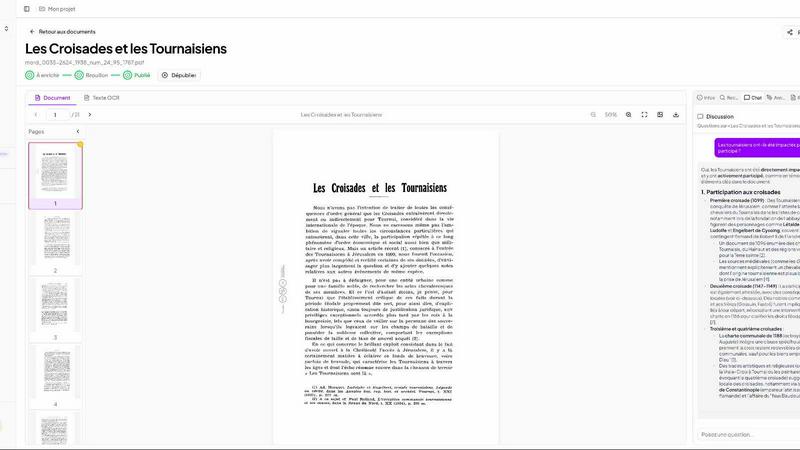
Simply drag and drop your PDFs, whether it's one file or hundreds in a batch. Patrivox takes over from there. Within minutes, the integrated Mistral AI engine reads every page with next-generation OCR, automatically extracts key entities (people, places, organizations, dates), and enriches document metadata. There's no manual data entry or complex configuration required. You drop your files, and the platform does the rest, turning unstructured scans into a structured database ready for exploration.
Intelligent Search & AI Chat
Find any word or phrase across your entire collection in less than a second, with smart typo tolerance so you don't need perfect spelling. You can also filter results by date, author, or document type. For more complex inquiries, use the AI chat feature. Ask questions in natural language, like "What was discussed about the cathedral in 1830?" and the AI will provide concise answers, directly citing the source documents it found the information in, making verification easy and trustworthy.
Interactive Knowledge Graph (Constellation)
This feature visually reveals the hidden connections within your archives. Every person, place, and organization identified by the AI becomes a node in an interactive graph. You can navigate from one entity to another, seeing all the documents that connect them. This allows you to discover relationships and patterns that were previously invisible, offering a powerful new way to conduct research and explore your collection's narrative.
Sovereign European Hosting & Sharing
Patrivox is built on a foundation of data sovereignty and security. All data is processed and hosted 100% within the European Union, ensuring full compliance with GDPR regulations. The platform also includes an audit log for transparency. Furthermore, it offers flexible sharing: you can have multiple administrators while granting unlimited read-only access to researchers, your team, or the public, making it easy to open your archives without compromising control.
Use Cases
Clipt
Content Creators
Whether you are a vlogger or a social media influencer, Clipt provides all the tools needed to create engaging video content that resonates with your audience. Use the captioning and character features to enhance your storytelling.
Marketing Teams
Marketing professionals can utilize Clipt to create promotional videos and advertisements that are visually appealing and informative. The AI-generated characters can serve as consistent brand representatives across campaigns.
Educators
Teachers and educators can use Clipt to produce educational videos, complete with captions and voice narration, making learning more accessible and engaging for students. The Slideshow Maker is particularly useful for creating lesson materials.
E-commerce Businesses
E-commerce brands can leverage Clipt for creating unboxing videos and product testimonials with AI-generated characters, fostering a personal connection with potential customers. This can lead to increased engagement and sales.
Patrivox
Municipal Archives
Municipalities can use Patrivox to digitize and showcase their historical deliberations, civil registers, and official correspondence. This makes decades or centuries of administrative history instantly searchable for staff and citizens, improving transparency and preserving local heritage for future generations without the need for manual indexing.
Historical Societies & Associations
Societies often have vast collections of bulletins, newsletters, and documentary collections. Patrivox allows them to upload these materials and make them fully searchable and explorable for their members and researchers. The knowledge graph helps uncover the intricate stories and connections between local figures and events featured in their publications.
Heritage Libraries & Archives
Libraries with special collections can use Patrivox to open their unique archives to a wider audience. Researchers can instantly search through rare manuscripts, historical books, or photo collections, while the AI chat helps them ask specific questions, accelerating discovery and making precious knowledge accessible without handling fragile originals.
Dioceses & Parish Archives
Religious institutions can preserve and index their valuable parish registers, ecclesiastical correspondence, and historical documents. Patrivox helps protect this delicate heritage by creating a digital, searchable copy, allowing for genealogical research and historical study while keeping the original documents safe and secure.
Overview
About Clipt
Clipt is an innovative video creation tool designed to streamline the process of generating high-quality video content. It allows users to ingest videos from over 50 platforms, including popular sites like YouTube, TikTok, and Instagram, or simply upload raw video files. The main value proposition of Clipt lies in its ability to create word-accurate captions with customizable fonts, colors, and animation presets, making it ideal for creators looking to enhance their videos with professional-quality features. The platform also includes advanced AI capabilities that assist in generating scripts, images, and even voice narration, transforming ideas into engaging visual content seamlessly. Whether you're a busy mom, a tech reviewer, or an indie creator, Clipt empowers you to produce captivating videos without the need for extensive video editing skills or costly equipment.
About Patrivox
Patrivox is a revolutionary AI-powered platform that breathes new life into your archives. Designed specifically for European heritage institutions, municipal services, associations, and businesses, it solves a common, frustrating problem: having thousands of scanned documents that are impossible to search through. Imagine simply dragging and dropping your PDFs and, within minutes, having every single page read, indexed, and connected. That's exactly what Patrivox does. Using cutting-edge Mistral AI, it performs advanced text recognition (OCR) to extract every word. But it goes far beyond simple text extraction. The AI intelligently identifies key entities like people, places, organizations, and dates, and weaves them together into an interactive knowledge graph. This means you can find any piece of information in seconds using a simple search (even with typos) or by asking questions in plain language, with the AI providing sourced answers. Its core value is transforming static, dusty archives into a dynamic, fully searchable knowledge base, making precious historical and institutional information easily accessible for research, administration, and the public. Best of all, it's 100% hosted in Europe and built with GDPR compliance from the ground up, ensuring your data's sovereignty and security.
Frequently Asked Questions
Clipt FAQ
How many characters can I create?
You can create multiple characters in Clipt, allowing for versatile video content. Each character can be reused across all features, ensuring consistency and brand recognition.
Can I use characters across different video types?
Yes, the characters you create can be used across various video types within Clipt. This flexibility allows you to maintain a cohesive brand identity across all your content.
Are the characters unique to me?
The characters generated by Clipt are unique in the sense that they are created based on your specific descriptions and preferences. While others can create similar characters, your chosen variations will be distinctive.
Can I edit a character after creating it?
Yes, Clipt allows users to edit their characters even after creation. This feature provides flexibility to adjust the character’s appearance and personality as your branding needs evolve over time.
Patrivox FAQ
How does Patrivox handle data privacy and security?
Patrivox is designed with data sovereignty as a core principle. All document processing and storage occurs on servers hosted 100% within the European Union. The platform is GDPR-native, meaning it is built from the ground up to comply with Europe's strict data protection regulations. You retain full ownership of your data at all times.
What types of documents can I upload?
Patrivox primarily works with PDF files, which are the standard format for scanned documents. You can upload documents one by one or in large batches of hundreds of files at once. There are file size limits depending on your plan (e.g., 250 MB per file on most plans), which are suitable for typical scanned pages.
What is included in the free trial?
The free "Decouverte" plan allows you to try Patrivox with no credit card required. It includes a one-time credit to process 100 pages, 200 MB of storage, and 50 AI queries per month. This is perfect for testing the platform with a small set of documents to see how it transforms your archives.
How does the AI chat provide sourced answers?
When you ask a question in natural language, the AI searches through the text of all your processed documents. It then generates a concise answer based on the relevant information it finds. Crucially, it will cite the specific source document(s) it used, often with a direct link or reference, so you can always verify the information in the original context.
Alternatives
Clipt Alternatives
Clipt is an innovative tool designed to streamline video editing processes, making it easier for users to focus on storytelling rather than the technicalities of editing. It belongs to the marketing category and is particularly useful for teams looking to enhance their video content efficiently. Users often seek alternatives to Clipt for a variety of reasons, including pricing concerns, specific feature sets, or compatibility with different platforms. Finding the right alternative involves assessing your unique needs, such as desired functionalities, integration capabilities, and budget constraints. When searching for an alternative, consider the features that are most important for your workflow, such as transcription accuracy, customization options for captions, and the ability to handle various video sources. Additionally, evaluate the user experience, customer support, and overall value for money. By focusing on these aspects, you can identify a solution that aligns with your goals and enhances your video editing and production processes.
Patrivox Alternatives
Patrivox is an AI-powered platform in the document management and content creation space. It specializes in turning scanned documents and PDFs into a searchable digital library by using OCR and AI to extract text, identify key information, and connect it all in a knowledge graph. People often explore alternatives to find a solution that better fits their specific needs. Common reasons include budget constraints, the need for different features, or requiring integration with other software platforms they already use. When evaluating other options, consider a few key factors. Look at the accuracy of the text recognition (OCR), how the tool organizes and tags information, and the flexibility of its search functions. Also, assess the pricing model and whether it can handle the volume and type of documents you work with.