CleanPaste.org vs Mailopoly
Side-by-side comparison to help you choose the right tool.

CleanPaste.org
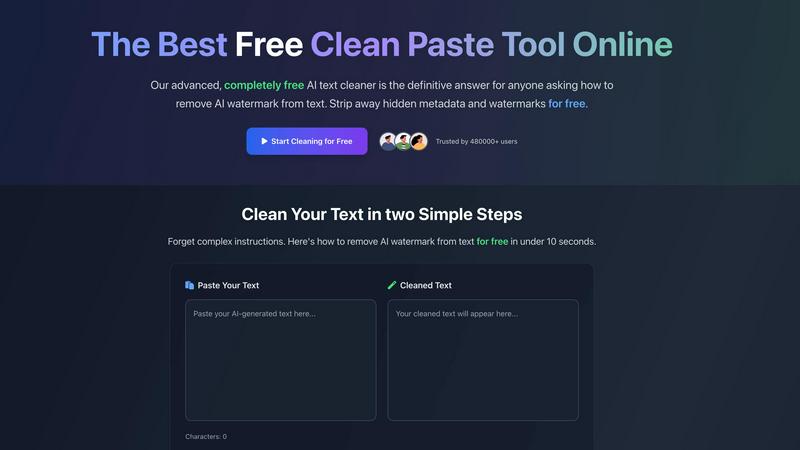
CleanPaste instantly removes AI watermarks and invisible characters from your text for free.
Last updated: March 2, 2026

Mailopoly is your AI email assistant that organizes your inbox, extracts key details, and drafts replies in your voice.
Last updated: February 26, 2026
Visual Comparison
CleanPaste.org
Mailopoly

Feature Comparison
CleanPaste.org
Instant AI Watermark Removal
Our specialized Watermark Removal Mode is designed to quickly and effectively strip AI watermarks from your text. This process ensures your content passes AI detection tests while meticulously preserving the original meaning, tone, and quality of your writing. It's the perfect tool for making AI-assisted drafts appear natural and human-crafted.
Deep Clean of Invisible Characters
CleanPaste.org uses an advanced algorithm to perform a deep scan of your text. It detects and eliminates all types of invisible characters and formatting artifacts, such as zero-width spaces and hidden metadata, that are often copied over from other documents or AI platforms. This leaves you with perfectly clean, standard text.
Real-Time Processing with Auto-Paste
Experience the ultimate convenience with our real-time processing feature. The tool works instantly the moment you paste your text. For an even smoother workflow, enable the auto-paste option to automatically clean content from your clipboard, delivering ready-to-use text in under 10 seconds without any extra clicks.
100% Free with No Limits
CleanPaste.org is committed to being completely free forever. There are no sign-up forms, no daily usage caps, and no premium features locked behind a paywall. Every powerful cleaning feature is available to all users immediately, making professional-grade text cleaning accessible to students, professionals, and creators everywhere.
Mailopoly
Clean Inbox Functionality
Mailopoly’s Clean Inbox feature ensures that only the most important emails reach your attention. The AI intelligently filters out noise, allowing you to see only relevant messages. This feature works from day one without any setup, meaning you can dive right into an organized inbox without stress.
AI Drafting Assistant
With Mailopoly, you don’t need to worry about crafting the perfect email response. The AI Drafting Assistant automatically writes replies in your unique voice, capturing your style and tone accurately. You receive multiple suggestions to choose from, allowing you to edit or send responses in just seconds.
Task Management Integration
Mailopoly is more than just an email client; it includes a built-in task management system. This feature tracks your personal finances, events, and shipments, providing a full timeline of important activities. You can stay organized with ease, ensuring nothing slips through the cracks amidst your busy schedule.
Instant Unsubscriber
Mailopoly’s Instant Unsubscriber allows you to quickly unsubscribe from unwanted senders with just one click. This feature helps maintain a clutter-free inbox, ensuring that you only receive communications from sources that matter to you.
Use Cases
CleanPaste.org
For Students Polishing Essays
Students can use CleanPaste.org to ensure their essays and assignments are submission-ready. By removing invisible characters and metadata from AI-assisted drafts, the tool helps avoid formatting issues and reduces the risk of being flagged for AI use, allowing students to submit their work with confidence and professionalism.
For Content Creators & Bloggers
Bloggers and digital content creators can refine their drafts to maintain an authentic brand voice. CleanPaste.org removes AI watermarks and hidden formatting, ensuring articles resonate as human-written with a natural tone. This helps in building trust with readers and improving content performance on search engines and social platforms.
For Professionals Drafting Communications
Professionals drafting important emails, reports, or client communications can use CleanPaste.org to ensure their messages are flawless. The tool cleans text copied from various sources, removing hidden formatting that can make documents look unprofessional, guaranteeing that every piece of communication is pristine and polished.
For Non-Native English Speakers
Individuals who use AI tools to help draft text in English can rely on CleanPaste.org to make the output undetectable and more natural. It smooths out the text, removing tell-tale AI markers and artifacts, resulting in clean, natural-sounding language that effectively communicates their intended message.
Mailopoly
Streamlined Communication for Professionals
For busy professionals juggling multiple projects and meetings, Mailopoly simplifies email management. You can effortlessly track important correspondence, ensuring you never miss crucial messages or deadlines, all while saving time with AI-generated replies.
Enhanced Organization for Multitaskers
If you are someone who balances work, home life, and side hustles, Mailopoly is your perfect companion. It consolidates your emails and tasks into one platform, making it easy to manage your priorities and stay on top of essential responsibilities without feeling overwhelmed.
Efficient Event Planning
Mailopoly's event manager feature streamlines the process of sending invitations and tracking responses. Whether you are organizing a business meeting or a social gathering, this tool makes planning events straightforward and stress-free.
Financial Management Made Easy
With Mailopoly, keeping track of personal finances becomes a breeze. The integrated task manager updates you on upcoming payments and important financial deadlines, giving you peace of mind and helping you stay financially organized.
Overview
About CleanPaste.org
Welcome to CleanPaste.org, your completely free and powerful solution for creating pristine, professional, and undetectable text. In the digital age, text often carries hidden baggage like invisible formatting, secret metadata, and AI watermarks. These elements can make your work look unprofessional or get it flagged by AI detection tools. CleanPaste.org solves this problem instantly. It is a simple, web-based tool designed to deep-clean your text, stripping away all hidden characters and markers while keeping your original content perfectly intact. Whether you are a student finalizing an essay, a content creator polishing a blog post, or a professional drafting a critical email, CleanPaste.org ensures your final copy is clean and appears 100% human-written. The best part is its incredible ease of use and truly free model—no sign-ups, no usage limits, and no hidden paywalls. Just paste your text, click a button, and get perfectly clean content in seconds. Join over 480,000 trusted users who rely on CleanPaste.org for confidence and clarity in their writing every day.
About Mailopoly
Mailopoly is a revolutionary email client designed to transform the way you manage your inbox and daily tasks. Unlike traditional email platforms, Mailopoly employs advanced AI technology to automatically extract essential information from your emails, allowing you to minimize reading time significantly. This means you can focus on what truly matters without the endless clutter of notifications and a crowded inbox. Mailopoly is perfect for busy professionals, multitaskers, and anyone looking to streamline their daily life. With features like integrated task management, an AI chatbot for personal assistance, and automatic reply suggestions, Mailopoly aims to reduce stress and enhance productivity. By organizing your emails and life admin tasks into one cohesive command center, Mailopoly empowers you to take control of your schedule and priorities, making your day more manageable and less overwhelming.
Frequently Asked Questions
CleanPaste.org FAQ
How does Clean Paste remove invisible characters?
Our tool employs advanced algorithms specifically designed to detect and strip out invisible characters, zero-width spaces, hidden metadata, and AI watermarks from your text. The process is simple and instant: you just paste your content into the box and click the clean button. All the complex processing happens in the background within seconds.
Is Clean Paste truly free? What's the catch?
Yes, CleanPaste.org is 100% free, with absolutely no catch. We do not impose any usage limits, hide premium features, or require account sign-ups. Our mission is to provide the best free tool for cleaning text and removing AI watermarks for everyone, from students to professionals, without any barriers.
What types of hidden characters does Clean Paste remove?
CleanPaste.org removes a wide array of hidden elements. This includes all types of invisible characters like zero-width spaces, non-printing formatting artifacts, hidden metadata embedded by word processors, and specific watermarks left by AI text generators. Every feature to remove these elements is available for free.
Can Clean Paste help my content pass AI detection tests?
Absolutely. A primary function of our Watermark Removal Mode is to strip the subtle markers that AI detectors look for. By using CleanPaste.org, you significantly increase the likelihood of your content passing as human-written in various AI detection tools, while keeping the original quality and meaning of your text fully intact.
Mailopoly FAQ
How does Mailopoly ensure my privacy and security?
Mailopoly is designed with security in mind and is SOC 2 certified, ensuring your data is protected. The platform prioritizes privacy, employing strict measures to safeguard your information while you manage your emails and tasks.
Can I use Mailopoly with multiple email accounts?
Yes, Mailopoly supports multiple email providers, including Gmail, Outlook, Yahoo, and any IMAP provider. This means you can consolidate all your email accounts into one convenient platform without losing access to existing accounts.
Is there a learning curve to using Mailopoly?
Not at all! Mailopoly is designed to be user-friendly and requires zero setup. The AI adapts to your preferences from day one, making it easy for you to start enjoying a clean and organized inbox immediately.
What types of notifications will I receive from Mailopoly?
Mailopoly sends notifications only for emails that are deemed crucial based on your preferences and activity. This ensures that you are only alerted about important messages, minimizing distractions and keeping you focused on what matters most.
Alternatives
CleanPaste.org Alternatives
CleanPaste.org is a free, web-based tool in the AI writing assistant category. It specializes in removing AI watermarks and invisible formatting from text, helping users produce clean, professional, and human-like content. It's designed for anyone who wants to refine their writing quickly and without cost. Users often explore alternatives for various reasons. Some might need additional features like grammar checking or style enhancement, while others may prefer a downloadable desktop application or a tool with a different user interface. Pricing changes, specific platform needs, or a desire for integrated writing suites can also lead people to look at other options. When choosing an alternative, consider your primary needs. Look for a tool that reliably removes AI detection markers if that's your main goal. Also, evaluate the cost, ease of use, and whether it offers any extra functionalities you might value, such as plagiarism checks or formatting preservation. Security and privacy policies are also crucial factors to review.
Mailopoly Alternatives
Mailopoly is an innovative AI-powered email client designed to streamline your email experience. It falls under the productivity and management category, as it not only helps reduce email clutter but also integrates various personal management tools. Users often seek alternatives to Mailopoly due to factors such as pricing, specific feature requirements, or compatibility with different platforms. When searching for an alternative, consider the essential features that matter most to you, such as task management capabilities, user interface design, and the level of AI assistance provided. Finding the right email client can significantly improve your productivity and reduce stress. Look for alternatives that offer intuitive navigation, seamless integration with your existing tools, and a comprehensive set of features tailored to your personal or professional needs. Evaluating user reviews and trial versions can also provide insight into whether a particular option will meet your expectations.