
claude-ide vs Doodle Duel
Side-by-side comparison to help you choose the right tool.

claude-ide
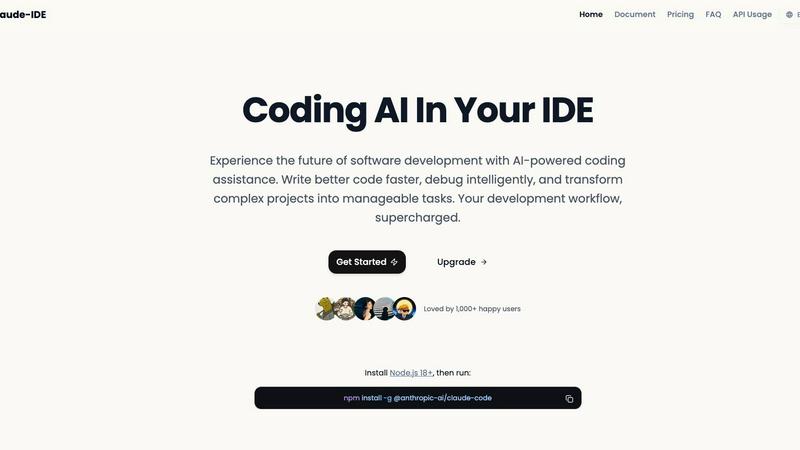
Code smarter with Claude AI directly in your terminal and VS Code.
Last updated: March 1, 2026

Doodle Duel
Compete in real-time drawing duels with friends as AI judges your creativity in this fun and free multiplayer game.
Last updated: February 28, 2026
Visual Comparison
claude-ide
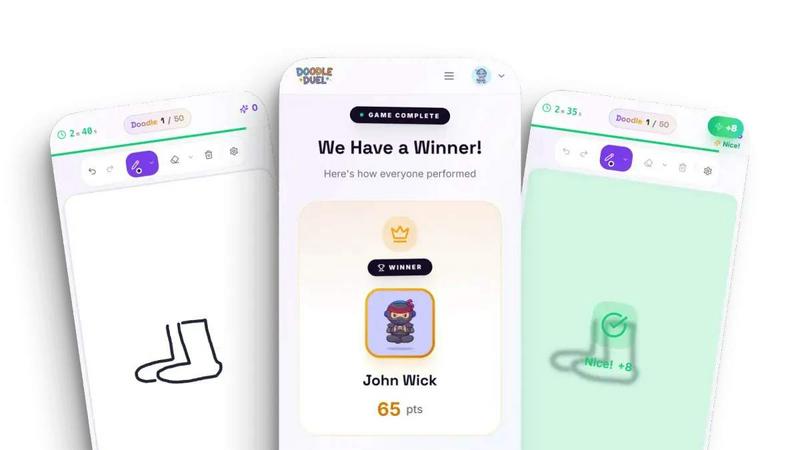
Doodle Duel
Feature Comparison
claude-ide
Intelligent Code Understanding
Claude IDE doesn't just look at isolated code snippets. It understands your entire project's architecture, dependencies, and structure. This deep comprehension allows it to make coordinated changes across multiple files and offer suggestions that truly fit your specific codebase. It can analyze and explain complete projects in seconds, giving you a high-level overview without you having to manually piece everything together.
Seamless Environment Integration
Say goodbye to switching between windows and tabs. Claude IDE lives right inside your terminal and your favorite IDE, including VS Code and JetBrains products. This deep integration means you can ask for help, generate code, or debug issues without ever leaving your coding workspace. It brings the AI assistant to you, making the workflow smooth and uninterrupted.
Powerful Multi-File Editing
With its deep understanding of your project, Claude IDE can execute powerful and accurate edits across multiple files at once. Whether you're refactoring code, updating dependencies, or implementing a new feature, the assistant ensures all changes are coordinated and functional. This saves you from the tedious and error-prone process of manually updating interconnected files.
Complete Development Workflow Management
Claude IDE integrates with tools like GitHub and GitLab to help manage your entire development workflow from start to finish. You can go from reading an issue, to writing the code, executing tests, and finally submitting a pull request, all without leaving your terminal. It streamlines the process, keeping you focused and productive.
Doodle Duel
Easy Setup
Doodle Duel allows you to start playing in under a minute. With no account creation or downloads required, players can simply create a room and invite friends using a shared code. This seamless setup means you can jump straight into the action without any hassle.
Real-Time Drawing
The game features real-time drawing where everyone receives the same prompt and has only 60 seconds to sketch their interpretation. This fast-paced gameplay keeps the energy high and encourages friendly competition among players as they race against the clock.
AI Judging
Our advanced AI judges each drawing based on accuracy, creativity, and style. This ensures that every doodle is evaluated fairly and objectively, eliminating any bias from popularity contests. Players can trust that their efforts will be recognized based on merit.
Multiple Game Modes
Doodle Duel offers versatile gameplay options, allowing players to choose between conquering the solo arcade mode or engaging in multiplayer duels. This flexibility ensures that whether you want to practice alone or challenge friends, there is something for everyone.
Use Cases
claude-ide
Quick Codebase Familiarization
When you join a new project or open an unfamiliar repository, Claude IDE can quickly analyze and explain the entire codebase. It will break down the project's purpose, main components, architecture, and key technologies in seconds. This is perfect for onboarding, code reviews, or contributing to open-source projects, as it gives you the understanding you need to start working effectively right away.
From Issue to Pull Request
Manage a complete feature or bug fix cycle without constant tool switching. Claude IDE can read a GitHub issue, understand the requirements, help you write the necessary code changes, run tests, and guide you through creating a pull request. It acts as a partner throughout the entire development task, keeping everything organized within your terminal or IDE.
Intelligent Debugging and Problem-Solving
Stuck on a tricky bug or an error message you don't understand? Claude IDE can examine your code, logs, and error outputs to diagnose the issue. It can then suggest precise fixes, explain why the error occurred, and even help you write the corrected code. This turns frustrating debugging sessions into quick learning opportunities.
Learning and Skill Development
For students and developers looking to learn a new language, framework, or best practice, Claude IDE is a patient tutor. You can ask it to explain concepts, review your code for improvements, suggest more efficient patterns, or generate examples. It provides step-by-step guidance tailored to your current project, making learning interactive and practical.
Doodle Duel
Family Gatherings
Doodle Duel is perfect for family gatherings where everyone can participate, regardless of age or artistic ability. It fosters creativity and camaraderie, making family time more enjoyable and interactive.
Parties and Social Events
For parties and social events, Doodle Duel adds an element of fun and competition. Friends can gather around to challenge each other in drawing duels, leading to laughter and memorable moments that everyone will cherish.
Team Building
Doodle Duel can be a unique team-building activity for workplaces. Colleagues can engage in friendly drawing competitions that promote teamwork, creativity, and communication in a relaxed environment.
Educational Tool
Teachers can use Doodle Duel as an educational tool to encourage creativity in the classroom. It allows students to express their ideas visually while also learning how to work under pressure and think on their feet.
Overview
About claude-ide
Claude IDE is your intelligent coding companion that brings the power of advanced AI directly into your development environment. It's more than just a chatbot; it's a deeply integrated assistant that understands your entire codebase, helping you write, debug, and manage projects with unprecedented ease. Powered by the latest Claude models like Sonnet 4.5 and Opus 4.6, it provides professional-grade coding assistance at a fraction of the cost of other services. The tool lives right where you code, whether that's in your terminal or inside popular IDEs like VS Code and JetBrains, eliminating the constant context switching that slows you down. Claude IDE is built for developers of all levels, from students and hobbyists who are just learning the ropes to seasoned professionals tackling complex systems. Its core promise is simple: to offer transparent, affordable, and powerful AI assistance that makes software development more intuitive, less frustrating, and significantly faster for everyone. It's designed to be your partner in coding, transforming complex tasks into manageable steps and helping you write better code from day one.
About Doodle Duel
Doodle Duel is a fun and innovative real-time drawing game that combines creativity, competition, and laughter. It is designed for anyone who enjoys sketching, regardless of their artistic skills. Whether you're an experienced artist or a doodle novice, Doodle Duel invites you and up to 29 friends to engage in entertaining drawing battles without the need for accounts or downloads. The game kicks off with a prompt, and players must race against the clock to create their best interpretation within a limited timeframe. The unique twist is that an AI judge, powered by advanced technologies like Google Gemini or OpenAI, evaluates each submission, offering humorous yet fair feedback. This exciting blend of speed and creativity makes Doodle Duel the ideal choice for parties, family gatherings, or casual hangouts. With flexible gameplay modes, including solo arcade journeys and chaotic multiplayer duels, there's plenty of fun to be had for everyone involved.
Frequently Asked Questions
claude-ide FAQ
What is Claude IDE?
Claude IDE is a powerful AI coding assistant that integrates directly into your terminal and code editors like VS Code. It uses advanced AI models from Anthropic to help you write, understand, debug, and manage code by understanding your entire project's context, not just single files.
How do I install Claude IDE?
Installation is straightforward. First, ensure you have Node.js version 18 or higher installed on your computer. Then, open your terminal and run the command: npm install -g @anthropic-ai/claude-code. This will install the Claude IDE tool globally, making it available from your command line.
Which IDEs and editors does it support?
Claude IDE offers deep integration with popular development environments. It works directly inside your terminal for general use. For a more integrated experience, it also supports VS Code and the full suite of JetBrains IDEs (like IntelliJ IDEA, PyCharm, and WebStorm), bringing the assistant right into your editor's interface.
Can Claude IDE access my private code?
Claude IDE operates with a strong focus on your privacy and security. It analyzes your codebase locally within your development environment to provide context-aware assistance. You control the context you provide, and it is designed to help you work on your code without unnecessary external data transmission.
Doodle Duel FAQ
Do I need to download the app to play Doodle Duel?
No, Doodle Duel is a browser-based game and does not require any downloads. You can start playing instantly by creating a room and sharing the code with friends.
How many players can participate in a game?
You can invite up to 29 friends to join you in a drawing duel, making it a great option for large gatherings. The game allows real-time competition with multiple players.
How does the AI judging work?
The AI evaluates each drawing based on three criteria: accuracy, creativity, and style. Players receive scores that reflect these aspects, ensuring fair and objective results for each round.
Can I play Doodle Duel alone?
Yes, Doodle Duel offers a solo arcade mode where you can conquer 50 levels of increasing difficulty. This mode allows you to practice your drawing skills and improve your scores on the global leaderboards.
Alternatives
claude-ide Alternatives
Claude IDE is an AI coding assistant that integrates directly into your development environment, like your terminal or VS Code. It helps you write, debug, and understand your code by analyzing your entire project, making it a powerful tool for developers of all skill levels. People often look for alternatives to tools like this for various reasons. You might need an option that fits a tighter budget, works on a different operating system, or offers specific features like support for a niche programming language. It's also common to explore other tools to find one that simply feels more intuitive for your personal workflow. When choosing an alternative, think about what matters most for your projects. Consider the cost, which programming languages and IDEs it supports, and how well it understands your code's context. The best choice is the one that feels like a natural extension of how you already like to work.
Doodle Duel Alternatives
Doodle Duel is an exciting multiplayer drawing game that invites players to compete in real-time sketching battles. With the help of an AI judge, participants can showcase their creativity as they interpret various prompts, making it a fun option for anyone who loves to doodle, whether they are seasoned artists or beginners. This game falls under the category of AI-assisted entertainment, combining creativity with competition in a dynamic format. Users often seek alternatives to Doodle Duel for a variety of reasons, such as pricing, unique features, or compatibility with different platforms. It's important to consider what aspects are most important to you when exploring options, whether it's the quality of graphics, the number of players allowed, or the ease of access without downloads. When choosing an alternative, look for games that offer similar interactive experiences, engaging prompts, and user-friendly interfaces to ensure a fun time with friends and family.