CastBandit vs ClipMake
Side-by-side comparison to help you choose the right tool.

CastBandit turns your podcast into an AI chatbot to boost listener engagement and discovery.
Last updated: March 1, 2026

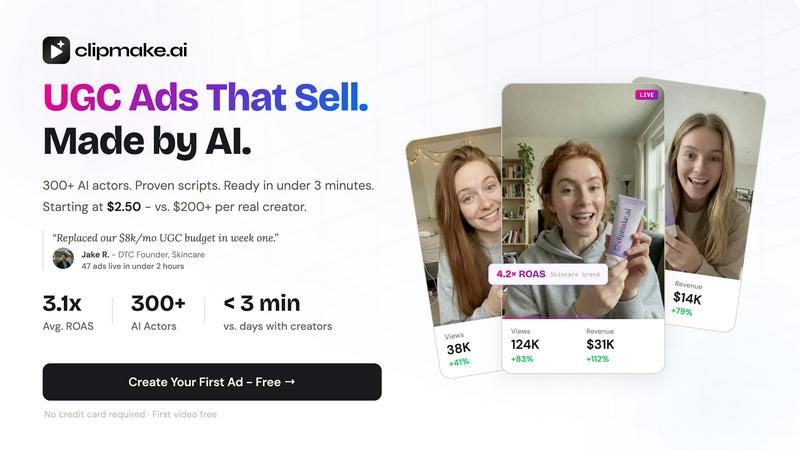
Create stunning UGC video ads with 300+ AI actors in under 3 minutes, starting at just $2.50 per video with ClipMake.
Last updated: April 13, 2026
Visual Comparison
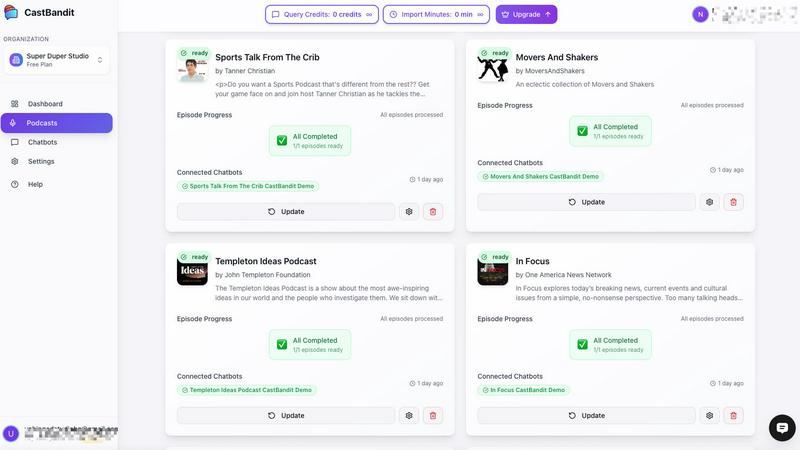
CastBandit
ClipMake
Feature Comparison
CastBandit
One-Click Podcast Import & Sync
Getting started is incredibly simple. All you need to do is paste your podcast's RSS feed URL into CastBandit. The tool automatically detects your entire back catalog and begins processing it. Even better, it stays in sync with your feed, so any new episodes you publish are automatically added and processed, ensuring your chatbot is always up-to-date with your latest content without any extra work from you.
AI-Powered Content Intelligence
CastBandit uses advanced speech-to-text AI to transcribe every episode in your library. It then goes a step further by generating intelligent summaries, identifying key moments, and linking important entities and resources mentioned. This deep processing allows your chatbot to truly understand your content and provide accurate, helpful answers to listener questions, directing them to the precise information they seek.
Beautiful, Customizable Website Widget
Once your podcast is processed, you can add the CastBandit chatbot to your website with a simple embed code. It works seamlessly on any platform, including WordPress, Squarespace, and Wix. You can choose from different theme presets to match your brand, and on paid plans, you can even remove the CastBandit logo for a fully white-labeled experience that looks completely native to your site.
Transparent Usage & Smart Management
You stay in full control with clear, real-time tracking of your usage. The dashboard shows you how many chatbot queries and import minutes you've used each month. You can also efficiently manage your episodes with batch processing, see the status of each episode (transcribing, summarizing, etc.), and set flexible limits to suit your podcast's needs and growth.
ClipMake
AI Actor Library
Choose from a diverse library of over 300 AI actors, each with unique styles and personalities. You can also create a custom avatar, allowing you to find the perfect fit for your brand message and audience engagement.
Script Generation
ClipMake utilizes advanced algorithms to generate hooks and scripts based on high-performing ad formats from platforms like Meta and TikTok. This feature ensures that your video ads are not only creative but also strategically designed to capture viewer attention.
Scene Templates
Select from a variety of scene templates, including unboxing, testimonials, tutorials, and lifestyle shots, to create ads that resonate with your target audience. These templates help streamline the creative process and provide structure to your videos.
Multilingual Voice Dubbing
With voice-matched dubbing available in over 20 languages, ClipMake ensures that your ads maintain a natural tone, preserving the unique voice of each AI actor. This feature allows you to reach a broader audience without compromising on quality.
Use Cases
CastBandit
Unlocking Your Back Catalog
Breathe new life into your older episodes that newer listeners may have missed. Instead of being buried, every past conversation becomes a searchable resource. Fans can ask questions about topics you covered months or years ago and instantly find the relevant episode, dramatically increasing the value and lifespan of all your content.
Boosting Listener Engagement & Loyalty
Transform passive listeners into active participants. By allowing your audience to interact with your content conversationally, you create a more engaging and sticky experience. This interactive element gives fans a reason to return to your website repeatedly, exploring different topics and deepening their connection with your show.
Gathering Valuable Audience Insights
Discover what your listeners are truly curious about. By reviewing the questions asked through your chatbot, you can identify which topics resonate most, what content gaps exist, and what your audience wants to learn more about. These insights are invaluable for planning future episodes and tailoring your content strategy.
Supporting a Podcast Network
Manage multiple shows from a single, powerful dashboard. If you run or are part of a podcast network, you can add several shows to one CastBandit account. This allows you to create a unified, intelligent assistant that can answer questions across your entire network's content, providing a seamless experience for listeners and efficient management for you.
ClipMake
E-commerce Product Launches
When launching new products, brands can quickly generate multiple video ads tailored to different audiences. ClipMake allows marketers to create engaging promotional content that showcases product features and benefits in a relatable manner.
Seasonal Campaigns
During peak shopping seasons, ClipMake helps brands to rapidly produce a high volume of ads to keep up with consumer demand. By generating variations of ads, brands can test which messages resonate best, optimizing their campaigns for maximum impact.
A/B Testing for Ad Performance
Performance marketers can use ClipMake to create dozens of ad variations in a single session. This capability enables efficient A/B testing of different hooks, actors, and scripts, allowing brands to hone in on the most effective content quickly.
Social Media Engagement
Brands aiming to enhance their social media presence can utilize ClipMake to generate regular video content that engages their audience. By producing consistent, high-quality ads, brands can maintain a vibrant online presence and foster community interaction.
Overview
About CastBandit
CastBandit is a revolutionary AI tool designed specifically for podcast creators who want to unlock the hidden value in their back catalog. If you've ever worried about your amazing older episodes getting buried and forgotten, CastBandit is your solution. It transforms your entire podcast library into an intelligent, interactive chatbot that lives on your website. This chatbot allows your listeners to ask natural questions, just like they would ask a friend, and instantly get directed to the exact episodes and even specific timestamps where their questions are answered. For example, a fan of your true crime podcast could ask, "What was the key evidence in the unsolved museum theft case?" and the chatbot would immediately point them to episode 42 with a link to the relevant segment. This solves the big problem of discoverability, keeping all your content alive and searchable. It turns passive listening into an active exploration, leading to more downloads, higher engagement with your sponsorships, and a deeper connection with your audience. Best of all, it's beginner-friendly with a one-click setup—no coding required. Simply paste your RSS feed, and CastBandit handles the rest, from transcribing episodes to launching your custom chatbot. It's built for every creator, from solo podcasters to large studios, helping you grow your audience and deepen engagement effortlessly.
About ClipMake
ClipMake is an innovative AI-driven platform designed to generate user-generated content (UGC) style video ads without the need for traditional creators, lengthy shoots, or complex editing. Tailored specifically for e-commerce brands and performance marketers, ClipMake empowers users to create high-volume ad creatives efficiently and effectively. With a library of over 300 AI actors, users can easily select their ideal avatar, input product details, and produce engaging video ads complete with natural voiceovers, dynamic product visuals, and proven ad structures in just minutes. The main value proposition of ClipMake lies in its ability to streamline the ad creation process, significantly reducing costs and time while maximizing creative output, making it an essential tool for brands looking to enhance their marketing strategies.
Frequently Asked Questions
CastBandit FAQ
How do I get started with CastBandit?
Getting started is easy and requires no technical skills. Simply sign up for a free account on the CastBandit website. Then, paste your podcast's RSS feed URL into the dashboard. CastBandit will automatically import your episodes, transcribe them, and build your AI chatbot. Finally, copy the provided embed code and paste it into your website to launch the chatbot for your listeners.
What if I publish a new episode?
CastBandit automatically syncs with your RSS feed. Once you publish a new episode to your regular hosting platform, CastBandit will detect it, automatically import it, process it with AI (transcribe, summarize, etc.), and add its knowledge to your chatbot. Your interactive assistant is always current without any manual updates needed from you.
Can I customize how the chatbot looks on my site?
Yes, you can customize the chatbot's appearance to fit your brand. CastBandit offers different color theme presets (like purple, coral, or green) that you can apply. For creators on paid plans, there is a white-label option that automatically removes the CastBandit logo, allowing the widget to blend seamlessly into your own website's design.
Is there a limit to how many episodes I can import?
CastBandit operates on a credit system that includes "Import Minutes." Your plan determines how many minutes of audio you can process each month. The dashboard provides clear, real-time tracking so you can always see your usage. The system is designed to be flexible, accommodating both new podcasters with smaller catalogs and established shows with extensive libraries.
ClipMake FAQ
How quickly can I create a video ad with ClipMake?
You can generate a finished video ad in under 3 minutes. Simply choose an AI actor, input your product details, and select a scene template to get started.
Do I need prior video editing experience to use ClipMake?
No, ClipMake is designed to be user-friendly and accessible for everyone, regardless of their video editing experience. The platform provides all the tools you need to create professional-quality ads effortlessly.
Is there a limit to how many videos I can create?
No, you can create as many videos as you need. ClipMake enables batch generation, allowing you to produce multiple variations in one session, making it perfect for high-volume ad campaigns.
Can I use my own product images in the videos?
Yes, you can upload your product images, and the AI actors will interact with them in the scene, ensuring your ads are visually appealing and relevant to your offerings.
Alternatives
CastBandit Alternatives
CastBandit is an AI-powered tool in the podcast marketing category. It helps creators turn their entire podcast library into an interactive chatbot for their website. This boosts listener engagement by letting fans ask questions and instantly find the exact episodes and moments that answer them. Podcasters might look for alternatives for a few common reasons. These can include budget constraints, a need for different specific features, or a preference for a tool that integrates with other platforms they use. It's a normal part of finding the perfect fit for your unique show and workflow. When evaluating other options, focus on a few key areas. Look at the core AI capability to accurately understand and search your content. Consider how easy it is to set up and maintain. Also, check how the tool helps you grow your audience and if it offers the customizations you need for your brand.
ClipMake Alternatives
ClipMake is an innovative AI-powered user-generated content (UGC) video generator designed to help e-commerce brands and performance marketers create hyper-realistic video ads quickly and efficiently. With over 300 AI actors and a streamlined process, users can produce captivating video content for platforms like Meta, TikTok, and YouTube in under three minutes. Many users seek alternatives to ClipMake due to various factors such as pricing, specific feature requirements, or platform compatibility, as businesses often need tailored solutions to meet their unique marketing needs. When looking for alternatives to ClipMake, it's essential to consider aspects such as ease of use, the quality of AI-generated content, the variety of customization options, and pricing structures. A user-friendly interface and robust support for different ad formats can enhance the overall experience. Additionally, ensure that the alternative can meet your specific marketing goals and help you scale your video production effectively while maintaining high-quality standards.