Blueberry vs Fallom
Side-by-side comparison to help you choose the right tool.

Blueberry
Blueberry is an all-in-one Mac app that unites your editor, terminal, and browser for seamless web app development.
Last updated: February 26, 2026

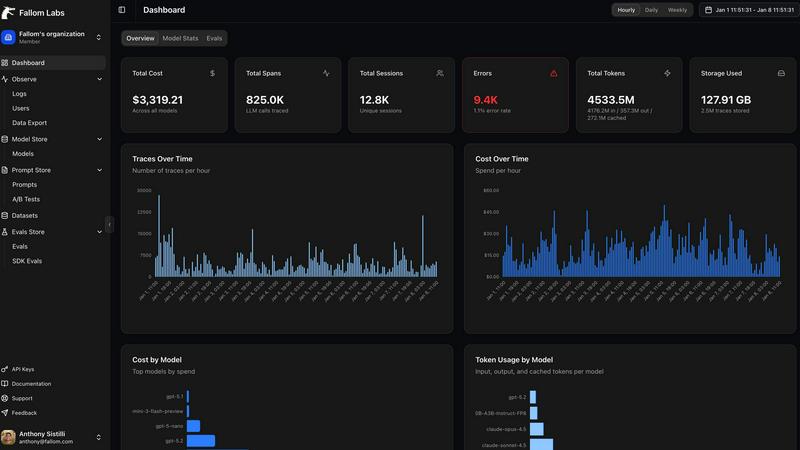
Fallom provides real-time insights into AI calls for tracking costs and efficient debugging of your AI operations.
Last updated: February 28, 2026
Visual Comparison
Blueberry

Fallom
Feature Comparison
Blueberry
Integrated Workspace
Blueberry provides a unified workspace that brings together your code editor, terminal, and browser. This integration allows for a fluid workflow where you can switch between coding, running commands, and previewing your work without the need to toggle between different applications.
AI Context Awareness
With Blueberry's MCP, your chosen AI models gain full context of your project. This means they can see your open files, terminal outputs, and even the live preview of your application, allowing for more intelligent suggestions and interactions as you work.
Customizable Command Bar
Blueberry features a powerful command bar that lets you launch any tool, file, or command instantly. This feature simplifies navigation and enhances productivity by allowing you to operate your entire workspace from a single keyboard shortcut.
Pinned Applications
You can dock essential apps like GitHub, Linear, and Figma directly within Blueberry's workspace. These pinned applications load with your project and maintain live context with your AI, ensuring that you have everything you need at your fingertips.
Fallom
Real-Time Observability
Fallom offers real-time observability for AI agents, allowing users to track tool calls and analyze their timing. This feature enables developers to debug with confidence, helping them understand exactly what happens during each interaction and ensuring smoother AI operations.
Cost Attribution
With Fallom, organizations can track spending on a per-model, per-user, and per-team basis. This feature provides full cost transparency, making it easier for teams to manage their budgets and allocate resources effectively, ensuring they know where their AI expenditures are going.
Complete Audit Trails
Fallom maintains comprehensive audit trails that log every LLM interaction, ensuring that organizations can meet their regulatory requirements. Features like input/output logging and model versioning help businesses maintain compliance with standards such as SOC 2 and GDPR.
Session Tracking
This feature groups traces by session, user, or customer, providing complete context for each interaction. With session tracking, teams can dive deeper into user behavior and understand how different users engage with their AI applications, making it easier to optimize performance.
Use Cases
Blueberry
Seamless Development
Developers can use Blueberry to build web applications without the hassle of switching between various tools. By keeping everything in one integrated workspace, developers can focus on coding and testing, significantly improving their efficiency.
Enhanced Collaboration
When working in teams, Blueberry's ability to pin applications and provide live context to AI models means that team members can collaborate more effectively. They can easily share insights and updates without losing track of their project details.
Rapid Prototyping
Blueberry is perfect for rapid prototyping. You can quickly make changes in your code editor, see the results in real-time in your preview browser, and gather immediate feedback from your AI assistant, allowing for a faster iteration cycle.
Learning and Experimentation
For beginners or those learning new technologies, Blueberry offers a supportive environment where you can experiment with code. The integrated help from AI models can provide guidance and suggestions based on your current context, making learning more interactive and effective.
Fallom
Debugging AI Responses
When an AI agent provides an unexpected or incorrect answer, developers can use Fallom to trace back through the LLM calls and tool interactions leading up to that response. This capability allows them to quickly identify and resolve issues, improving the overall reliability of their applications.
Budget Management
Fallom empowers organizations to monitor their AI spending in real-time. By tracking costs on a granular level, teams can make informed decisions about resource allocation and budget adjustments, ensuring that they stay within financial boundaries while maximizing AI effectiveness.
Compliance and Regulatory Support
For organizations operating in regulated industries, Fallom provides the necessary tools to maintain compliance with various regulations. With detailed audit trails and user consent tracking, businesses can confidently navigate the complexities of compliance, mitigating risks associated with data privacy.
Model Performance Evaluation
Fallom enables teams to run evaluations on their LLM outputs, catching regressions before deploying updates to production. By assessing accuracy, relevance, and potential hallucinations, developers can ensure that their AI models continue to perform at the highest standards.
Overview
About Blueberry
Blueberry is a revolutionary macOS application designed specifically for modern product builders who want to streamline their workflow when developing web applications. By integrating your editor, terminal, and browser into one focused workspace, Blueberry eliminates the tedious task of juggling multiple windows and applications. Whether you are a seasoned developer or just starting, Blueberry enhances your coding experience by providing a seamless environment where you can write, test, and preview your code all in one place. With the ability to connect AI models like Claude, Gemini, Codex, and more through its built-in MCP (Multi-Context Platform), Blueberry allows these models to access your files, terminal output, and live previews simultaneously. This unique feature means you no longer have to waste time with copy-pasting context; your AI assistant can understand your entire project at a glance. Best of all, Blueberry is currently available for free during its beta phase, making it an attractive choice for developers looking to improve their productivity without incurring costs.
About Fallom
Fallom is an innovative observability platform tailor-made for the rapidly evolving landscape of artificial intelligence. Designed for developers and engineering teams working with Large Language Models (LLMs) and autonomous AI agents, Fallom provides a comprehensive solution that enhances transparency and control over AI operations. This powerful tool enables users to capture and analyze every interaction, from the prompts sent to the responses received, along with detailed information on tool calls, token usage, latency, and costs. By transforming what was once a black-box process into a clear and manageable system, Fallom allows teams to quickly diagnose issues, monitor real-time usage, and optimize their AI deployments. With features built on the open OpenTelemetry standard, Fallom ensures a smooth setup experience without vendor lock-in, making it accessible for organizations of all sizes. Additionally, enterprise-ready functionalities like audit trails, model versioning, and consent tracking help businesses comply with regulations like GDPR and the EU AI Act. Fallom truly empowers teams to harness the full potential of their AI technologies while keeping costs in check.
Frequently Asked Questions
Blueberry FAQ
What operating systems does Blueberry support?
Currently, Blueberry is designed exclusively for macOS, ensuring a tailored experience for Mac users looking to enhance their product development workflow.
How does Blueberry integrate with AI models?
Blueberry connects effortlessly with AI models like Claude, Gemini, and Codex through its Multi-Context Platform, allowing these models to access and interact with your files, terminal output, and live previews simultaneously.
Is Blueberry really free during the beta phase?
Yes, Blueberry is 100% free during its beta phase. Users can download the app without any cost and explore its features as they develop their projects.
Can I customize my workspace in Blueberry?
Absolutely! Blueberry allows you to save and restore your workspace configurations per project. You can customize your terminal sessions, editor tabs, and layout to fit your workflow needs.
Fallom FAQ
What is Fallom used for?
Fallom is an observability platform designed for AI applications, particularly those using Large Language Models. It captures detailed data on LLM interactions, helping teams monitor performance, debug issues, and manage costs effectively.
How does Fallom support compliance?
Fallom provides features like complete audit trails and user consent tracking, ensuring that organizations can meet regulatory requirements such as GDPR and the EU AI Act. This support helps businesses navigate compliance challenges confidently.
Can I use Fallom with any AI provider?
Yes, Fallom is built on the open OpenTelemetry standard, which means it is compatible with all AI providers. You can set it up quickly with a single SDK, ensuring flexibility without vendor lock-in.
How does Fallom help with debugging?
Fallom captures every LLM call and tool interaction, allowing developers to trace back through the sequence of events leading to an AI agent's response. This visibility aids in diagnosing issues and improving the reliability of AI applications.
Alternatives
Blueberry Alternatives
Blueberry is a versatile Mac application designed for developers, combining an editor, terminal, and browser into a single, streamlined workspace. This integration allows users to seamlessly switch between tasks without the hassle of juggling multiple windows. By connecting to various AI models, Blueberry enhances productivity by providing immediate access to files, terminal outputs, and live previews. Users often seek alternatives to Blueberry for various reasons, including pricing concerns, specific feature requirements, or compatibility with different operating systems. When searching for an alternative, it’s essential to consider factors such as user interface, integration capabilities, and the range of supported AI models. These elements can significantly impact your overall experience and productivity.
Fallom Alternatives
Fallom is a specialized observability platform designed for managing AI applications, particularly those using Large Language Models (LLMs) and autonomous agents. It provides developers and engineering teams with a comprehensive way to track interactions, debug issues, and manage costs effectively in real-time. Users often seek alternatives to Fallom for various reasons, including pricing concerns, specific feature requirements, or compatibility with their existing platforms. When looking for an alternative, consider factors such as the level of detail in monitoring capabilities, user interface intuitiveness, compliance features, and overall scalability. It’s essential to evaluate how well the alternative meets your specific needs, particularly in tracking AI costs and ensuring operational transparency.