Bantr: Offline & Unlimited TTS for Mac vs Dubvid
Side-by-side comparison to help you choose the right tool.

Bantr: Offline & Unlimited TTS for Mac
Bantr offers unlimited offline text-to-speech on your Mac, ensuring privacy and studio-quality voiceovers with no.
Last updated: February 28, 2026

Dubvid
Dubvid quickly dubs your audio and video into multiple languages using natural voices and optional lip-sync features.
Last updated: February 27, 2026
Visual Comparison
Bantr: Offline & Unlimited TTS for Mac

Dubvid
Feature Comparison
Bantr: Offline & Unlimited TTS for Mac
Over 150 High-Quality Voices
Bantr offers a rich variety of over 150 voices, allowing users to choose the perfect tone and style for any project. Whether you need a formal narration or a casual dialogue, Bantr has you covered with diverse voice options that sound incredibly natural.
Fully Offline Operation
One of the standout features of Bantr is its offline functionality. Unlike other TTS applications that require an internet connection, Bantr processes everything on your Mac. This ensures that your personal data remains confidential and that you can work without interruptions from connectivity issues.
No Subscription Fees
With Bantr, you pay once for lifetime access. Say goodbye to annoying monthly fees and usage limits! This straightforward pricing model allows you to use the app freely without worrying about additional costs, making it a cost-effective solution for long-term projects.
Continuous Updates and Improvements
Bantr is not just a static application; it is continually evolving. The developers are committed to enhancing the software based on user feedback, with exciting upcoming features like custom voice cloning, document uploads, and multi-speaker dialogue generation. This ensures that you always have access to the latest tools and capabilities.
Dubvid
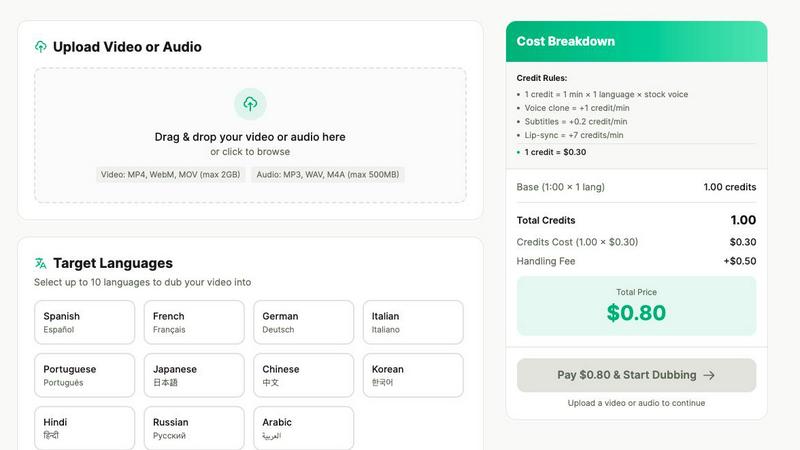
Seamless Uploading
Dubvid allows users to upload videos in formats like MP4, MOV, and WebM with ease. Simply drag and drop your file or click to browse, making the initial step quick and hassle-free.
Multiple Language Support
With support for over 10 languages, Dubvid allows you to select target languages tailored to your audience. This feature helps you reach diverse demographics and connect with millions more viewers.
Voice Selection
Choose from a range of natural AI voices or clone your own voice for dubbing. This flexibility ensures that your content retains its original essence while appealing to international audiences.
Optional Lip-Syncing
For those looking for a higher level of realism, Dubvid offers an optional lip-syncing feature. This ensures that your dubbed audio matches the mouth movements in your video, creating a more engaging viewing experience.
Use Cases
Bantr: Offline & Unlimited TTS for Mac
Educational Content Creation
Teachers and educators can utilize Bantr to create engaging audio for lessons, tutorials, and study materials. With the ability to generate high-quality voices, educators can enhance learning experiences and cater to different learning styles.
Content Creation for Videos and Podcasts
Content creators can harness Bantr to produce voiceovers for videos, podcasts, and other multimedia projects. The diverse voice options and natural intonation help elevate the quality of audio content, making it more appealing to audiences.
Accessibility Tools
Bantr is an excellent resource for individuals with reading difficulties, such as dyslexia. By converting written text to speech, it provides an effective way for users to access written content, promoting inclusivity and understanding.
Game Development and Animation
Game developers and animators can use Bantr to generate voices for characters and narratives. The ability to create multiple voices allows for richer storytelling and character development, enhancing the overall user experience in games and animations.
Dubvid
Content Creation for Social Media
Short-form creators can dub their videos into multiple languages, allowing them to increase their reach on platforms such as YouTube Shorts, Instagram Reels, and TikTok. This expands their audience while maintaining engagement.
Educational Content Localization
Course creators can quickly translate lessons and tutorials for global learners. Dubvid helps educators share valuable knowledge across borders, making learning accessible to everyone.
Customer Support Enhancement
Businesses can localize their help center videos and product demos, which reduces customer support tickets by providing clear walkthroughs in the user's preferred language, leading to improved customer satisfaction.
Podcast Dubbing
Podcasters can release episodes in new languages without the need for extensive production. This allows them to tap into international markets and grow their audience base efficiently.
Overview
About Bantr: Offline & Unlimited TTS for Mac
Welcome to Bantr, the revolutionary text-to-speech application designed exclusively for Mac users who value privacy, quality, and unlimited access. Unlike many text-to-speech tools that rely on cloud services, Bantr operates entirely offline, ensuring that your personal data remains secure on your device. With a one-time purchase, you gain access to over 150 high-quality voices generated using Apple's advanced MLX framework. This means you can create expressive and natural-sounding audio for various projects without worrying about monthly subscriptions or usage quotas. Bantr is perfect for content creators, educators, students, and developers who need reliable and professional voice generation without compromising their privacy. Experience the freedom of a powerful TTS tool that respects your data and delivers studio-grade audio right from your Mac.
About Dubvid
Dubvid is an innovative AI-powered platform that transforms the way creators, businesses, and brands approach video and audio dubbing. It allows users to easily connect with a global audience by simply uploading their original content. With Dubvid, you can select from a variety of target languages, and the platform will automatically translate and recreate your voice, ensuring that your natural tone, pacing, and emotions are preserved. This groundbreaking service eliminates the need for traditional studios, voice actors, or complicated editing workflows, making it accessible for everyone—from YouTubers looking to expand their reach to educators eager to share lessons worldwide. Whether you are a marketing team aiming to localize content quickly or a content creator wanting to engage diverse audiences, Dubvid provides a quick solution that scales your content internationally in just minutes rather than weeks. Supporting over 10 languages, Dubvid simplifies the process of bridging language barriers and enhances engagement with audiences around the globe.
Frequently Asked Questions
Bantr: Offline & Unlimited TTS for Mac FAQ
Is Bantr compatible with all Mac models?
Bantr is compatible with macOS 15 and above, specifically designed for Apple Silicon models (M1, M2, M3, M4, M5, etc.). Ensure that your Mac meets these requirements for optimal performance.
How does Bantr maintain my privacy?
Bantr operates entirely offline, meaning that all processing occurs locally on your device. This eliminates the risk of your data being sent to the cloud or collected by third parties, ensuring your privacy is fully protected.
Can I try Bantr before purchasing?
While Bantr does not offer a free trial, it comes with a 7-day money-back guarantee. This allows you to purchase the software with confidence, knowing you can request a refund if it does not meet your expectations.
What types of voices does Bantr offer?
Bantr provides over 150 voices, including various accents and styles suitable for different contexts. Whether you need a professional tone for a presentation or a friendly voice for a tutorial, Bantr has a voice that fits your needs.
Dubvid FAQ
How does Dubvid maintain voice quality during dubbing?
Dubvid uses advanced AI technology to recreate your voice, ensuring that the natural tone, pacing, and emotion are preserved in the dubbed content, keeping it authentic and engaging.
What file formats does Dubvid support for uploads?
Dubvid supports various file formats including MP4, MOV, WebM, MP3, and WAV, allowing users to upload their audio or video files with ease, up to a maximum size of 500MB.
Can I try Dubvid before committing to a payment?
Yes, Dubvid offers a free trial where users receive 2 free credits to dub up to 60 seconds of content without needing to provide any credit card information.
Is there a limit on how many languages I can dub my content into?
While Dubvid supports over 10 languages, you can choose multiple target languages for each project, allowing you to create content that resonates with a diverse audience around the world.
Alternatives
Bantr: Offline & Unlimited TTS for Mac Alternatives
Bantr: Offline & Unlimited TTS for Mac is a powerful text-to-speech application designed specifically for Mac users. It belongs to the AI Assistants category and allows users to create unlimited voiceovers directly on their devices without any subscriptions or internet connection. Many users seek alternatives for various reasons, including pricing concerns, feature requirements, or compatibility with different platforms. When considering an alternative, it is essential to evaluate factors such as privacy, ease of use, the quality of voice generation, and whether the pricing model aligns with your budget and usage needs.
Dubvid Alternatives
Dubvid is an innovative AI-powered platform that specializes in dubbing audio and video content into multiple languages with natural-sounding voices. It falls under the content creation category, making it a valuable tool for creators, businesses, and brands aiming to communicate effectively with diverse audiences. Users often seek alternatives to Dubvid for various reasons, including pricing options, feature sets, or specific platform compatibility that better meets their needs. When choosing an alternative, it's essential to consider factors such as ease of use, language support, voice quality, and the speed of the dubbing process to ensure it aligns with your content goals.