
Avif2Png vs Img Editor
Side-by-side comparison to help you choose the right tool.
Avif2Png
Convert your AVIF images to the widely compatible PNG format instantly and for free.
Last updated: March 1, 2026

Img Editor
Turn your ideas into stunning AI images effortlessly with Img Editor's advanced and intuitive technology.
Last updated: February 28, 2026
Visual Comparison
Avif2Png
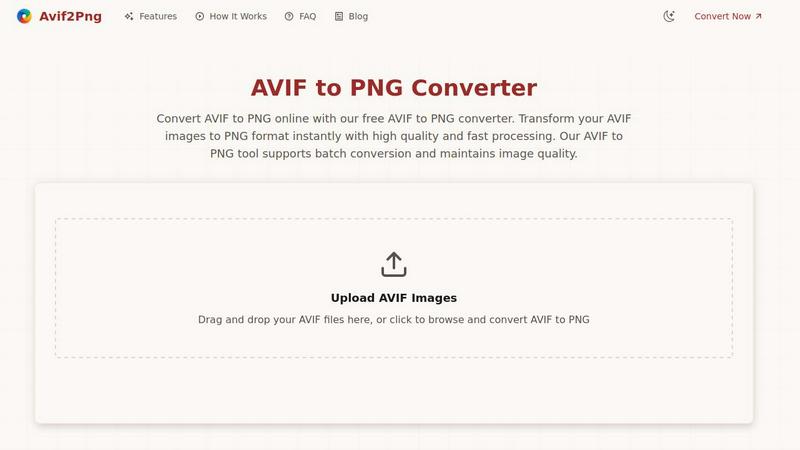
Img Editor

Feature Comparison
Avif2Png
Free & No Registration Required
Our service is completely free to use with no hidden costs or trials. You can start converting your AVIF images to PNG right away without the need to sign up for an account or provide any personal information. This makes the process instant and hassle-free, allowing you to focus on your work instead of filling out forms.
Batch Conversion for Multiple Files
Save valuable time by converting several images at once. Our batch conversion feature allows you to upload multiple AVIF files simultaneously. The tool will process them all in one go, delivering a set of converted PNG files ready for you to download together, which is perfect for handling projects with lots of images.
High-Quality, Lossless Output
We prioritize your image quality. The conversion process from AVIF to PNG is designed to be lossless, meaning the visual integrity, sharpness, and details of your original AVIF file are preserved in the resulting PNG. You won't have to worry about blurry edges, pixelation, or degraded colors in your final image.
Secure & Private Processing
Your privacy is important to us. All files you upload are processed securely on our servers. We automatically delete your original AVIF files and the converted PNGs from our system shortly after the conversion is complete. Your images are never stored long-term, shared, or used for any other purpose.
Img Editor
Text-to-Image Generation
This is the heart of Img Editor. Simply type a description of the image you want into the prompt box. You can be as simple or as detailed as you like. The advanced AI then interprets your words and generates a completely original image that matches your vision. You can try example prompts provided or let your own imagination run wild to create anything from photorealistic scenes to abstract digital art.
Advanced Image Customization
Before you generate an image, Img Editor gives you control over the final output. You can select the aspect ratio (like square 1:1 for Instagram or wide 16:9 for banners) to fit your project. More importantly, you can choose the image quality, from Standard 1K up to Ultra Quality 4K for incredibly detailed, professional-grade results, ensuring your creation looks perfect wherever you use it.
Prompt Generator & Inspiration Gallery
If you're ever stuck for ideas, Img Editor has you covered. The built-in Prompt Generator can help you craft effective descriptions. Furthermore, you can browse the public Gallery to see what other users have created. You can click on any prompt in the gallery to use it yourself, which is a fantastic way to learn how to write better prompts and discover new creative possibilities you hadn't considered.
Community Engagement & Bonus Rewards
Img Editor encourages sharing and inspiration. After generating an image, you can submit it to the public Gallery for review. When your submission is approved, you earn 10 extra free image generations! This system rewards your creativity and helps build a vibrant community where everyone can learn from and inspire each other, making the creative process more collaborative and rewarding.
Use Cases
Avif2Png
Ensuring Universal Website Compatibility
Web developers and bloggers use Avif2Png to ensure their images display correctly for all visitors. While modern browsers support AVIF, many older browsers and some content management systems (like older WordPress themes) do not. Converting AVIF to PNG guarantees that every user sees your images perfectly, regardless of their device or browser.
Preparing Graphics for Design Projects
Graphic designers and digital artists often need a format that supports transparency and sharp edges for logos, icons, and illustrations. PNG is the ideal format for this, and Avif2Png allows designers to easily convert their high-compression AVIF source files into editable, transparent PNGs for use in software like Photoshop or Canva.
Simplifying Academic and Personal Use
Students, teachers, and individuals frequently encounter AVIF files online but need PNGs to insert into presentations, documents, or school projects. Avif2Png provides a simple, one-click solution that doesn't require technical skill, making it easy for anyone to get the right format for their reports, slideshows, or personal portfolios.
Meeting Requirements for Print and Publishing
Many print services, online publishing platforms, and submission portals specifically require PNG format due to its reliable, lossless quality. Photographers and content creators can use Avif2Png to quickly convert their AVIF images to a print-ready PNG format, ensuring their work meets the strict quality standards for physical prints or professional publications.
Img Editor
Social Media Content Creation
Quickly generate eye-catching graphics, story backgrounds, or promotional art for your Instagram, Facebook, or Twitter pages. Describe the mood, theme, and elements you need, and Img Editor will produce unique visuals that help your posts stand out, all without needing a graphic designer or expensive stock photos.
Concept Art & Brainstorming
Writers, game developers, and designers can use Img Editor to visualize characters, settings, or objects from their stories or projects. It's a powerful brainstorming tool to rapidly prototype ideas and explore different artistic styles before committing to a final design, saving immense time and effort.
Personal Art Projects & Gifts
Create custom artwork for your home, like a landscape of your dream vacation spot, or design a one-of-a-kind piece of art as a personalized gift. You can generate portraits in unique styles, abstract pieces for decoration, or illustrations for personal stories, making your creative ideas tangible.
Marketing & Blog Illustrations
Bloggers, small business owners, and marketers can generate custom featured images, blog graphics, ad banners, and product concept visuals. This ensures you have original, relevant imagery that perfectly matches your article's topic or brand's message, enhancing your professional appearance.
Overview
About Avif2Png
Welcome to Avif2Png, your friendly and free online solution for converting modern AVIF images into the universally compatible PNG format. Have you ever downloaded a beautiful image only to find it won't open on your phone or upload to your favorite website? That's a common compatibility issue with the newer AVIF format. Avif2Png is here to solve that problem effortlessly. We are a dedicated web-based tool designed to be your digital adapter, transforming your high-quality AVIF files into ready-to-use PNGs without any fuss. Our tool is built for absolutely everyone—whether you're a student working on a project, a blogger preparing images for a post, a graphic designer needing a compatible file for a client, or a web developer ensuring cross-browser support. You don't need to install complicated software, create an account, or have any technical knowledge. Our core promise is simple: we provide fast, secure, and high-quality conversions. Just upload your image, and we handle the rest, preserving the detail and quality of your original picture so it can be shared, edited, and viewed on any device or platform without any headaches.
About Img Editor
Img Editor is a revolutionary, free AI-powered platform that makes professional-grade image creation accessible to everyone. Whether you're a complete beginner with no design experience, a professional artist, a marketer, or just someone with a creative idea, Img Editor empowers you to bring your vision to life. At its core, it uses cutting-edge artificial intelligence to generate stunning, unique images from simple text descriptions. You just tell the AI what you want to see, and it creates a visual masterpiece in seconds. Beyond generation, it also offers tools to modify and enhance existing images. The best part? It's incredibly generous, offering 10 free image generations every single day. You can even earn bonus generations by sharing your creations with the community. Img Editor removes the traditional barriers of cost, complex software, and required artistic skill, making it the perfect starting point for anyone's creative journey.
Frequently Asked Questions
Avif2Png FAQ
What is the difference between AVIF and PNG?
AVIF is a very modern image format that offers excellent compression, meaning files can be much smaller while maintaining high quality, which is great for website speed. PNG is an older, widely-supported format known for lossless compression and support for transparent backgrounds. You convert AVIF to PNG primarily for broader compatibility with software, browsers, and print services.
Is there a limit to the number or size of files I can convert?
Based on the provided information, Avif2Png supports batch conversion for multiple files, suggesting you can convert several at once. For specific limits on the number of files or the maximum file size per upload, it's best to check the tool's website interface for any current restrictions, but the service is designed to be generous for typical user needs.
Are my uploaded files kept private and secure?
Yes, absolutely. Security and privacy are core features. Your uploaded AVIF files and the converted PNGs are processed securely and are automatically deleted from the servers shortly after the conversion is complete. They are not shared, stored long-term, or used for any other purpose.
Do I need to install any software to use Avif2Png?
No, you do not need to install anything. Avif2Png is a 100% web-based online tool. You can access it directly from any modern web browser on your computer, phone, or tablet. Just visit the website, upload your file, and download the conversion result—it's that simple.
Img Editor FAQ
Is Img Editor really free to use?
Yes, Img Editor is fundamentally free. Every user receives 10 free image generations per day without any cost or credit card required. You can use the platform regularly with this daily allowance. You can also earn additional free generations by participating in the community, such as submitting your approved images to the public Gallery.
How do I get better results from the AI?
Being specific in your text prompt is key. Instead of "a dog," try "a fluffy golden retriever puppy playing in a sunlit autumn park." Use the example prompts and the Gallery for inspiration. Also, experiment with the settings like Aspect Ratio and Image Quality to match your intended use, as higher quality settings produce more detailed results.
What can I do with the images I create?
You own the images you generate with Img Editor. You can use them for personal projects, social media, blogs, presentations, and even for commercial purposes like marketing your small business. Always ensure your prompts and the resulting images comply with the platform's content guidelines.
What is the "Submit to Gallery" feature?
This feature allows you to share your generated image with the Img Editor community. When you submit an image, it goes for review. Once approved, it appears in the public Gallery where others can see it and be inspired. As a reward for sharing, you instantly receive 10 extra free image generations added to your account.
Alternatives
Avif2Png Alternatives
Avif2Png is a free online tool in the image conversion category that instantly changes AVIF files into the more widely supported PNG format. It's designed to be simple and accessible for everyone, solving common compatibility issues with a few clicks. People often look for different tools for various reasons. You might need software that runs directly on your computer without internet, require advanced editing features beyond simple conversion, or prefer a tool that handles many other file formats. Your specific workflow and needs will guide your search. When choosing a different conversion method, consider what's most important for you. Think about the required output quality, whether you need to convert many files at once, and how easy the tool is to use. Security is also key, especially if you're working with sensitive images, so always check a service's privacy policy.
Img Editor Alternatives
Img Editor is a free AI image generation platform in the image and photo category. It lets anyone create or edit stunning visuals using simple text descriptions, making professional-looking graphics accessible to all. People often look for different tools for various reasons. Some might need more advanced features for complex projects, while others may require a tool that works on a specific device or operating system. Budget, daily usage limits, and the desire for different artistic styles are also common factors in the search. When choosing a different tool, consider what matters most for your projects. Think about your budget, how many images you need to create regularly, and the specific features you'll use. It's also helpful to find a platform with an interface you find intuitive, so you can bring your ideas to life without a steep learning curve.